
Jebao AFD-6
Jebao AFD-6 Solar Automatic Pond Fish Feeder Instruction Manual
Model: AFD-6 | Brand: Jebao
1. Introduction
Thank you for choosing the Jebao AFD-6 Solar Automatic Pond Fish Feeder. This device is designed to provide convenient and consistent feeding for your pond fish, ensuring their health and well-being. With its solar-powered operation and weatherproof design, it offers a reliable solution for outdoor use without the need for complex wiring.
This manual provides essential information for the safe and efficient operation of your new feeder. Please read it thoroughly before installation and use, and retain it for future reference.

Figure 1: Jebao AFD-6 Solar Automatic Pond Fish Feeder and its retail packaging.
2. Safety Instructions
To ensure safe operation and prevent damage to the product or injury, please observe the following safety precautions:
- Read All Instructions: Before operating the feeder, read and understand all instructions in this manual.
- Outdoor Use Only: This feeder is designed for outdoor use. Ensure it is placed in a stable location where it will not be easily knocked over.
- Water Proximity: While designed to be rainproof, avoid submerging the unit in water. Do not place it directly in the pond where it could fall in.
- Power Source: The feeder is primarily solar-powered. If using the power adapter for initial charging or troubleshooting, ensure it is connected to a suitable power outlet away from water sources.
- Children and Pets: Keep the feeder out of reach of small children and pets to prevent accidental ingestion of fish food or damage to the unit.
- Maintenance: Disconnect any external power source before performing maintenance or cleaning.
- Temperature: Do not expose the feeder to extreme temperatures outside its operating range.
- Modifications: Do not attempt to modify or disassemble the feeder. Repairs should only be performed by qualified personnel.
- Food Type: Use only dry fish pellets or flakes suitable for automatic feeders. Do not use wet or sticky food, which can clog the dispenser.
3. Product Components
The Jebao AFD-6 feeder comes with the following main components:
- Main Feeder Unit with integrated solar panel and LED display
- Food Dispensing Funnel
- Power Adapter (for initial charging or backup)
- Internal Battery (pre-installed)
- Instruction Manual (this document)

Figure 2: All components included with the Jebao AFD-6 Solar Automatic Pond Fish Feeder.
4. Setup
4.1 Placement
Choose a suitable location for the feeder near your pond. The location should:
- Receive ample direct sunlight throughout the day for optimal solar charging.
- Be stable and level to prevent the feeder from tipping over.
- Allow the dispensed food to fall directly into the pond without obstruction.
- Be easily accessible for refilling and maintenance.
4.2 Assembly
- Attach the food dispensing funnel to the outlet port at the bottom front of the main feeder unit. Ensure it is securely fastened.
- If the internal battery is not pre-installed or needs to be connected, follow the instructions provided with the battery to connect it to the feeder's internal power port.
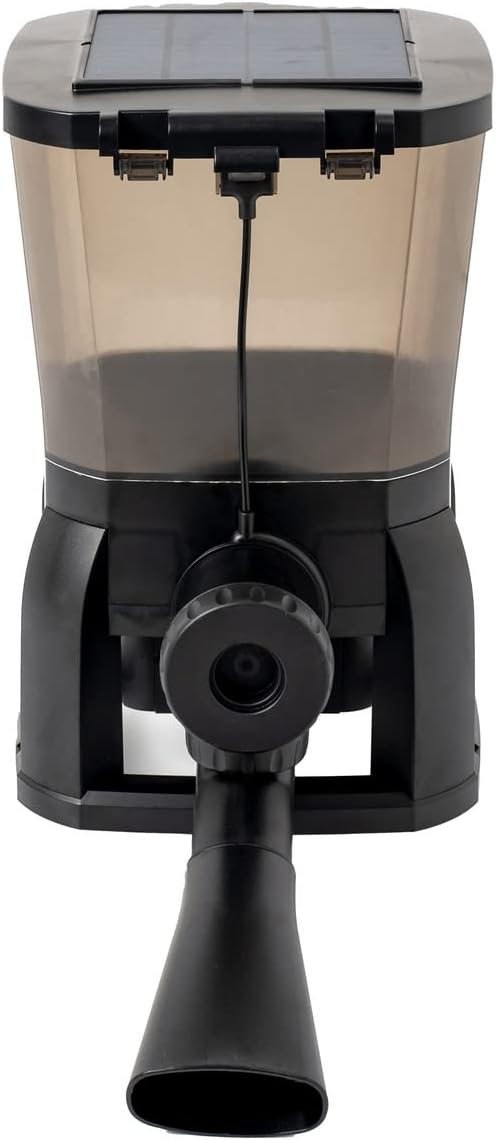
Figure 3: Front view of the feeder with the dispensing funnel attached.
4.3 Initial Charging (Optional)
While the unit is solar-powered, it is recommended to fully charge the internal battery using the provided power adapter before first use, especially if the unit has been stored for a long time or if sunlight is limited.
- Connect the power adapter to the charging port on the feeder.
- Plug the adapter into a standard electrical outlet.
- Allow the unit to charge for several hours until the battery indicator on the LED display shows a full charge.
4.4 Filling the Feeder
- Open the lid on top of the feeder unit.
- Pour dry fish pellets or flakes into the food tank. Do not overfill.
- Close the lid securely to maintain food freshness and prevent moisture ingress.
5. Operating Instructions
The Jebao AFD-6 features a clear LED display and intuitive buttons for programming.

Figure 4: LED display and control buttons for programming the feeder.
5.1 Button Functions
- ON/OFF: Powers the unit on or off.
- CLOCK: Enters time setting mode.
- FEED: Manually dispenses food once.
- MODE: Cycles through programming modes (e.g., setting feeding times, quantity).
- UP/DOWN Arrows: Adjust values (time, quantity).
- SET: Confirms selection or saves settings.
5.2 Setting Current Time
- Press the CLOCK button. The hour digit will flash.
- Use the UP/DOWN arrows to adjust the hour.
- Press CLOCK again to move to the minute digit.
- Use the UP/DOWN arrows to adjust the minute.
- Press SET to confirm and save the current time.
5.3 Programming Feeding Times and Quantity
The feeder allows up to 6 feeding times per day, with 9 different quantity options for each feeding.
- Press the MODE button to enter the feeding program setting. The display will show "1" (for the first feeding time) and the hour digit will flash.
- Use the UP/DOWN arrows to set the desired hour for the first feeding.
- Press MODE to move to the minute digit. Adjust with UP/DOWN arrows.
- Press MODE again. The display will show the current food quantity setting (e.g., "P1" for quantity level 1).
- Use the UP/DOWN arrows to select the desired food quantity (P1 to P9, where P9 is the largest quantity).
- Press SET to confirm the settings for the first feeding time.
- Repeat steps 1-6 for additional feeding times (up to 6). After setting the 6th time, pressing MODE again will cycle back to the first setting or exit programming mode.
- To disable a specific feeding time, set its time to "--:--" or a similar indicator if available on the display, or simply do not set it.
5.4 Manual Feeding
To dispense food manually at any time, simply press the FEED button. The feeder will dispense a single portion of food according to the last set quantity.
5.5 Solar Charging
The integrated solar panel on top of the unit continuously charges the internal battery when exposed to direct sunlight. Ensure the solar panel is clean and unobstructed for efficient charging.
6. Maintenance
Regular maintenance will ensure the longevity and optimal performance of your Jebao AFD-6 feeder.
- Cleaning the Food Tank: Periodically empty and clean the food tank to prevent mold or bacterial growth, especially if using different types of food. Use a damp cloth and mild detergent, then rinse thoroughly and ensure it is completely dry before refilling.
- Cleaning the Dispenser: Check the dispensing mechanism and funnel for any clogs or residue. Clean as needed to ensure smooth food delivery.
- Solar Panel Cleaning: Wipe the solar panel regularly with a soft, damp cloth to remove dust, dirt, or debris that may reduce charging efficiency.
- Battery Care: If the feeder will not be used for an extended period, fully charge the battery and store the unit in a cool, dry place. Avoid completely draining the battery frequently.
- Winter Storage: In regions with freezing temperatures, it is recommended to bring the feeder indoors during winter months to prevent damage from ice and extreme cold.
7. Troubleshooting
If you encounter issues with your Jebao AFD-6 feeder, please refer to the following common problems and solutions:
| Problem | Possible Cause | Solution |
|---|---|---|
| Feeder not dispensing food. |
|
|
| LED display freezes or is unresponsive. |
|
|
| Battery not charging. |
|
|
| Food gets wet or moldy. |
|
|
8. Specifications
Key technical specifications for the Jebao AFD-6 Solar Automatic Pond Fish Feeder:
| Feature | Detail |
|---|---|
| Brand | Jebao |
| Model Number | AFD-6 |
| Target Species | Fish |
| Recommended Use | Feeding Station |
| Material | Plastic |
| Special Features | Lightweight, Automatic, Weatherproof, Solar Powered |
| Product Dimensions (L x W x H) | 17.2"L x 9.7"W x 15.5"H |
| Power Source | Solar Powered |
| Included Components | Feeder, Power Adapter |
| Capacity | 10 Liters (approximate, based on 1E+1 Liters) |
| Color | Black |
| Item Weight | 6.4 pounds |
| Country of Origin | China |

Figure 5: Product dimensions of the Jebao AFD-6 Solar Automatic Pond Fish Feeder.
9. Warranty and Support
For information regarding the product warranty, please refer to the warranty card included with your purchase or contact the retailer from whom you purchased the Jebao AFD-6 feeder.
If you require technical support or have questions not covered in this manual, please contact Jebao customer service or your local distributor. Please have your product model number (AFD-6) and purchase details ready when contacting support.
Note: Product specifications and features are subject to change without prior notice.
Ask a question about this manual
Ask about setup, troubleshooting, compatibility, parts, safety, or missing instructions. Manuals+ will review the question and use this page’s manual context to help answer it.