
1. Introduction
This manual provides detailed instructions for the setup, operation, maintenance, and troubleshooting of your TONGVEO AI Auto-Tracking PTZ Camera VL20N. This camera is designed for high-quality video conferencing and live streaming applications, featuring 20x optical zoom, 1080P 60fps video output, and advanced AI-powered auto-tracking capabilities.
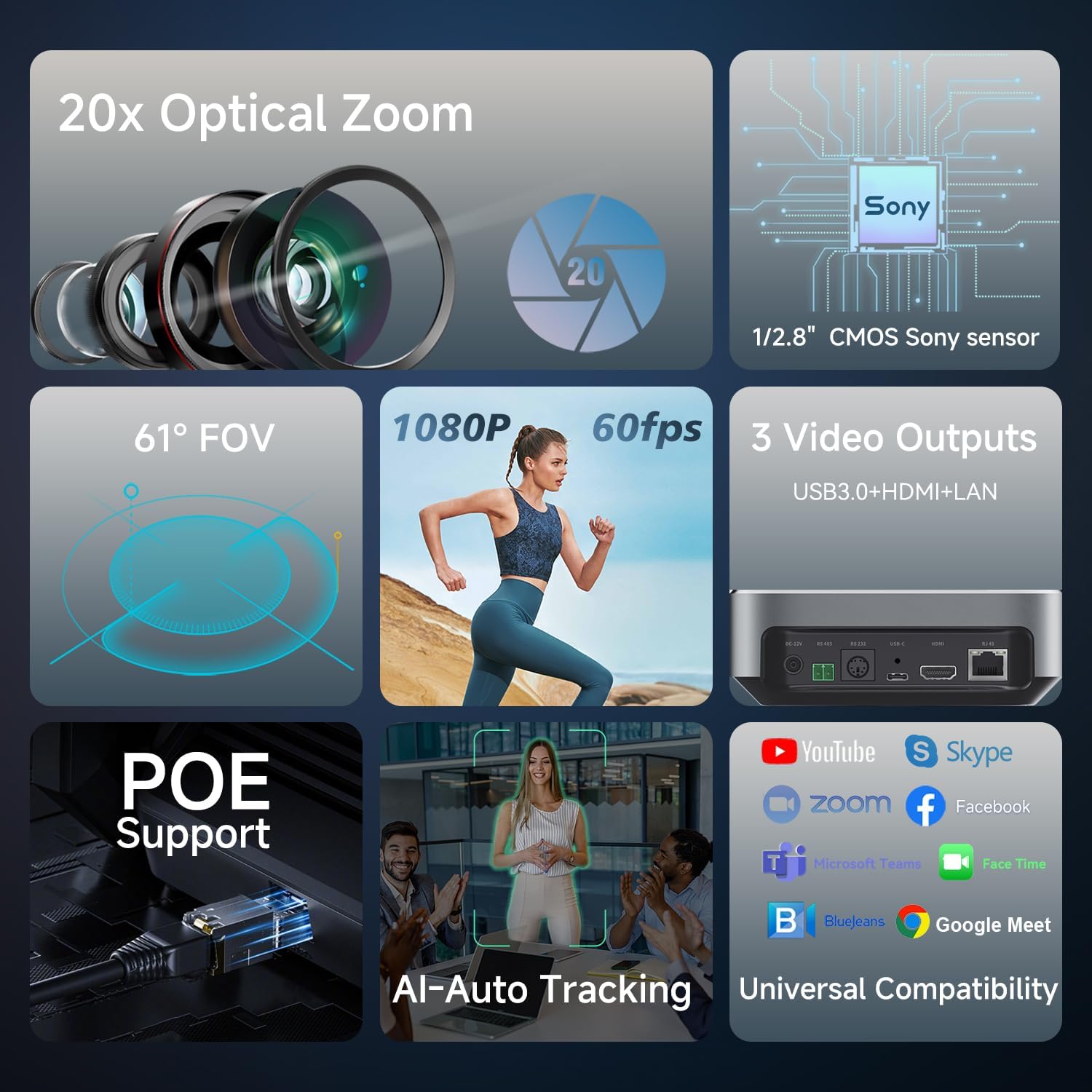
Image: Overview of the TONGVEO AI Auto-Tracking PTZ Camera VL20N's main features.
2. Product Overview
2.1. Components in the Box
The following items are included with your TONGVEO AI Auto-Tracking PTZ Camera VL20N:
- PTZ camera
- IR remote control
- USB cable
- DC power adapter
- Wall bracket with screws
- Manual
2.2. Key Features
- 20x Optical Zoom & 1080P 60fps: Equipped with a 1/2.8" HD CMOS sensor, delivering up to 2.38 Megapixels and 1920x1080 resolution at 60 frames per second. Features accurate and stable autofocus with a 63° field of view.
- AI Auto-Tracking: Utilizes advanced AI for precise humanoid and face recognition, enabling seamless tracking of lecturers or speakers. Adjustable settings for close-up image proportions are available via the camera's web page.
- Multiple Video Outputs: Simultaneous 1080p 60fps video output via USB, HDMI, and IP streaming. Supports PoE (Power over Ethernet) for simplified installation.
- Professional IP Live Streaming: Direct streaming via RTSP, RTMP(S), and SRT protocols. Supports H.265/H.264 encoding for smooth video under low bandwidth.
- Smooth PTZ Control: Offers horizontal rotation (-175° to +175°) and vertical rotation (-90° to 90°). Control methods include the included IR remote, RS232, and RS485 serial ports. Supports 10 presets via IR remote and 255 presets via VISCA/Pelco-D/Pelco-P.
- Noise Reduction: High SNR CMOS sensor and 2D&3D noise reduction algorithms ensure clear images even in low light conditions (Video S/N ≥55dB).
- Universal Compatibility: Compatible with popular conferencing software and platforms such as Zoom, OBS, vMix, Teams, Hangouts, and YouTube.
3. Setup
3.1. Physical Installation
The camera can be mounted on a wall, ceiling, or placed on a desktop using the provided wall bracket and screws. Ensure the camera is securely positioned to prevent accidental falls.
3.2. Connectivity Options
The VL20N camera offers various connectivity options:
- USB: Connects directly to a computer for video output.
- HDMI: Connects to a display or video switcher for high-definition video output.
- LAN (RJ45): For IP streaming, IP control, and Power over Ethernet (PoE).
- RS232/RS485: For external PTZ control via serial joystick or control systems.
- DC-12V: For power supply using the included DC power adapter.
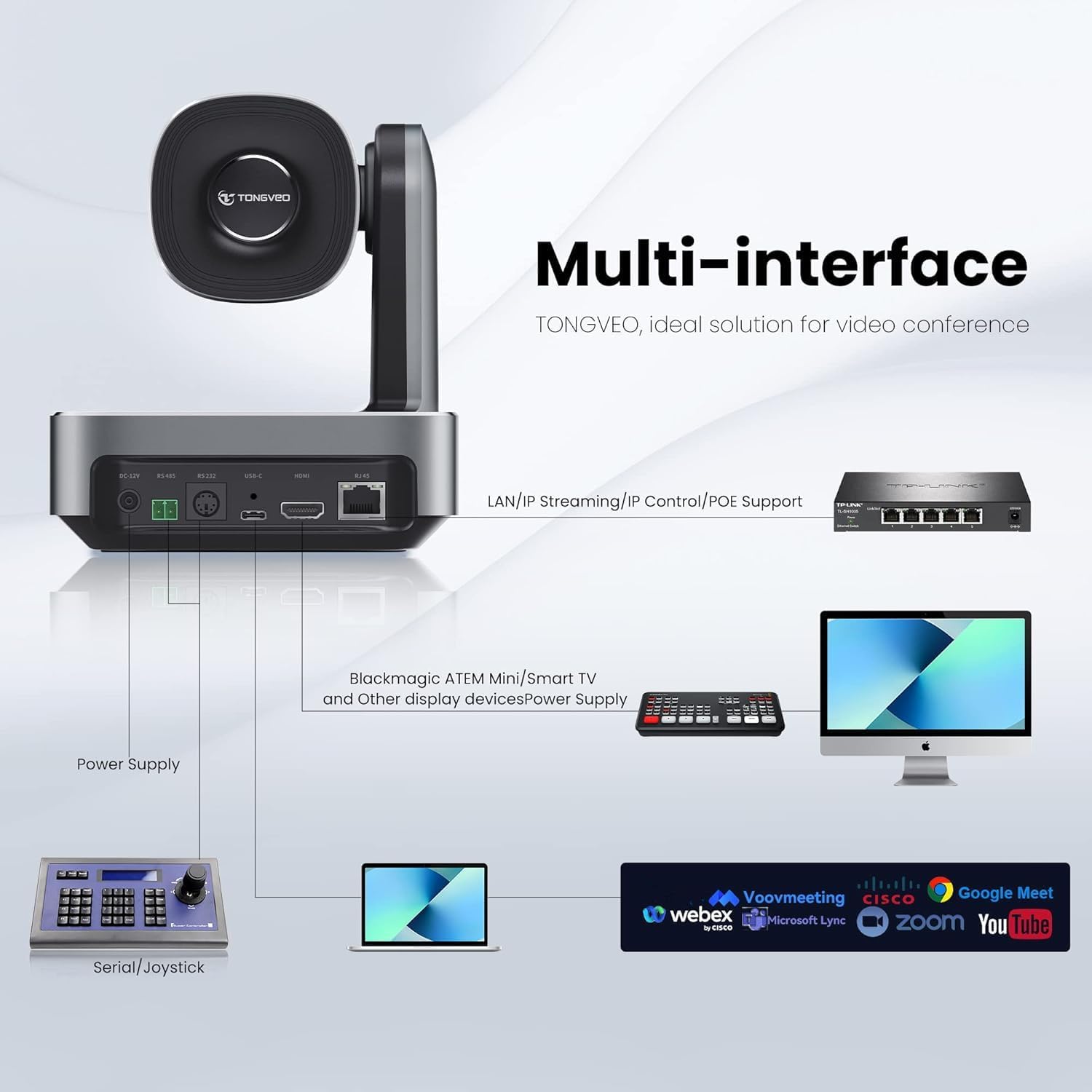
Image: Rear view of the camera highlighting various input/output ports.
3.3. Power over Ethernet (PoE)
The camera supports PoE, allowing power, video, and control signals to be transmitted over a single Ethernet cable. To utilize PoE, a PoE switch with power supply functionality is required. Use a Cat5/6 or higher Ethernet cable for normal power supply and effective transmission up to 328ft.

Image: PoE setup for the camera.
3.4. Network Connection (IP)
The camera's default IP address is 192.168.1.205. If connecting to a network, ensure your PC or laptop's IP address is within the same network segment as the camera for initial setup and access to the web interface.
4. Operating Instructions
4.1. Remote Control Operation
The included IR remote control allows for easy adjustment of camera functions:
- PTZ Control Keys: Use the arrow keys to pan (horizontal) and tilt (vertical) the camera. The center button returns the PTZ to the middle position.
- Zoom Keys: Use 'ZOOM SLOW Key' for gradual zoom in/out and 'ZOOM Fast Key' for rapid zoom in/out.
- Focus Key: Adjusts focus (Auto/Manual/Far/Near). Default is Auto Focus.
- Preset Positions: Set and recall up to 10 preset camera positions using the 'PRESET' and number keys.
- Menu: Access the OSD (On-Screen Display) menu for advanced settings.

Image: Remote control layout and functions.
4.2. AI Auto-Tracking
The camera's AI auto-tracking feature can be controlled via the remote or the web UI:
- Enable Auto-framing: Click the designated button on the remote or enable via the web UI.
- Enable AI Tracking: Short-press 'A' then short-press 'target selection' (if multiple people) then press 'Home' to confirm.
- Disable AI Tracking: Short-press 'A' to exit tracking (returns to auto-framing) or short-press 'A' directly to disable AI (returns to normal mode).

Image: AI Auto-Tracking in action.
4.3. Web UI Control
Access the camera's web interface by entering its IP address into a web browser. The web UI provides comprehensive control over camera settings, including image adjustments, tracking parameters, network configuration, and more.

Image: Web UI for camera control.
5. Maintenance
To ensure optimal performance and longevity of your TONGVEO AI Auto-Tracking PTZ Camera VL20N, follow these maintenance guidelines:
- Cleaning: Use a soft, dry cloth to clean the camera body. For the lens, use a specialized lens cleaning cloth and solution to avoid scratches.
- Storage: When not in use for extended periods, store the camera in a dry, dust-free environment.
- Environmental Conditions: Avoid exposing the camera to extreme temperatures, high humidity, or direct sunlight.
6. Troubleshooting
If you encounter issues with your camera, refer to the following common troubleshooting tips:
- No Video Output: Check all cable connections (USB, HDMI, LAN). Ensure the camera is powered on. Verify input selection on your display or video switcher.
- No Audio: The PTZ camera VL20N does NOT have a built-in microphone. An external microphone is required for audio capture.
- Network Connection Issues: If connecting via IP, ensure your computer's IP address is in the same network segment as the camera (default: 192.168.1.205). Refer to the product page video "How to the Live Streaming Camera connect the IP or Network?" for detailed instructions.
- PoE Not Working: Confirm that you are using a PoE switch with power supply functionality and a Cat5/6 or higher Ethernet cable.
- PTZ Control Unresponsive: Check the remote control batteries. Ensure there are no obstructions between the remote and the camera's IR receiver. If using serial control, verify cable connections and software settings.
For further assistance, please contact TONGVEO Technical Support. All questions will be answered within 24 hours.
7. Specifications
| Feature | Specification |
|---|---|
| Brand | TONGVEO |
| Model Number | VL20N |
| Photo Sensor Technology | CMOS (1/2.8" HD CMOS sensor) |
| Video Capture Resolution | 1080p @ 60fps |
| Optical Zoom | 20x |
| Field of View | 63° |
| Connectivity Technology | Ethernet, HDMI, Infrared, USB |
| Video Compression Format | YUV, MJPEG, H.264, H.265 |
| PTZ Control | IR Remote, RS232, RS485 (VISCA/Pelco-D/Pelco-P) |
| AI Features | AI Auto-Tracking, Humanoid & Face Recognition, Dynamic Auto-Framing |
| Noise Reduction | 2D&3D Noise Reduction Algorithms |
| Item Weight | 2.64 Kilograms |
| Color | Silver |
8. Warranty & Support
8.1. Product Warranty
The TONGVEO AI Auto-Tracking PTZ Camera VL20N comes with a 3-year manufacturer's warranty.
8.2. Technical Support
TONGVEO provides dedicated technical support for all its video conference camera systems. Any questions or issues will be addressed within 24 hours. For support, please refer to the contact information provided on the official TONGVEO website or your purchase documentation.
9. Official Product Videos
TONGVEO 20x Optical Zoom PTZ Camera with USB/HDMI/LAN Overview
Video: This official TONGVEO video provides a comprehensive overview of the 20x Optical Zoom PTZ Camera, demonstrating its features and connectivity options including USB, HDMI, and LAN.


