
1. Introduction
Thank you for choosing the BITIWEND Wireless Door Chime and Contact Sensor. This system is designed to provide reliable alerts for opened doors or windows, enhancing security and convenience in various environments such as homes, offices, and stores. With a wireless range of up to 600 feet and 58 selectable chimes, this system offers flexibility and ease of use. Please read this manual carefully to ensure proper installation and operation.
Video 1: Overview of the BITIWEND Wireless Door Chime system, demonstrating its components and basic functionality.
2. Product Overview
The BITIWEND Door Chime system consists of plug-in receivers and contact sensors. The receivers produce an audible alert when a paired sensor detects an opening. The sensors are designed to be discreetly mounted on doors or windows.
Components and Features:
- Receiver: Plugs into a standard electrical outlet. Features a volume button (5 levels), Up/Down buttons for chime selection, and an LED light indicator.
- Contact Sensor: Battery-powered, two-part magnetic sensor. When the two parts separate, a signal is sent to the receiver. Includes an LED indicator.
- Wireless Range: Up to 600 feet (180 meters) in open areas.
- Chimes: 58 selectable melodies.
- Volume Levels: 5 adjustable volume levels (0dB-110dB), including a mute mode.
- Memory Function: Retains selected chime and volume settings after power loss.

Image 1: Detailed view of the receiver and sensor, highlighting the LED light, volume button, Up/Down buttons, and dimensions (Receiver: 3.15 x 3.35 x 0.94 inches; Sensor: 1.85 x 0.96 x 0.43 inches).
3. Setup Instructions
Follow these steps to set up your BITIWEND Wireless Door Chime system.
3.1 Initial Activation and Powering On
- Sensor Activation: For new sensors, pull out the plastic insulation strip from the battery compartment to activate the battery.
- Receiver Power: Plug the receiver into a standard electrical outlet.

Image 2: Activating the sensor by removing the battery insulation strip.
3.2 Adjusting Volume and Selecting Chime
- Adjust Volume: Press the 'Volume' button on the receiver to cycle through 5 volume levels (0dB to 110dB).
- Select Chime: Use the 'Up' and 'Down' buttons to browse through the 58 available chimes. Stop on your desired melody.
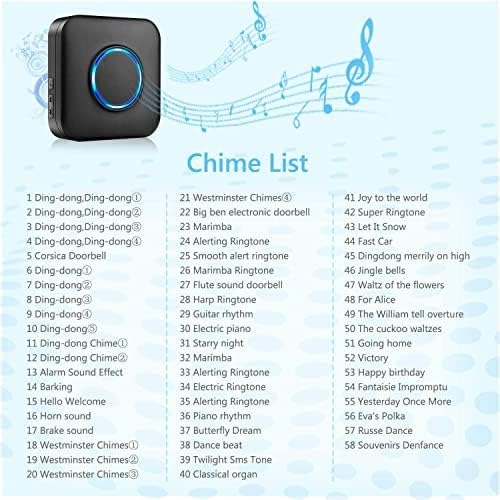
Image 3: A partial list of the 58 available chimes for the system.
3.3 Pairing Sensors with Receiver
To pair a sensor with the receiver:
- Press and hold the 'Volume' button and the 'Down' button on the receiver simultaneously until the LED light flashes.
- Quickly separate the two parts of the door sensor. The receiver will ding, indicating successful pairing.
3.4 Sensor Installation
Mount the contact sensor on a door or window frame using the provided adhesive tape. Ensure the two parts of the sensor are aligned and within 0.4 inches (1 cm) of each other when the door/window is closed. The larger part with the LED indicator should be on the fixed frame, and the smaller magnetic part on the moving door/window.

Image 4: Installing the door sensor using adhesive backing.
3.5 Resetting the System
To reset the receiver and clear all paired sensors, long press the 'Down' button for 10 seconds. The receiver will ding, confirming the reset is successful.

Image 5: Visual guide for battery replacement, sensor installation, chime setup, and system reset.
4. Operation
Once installed and paired, the BITIWEND Wireless Door Chime operates automatically.
4.1 General Functionality
When a paired contact sensor detects that a door or window has been opened (i.e., the two magnetic parts separate), it sends a wireless signal to the receiver. The receiver will then play the selected chime melody and its LED indicator will flash, alerting you to the event.
4.2 Application Scenarios
- Children Safety: Place sensors on doors leading to unsafe areas or exits to be alerted when children open them.

Image 6: Using the door chime to monitor doors for child safety.
- Security: Install sensors on entry points like doors and windows to detect unauthorized access and deter potential intruders with an audible alert.

Image 7: The door chime system can act as a deterrent against intruders.
- Customer Welcome: In retail or office settings, use the chime to announce the arrival of customers or visitors.

Image 8: The chime can be used to welcome customers into a store or office.
- Pet Monitoring: Attach sensors to pet doors to be notified when your pet enters or exits.

Image 9: Monitoring pet activity through a pet door with the sensor.
4.3 Expandable System
The BITIWEND Door Chime system is expandable. You can add multiple receivers and sensors to cover more entry points or larger areas, creating a comprehensive alert system for your property.

Image 10: The system supports multiple receivers and sensors for expanded coverage.
5. Maintenance
Regular maintenance ensures the longevity and optimal performance of your door chime system.
5.1 Battery Replacement for Sensors
The contact sensors are battery-powered. When the sensor's LED indicator no longer lights up or the signal becomes unreliable, it's time to replace the battery.
- Use the provided screwdriver to gently pry open the door sensor casing.
- Carefully remove the battery panel.
- Take out the old battery. CAUTION: Be careful not to touch the metal ring tube at the top and the black conduit raised on the side to avoid damage.
- After removing the battery, press the metal tab of the battery slot to ensure a snug fit for the new battery.
- Insert a new CR2032 battery, ensuring the positive (+) and negative (-) poles are placed correctly.
- Place the battery panel back into its original position and press it tightly until it clicks into place.
- Test the sensor by separating its two parts to confirm the blue light comes on.
Video 2: Step-by-step guide on how to replace the battery in the BITIWEND door sensor.
5.2 Cleaning
Wipe the surfaces of the receiver and sensors with a soft, dry cloth. Avoid using abrasive cleaners or solvents.
6. Troubleshooting
If you encounter issues with your BITIWEND Door Chime, refer to the following common problems and solutions:
- No sound from receiver:
- Ensure the receiver is properly plugged into a working outlet.
- Check the volume level; it might be set to mute (0dB). Press the 'Volume' button to increase.
- Verify the sensor is paired correctly. If not, re-pair the sensor following the instructions in Section 3.3.
- Sensor not triggering chime:
- Check the sensor battery. Replace if necessary (refer to Section 5.1).
- Ensure the sensor parts are installed correctly and are within 0.4 inches (1 cm) when the door/window is closed.
- Confirm the sensor is within the wireless range of the receiver (up to 600ft in open areas). Walls and metal objects can reduce range.
- Re-pair the sensor with the receiver (Section 3.3).
- Chime sounds intermittently or falsely:
- Check the sensor's alignment. Ensure the two parts are securely attached and do not shift.
- Interference from other wireless devices might occur. Try relocating the receiver or sensor.
- Low sensor battery can cause erratic behavior. Replace the battery.
- Short wireless range:
- Thick walls, metal structures, or other electronic devices can interfere with the signal. Try to minimize obstructions between the sensor and receiver.
- Ensure the receiver is not plugged into a metal outlet box or near large metal appliances.
- The system is not suitable for metal doors, which can significantly reduce range.
7. Specifications
| Feature | Detail |
|---|---|
| Brand | BITIWEND |
| Model Number | Door Chime |
| Sensor Technology | Contact Sensor |
| Power Source (Receiver) | Plug-in (AC) |
| Power Source (Sensor) | Battery Powered (CR2032, not included) |
| Voltage | 3 Volts (DC) for sensor |
| Wireless Range | Up to 600 feet (180 meters) in open areas |
| Number of Chimes | 58 |
| Volume Levels | 5 (0dB - 110dB) |
| Control Method | Touch buttons |
| Mounting Type | Door Mount (Adhesive) |
| Product Dimensions | 4 x 3 x 5 inches (overall package/system dimensions) |
| Item Weight | 10.2 ounces (overall package/system weight) |
8. Warranty and Support
BITIWEND is committed to providing quality products and customer satisfaction. For any product-related issues, technical assistance, or warranty inquiries, please contact our customer support team.
Please refer to your purchase documentation or the BITIWEND official website for specific warranty terms and contact information. When contacting support, please have your product model number and purchase details ready.


