1. Introduction
Thank you for choosing the Depusheng G4 4-Channel Portable Audio Mixer. This compact and versatile mixer is designed for various audio applications, including recording, live performances, and DJing. It features USB and Bluetooth connectivity, built-in digital effects, and a PC audio interface for seamless integration with your setup. Please read this manual thoroughly to understand the mixer's functions and ensure safe and optimal operation.
2. Important Safety Information
- Power Source: Use only the specified DC5V power adapter. Ensure the voltage is compatible with your region.
- Water and Moisture: Do not expose the mixer to water, rain, or excessive moisture. Avoid placing liquid-filled objects on the unit.
- Ventilation: Ensure proper ventilation around the unit. Do not block ventilation openings.
- Heat: Keep the mixer away from heat sources such as radiators, heat registers, stoves, or other heat-producing appliances.
- Cleaning: Disconnect power before cleaning. Use a soft, dry cloth. Do not use liquid cleaners or aerosol cleaners.
- Servicing: Do not attempt to service this product yourself. Refer all servicing to qualified service personnel.
- Cables: Protect power cords from being walked on or pinched, particularly at plugs, convenience receptacles, and the point where they exit from the apparatus.
3. Package Contents
Please check that all items are included in your package:
- Depusheng G4 Audio Mixer
- USB Cable
- Power Adapter (DC5V)
- User Manual (this document)
4. Product Overview
The Depusheng G4 mixer features a robust metal casing and sealed rotary knobs for durability. Below is a detailed diagram of the mixer's control panel and connections.

Figure 4.1: Depusheng G4 Audio Mixer Control Panel Diagram. This image displays the top view of the G4 mixer with labels pointing to each control and input/output, including MIC/LINE inputs, LINE IN, REC, MAIN OUT, Phantom Power switch, Gain knobs, High-bass (EQ) knobs, Effect key switch, Volume knobs, Digital effects processing knob (Delay/Repeat), USB interface, Liquid Crystal Display, Power indicator, Channel level indicator, 3.5mm headphone output plug, Headphone volume knob, and Master output volume knob.
Key Features:
- 4-Channel Mixer: Two mono input channels (MIC/LINE) and one stereo input channel (LINE IN 3/4 or USB/Bluetooth).
- USB Audio Interface: Connects to a computer for recording and playback.
- Bluetooth Functionality: Wireless audio streaming from smartphones, tablets, etc.
- Built-in Digital Effects: Adjustable Delay and Repeat for vocal and instrument enhancement.
- 48V Phantom Power: For condenser microphones on channels 1 and 2.
- 2-Band EQ: High and Low frequency adjustment for each channel.
- Multiple Inputs/Outputs: XLR/1/4" combo jacks, RCA inputs/outputs, 1/4" main outputs, 3.5mm headphone output.

Figure 4.2: Depusheng G4 Audio Mixer Front View. This image shows the top-down perspective of the Depusheng G4 mixer, highlighting its compact design and the layout of all knobs, faders, and input/output ports.

Figure 4.3: Depusheng G4 Mixer Universal Compatibility. This image illustrates the mixer's compatibility with various devices, including computers, musical instruments, monitor headphones, and power amplifiers, demonstrating its versatility in different audio setups.
5. Setup Guide
5.1 Power Connection
- Ensure the mixer's power switch is in the OFF position.
- Connect the provided DC5V power adapter to the mixer's power input jack.
- Plug the power adapter into a suitable electrical outlet.
5.2 Connecting Audio Devices
The G4 mixer offers various input and output options:
- Microphones/Instruments (Channels 1 & 2): Connect microphones (XLR or 1/4" TRS) or instruments (1/4" TS/TRS) to the MIC/LINE 1 and MIC/LINE 2 combo jacks. If using condenser microphones, activate the +48V PHANTOM power switch.
- Line-Level Devices (Channels 3/4): Connect stereo line-level devices (e.g., keyboards, media players) to the LINE IN 3/4 RCA inputs.
- Main Output: Connect your powered speakers, amplifier, or recording device to the MAIN OUT 1/4" TRS jacks.
- Recording Output: Use the REC RCA outputs to send the main mix to a dedicated recording device.
- Headphones: Plug your headphones into the 3.5mm PHONE jack.
6. Operating Instructions
6.1 Basic Operation
- Power On: After connecting all devices, switch the mixer's power ON. The POWER indicator will illuminate.
- Gain Adjustment: For each input channel, adjust the GAIN knob to set the input sensitivity. Aim for the signal to be strong without clipping (the PK indicator should only flash occasionally).
- Equalization (EQ): Use the HIGH and LOW knobs to adjust the treble and bass frequencies for each channel.
- Channel Level: Adjust the LEVEL knob for each channel to control its volume in the main mix.
- Main Output Level: Control the overall output volume using the MAIN level knob.
- Headphone Level: Adjust the PHONE knob for headphone monitoring volume.
6.2 Digital Effects
The G4 mixer includes built-in digital effects, primarily Delay and Repeat.
- Press the FX switch on the desired channel to send its signal to the effects processor.
- Adjust the blue DELAY knob to control the delay time.
- Adjust the orange REPEAT knob to control the number of repetitions of the delay effect.

Figure 6.1: Depusheng G4 Mixer with Built-in Digital Effects. This image shows a hand adjusting one of the blue and orange knobs, indicating the control over the built-in digital effects processor for delay and repeat functions.
6.3 USB Playback
The mixer supports playback from USB flash drives and acts as a USB audio interface for PC.
- USB Flash Drive: Insert a USB flash drive containing MP3 files into the USB port. Use the playback controls (play/pause, skip) on the mixer's USB AUDIO section. The LCD will display track information.
- PC USB Audio: Connect the mixer to your computer using the provided USB cable. The mixer will be recognized as an audio device. You can then play audio from your computer through the mixer or record the mixer's output to your computer. Ensure the CH3/4 USB switch is engaged to route USB audio to channels 3/4.
6.4 Bluetooth Connectivity
Connect your smartphone or tablet wirelessly via Bluetooth for audio playback.
- Ensure the mixer is powered on.
- Press the MODE button on the USB AUDIO section until "bt" appears on the LCD, indicating Bluetooth mode.
- On your mobile device, search for Bluetooth devices and select "Depusheng G4" (or similar).
- Once paired, audio from your device will play through the mixer. Use the mixer's playback controls or your device's controls. Ensure the CH3/4 USB switch is engaged to route Bluetooth audio to channels 3/4.

Figure 6.2: Depusheng G4 Mixer Bluetooth and USB Playback Options. This image illustrates the two primary wireless and wired playback methods: Bluetooth connectivity from a smartphone and direct USB flash drive playback, both integrated into the mixer's functionality.
7. Maintenance
7.1 Cleaning
To maintain the appearance and functionality of your mixer:
- Always disconnect the power adapter before cleaning.
- Use a soft, dry, lint-free cloth to wipe the surface of the mixer.
- Do not use abrasive cleaners, solvents, or chemical sprays, as these may damage the finish or internal components.
- For stubborn dirt, lightly dampen the cloth with water, then wipe dry immediately.
7.2 Storage
When not in use for extended periods, store the mixer in a cool, dry place, away from direct sunlight and extreme temperatures. It is recommended to keep it in its original packaging or a protective case to prevent dust accumulation and physical damage.
8. Troubleshooting
| Problem | Possible Cause | Solution |
|---|---|---|
| No sound output |
|
|
| Distorted sound |
|
|
| Bluetooth not connecting |
|
|
| No sound from USB flash drive |
|
|
| Phantom power not working |
|
|
9. Specifications
| Feature | Detail |
|---|---|
| Model | G4 |
| Number of Channels | 4 (2 Mono, 1 Stereo/USB/BT) |
| Connectivity Technology | USB, Bluetooth |
| Audio Input | Microphones (XLR/1/4"), Instruments (1/4"), Line (RCA) |
| Output Connector Type | 1/4" TRS (Main), RCA (REC), 3.5mm (Headphones) |
| Power Source | Cable Electric (DC5V) |
| Voltage | 48 Volts (Phantom Power) |
| Item Weight | 800 grams (1.76 lbs) |
| Package Dimensions | 21.6 x 18.6 x 7.4 cm (8.5 x 7.3 x 2.9 inches) |
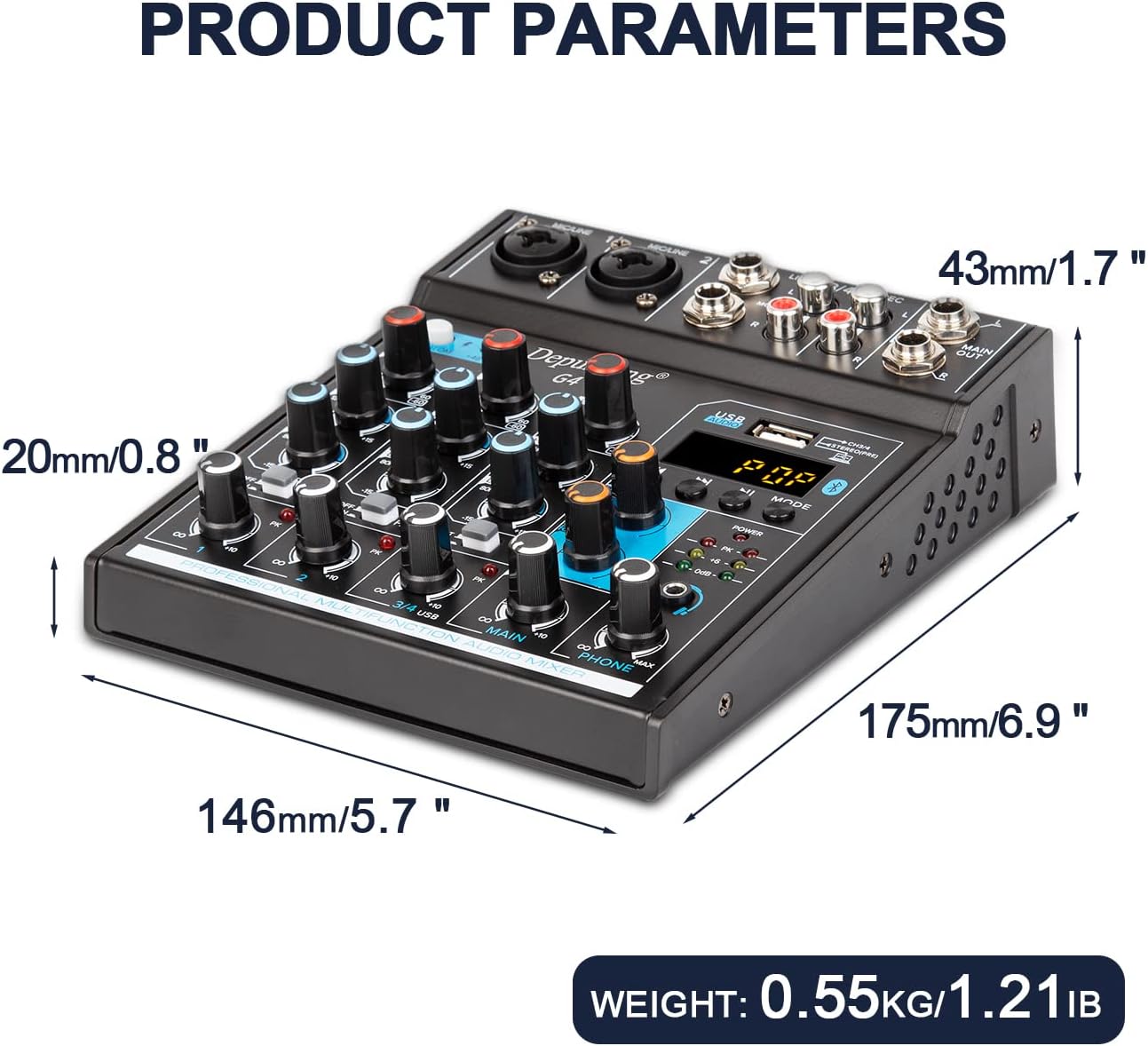
Figure 9.1: Depusheng G4 Audio Mixer Dimensions and Weight. This image provides a visual representation of the mixer's physical dimensions (length, width, height) and its total weight, aiding in understanding its compact size and portability.
10. Warranty and Support
Depusheng products are manufactured to high-quality standards. For warranty information, technical support, or service inquiries, please refer to the documentation provided with your purchase or contact your retailer. Keep your proof of purchase for warranty claims.


