
Introduction
This user manual provides comprehensive instructions for the operation and maintenance of your Silvercrest DAB+ Radio. Please read this manual carefully before using the device to ensure proper functionality and to prevent damage. Keep this manual for future reference.
Safety Instructions
- Do not expose the device to rain, moisture, or extreme temperatures.
- Avoid placing the device near heat sources such as radiators or stoves.
- Do not open the device casing. Repairs should only be performed by qualified personnel.
- Ensure proper ventilation around the device.
- Disconnect the power plug during thunderstorms or when not in use for extended periods.
- Clean the device only with a dry, soft cloth. Do not use liquid cleaners.
Package Contents
Please check that all items are present and in good condition:
- Silvercrest DAB+ Radio Unit
- Power Adapter
- User Manual (this document)
Product Overview
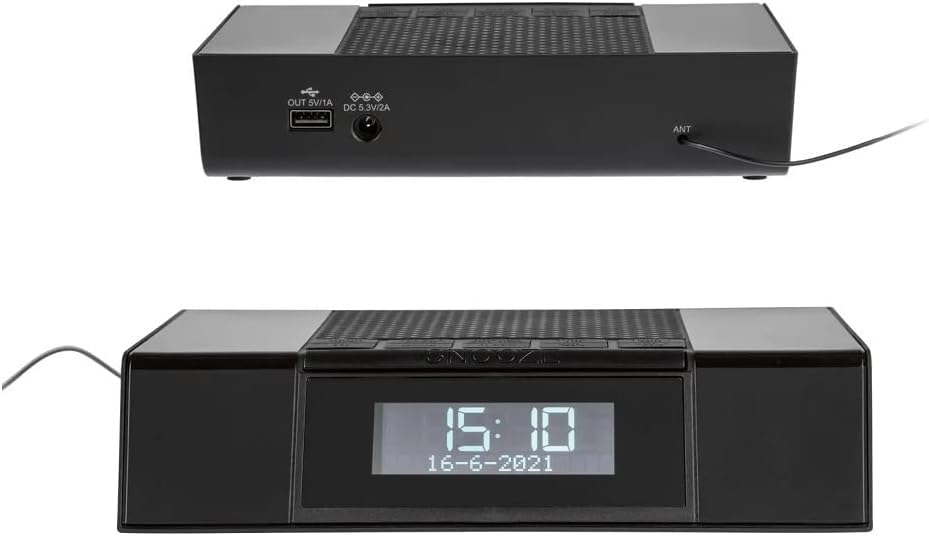
Figure 1: Front View. This image displays the front of the Silvercrest DAB+ Radio, highlighting its clear digital display which shows the current time and date. Above the display, several control buttons are visible, including a large 'SNOOZE' button.

Figure 2: Top and Rear View. This image provides a view of the top control panel with various buttons and the rear panel of the radio. The rear panel features a USB output port (OUT 5V/1A) for charging external devices, a DC input port (DC 5.3V/2A) for power, and an antenna (ANT) connection.
Controls and Connections:
- Display: Shows time, date, radio station information, and menu options.
- Control Buttons (Top Panel): For navigation, mode selection, volume, alarm settings, and snooze.
- USB OUT (5V/1A): USB port for charging compatible external devices.
- DC IN (5.3V/2A): Power input port for connecting the power adapter.
- ANT: Connection point for the external antenna.
Setup
- Connect Antenna: Connect the provided antenna cable to the ANT port on the rear of the radio. Extend the antenna fully for optimal reception.
- Connect Power: Insert the power adapter cable into the DC IN (5.3V/2A) port on the rear of the radio. Plug the power adapter into a standard wall outlet.
- Initial Power On: The radio will power on automatically or require a press of the power button. The display will light up.
- Automatic Time/Date Sync: Upon first power-on, the radio will attempt to synchronize the time and date automatically via DAB+ signal. Ensure good reception for this feature.
Operating Instructions
Power On/Off
- Press the Power button to turn the radio on or off.
Mode Selection (DAB+/FM)
- Press the Mode button to switch between DAB+ and FM radio modes.
DAB+ Radio Operation
- First Time Scan: When in DAB+ mode for the first time, the radio will automatically perform a full scan for available stations. This may take a few minutes.
- Manual Scan: To perform a manual scan, navigate to the DAB+ menu and select "Full Scan" or "Auto Scan".
- Selecting Stations: Use the Tune/Select knob or Up/Down buttons to browse through the list of available DAB+ stations. Press Select to confirm your choice.
- Saving Presets: To save a station as a preset, tune to the desired station, then press and hold the Preset button. Use the Tune/Select knob or Up/Down buttons to choose a preset number (e.g., P1-P10), then press Select to confirm.
- Recalling Presets: Briefly press the Preset button, then use the Tune/Select knob or Up/Down buttons to select the desired preset number, and press Select.
FM Radio Operation
- Auto Scan: In FM mode, press and hold the Scan button to automatically scan and save strong FM stations.
- Manual Tuning: Briefly press the Tune/Select knob or Up/Down buttons to fine-tune the frequency step by step. Press and hold to quickly scan for the next available station.
- Saving Presets: Similar to DAB+, tune to the desired FM station, then press and hold the Preset button. Choose a preset number and press Select.
- Recalling Presets: Briefly press the Preset button, then select the desired preset number and press Select.
Alarm Function
- Setting Alarm: Press the Alarm button. Use the Up/Down buttons or Tune/Select knob to set the alarm time (hour and minute). Press Select to confirm each setting.
- Alarm Source: Choose between Buzzer, DAB+, or FM as the alarm sound source.
- Alarm Volume: Adjust the desired alarm volume.
- Activating/Deactivating Alarm: After setting, ensure the alarm is activated (indicated by an alarm icon on the display). Press the Alarm button repeatedly to toggle between Alarm 1, Alarm 2, or Off.
- Snooze: When the alarm sounds, press the large Snooze button to temporarily silence it for a set period (e.g., 9 minutes).
- Stop Alarm: To stop the alarm completely, press the Power button or the Alarm button.
Sleep Timer Function
- Press the Sleep button repeatedly to cycle through available sleep timer durations (e.g., 15, 30, 45, 60, 90 minutes, or Off). The radio will automatically turn off after the selected duration.
USB Charging Port
- The USB OUT (5V/1A) port on the rear of the radio can be used to charge small electronic devices such as smartphones or MP3 players. Connect your device's USB charging cable to this port.
Maintenance
- Cleaning: Use a soft, dry, lint-free cloth to clean the exterior of the radio. Do not use abrasive cleaners, waxes, or solvents.
- Storage: If storing the radio for an extended period, disconnect it from the power outlet and store it in a cool, dry place.
- Antenna Care: Handle the antenna gently to avoid bending or breaking it.
Troubleshooting
| Problem | Possible Cause | Solution |
|---|---|---|
| No power | Power adapter not connected or faulty outlet. | Check power adapter connection. Try a different power outlet. |
| Poor radio reception (DAB+/FM) | Antenna not extended or poor signal area. | Fully extend the antenna. Reposition the radio for better signal. Perform a new scan. |
| No sound | Volume too low or muted. | Increase volume. Check if the radio is muted. |
| Alarm does not sound | Alarm not activated or set incorrectly. | Verify alarm time and activation status. Ensure alarm volume is audible. |
| Display is blank or frozen | Temporary software glitch. | Disconnect power for a few seconds, then reconnect to reset the device. |
Specifications
| Brand | Crivit |
| Model | B0BVW5K8CV |
| Tuner Technology | DAB+ |
| Connectivity Technology | USB |
| Special Feature | Lightweight |
| Item Weight | 330 Grams |
| Water Resistance Level | Waterproof |
| Hardware Interface | USB |
| Frequency | 108 MHz (likely FM max frequency) |
| Compatible Devices | Headphones |
Warranty and Support
For warranty information and technical support, please refer to the documentation provided with your purchase or contact the retailer/manufacturer directly. Keep your proof of purchase for warranty claims.


