
1. Introduction
The OWON 3-Phase WiFi Smart Home Energy Monitor (Model O-321-300A) is designed to provide real-time monitoring of your home's or facility's electrical energy consumption. This device helps you track voltage, current, power factor, and active power, enabling informed decisions to optimize energy usage and potentially reduce costs. It integrates seamlessly with the SmartLife application for convenient remote access and data analysis.
2. Important Safety Information
WARNING: Electrical installations should only be performed by qualified professionals. Failure to follow these safety guidelines may result in electric shock, fire, or other hazards.
- The power clamp and monitor must be installed and maintained exclusively by a qualified electrician.
- Do not touch the device terminals or any live electrical components during testing or installation.
- Always turn off all power to the electrical panel or equipment before beginning installation or maintenance of this device.
- Ensure all connections are secure and properly insulated to prevent short circuits or electrical hazards.
3. Product Features
- Comprehensive Energy Monitoring: Monitors real-time energy consumption, voltage, current, and power factor to help prevent costly repairs and save energy.
- Real-time Data: Provides energy data updates every 2 seconds with an accuracy of ±2%. Requires a 2.4 GHz Wi-Fi connection and internet access for monitoring via the phone application.
- Appliance-Specific Monitoring: Includes three 300A current sensors to precisely monitor individual appliances such as air conditioners, furnaces, water heaters, washing machines, and dryers. Compatible with Tuya-enabled smart home systems.
- User-Friendly Design: Lightweight and easy to install. The PC321-TY power clamp connects directly to the power cable.
4. Package Contents
Upon unpacking, please verify that all the following items are included:
- OWON 3-Phase WiFi Smart Home Energy Monitor (Main Unit)
- 3 x 300A Current Sensors (CT Clamps)
- Wi-Fi Antenna
- Mounting Bracket and Screws
- User Manual (this document)
5. Setup and Installation
Follow these steps for proper installation of your OWON Energy Monitor:
- Power Off: Before any installation, ensure the main power supply to your electrical panel is completely turned off at the circuit breaker. Verify with a voltage tester.
- Mount the Monitor: Use the provided mounting bracket and screws to securely attach the main monitor unit to a suitable surface near your electrical panel.
- Connect Current Sensors (CT Clamps):
- Identify the phase wires you wish to monitor. For 3-phase systems, connect one CT clamp to each phase wire.
- Ensure the arrow on the CT clamp points in the correct direction of current flow (e.g., from the meter towards the load, or P1→P2 / K→L). Incorrect direction will result in negative readings.
- Carefully clip each CT clamp around its respective phase wire. Ensure the clamp is fully closed.
- Connect the CT clamp cables to the corresponding inputs on the main monitor unit.
- Connect Power Supply: Connect the monitor's power supply cable to a suitable power source within the electrical panel, ensuring it is connected to the correct voltage lines as per the device specifications.
- Attach Wi-Fi Antenna: Screw the Wi-Fi antenna onto the designated port on the main monitor unit.
- Restore Power: Once all connections are secure and verified, restore power to your electrical panel.

Figure 5.1: OWON 3-Phase Energy Monitor installed in an electrical panel, showing current clamps connected to circuit breakers and a smartphone displaying real-time energy data via the app.
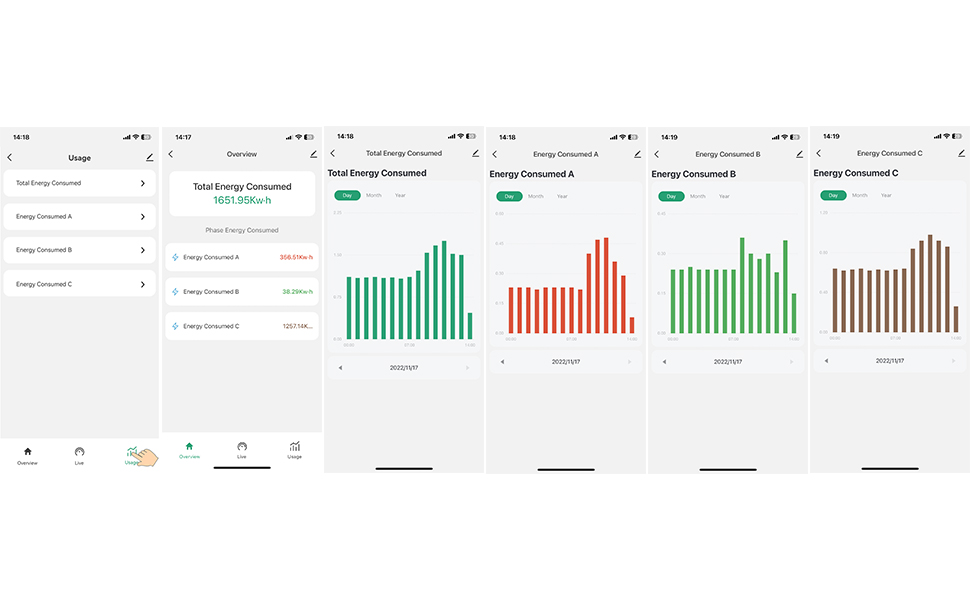
Figure 5.2: Illustration of the correct mounting direction for current clamps. The arrow on the clamp should point from the meter towards the breaker, or from the breaker towards the load, depending on the measurement point.

Figure 5.3: Different sizes of current clamps available (80A, 120A, 200A, 300A) and a detailed view of a clamp indicating the direction of current flow (Load).
6. Operating Instructions
The OWON Energy Monitor operates primarily through the SmartLife mobile application.
- Download the App: Download and install the "SmartLife" application from your smartphone's app store (available for iOS and Android).
- Register/Log In: Open the SmartLife app and register a new account or log in with an existing one.
- Add Device: Follow the in-app instructions to add your OWON Energy Monitor. Ensure your phone is connected to a 2.4 GHz Wi-Fi network during the pairing process.
- Monitor Energy: Once connected, you can view real-time energy consumption data, including total active power, total current, frequency, and individual phase data (voltage, current, power factor, active power).
- View Historical Data: The app allows you to view historical energy consumption data by day, month, or year, providing insights into your energy usage patterns.

Figure 6.1: SmartLife app interface displaying total energy consumed and live electrical parameters for each phase (A, B, C).

Figure 6.2: SmartLife app interface showing historical energy consumption graphs, allowing users to track daily, monthly, and yearly usage for each phase.
7. Bidirectional Measurement Technology
The OWON Energy Monitor supports bidirectional measurement, which is crucial for systems with renewable energy sources like solar panels. This feature allows it to measure both energy consumed from the grid and energy produced and fed back into the grid.
- Grid Measurement: If the current flows from P1→P2 (or K→L), the energy reading accumulates as 'energy from the grid'.
- Feed-in Measurement: If the current flows from P2→P1 (or L→K), the energy reading accumulates as 'energy to the grid'.
- Inverter Clamp: When clamping on an inverter, the clamp's direction should point towards the inverter to measure generated energy.
- Load Clamp: When clamping on a load, the clamp's direction should point towards the load to measure consumption.
Figure 7.1: Schematic of a grid-connected system, demonstrating how current clamps are positioned to measure energy flow from solar panels via an inverter, to the AC loads panel, and bidirectionally with the main grid connection.
8. Applications
The OWON PC321-TY Energy Monitor is versatile and can be used in various settings to monitor electrical consumption and parameters:
- Residential Homes: Monitor household energy usage, identify energy-hungry appliances, and optimize consumption.
- Commercial Buildings: Track energy consumption in offices, retail spaces, and other commercial establishments to manage operational costs.
- Industrial Facilities: Monitor machinery and production lines for energy efficiency and fault detection.
- Educational Institutions & Research: For energy studies, facility management, and educational purposes.
- Hotels & Hospitality: Manage energy usage across various zones and guest rooms.

Figure 8.1: Examples of environments where the OWON Energy Monitor can be effectively utilized, including commercial markets, industrial factories, residential homes, and large hotel complexes.
9. Maintenance
The OWON Energy Monitor is designed for minimal maintenance. However, regular checks can ensure optimal performance:
- Visual Inspection: Periodically inspect the device and its connections for any signs of damage, loose wires, or corrosion.
- Cleaning: Keep the unit clean and free from dust. Use a dry, soft cloth for cleaning. Do not use liquid cleaners or solvents.
- Firmware Updates: Check the SmartLife app periodically for any available firmware updates for the device to ensure you have the latest features and security enhancements.
- Professional Check: For any concerns regarding electrical connections or device functionality, consult a qualified electrician.
10. Troubleshooting
If you encounter issues with your OWON Energy Monitor, refer to the following common troubleshooting steps:
| Problem | Possible Cause | Solution |
|---|---|---|
| Device not connecting to Wi-Fi | Incorrect Wi-Fi password; 5GHz Wi-Fi network; device too far from router | Ensure correct 2.4 GHz Wi-Fi network and password. Move device closer to router. Restart router and device. |
| No data or incorrect readings in app | CT clamps not properly installed; incorrect clamp direction; loose connections | Verify CT clamp installation, ensuring arrows point in the correct direction. Check all wiring connections for tightness. Ensure power is supplied to the monitor. |
| App shows offline | No internet connection; device power off; Wi-Fi signal loss | Check your home internet connection. Verify the monitor has power. Check Wi-Fi signal strength at the device location. |
| Negative power readings | CT clamp installed in reverse direction | Reverse the direction of the CT clamp on the wire. The arrow should point towards the load for consumption, or towards the inverter for generation. |
11. Specifications
Detailed technical specifications for the OWON 3-Phase WiFi Smart Home Energy Monitor (Model O-321-300A):
| Specification | Detail |
|---|---|
| Model Number | O-321-300A |
| Brand | OWON |
| Dimensions (L x W x H) | 21 x 14 x 5.8 cm (8.27 x 5.51 x 2.28 inches) |
| Weight | 1.13 kilograms (2.49 lbs) |
| Power Source | Electric Cable |
| Measurement Type | Amperemeter (Current, Voltage, Power Factor, Active Power) |
| Current Sensor Capacity | 300A (with 3 sensors included) |
| Compatible Devices | Devices with 2.4 GHz Wi-Fi, internet connection, and PC321-TY terminal support (e.g., SmartLife app) |
| Certifications | CE, ETL |
| Country of Origin | China |
12. Warranty and Support
For warranty information, technical support, or service inquiries, please refer to the official OWON website or contact their customer service department. Keep your purchase receipt as proof of purchase for any warranty claims.
OWON Official Website: www.owon.com
