
1. Introduction
This manual provides essential information for the safe and efficient installation, operation, and maintenance of the ebm-papst G3G280-BR04-M7 Centrifugal Fan. This fan is designed for robust industrial applications requiring effective ventilation and heat dissipation.
2. Safety Information
Adhere to the following safety guidelines to prevent injury and damage to the equipment:
- Read all instructions thoroughly before attempting installation or operation.
- Ensure the power supply voltage and frequency precisely match the fan's nominal specifications (400VAC, 50/60Hz).
- Always disconnect the fan from the main power supply before performing any installation, maintenance, cleaning, or repair procedures.
- Installation and electrical wiring must be carried out by qualified and certified personnel in strict accordance with all local and national electrical codes and safety regulations.
- Protect the fan from direct exposure to moisture, corrosive substances, and extreme temperatures that fall outside the specified operating range of -25°C to 60°C.
- Do not operate the fan if any visible damage to the housing, impeller, or electrical components is present.
- Keep hands, tools, and any foreign objects clear of the fan's rotating parts during operation to prevent severe injury.
3. Product Specifications
The ebm-papst G3G280-BR04-M7 is a high-performance centrifugal fan engineered for demanding industrial environments.

Image 1: Overview of the ebm-papst G3G280-BR04-M7 Centrifugal Fan, highlighting its 280mm size, 400V nominal voltage, and 530W power consumption.
| Parameter | Value |
|---|---|
| Model | G3G280-BR04-M7 |
| Brand | ebm-papst |
| Fan Type | Centrifugal Fan |
| Motor | M3G084-DF |
| Nominal Voltage | 400VAC |
| Voltage Range | 380-480VAC |
| Frequency | 50/60Hz |
| Speed | 2700 RPM |
| Power Consumption | 530W |
| Current Draw | 0.85A |
| Min. Ambient Temperature | -25°C |
| Max. Ambient Temperature | 60°C |
| Weight | 15 KG (approx. 33 lbs) |
| Size (Diameter) | 280mm |
| Degree of Protection | IP55 |
| Insulation Class | F |
| Motor Bearing | Ball bearing |
| Material | Aluminum (housing), Plastic (impeller) |
| Compatible Devices | Desktop, Refrigerator, Transmission Coolers (general applications) |

Image 2: The centrifugal fan with arrows indicating air flow, demonstrating its function in ventilation and heat dissipation. The product label with specifications is also visible.

Image 3: A close-up view highlighting the impeller material, which is made of plastic, contributing to the fan's design and performance.
4. Setup and Installation
Proper installation is critical for the fan's optimal performance, safety, and longevity.
- Mounting: Securely mount the fan using appropriate hardware suitable for its weight (15 KG) and operational vibrations. Ensure the mounting surface is stable and capable of supporting the fan.
- Electrical Connection:
- Verify that the power supply voltage (400VAC) and frequency (50/60Hz) precisely match the fan's requirements.
- Connect the fan to the power source using an IEC 60320 C13/C19 power connector type, as specified.
- All wiring must strictly comply with local electrical codes and safety standards.
- Ensure proper grounding to prevent electrical hazards and ensure safe operation.
- Wiring Diagram: Always refer to the specific wiring diagram provided with your fan unit for detailed connection instructions. Incorrect wiring can lead to severe damage to the fan or pose significant safety risks.

Image 4: A detailed view of the fan's wiring terminal, showing the connection points for electrical installation. Ensure all connections are secure and correctly made.
- Environmental Considerations: Install the fan in an environment where the ambient temperature consistently remains within the specified range of -25°C to 60°C. Ensure adequate clearance for optimal airflow and ease of maintenance. While the IP55 degree of protection offers resistance to dust and low-pressure water jets, avoid direct exposure to harsh environmental elements.
5. Operating Instructions
Once the fan is correctly installed and wired, it is ready for operation.
- Power On: Apply power to the fan. The fan should begin rotating immediately.
- Initial Monitoring: During the initial operation, carefully observe the fan for any unusual noises, excessive vibrations, or other signs of malfunction.
- Speed Control: If the fan is connected to a frequency variator (inverter), adjust the fan speed as required for your specific application. The nominal speed of this fan is 2700 RPM.
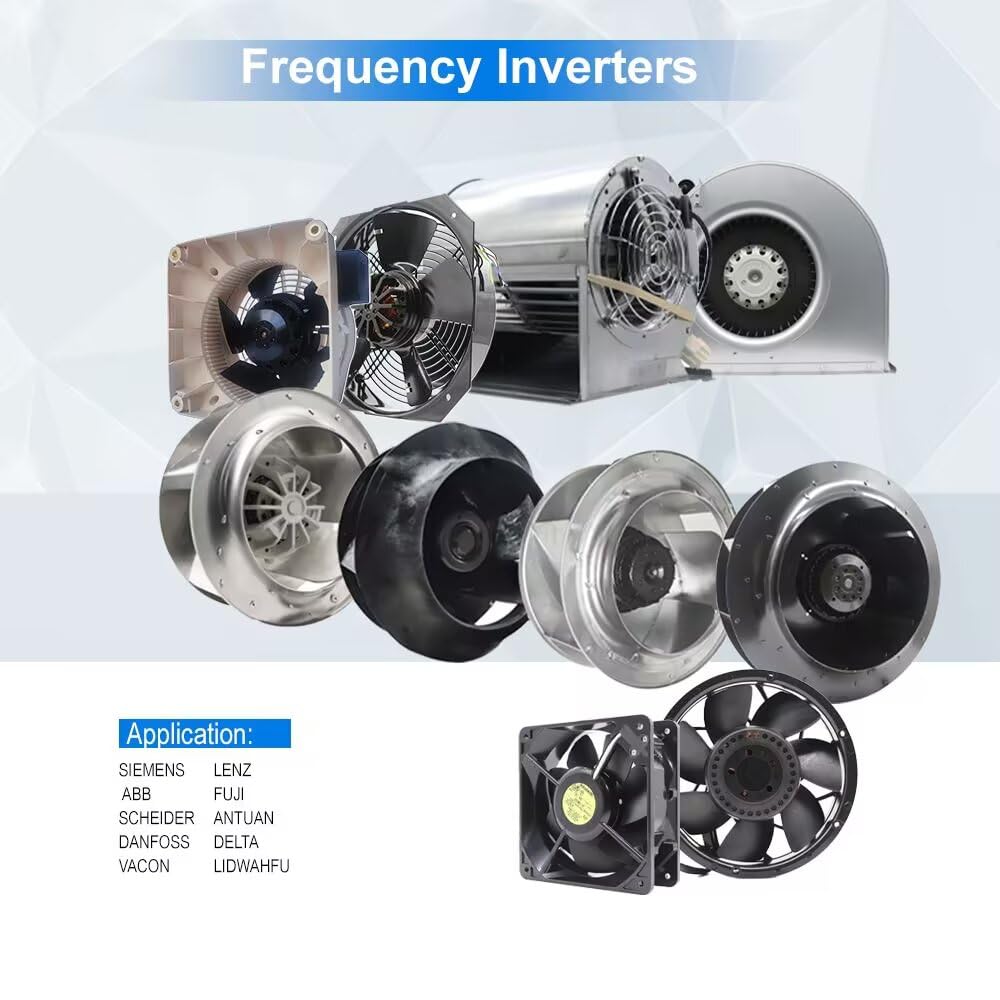
Image 5: The ebm-papst centrifugal fan shown alongside a Siemens inverter, illustrating its compatibility with frequency variators for precise speed control in industrial applications.
- Continuous Operation: The fan is designed for continuous operation within its specified technical parameters.
6. Maintenance
Regular and proper maintenance is essential to ensure optimal performance, efficiency, and to extend the operational lifespan of your ebm-papst fan.
- Power Disconnection: Always ensure the fan is completely disconnected from the power supply before commencing any maintenance or cleaning tasks.
- Cleaning: Periodically clean the fan impeller and the interior of the housing to prevent the accumulation of dust, dirt, and debris. Buildup can significantly reduce efficiency, cause imbalance, and lead to premature wear. Use a soft brush, cloth, or compressed air for cleaning.
- Inspection: Regularly inspect the fan for any visible signs of wear, damage, or loose connections. Pay particular attention to the motor bearings (ball bearing type) to ensure smooth and quiet operation.
- Fasteners: Verify that all mounting bolts, screws, and electrical connections remain tight and secure. Retighten as necessary.
- Environmental Check: Periodically confirm that the operating environment continues to meet the specified temperature and humidity conditions to prevent undue stress on the fan components.
7. Troubleshooting
This section provides solutions for common issues that may arise during the operation of your centrifugal fan.
| Problem | Possible Cause | Solution |
|---|---|---|
| Fan does not start | No power supply; Incorrect wiring; Motor fault | Check power connection and circuit breaker; Verify wiring against the provided diagram; If issues persist, contact qualified service personnel. |
| Reduced airflow | Blocked intake/exhaust; Dirty impeller; Incorrect speed setting | Clear any obstructions from the intake and exhaust; Clean the impeller and housing thoroughly; Adjust fan speed via the inverter if applicable. |
| Excessive noise or vibration | Loose mounting; Damaged impeller; Worn bearings; Debris inside fan housing | Tighten all mounting bolts; Inspect the impeller for any damage or imbalance; Contact service for potential bearing replacement; Clean the fan thoroughly to remove any foreign objects. |
| Overheating | Insufficient ventilation around the fan; High ambient temperature; Motor overload | Ensure adequate airflow and clearance around the fan; Check that the ambient temperature is within the specified operating range; Verify the fan is operating within its specified load limits. |
8. Warranty and Support
This ebm-papst G3G280-BR04-M7 Centrifugal Fan is supplied as a new and fully tested unit. For detailed warranty information, please refer to the terms and conditions provided at the time of purchase or contact your original supplier.
For technical support, specific product specifications, or additional product images, please contact Captain Fan or your authorized ebm-papst distributor. They can provide expert assistance and guidance.

Image 6: The fan displaying its compliance and approval marks, including CE, cURus, and EAC, indicating adherence to international safety and quality standards.


