
1. Introduction
Thank you for choosing the Starway SW2VC 30cm Built-in Vitroceramic Electric Hob. This manual provides essential information for the safe and efficient use of your appliance. Please read these instructions carefully before installation and operation, and keep them for future reference.

Figure 1: Starway SW2VC 30cm Built-in Vitroceramic Electric Hob, front view.
2. Safety Information
Your safety and the safety of others are paramount. Please observe all safety warnings and precautions outlined in this manual.
General Safety
- This appliance is intended for household use only.
- Do not operate the hob if the glass ceramic surface is cracked or broken.
- Keep children away from the appliance during operation as surfaces can become very hot.
- Ensure proper ventilation during use.
- Do not store flammable materials on or near the hob.
Electrical Safety
- The appliance must be correctly installed by a qualified technician.
- Ensure the voltage and frequency match the specifications on the rating plate.
- This hob features high and low voltage protection.
- Do not use adapters, multiple sockets, or extension cables.
3. Product Overview
The Starway SW2VC is a 30cm built-in vitroceramic electric hob designed for modern kitchens. It features two cooking zones and touch controls for precise temperature management.
Key Features:
- Two Cooking Zones: Efficiently cook multiple dishes simultaneously.
- Bridge Function: Combine two cooking zones for larger cookware.
- Power Boost: Provides rapid and intense heat for quick boiling or searing.
- Touch Control: Easy and intuitive operation with a sleek touch interface.
- 9 Power Levels: Offers precise heat control for various cooking needs.
- Stain-Resistant Vitroceramic Surface: Durable and easy to clean.
- High and Low Voltage Protection: Enhances appliance safety and longevity.
- Child Lock: Prevents accidental operation.
4. Installation (Setup)
Installation must be carried out by a qualified professional in accordance with local regulations and safety standards.
Dimensions and Cut-out
Ensure the countertop cut-out dimensions match the appliance requirements. Refer to the diagram below for precise measurements.
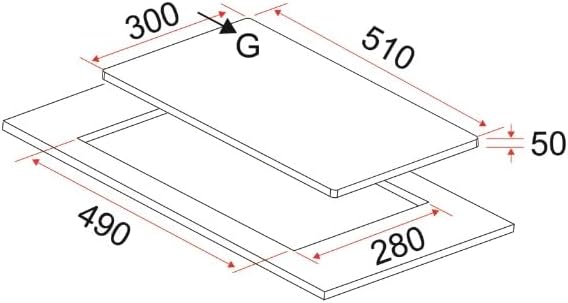
Figure 2: Installation dimensions for the Starway SW2VC hob. The hob measures 52cm (Depth) x 30cm (Width) x 4cm (Height). The required cut-out dimensions are approximately 49cm (Depth) x 28cm (Width).
Electrical Connection
Connect the hob to a suitable electrical supply (230 Volts) via a dedicated circuit breaker. The wiring must comply with national and local electrical codes.
5. Operation
The hob is operated using touch controls located on the glass ceramic surface. Familiarize yourself with the control panel before first use.

Figure 3: Close-up of the touch control panel on the Starway SW2VC hob, showing power level indicators and function buttons.
Turning On/Off
- Press the Power button to turn the hob on.
- Select the desired cooking zone.
- Adjust the power level using the + and - buttons (1-9 levels).
- To turn off, select the cooking zone and press - until the power level is 0, or press the Power button to turn off the entire hob.
Special Functions
- Power Boost: Activates maximum power for rapid heating. Press the boost button (often indicated by a 'P' or similar icon) after selecting a zone.
- Bridge Function: Allows two cooking zones to be linked to create a larger heating area for oversized pots or griddles. Refer to the specific icon for this function on the control panel.
- Child Lock: To activate, press and hold the child lock button (key icon) for a few seconds. This prevents accidental changes to settings or turning on the hob. Repeat to deactivate.
6. Cleaning and Maintenance
Regular cleaning and maintenance will ensure the longevity and optimal performance of your hob.
Cleaning the Vitroceramic Surface
- Always ensure the hob is cool before cleaning.
- Wipe the surface with a soft cloth and a mild detergent.
- For stubborn stains, use a specialized ceramic hob cleaner and a scraper designed for glass ceramic surfaces.
- Avoid abrasive cleaners, scouring pads, or harsh chemicals, as these can damage the surface.
- Dry the surface thoroughly after cleaning to prevent water marks.
General Maintenance
- Check the power cord periodically for any signs of damage.
- Do not attempt to repair the appliance yourself. Contact qualified service personnel for any repairs.
7. Troubleshooting
Before contacting customer service, please refer to the following common issues and their solutions:
| Problem | Possible Cause | Solution |
|---|---|---|
| Hob does not turn on | No power supply; Child lock activated | Check circuit breaker; Deactivate child lock |
| Cooking zone not heating | Incorrect pot type; Power level too low | Ensure cookware is suitable for induction; Increase power level |
| Display shows an error code | Internal fault; Overheating | Turn off and restart the hob; Allow to cool down. If problem persists, contact service. |
| Unusual noise during operation | Normal operation sound (fan); Cookware vibration | This is often normal. If noise is excessive or unusual, contact service. |
8. Specifications
Detailed technical specifications for the Starway SW2VC Built-in Vitroceramic Electric Hob.

Figure 4: Overview of Starway SW2VC product and specifications.
| Feature | Detail |
|---|---|
| Brand | Starway |
| Model Number | SW2VC |
| Installation Type | Built-in |
| Hob Type | Induction (Vitroceramic) |
| Number of Heating Elements | 2 |
| Control Type | Touch |
| Power Levels | 9 |
| Special Features | Bridge function, Power Boost, Child Lock, High/Low Voltage Protection |
| Power Source | Electric |
| Voltage | 230 Volts |
| Product Dimensions (DxWxH) | 52cm x 30cm x 4cm |
| Heater Surface Material | Glass Ceramic |
| Color | Black |
| Included Components | 1 x Starway Built-in Vitroceramic Hob with two cooking zones, 30cm, Black |
| Country of Origin | Saudi Arabia |
9. Warranty and Support
Starway provides a standard two-year warranty for this product. For warranty claims, technical support, or service inquiries, please contact your local Starway authorized service center or retailer.
Keep your purchase receipt as proof of purchase for warranty purposes.