
1. Product Overview
The Satisfyer Pro 2 Generation 3 is an innovative clitoral stimulator featuring Liquid Air Technology, Air-Pulse Stimulation, and vibration. It is made from body-friendly silicone and offers app control via Bluetooth for enhanced customization and remote play. This device is fully waterproof for versatile use and easy cleaning.

Image: Satisfyer Pro 2 Generation 3 device in Wine Red, shown with its retail packaging.
2. Package Contents
- Satisfyer Pro 2 Generation 3 Device
- Liquid Air Technology Cap (pre-installed or separate)
- Air Pulse Technology Cap (pre-installed or separate)
- Magnetic USB Charging Cable
- Quick Start Guide
- Safety Information
- Guarantee Information
3. Setup
3.1 Initial Charging
Before first use, fully charge the device. Connect the magnetic USB charging cable to the charging contacts on the device. Plug the USB end into a compatible USB power source (e.g., computer, USB wall adapter). The charging indicator light will illuminate. A full charge typically takes approximately 4 hours and provides up to 60 minutes of operating time.
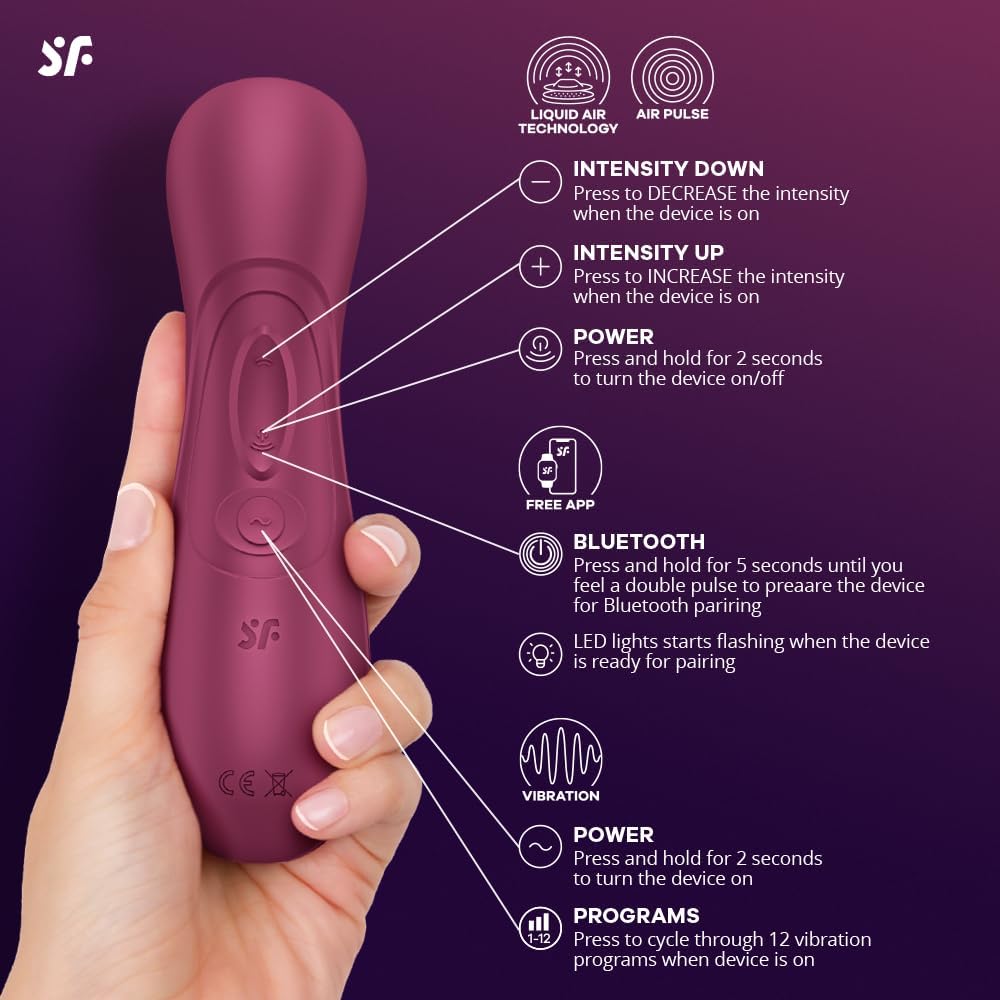
Image: The Satisfyer Pro 2 Generation 3 device showing the magnetic charging port and included USB cable.
3.2 App Download and Pairing
- Download the free 'Satisfyer Connect' app from the App Store (iOS) or Google Play Store (Android).
- Ensure Bluetooth is enabled on your smartphone.
- Press and hold the power button on the device for 2 seconds to turn it on.
- Open the Satisfyer Connect app and follow the on-screen instructions to pair your device. The device's LED lights will start flashing when it is ready for pairing.
4. Operating Instructions
4.1 Manual Controls
The device features intuitive buttons for manual operation:
- Power Button (⏻): Press and hold for 2 seconds to turn the device on/off.
- Intensity Down Button (-): Press to decrease the intensity of air pulse or vibration.
- Intensity Up Button (+): Press to increase the intensity of air pulse or vibration.
- Programs Button (☰): Press to cycle through 12 vibration programs when the device is on.
- Bluetooth Button (Ⓘ): Press and hold for 5 seconds until you feel a double pulse to prepare the device for Bluetooth pairing.
Image: Diagram illustrating the function of each control button on the Satisfyer Pro 2 Generation 3.
4.2 Air Pulse and Liquid Air Technology
The device comes with two interchangeable caps:
- Air Pulse Cap: Provides touch-free clitoral stimulation through pressure waves.
- Liquid Air Cap: Features a thin, super-soft silicone membrane that mimics the sensual surge of pulsing water.
To switch between caps, gently pull off the current cap and push the desired cap onto the device head until it is securely in place. The device offers 11 pressure wave intensities.

Image: The Satisfyer Pro 2 Generation 3 highlighting the Air Pulse and Liquid Air caps for varied stimulation.
4.3 Vibration Modes
The device includes a separate motor for vibration, offering 12 distinct vibration programs. Use the Programs button (☰) to cycle through these settings. The vibration and air pulse functions can be used independently or simultaneously for a combined experience.
4.4 App Control Features
The Satisfyer Connect app unlocks additional features:
- Remote Control: Control your device from your smartphone.
- Vibration Creator: Design and save custom vibration patterns.
- Playlist Vibration: Sync vibrations to your favorite music.
- Ambient Vibration: Device responds to ambient sounds.
- Remotyca Stories: Experience interactive audio erotica with synchronized sensations.
- Long-Distance Control: Connect with a partner for remote control via video call.

Image: Visual representation of the Satisfyer Connect App interface and its various features.
4.5 Waterproof Use
The Satisfyer Pro 2 Generation 3 is waterproof (IPX7 rated), allowing for use in the shower or bath. It is protected against immersion in water up to 1 meter deep for up to 30 minutes.

Image: The device shown in water, illustrating its waterproof design.
Video: Official product demonstration of the Satisfyer Pro 2 Generation 3, showcasing its features and operation.
5. Maintenance
5.1 Cleaning
Clean the device thoroughly after each use. Use warm water and a mild soap or a specialized toy cleaner. Rinse thoroughly and allow to air dry completely before storing.
5.2 Storage
Store the device in a clean, dry place away from direct sunlight and extreme temperatures. Avoid storing with other toys made of different materials to prevent material degradation.
6. Troubleshooting
- Device not turning on/charging: Ensure the magnetic charging cable is correctly aligned and connected. Check the USB power source. If the issue persists, contact customer support.
- Weak Air Pulse/Vibration: Ensure the device is fully charged. Clean the air pulse opening and ensure the cap is correctly attached.
- Bluetooth Connection Issues: Ensure Bluetooth is enabled on your phone and the device is in pairing mode (LED flashing). Try restarting both the device and your phone. If problems continue, try resetting the device to factory settings (refer to the quick start guide for specific instructions) and re-pairing.
- App Functionality Problems: Ensure the app is updated to the latest version. Check your phone's operating system compatibility.
7. Specifications
| Brand | Satisfyer |
| Model | Pro 2 Generation 3 |
| Color | Wine Red |
| Material | Silicone |
| Water Resistance Level | Waterproof (IPX7) |
| Battery | 1 Lithium Ion battery (included) |
| Style | App Enabled |
| Package Dimensions | 10.59 x 5.87 x 3.23 inches |
| Weight | 15.2 ounces |
8. Warranty and Support
8.1 Warranty Information
The Satisfyer Pro 2 Generation 3 comes with a 15-year warranty, ensuring long-lasting satisfaction. Please refer to the included 'Guarantee Information' document for full details on warranty terms and conditions.
8.2 Legal Disclaimer
The Bluetooth® word mark and logos are registered trademarks owned by Bluetooth SIG, Inc. and any use of such marks by EIS GmbH is under license. Apple, the Apple logo and Apple Watch are trademarks of Apple Inc., The Android name and the logo are trademarks and property of Google LLC.
8.3 Customer Support
For further assistance, technical support, or warranty claims, please contact Satisfyer customer service through their official website or the contact information provided in your product packaging.


