
MSI CUBI512M015B
MSI Cubi 5 12M Mini PC User Manual
Model: 12M-015BUS | Brand: MSI
1. Introduction
This manual provides essential instructions for setting up, operating, and maintaining your MSI Cubi 5 12M Mini PC. The MSI Cubi 5 12M is a compact and versatile mini-computer designed for various applications, featuring an Intel Core i5-1235U processor, WiFi 6, Bluetooth 5.2, dual LAN, and Thunderbolt Type-C connectivity.
Please read this manual thoroughly before using the product to ensure proper functionality and to prevent damage.
2. Package Contents
Verify that all items are present in your product packaging. If any item is missing or damaged, contact your retailer.
- MSI Cubi 5 12M Mini PC
- Power Adapter
- Quick Start Guide (may vary by region)
- Warranty Card (may vary by region)
3. Product Overview
Familiarize yourself with the components and ports of your MSI Cubi 5 12M Mini PC.

Figure 3.1: Front-side view of the MSI Cubi 5 12M Mini PC, showcasing its compact design and front ports.
3.1. Front and Rear Ports

Figure 3.2: Detailed diagram illustrating the front and rear connectivity ports of the MSI Cubi 5 12M Mini PC.
- Front Ports:
- 1x Mic-in / Headphone-out combo jack
- 2x USB 3.2 Gen 2 Type-A ports
- 1x Thunderbolt 4 (USB Type-C) port
- Power button
- Rear Ports:
- 1x HDMI™ out (2.0b)
- 1x DP out (1.4)
- 2x RJ45 (Dual LAN) ports
- 2x USB 3.2 Gen 2 Type-A ports
- 1x DC Jack for power input
3.2. Key Features

Figure 3.3: Intel Core processor branding, highlighting the stable and powerful performance capabilities of the Mini PC.
- Processor: Intel Core i5-1235U (10 Cores/12 Threads, 12MB Cache)
- Graphics: Intel Iris Xe Graphics
- Wireless Connectivity: WiFi 6E (802.11ax) and Bluetooth 5.2
- Networking: Dual LAN (RJ45) ports for flexible network configurations
- High-Speed Data Transfer: Thunderbolt 4 (USB Type-C) supporting up to 40 Gbps data transmission.
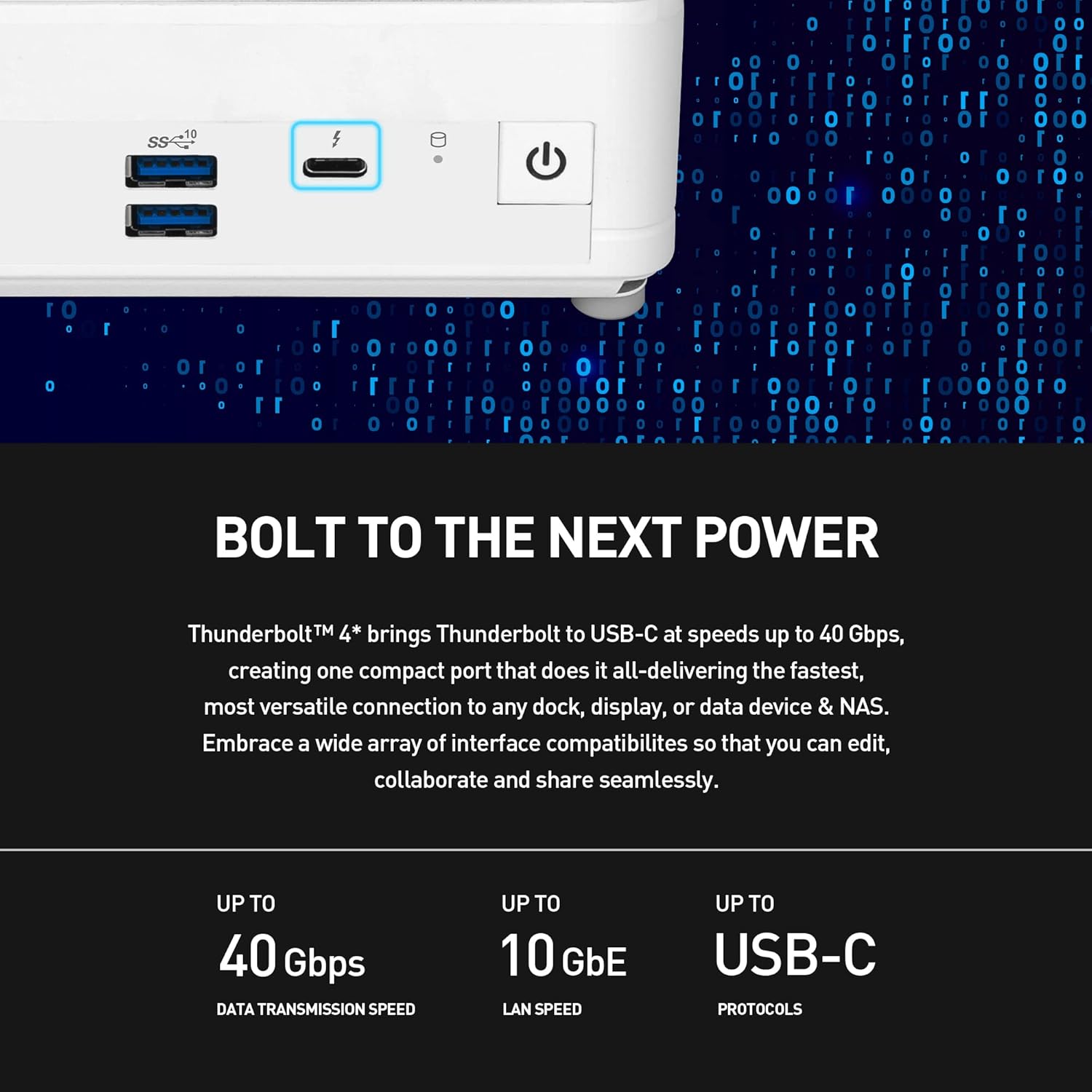
Figure 3.4: The Thunderbolt 4 port, highlighting its high-speed data transfer capabilities and versatility.
4. Setup Instructions
- Connect Display: Connect your monitor(s) to the HDMI or DisplayPort outputs on the rear of the Mini PC.
- Connect Peripherals: Connect your keyboard, mouse, and other USB devices to the available USB ports.
- Connect Network: For wired internet access, connect an Ethernet cable to one of the RJ45 LAN ports. For wireless, ensure your WiFi network is available during OS setup.
- Connect Power: Plug the power adapter into the DC Jack on the rear of the Mini PC, then plug the power cord into an electrical outlet.
- Power On: Press the power button located on the front of the Mini PC.
- Operating System Installation (if applicable): As this model is "Non-OS", you will need to install an operating system (e.g., Windows, Linux) from a bootable USB drive or other media. Follow the on-screen instructions for your chosen OS.
5. Operating Instructions
Once the operating system is installed and configured, your MSI Cubi 5 12M Mini PC is ready for use.
- Power On/Off: Press the power button to turn the system on. To turn off, use the shutdown option within your operating system. A short press of the power button can also put the system to sleep.
- Restart: Use the restart option within your operating system.
- BIOS/UEFI Access: During startup, repeatedly press the Delete key to enter the BIOS/UEFI setup utility.
- Boot Menu: During startup, repeatedly press the F11 key to access the boot device selection menu.
- Connecting to Wi-Fi: If using a wireless operating system, connect to your preferred Wi-Fi network through the operating system's network settings.
6. Maintenance
Regular maintenance helps ensure the longevity and optimal performance of your Mini PC.
- Cleaning: Use a soft, dry cloth to clean the exterior of the device. Avoid liquid cleaners directly on the unit. Use compressed air to clear dust from vents periodically.
- Software Updates: Keep your operating system, drivers, and applications updated to ensure security and performance.
- Storage Management: Regularly manage your storage to free up space and maintain system speed.
6.1. Easy Upgrades
The MSI Cubi 5 12M is designed for easy maintenance and upgrades. Users can upgrade storage and memory by disassembling the cover.

Figure 6.1: Illustration of the internal upgrade options for M.2 SSD and 2.5" SSD/HDD, demonstrating the ease of maintenance.
- Memory (RAM): The system supports up to 16GB DDR4 SO-DIMM memory.
- Storage: You can install one M.2 SSD and one 2.5" HDD/SSD.
For detailed upgrade instructions, please refer to the official MSI support website or contact customer service.
7. Troubleshooting
This section addresses common issues you might encounter with your Mini PC.
| Problem | Possible Cause | Solution |
|---|---|---|
| No power/System does not turn on | Power adapter not connected properly; Power outlet issue | Ensure power adapter is securely connected to the PC and a working electrical outlet. Test the outlet with another device. |
| No display on monitor | Display cable loose; Incorrect input selected on monitor; Monitor off | Check display cable connections. Ensure monitor is on and set to the correct input source (HDMI/DP). |
| Operating System not found (Non-OS model) | No OS installed; Boot device not configured | Install an operating system. Ensure your bootable media is correctly inserted and selected in the BIOS/UEFI boot menu. |
| Wi-Fi connection issues | Driver issues; Router problems; Incorrect password | Ensure Wi-Fi drivers are installed. Restart your router. Verify Wi-Fi password. |
If you encounter issues not listed here, please consult the MSI support website or contact customer service for further assistance.
8. Specifications
Detailed technical specifications for the MSI Cubi 5 12M Mini PC (Model: 12M-015BUS).
| Feature | Detail |
|---|---|
| Brand | MSI |
| Series | Cubi 5 12M-015BUS |
| Item Model Number | CUBI512M015B |
| Processor | Intel Core i5-1235U (3.3 GHz, 10 Cores, 12 Threads) |
| Graphics Coprocessor | Intel Iris Xe Graphics (Integrated) |
| RAM | Up to 16 GB DDR4 (1450 MHz Memory Speed) |
| Hard Drive | SSD (Supports M.2 SSD and 2.5" SSD/HDD) |
| Operating System | Non-OS (User-installable) |
| Wireless Type | 802.11ax (WiFi 6E), Bluetooth 5.2 |
| USB 3.0 Ports | 5 (including Thunderbolt 4 Type-C) |
| Video Output | HDMI 2.0b, DisplayPort 1.4 |
| LAN | Dual RJ45 |
| Max Screen Resolution | 3840 x 2160 |
| Item Weight | 1.21 pounds |
| Item Dimensions (LxWxH) | 4.88 x 2.11 inches |
| Color | Black |
| Specific Uses | Business, Education, Multimedia |
9. Safety Information
Please observe the following safety guidelines:
- Do not expose the device to extreme temperatures, humidity, or direct sunlight.
- Avoid placing the device near strong magnetic fields.
- Do not open the casing unless performing authorized upgrades (RAM/Storage) as described in this manual. Refer to qualified service personnel for other repairs.
- Use only the provided power adapter or a compatible replacement specified by MSI.
- Ensure proper ventilation to prevent overheating. Do not block the ventilation openings.
WARNING: This product may contain chemicals known to the State of California to cause cancer and birth defects or other reproductive harm. For more information, go to www.P65Warnings.ca.gov.
10. Warranty and Support
Your MSI Cubi 5 12M Mini PC comes with a 3-year limited warranty, as indicated in the product title. Please retain your proof of purchase for warranty claims.
For technical support, driver downloads, and further information, please visit the official MSI website:
You may also contact MSI customer service directly for assistance with product issues or warranty inquiries.
Related documentsCUBI512M015B


Ask a question about this manual
Ask about setup, troubleshooting, compatibility, parts, safety, or missing instructions. Manuals+ will review the question and use this page’s manual context to help answer it.