
Introduction
This manual provides detailed instructions for the setup, operation, maintenance, and troubleshooting of your MSI MAG 255XF 25-inch Full HD monitor. Please read this manual thoroughly before using the product to ensure proper functionality and to prevent damage.
The MSI MAG 255XF monitor features a 25-inch Rapid IPS panel with a 1920 x 1080 (FHD) resolution, a super-fast 300Hz refresh rate, and a 0.5ms response time. It includes HDMI and DisplayPort connectivity, VESA mount compatibility, and an adjustable stand for ergonomic viewing.

Image: Front view of the MSI MAG 255XF monitor, showcasing its slim bezels and display.
Setup
1. Unpacking
Carefully remove all components from the packaging. Ensure all items listed in the packing list are present. Retain the packaging for future transport or service needs.
2. Stand Assembly
- Place the monitor face down on a soft, clean surface to prevent scratches.
- Attach the stand base to the stand neck using the provided screws.
- Connect the assembled stand to the back of the monitor until it clicks into place or is secured with screws, depending on the model's design.

Image: The adjustable stand of the MSI MAG 255XF monitor, allowing for tilt, swivel, and height adjustments.
3. Connecting Cables
Connect the necessary cables to the corresponding ports on the monitor and your computer.
- Power Cable: Connect the power cable to the monitor's power input and then to a power outlet.
- Video Cable: Use either a DisplayPort or HDMI cable to connect the monitor to your computer's graphics card. The monitor supports DisplayPort and HDMI inputs.
- USB Cable (Optional): If your monitor has USB ports, connect the upstream USB cable from the monitor to your computer to enable the monitor's USB hub functionality.
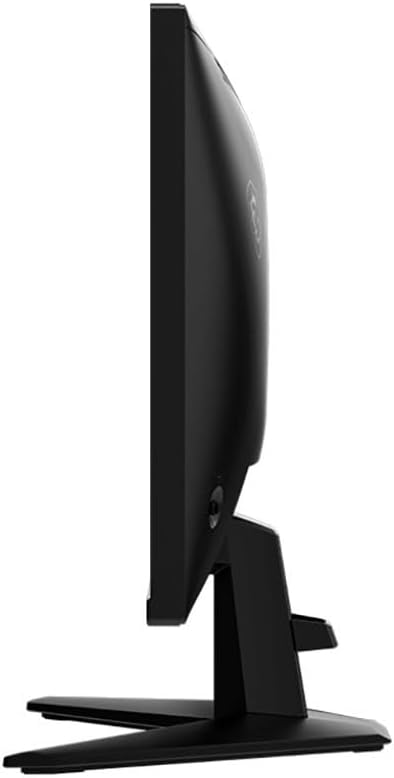
Image: Rear view of the MSI MAG 255XF monitor, highlighting the DisplayPort, HDMI, and power input ports.
4. VESA Mounting (Optional)
The monitor is VESA mount compatible. To use a VESA mount, remove the stand and attach the monitor to a compatible VESA arm or wall mount (100x100mm) using appropriate screws. Refer to your VESA mount's instructions for specific installation steps.
Operating Instructions
1. Powering On/Off
Press the power button, usually located on the back or bottom of the monitor, to turn the monitor on or off. The power indicator light will illuminate when the monitor is on.
2. On-Screen Display (OSD) Menu
The OSD menu allows you to adjust various monitor settings. Access the OSD menu using the joystick or buttons typically found on the back or bottom right of the monitor.
- Navigation: Use the joystick or directional buttons to navigate through the menu options.
- Selection: Press the joystick or a dedicated button to select an option.
- Exit: Move the joystick left or press an 'Exit' button to go back or exit the menu.
3. Adjusting Settings
Key settings you can adjust include:
- Brightness/Contrast: Adjust the overall luminance and difference between light and dark areas.
- Color Settings: Modify color temperature, gamma, and individual RGB levels.
- Input Source: Manually select between DisplayPort and HDMI inputs.
- Refresh Rate: Ensure your computer's display settings are configured to utilize the monitor's 300Hz refresh rate for optimal performance.
- Response Time: Adjust the GtG (Gray-to-Gray) response time setting, typically found under 'Gaming' or 'Overdrive' options, to achieve the advertised 0.5ms response.
- Adaptive Sync (G-Sync Compatible): Enable this feature in the OSD and your graphics card control panel to synchronize the monitor's refresh rate with your GPU's frame rate, reducing screen tearing and stuttering.
4. Rapid IPS Technology
The Rapid IPS panel technology provides fast response times while maintaining excellent color accuracy and wide viewing angles. This technology is designed to enhance the gaming experience by minimizing motion blur.
Maintenance
1. Cleaning the Monitor
- Always power off the monitor and unplug the power cord before cleaning.
- Use a soft, lint-free cloth lightly dampened with water or a non-abrasive screen cleaner.
- Do not spray cleaner directly onto the screen.
- Avoid using benzene, thinner, ammonia-based cleaners, or abrasive materials, as these can damage the screen or casing.
2. Safety Precautions
- Do not block ventilation openings on the monitor.
- Keep the monitor away from direct sunlight, heat sources, and excessive moisture.
- Avoid placing heavy objects on the power cord or monitor.
- If any liquid or foreign object enters the monitor, unplug it immediately and contact qualified service personnel.
Troubleshooting
If you encounter issues with your monitor, refer to the following common problems and solutions:
| Problem | Possible Solution |
|---|---|
| No image on screen | Ensure the power cable is securely connected and the monitor is powered on. Check that the video cable (DisplayPort/HDMI) is properly connected to both the monitor and the computer. Select the correct input source via the OSD menu. |
| Image is blurry or distorted | Check the display resolution settings on your computer to ensure it matches the monitor's native resolution (1920x1080). Adjust the refresh rate in your computer's display settings. |
| Screen flickering | Ensure the video cable is securely connected. Try a different video cable. Disable Adaptive Sync temporarily to see if the issue persists. Check for external interference. |
| Colors are incorrect | Adjust color settings in the OSD menu. Reset the monitor to factory default settings. Ensure your graphics card drivers are up to date. |
| Monitor does not turn on | Verify the power cable is connected to a working power outlet and the monitor. Test the power outlet with another device. |
Specifications
Below are the key technical specifications for the MSI MAG 255XF monitor:
- Model Name: MAG 255XF
- Screen Size: 25 Inches
- Panel Type: Rapid IPS
- Resolution: 1920 x 1080 (FHD)
- Aspect Ratio: 16:9
- Refresh Rate: 300 Hz
- Response Time: 0.5 Milliseconds (GtG, Min.)
- Brightness: 250 cd/m²
- Contrast Ratio: 1000:1
- Viewing Angle: 178° (H) / 178° (V)
- Connectivity: 2x HDMI, 1x DisplayPort, 3x USB Ports
- Adaptive Sync: G-Sync Compatible
- VESA Mounting: 100 x 100 mm
- Dimensions (D x W x H): 8.66"D x 21.94"W x 16.47"H
- Weight: 7.2 Pounds

Image: A visual representation emphasizing the 24.5-inch FHD Rapid IPS Panel technology.
Warranty Information
The MSI MAG 255XF monitor comes with a 2-Year Manufacturer Warranty. This warranty covers defects in materials and workmanship under normal use. For specific terms and conditions, please refer to the warranty card included with your product or visit the official MSI website.
Support
For further assistance, technical support, or to download the latest drivers and firmware, please visit the official MSI support website. You can typically find FAQs, troubleshooting guides, and contact information for customer service there.
MSI Official Website: www.msi.com


