
Product Overview
The STF Viva Wireless Keyboard and Mouse Combo provides a compact and efficient solution for your computing needs. This combo includes a membrane keyboard with 8 anti-ghosting keys and a comfortable 3-button mouse, both connecting wirelessly via a single USB receiver. It is designed for ease of use and broad compatibility.
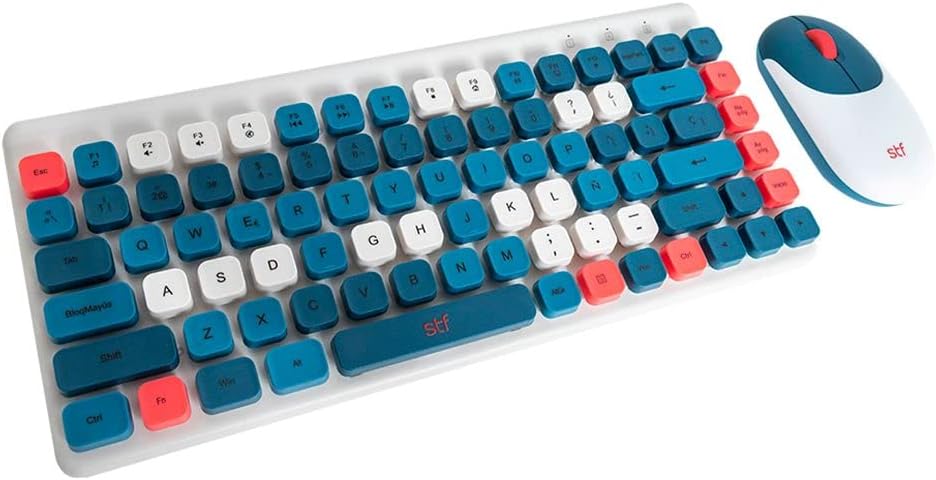
Image: The STF Viva Wireless Keyboard and Mouse Combo in blue, showcasing both devices.
Package Contents
- STF Viva Wireless Keyboard
- STF Viva Wireless Mouse
- USB Wireless Receiver
- 2 x AA Batteries (pre-installed or included)
- User Manual (this document)

Image: The retail packaging for the STF Viva Wireless Keyboard and Mouse Combo, displaying both components.
Setup Instructions
1. Insert Batteries
The mouse requires 2 AA batteries. Locate the battery compartment on the underside of the mouse. Open the cover, insert the batteries according to the polarity indicators, and close the cover securely. The keyboard typically does not require separate batteries as it connects via USB, but some models may have an internal battery or require external power. For this model, the mouse uses batteries.

Image: Close-up of the STF Viva Wireless Mouse in blue, showing its ergonomic design.
2. Connect USB Receiver
Locate the USB wireless receiver, which is often stored within the mouse's battery compartment or a dedicated slot in the keyboard for safekeeping. Plug the USB receiver into an available USB port on your computer (desktop or laptop). Your operating system should automatically detect and install the necessary drivers.
3. Power On Devices
Ensure the mouse has its power switch (if present) turned to the 'ON' position. The keyboard should activate automatically once the USB receiver is connected. No additional pairing steps are typically required as the keyboard and mouse are pre-paired with the receiver.
4. System Compatibility
The STF Viva combo is compatible with various operating systems, including Windows 7, Windows 8, Windows 8.1, Windows 10, Mac OS, and Linux. No special software installation is needed for basic functionality.
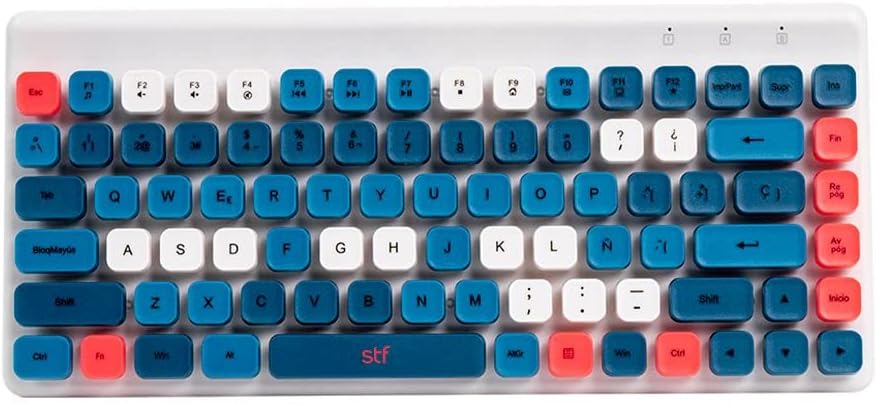
Image: Close-up of the STF Viva Wireless Keyboard in blue, highlighting its compact layout and key colors.
Operating Instructions
Keyboard Usage
- Compact Design: The keyboard features a compact layout, saving desk space while providing full functionality.
- Membrane Keys: Enjoy a quiet and comfortable typing experience with membrane key technology.
- Anti-Ghosting: The keyboard includes 8 anti-ghosting keys, ensuring accurate input during fast typing or gaming.
- QWERTY Layout: Standard QWERTY layout for familiar typing.
Mouse Usage
- 3-Button Design: Standard left-click, right-click, and scroll wheel button for essential navigation.
- 1200 DPI Resolution: Provides precise and responsive cursor control.
- 10-Meter Wireless Range: Operate your mouse comfortably from a distance of up to 10 meters from the USB receiver.
- Ergonomic and Lightweight: Designed for comfortable use over extended periods.
- Ambidextrous Design: Suitable for both left and right-handed users.
Maintenance
Cleaning
- Disconnect the USB receiver from your computer before cleaning.
- Use a soft, dry cloth to wipe the surfaces of the keyboard and mouse.
- For stubborn dirt, slightly dampen the cloth with water or a mild cleaning solution. Avoid excessive moisture.
- Do not use harsh chemicals, abrasive cleaners, or solvents.
- Use compressed air to remove dust and debris from between keyboard keys.
Battery Replacement (Mouse)
- When the mouse performance degrades or stops responding, it may be time to replace the batteries.
- Open the battery compartment on the underside of the mouse.
- Remove the old AA batteries and dispose of them responsibly.
- Insert two new AA batteries, ensuring correct polarity (+/-).
- Close the battery compartment cover.
Storage
When not in use for extended periods, store the keyboard and mouse in a cool, dry place. It is recommended to remove batteries from the mouse if storing for a very long time to prevent leakage.
Troubleshooting
Keyboard or Mouse Not Responding
- Check USB Receiver: Ensure the USB receiver is securely plugged into a working USB port on your computer. Try a different USB port.
- Check Mouse Batteries: For the mouse, ensure the batteries are correctly inserted and not depleted. Replace them if necessary.
- Power Switch: Verify the mouse's power switch is in the 'ON' position.
- Restart Computer: Sometimes, a simple computer restart can resolve connectivity issues.
- Interference: Move the keyboard and mouse closer to the USB receiver. Avoid placing them near other wireless devices that might cause interference.
Keys or Buttons Not Working Correctly
- Clean Devices: Dust or debris under keys or buttons can cause malfunction. Refer to the 'Maintenance' section for cleaning instructions.
- Test on Another Computer: If possible, test the keyboard and mouse on another computer to determine if the issue is with the devices or your computer's settings.
Specifications
| Feature | Detail |
|---|---|
| Brand | STF |
| Model | Viva |
| Connectivity Technology | Wireless (USB Receiver) |
| Keyboard Type | Compact Membrane Keyboard |
| Number of Keyboard Keys | 82 |
| Anti-Ghosting Keys | 8 Keys |
| Keyboard Layout | QWERTY |
| Mouse Buttons | 3 Buttons |
| Mouse DPI Resolution | 1200 DPI |
| Wireless Range | Up to 10 meters |
| Mouse Power Source | 2 x AA Batteries (included) |
| Compatible Operating Systems | Windows 7/8/8.1/10, Mac OS, Linux |
| Special Features | Ergonomic, Lightweight |
| Manufacturer | Stuffactory |
| Country of Origin | China |
Warranty Information
This STF Viva Wireless Keyboard and Mouse Combo comes with a 1-year warranty from the date of purchase. This warranty covers manufacturing defects and malfunctions under normal use. It does not cover damage caused by misuse, accidents, unauthorized modifications, or normal wear and tear.
Please retain your proof of purchase for warranty claims. For service or support, refer to the 'Support' section.
Support
For technical assistance, warranty claims, or further inquiries regarding your STF Viva Wireless Keyboard and Mouse Combo, please contact Stuffactory customer support:
- Manufacturer: Stuffactory
- Website: STF Official Store on Amazon
- Refer to the product packaging or the official STF website for the most current contact information.