
Introduction
Thank you for choosing the Rowenta Eole Ultra VU6871 Silent Tower Fan. This manual provides essential information for the safe and efficient use of your appliance. Please read it thoroughly before first use and keep it for future reference.
The Rowenta Eole Ultra VU6871 offers powerful and quiet cooling, designed to provide comfort in your home or office. Its features include a remote control, multiple speed settings, automatic modes, and a timer function.
Important Safety Instructions
- Read all instructions before using this appliance.
- This appliance is for indoor use only. Do not use outdoors or in wet conditions.
- Ensure the voltage indicated on the appliance corresponds to your local mains voltage before connecting.
- Do not operate any fan with a damaged cord or plug. If the cord or plug is damaged, it must be replaced by the manufacturer, its service agent, or similarly qualified persons to avoid a hazard.
- Do not place the fan near heat sources such as radiators, heat registers, stoves, or other appliances that produce heat.
- Keep fingers and other objects away from the fan blades and openings during operation.
- Always unplug the fan before cleaning, moving, or performing any maintenance.
- Do not immerse the fan in water or other liquids.
- This appliance is not intended for use by persons (including children) with reduced physical, sensory or mental capabilities, or lack of experience and knowledge, unless they have been given supervision or instruction concerning use of the appliance by a person responsible for their safety.
- Children should be supervised to ensure that they do not play with the appliance.
Product Overview
The Rowenta Eole Ultra VU6871 tower fan is designed for efficient air circulation and cooling. It features a sleek, tall design with an integrated control panel and comes with a remote control for convenience.

Image: The Rowenta Eole Ultra VU6871 tower fan illustrating its airflow capabilities.
Main Components:
- Air Outlet Grille: Front panel where air is expelled.
- Control Panel: Located on top of the fan for manual operation.
- Base: Provides stability for the tower fan.
- Power Cord: For connecting to a mains power supply.
- Carry Handle: Integrated at the back for easy transport.
- Remote Control: For convenient operation from a distance.
- Remote Control Storage: Integrated compartment for the remote.
Assembly and Setup
The Rowenta Eole Ultra VU6871 typically comes pre-assembled. If any assembly is required, follow these general steps:
- Unpack: Carefully remove all packaging materials and ensure all components are present.
- Base Attachment (if separate): If the base is separate, align it with the bottom of the fan body and secure it using the provided screws. Ensure it is stable.
- Placement: Place the fan on a firm, level surface. Ensure there is adequate space around the fan for optimal air circulation and oscillation. Avoid placing it directly against walls or furniture that might obstruct airflow.
- Power Connection: Plug the power cord into a standard electrical outlet (220-240V).

Image: The tower fan positioned in a room, demonstrating its suitability for various living spaces.
Operating Instructions
Your Rowenta Eole Ultra VU6871 fan can be operated using the control panel on top of the unit or the included remote control.
Control Panel Functions:
- Power Button (U): Press to turn the fan ON or OFF.
- Speed Adjustment (+/-): Increase or decrease the fan speed. There are 3 manual speed settings.
- Mode Button (M): Cycle through the available operating modes: Standard, Night, and Natural Breeze.
- Oscillation Button (~): Activate or deactivate the 60° horizontal oscillation function.
- Timer Button (L): Set the automatic shut-off timer for 1, 2, 4, or 7 hours.
Remote Control:
The compact remote control provides full access to all fan functions from a distance.
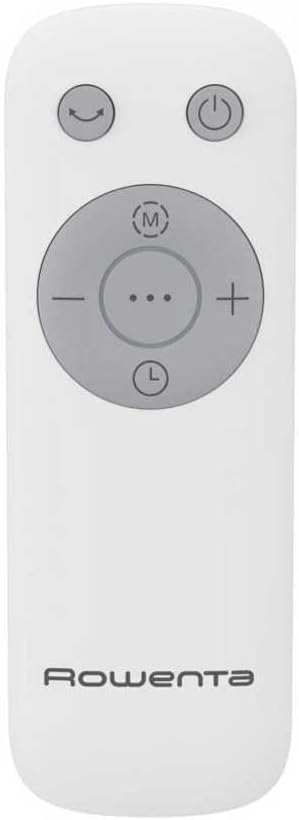
Image: The remote control for the Rowenta Eole Ultra VU6871 tower fan.

Image: A hand operating the fan using the remote control.
- Ensure the remote control has working batteries (typically 2x AAA, not included).
- Point the remote control towards the fan's receiver.
- The buttons on the remote correspond to the functions on the control panel.
- Store the remote control in its integrated compartment on the fan when not in use.
Operating Modes:
- Standard Mode: Provides continuous airflow at your selected speed.
- Night Mode: Designed for quiet operation during sleep, with reduced noise levels (as low as 52 dB(A)) and gentle airflow.
- Natural Breeze Mode: Simulates a natural outdoor breeze by varying the fan speed intermittently.

Image: The fan operating in a bedroom, highlighting its quiet performance for undisturbed sleep.
Maintenance and Cleaning
Regular cleaning helps maintain the performance and longevity of your fan.
- Before Cleaning: Always unplug the fan from the power outlet before cleaning.
- Exterior Cleaning: Wipe the exterior surfaces of the fan with a soft, damp cloth. Do not use abrasive cleaners, solvents, or harsh chemicals, as these can damage the plastic.
- Air Inlet/Outlet Grilles: Use a vacuum cleaner with a brush attachment to remove dust from the air inlet and outlet grilles. This helps prevent dust buildup that can impede airflow.
- Storage: If storing the fan for an extended period, cover it to protect it from dust and store it in a dry place.
Troubleshooting
If you encounter issues with your fan, refer to the following common problems and solutions:
| Problem | Possible Cause | Solution |
|---|---|---|
| Fan does not turn on. | No power supply. Power cord not properly plugged in. | Check if the fan is plugged into a working electrical outlet. Ensure the power cord is securely connected. |
| Weak airflow. | Air grilles are blocked by dust. Fan speed is too low. | Clean the air inlet and outlet grilles. Increase the fan speed setting. |
| Fan is noisy. | Dust buildup inside. Fan not on a level surface. | Clean the fan thoroughly. Ensure the fan is placed on a stable, flat surface. |
| Remote control not working. | Batteries are dead or incorrectly inserted. Obstruction between remote and fan. | Replace batteries (2x AAA). Ensure clear line of sight to the fan's receiver. |
If the problem persists after trying these solutions, please contact customer support.
Technical Specifications
| Feature | Specification |
|---|---|
| Model Number | VU6871 |
| Power | 40 Watts |
| Dimensions (L x W x H) | 30 x 30 x 102.8 cm |
| Weight | 3.5 Kilograms |
| Noise Level (Min) | 52 Decibels (dB(A)) |
| Airflow (Max) | 3.23 Cubic meters per minute |
| Speed Settings | 3 Manual Speeds |
| Operating Modes | Standard, Night, Natural Breeze |
| Oscillation | 60° Horizontal |
| Timer Settings | 1h, 2h, 4h, 7h |
| Control Type | Electronic Button, Remote Control |
| Power Source | Mains Powered (Schuko Plug) |
| Material | Plastic |
| Safety Features | Automatic Stop, Indicator Light, TÜV Certified |
Warranty and Customer Support
Rowenta products are manufactured to high-quality standards. For information regarding warranty coverage, please refer to the warranty card included with your purchase or visit the official Rowenta website.
For technical assistance, spare parts, or any questions not covered in this manual, please contact Rowenta customer support. Contact details can typically be found on the Rowenta website or on your product packaging.


