
1. Introduction
Thank you for choosing the ODK 48 Inch Computer Desk. This manual provides essential information for the safe and proper assembly, operation, and maintenance of your new desk. Please read these instructions carefully before beginning assembly and retain them for future reference.

Image 1.1: The ODK 48 Inch Computer Desk, showcasing its spacious desktop and integrated storage solutions.
1.1 Safety Information
- Always assemble the desk on a stable, level surface to prevent instability.
- Ensure the desk is properly anchored to the wall or floor if required, especially if used for activities that may cause sudden movements.
- Do not exceed the maximum weight capacity of the desk. Refer to the specifications section for details.
- Keep small parts and packaging materials away from children to avoid choking hazards.
- Regularly check all fasteners to ensure they remain tight and secure.
2. Setup and Assembly
The ODK Computer Desk is designed for straightforward assembly. All necessary tools and hardware are included in the package. It is recommended to have a clear, spacious area for assembly.
2.1 Package Contents
Before starting, verify that all components are present. Refer to the included assembly diagram for a detailed list of parts and hardware.
2.2 Assembly Steps
- Unpack all components and lay them out on a soft, clean surface to prevent scratches.
- Follow the step-by-step instructions provided in the assembly manual included in your package.
- Attach the desk legs to the desktop using the provided screws and tools.
- Secure any cross-bars or support structures as indicated in the manual to ensure stability.
- Install the side storage bag and headphone hook according to the instructions.
- Once assembled, gently lift and place the desk in its desired location. Avoid dragging the desk to prevent damage.

Image 2.1: Visual guide illustrating the four main steps for assembling the ODK desk, emphasizing quick and easy setup.
3. Operating Instructions
The ODK Computer Desk is designed to enhance your workspace with practical features.
3.1 Using the Side Storage Bag
The detachable side-mounted storage bag provides convenient access to books, office supplies, and personal items. It helps optimize desktop organization by keeping frequently used items within reach but off the main work surface.

Image 3.1: A close-up view of the desk's high-quality cloth storage bag, demonstrating its capacity for various items.
3.2 Utilizing the Headphone Hook
A solid metal hook is located on the opposite side of the desk, offering a dedicated space to hang headphones, bags, or other accessories. This feature helps keep your desk tidy and your items easily accessible.

Image 3.2: The solid metal hook providing extra space for hanging headphones or other items.
3.3 Monitor Clamp Compatibility
The desktop is designed to be compatible with most monitor clamps, allowing for flexible monitor setup and maximizing your workspace.

Image 3.3: The desk's edge showing its suitability for monitor clamp installations.
4. Maintenance
Proper care and maintenance will ensure the longevity and appearance of your ODK Computer Desk.
4.1 Cleaning the Desktop
The desktop is made of high-quality particleboard with a laminated finish, making it scratch-resistant, anti-collision, and waterproof. For daily cleaning, wipe the surface with a soft, damp cloth. Avoid abrasive cleaners or harsh chemicals that could damage the finish.

Image 4.1: The desk's high-quality desktop, highlighting its easy-to-clean, waterproof, and anti-scratch features.
4.2 Frame Care
The solid metal frame provides maximum durability and stability. Wipe the metal parts with a dry or slightly damp cloth. Ensure all connections remain tight to maintain structural integrity.
5. Troubleshooting
This section addresses common issues you might encounter with your ODK Computer Desk.
5.1 Desk Wobbles
- Check all screws: Ensure all assembly screws are securely tightened. Loose fasteners are a common cause of wobbling.
- Level the desk: Verify that the desk is on a flat, even surface. Many ODK desks include adjustable footpads to compensate for uneven floors. Adjust these as needed.
- Inspect frame connections: Ensure the X-shaped cross-bars (if applicable to your model) are correctly installed and tightened, as they reinforce the frame's stability.
5.2 Missing or Damaged Parts
If you find any parts missing or damaged upon unboxing, please contact ODK customer service immediately. Do not attempt to assemble the desk with incomplete or damaged components.

Image 5.1: A visual representation of common questions and answers, indicating support availability.
6. Specifications
| Feature | Detail |
|---|---|
| Brand | ODK |
| Model Number | B01011636 |
| Product Dimensions (D x W x H) | 18.9"D x 47.2"W x 28.9"H |
| Color | Deep Brown |
| Style | Modern |
| Top Material Type | Engineered Wood (Particleboard) |
| Base Material | Metal |
| Finish Type | Laminated |
| Special Feature | Scratch Resistant, Waterproof |
| Included Components | Headphone Hook, Storage Bag |
| Item Weight | 23.8 Pounds |
| Required Assembly | Yes |
| UPC | 850050098423 |
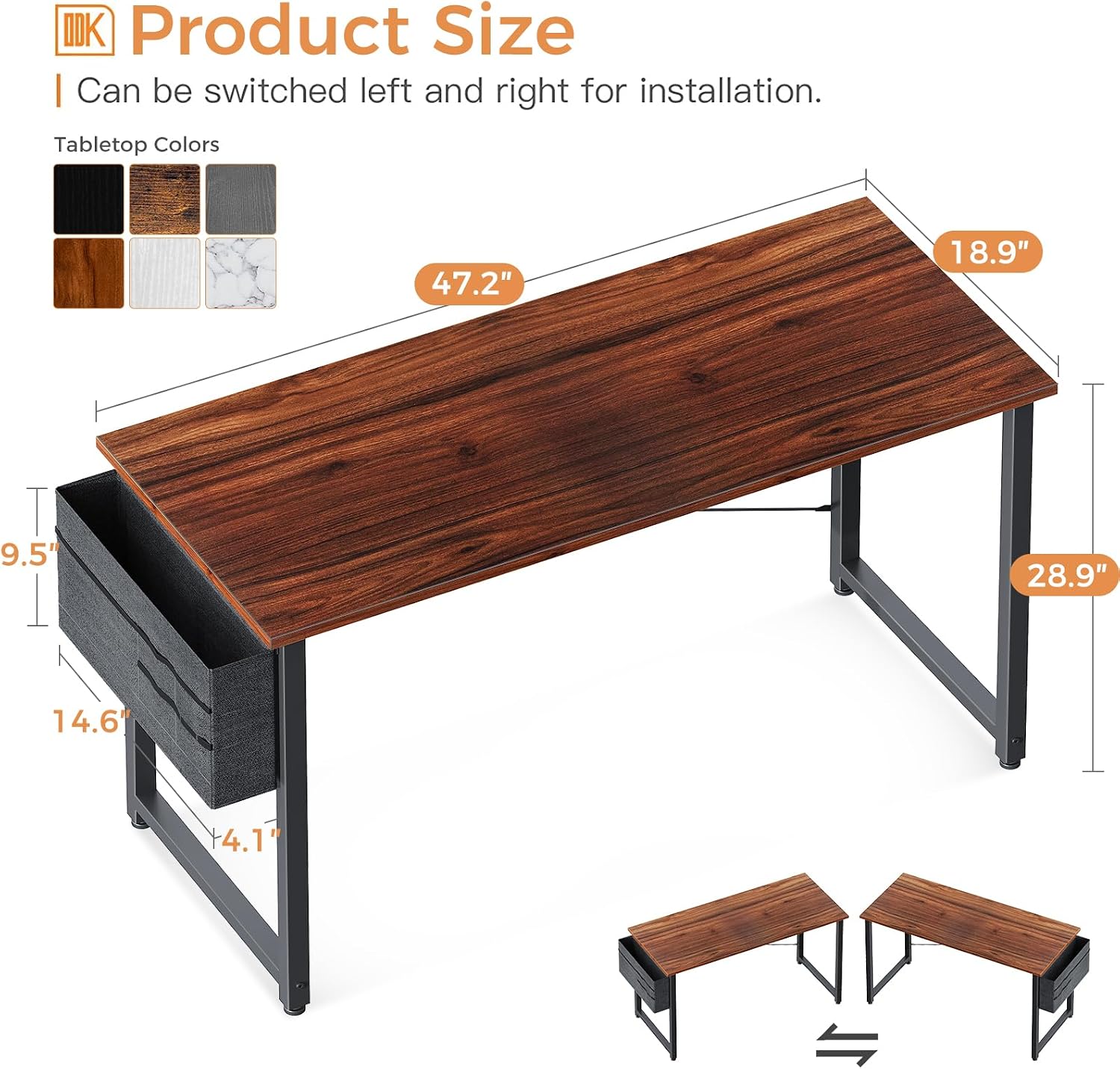
Image 6.1: Detailed product dimensions for the ODK 48 Inch Computer Desk.
7. Warranty and Support
7.1 Limited Warranty
ODK provides a limited warranty for this product. Details regarding the duration and coverage of the warranty are typically included with your purchase documentation. Please retain your proof of purchase for warranty claims.
7.2 Customer Support
For any questions, concerns, or assistance with assembly or product issues, please contact ODK customer service. Our team is dedicated to providing considerate service and resolving any problems you may encounter.
Contact information can usually be found on the ODK official website or through your retailer's support channels.