
Introduction
Thank you for choosing the KTUEOV G14 Wall-Mounted 12-Digit Combination Key Safe. This product is designed to provide secure and convenient storage for your keys and other small valuables. Its robust construction and weather-resistant features make it suitable for both indoor and outdoor use, offering a reliable solution for shared access, emergency entry, or simply keeping spare keys safe.
The safe features a 12-digit resettable combination lock, providing a high level of security with tens of thousands of possible combinations. This manual will guide you through the installation, operation, and maintenance of your key safe to ensure optimal performance and longevity.

Image: The KTUEOV G14 key safe shown in various application settings, including after school access, courier delivery, tenant/Airbnb use, wardrobe storage, garage access, and general home/office use, highlighting its wide applicability and convenience.
Package Contents
Please ensure all the following items are included in your package:
- 1 x KTUEOV G14 Key Safe Box
- 4 x Mounting Screws
- 4 x Expansion Plugs
- 1 x Screwdriver
- 1 x Instruction Manual (multi-language)
Setup: Installation Instructions
The KTUEOV G14 key safe is designed for wall-mounting. Follow these steps for secure installation:
- Mark Screw Locations: Choose a suitable, discreet, and sturdy location on a wall. Place the key safe against the wall and use a pencil to mark the positions for the mounting screws.
- Drill Holes: Using an appropriate drill bit for your wall type (e.g., masonry bit for brick/concrete), drill five holes at the marked locations. Ensure the depth is sufficient for the expansion plugs.
- Insert Expansion Plugs: Gently tap the four expansion plugs into the drilled holes until they are flush with the wall surface. These provide a secure anchor for the screws.
- Install the Box: Align the key safe with the drilled holes and expansion plugs. Insert the mounting screws through the safe's back panel and into the expansion plugs. Use the provided screwdriver to tighten the screws firmly until the safe is securely attached to the wall. Do not overtighten.
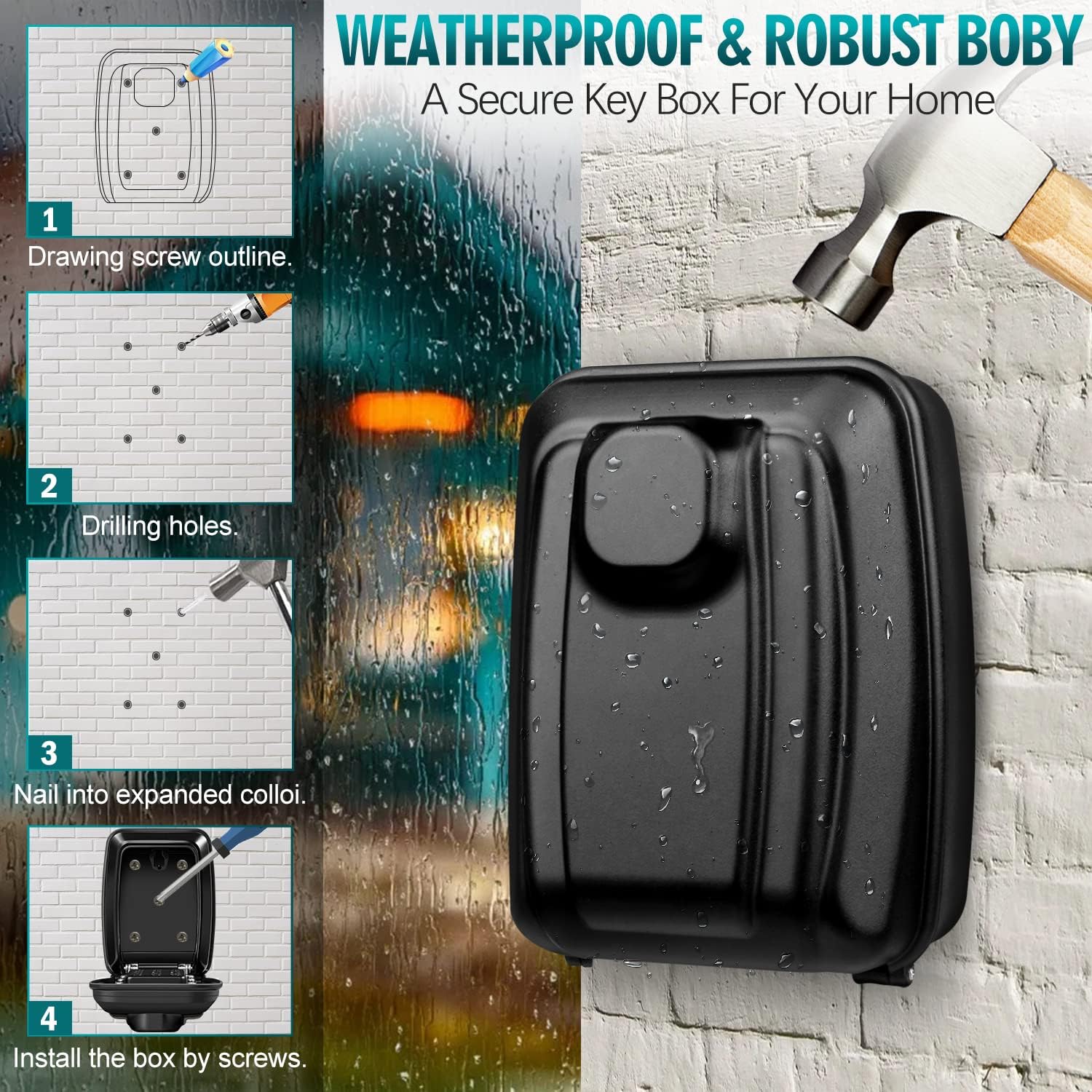
Image: A visual guide demonstrating the four installation steps: 1. Marking screw outlines, 2. Drilling holes, 3. Nailing into expanded anchors, and 4. Installing the box with screws. The image also highlights the weatherproof and robust body of the key safe.
Operation
Setting Your Combination Code
The KTUEOV G14 key safe uses a 12-digit push-button combination. You can set a code between 4 and 12 digits. Follow these steps to set your personal combination:
- Open the Key Safe: If the safe is new, it will be in an open state or have a factory default code (check the included manual for default). Open the safe door.
- Access Code Setting Mechanism: On the inside of the safe door, locate the code setting mechanism. This usually involves a switch or a series of small screws corresponding to the numbers on the keypad.
- Set Your Code: For each number you wish to include in your combination, rotate its corresponding switch/screw 180 degrees (usually from a vertical to a horizontal position, or vice-versa). For numbers you do not wish to include, leave them in their original position. Your code can be 4 to 12 digits long.
- Record Your Code: It is crucial to write down your new combination code and store it in a safe, memorable place. If you forget your code and have not recorded it, the safe cannot be opened without destructive means.
- Test Your Code: Before closing the safe, test your new combination several times with the door open to ensure it works correctly.
- Close and Scramble: Close the safe door and scramble the buttons on the keypad to lock it.

Image: The KTUEOV G14 key safe with its door open, showing the internal keypad and the mechanism for setting a 4-12 digit password. The image emphasizes the security of a multi-digit code compared to hiding keys in common places.
Opening the Key Safe
- Enter Your Code: Press the buttons corresponding to your combination code in any order. The order of pressing the buttons does not matter, only that the correct buttons are pressed.
- Press 'C' to Clear: If you make a mistake, press the 'C' (Clear) button to reset the entry and re-enter your code.
- Open the Door: Once the correct combination is entered, pull down the lever or turn the knob (if present) to release the latch and open the safe door.
Closing the Key Safe
- Place Items Inside: Ensure all items are securely placed within the safe and do not obstruct the closing mechanism.
- Close the Door: Close the safe door firmly until it latches shut.
- Scramble Buttons: To secure the safe, scramble the buttons on the keypad by pressing a few random numbers. This prevents unauthorized access.

Image: An exploded view of the KTUEOV G14 key safe, highlighting its key features: the 4-12 digit password setting capability, an internal hook for keys, a protective cover for the keypad, and a large-capacity key box for multiple items.
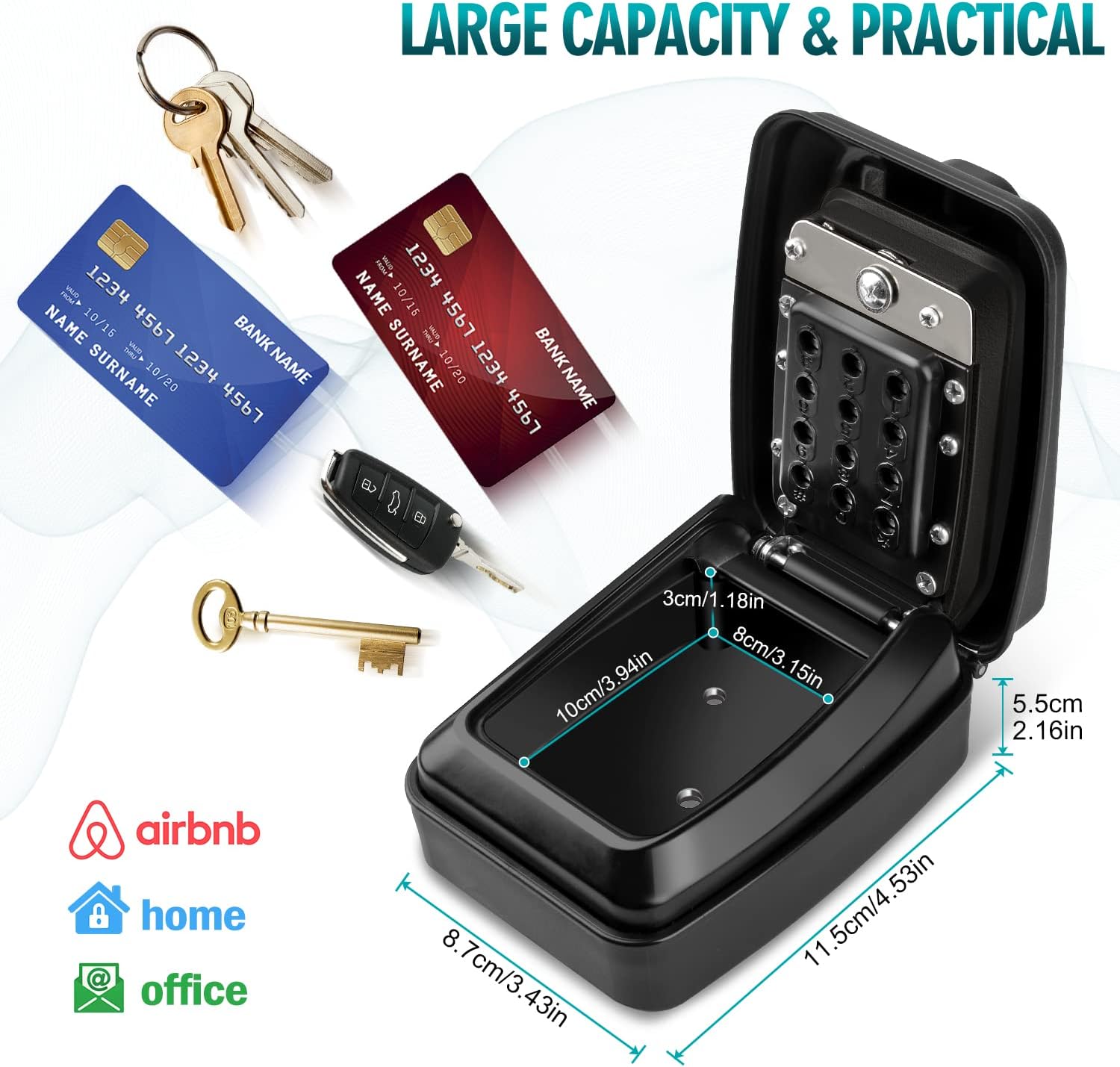
Image: The KTUEOV G14 key safe demonstrating its large capacity, capable of holding multiple keys, bank cards, and car keys. Key dimensions are provided in centimeters and inches, illustrating its practical size for various items.
Maintenance
Regular maintenance helps ensure the smooth operation and longevity of your key safe:
- Cleaning: Wipe the exterior of the safe with a soft, damp cloth. Avoid abrasive cleaners or solvents that could damage the finish or weather cover.
- Weather Cover: Ensure the weather-resistant cover is always properly closed when the safe is not in use to protect the keypad from dust, rain, and snow.
- Mechanism Check: Periodically check the locking mechanism and hinges for any signs of wear or obstruction. If the buttons feel stiff, a small amount of graphite powder (not oil-based lubricants) can be applied to the mechanism.
- Screw Tightness: Occasionally check the mounting screws to ensure they remain tight and secure.
Troubleshooting
- Difficulty Opening the Safe:
- Ensure you are entering the correct combination. Press the 'C' button to clear any previous entries before trying again.
- Check for any obstructions around the latch or door.
- If the buttons feel sticky or stiff, refer to the maintenance section for cleaning and lubrication advice.
- Forgotten Combination:
- If you have forgotten your combination and did not record it, there is no master key or override code. The safe is designed to be highly secure, and without the correct combination, it cannot be opened non-destructively.
- Always record your combination in a secure, separate location.
- Safe Not Closing Properly:
- Ensure no items inside the safe are preventing the door from closing completely.
- Check the hinges and latch for any damage or debris.
Specifications
| Feature | Detail |
|---|---|
| Brand | KTUEOV |
| Model Number | G14 |
| Product Dimensions (L x W x H) | 13 x 7 x 9 cm (5.1 x 2.8 x 3.5 inches) |
| Weight | 600 Grams (1.32 lbs) |
| Color | Black |
| Material | Aluminum, PVC |
| Lock Type | Mechanical Combination Lock (12-digit) |
| Mounting Type | Wall-Mounted |
| Water Resistance Level | Waterproof |
| Special Feature | Lockable |
| Included Components | Key Box, Mounting Hardware, Screwdriver, Manual |
| Batteries Required/Included | No |
Warranty and Support
For any questions, technical support, or warranty inquiries regarding your KTUEOV G14 Key Safe, please contact the manufacturer directly through their official channels or the retailer from whom you purchased the product. Please retain your proof of purchase for any warranty claims.

