
1. Introduction
This manual provides instructions for the Beyution RMT-V504A replacement infrared remote control. This remote is designed to operate various Sony DVD VCR Combo Player models without requiring any programming or setup. Simply insert batteries, and it is ready for use.
Compatible Models include:
- RMT-V501A, RMT-V501, RMT-V501C, RMT-V501D, RMT-V501E, RMT-V501F
- SLV-D100, SLV-D281P, SLV-D380P, YSP-4000BL, HT-V1000D, HT-V1000DP, HT-V3000DP
- SLV-D201, SLV-D201P, SLV-D251, SLV-D251P, SLV-D261, SLV-D261P, SLV-D271, SLV-D271P
- SLV-D281, SLV-D300, SLV-D300P, SLV-D350, SLV-D350P, SLV-D360P, SLV-D370P, SLV-D380
- SLV-D550P, SLV-D560P, SLV-D570H, SLVD-100, SLVD100, SLVD281P, SLVD380P, YSP4000BL
- SLVD271P, SLVD500P, SLVD506P, SLV-D500, SLV-D506P, SLVD560P, SLVD570H, SLVD360
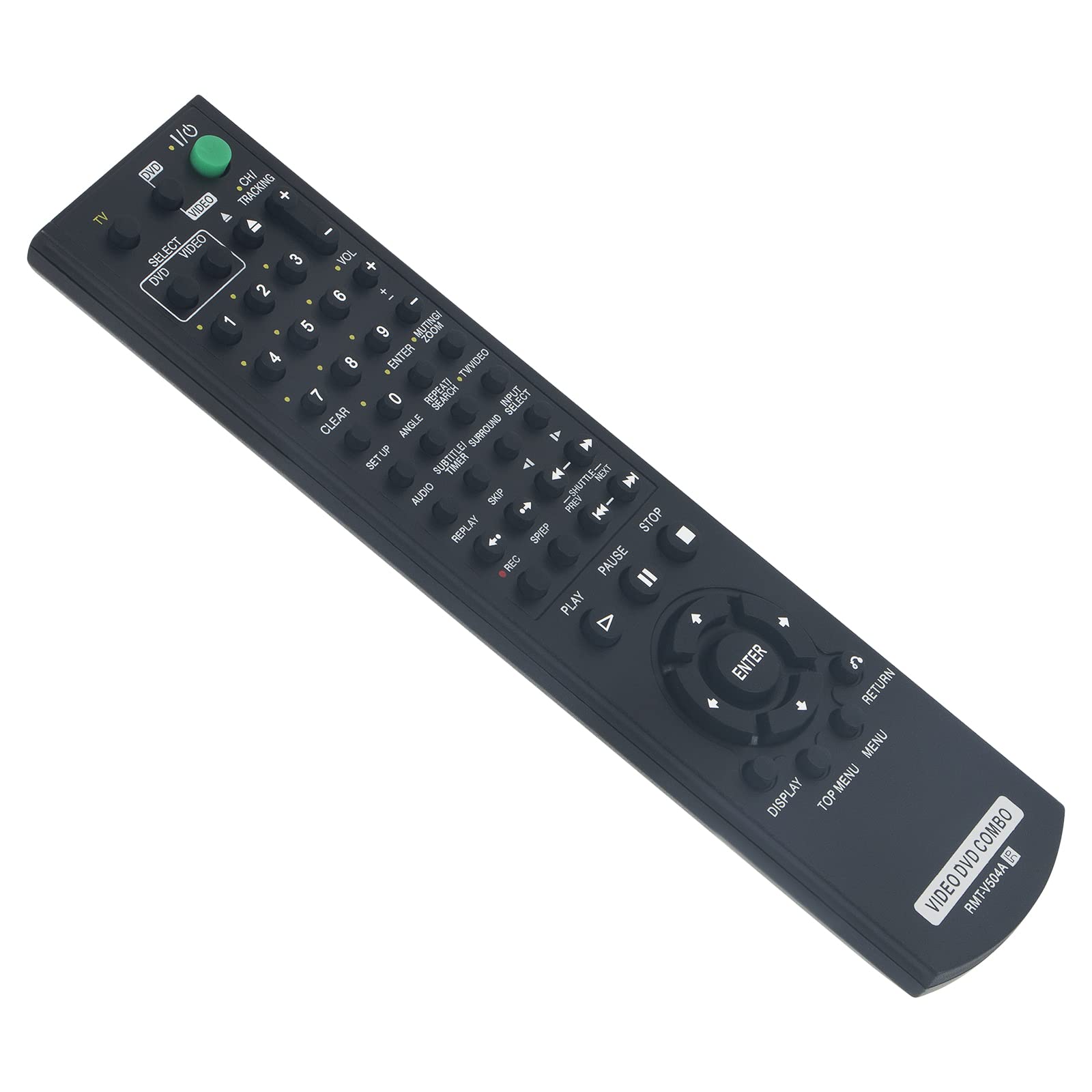
Figure 1: Beyution RMT-V504A Replacement Remote Control
2. Setup
2.1 Battery Installation
The Beyution RMT-V504A remote control requires two (2) AAA batteries (not included) for operation.
- Locate the battery compartment cover on the back of the remote control.
- Slide the cover downwards or press the latch (if present) to open the compartment.
- Insert two new AAA alkaline batteries, ensuring the positive (+) and negative (-) terminals match the diagrams inside the compartment.
- Replace the battery compartment cover by sliding it back into place until it clicks securely.

Figure 2: Battery Installation
2.2 Initial Use
This replacement remote control is pre-programmed and does not require any additional setup or coding. Once batteries are installed, it is ready to operate your compatible Sony DVD VCR Combo Player.
3. Operating Instructions
Point the remote control directly at the infrared receiver on your Sony DVD VCR Combo Player. The effective operating distance is approximately 8 to 10 meters (26 to 33 feet).

Figure 3: Remote Control Features
3.1 Key Functions
- POWER (TV I/O): Turns the connected device on or off.
- SELECT DVD/VIDEO: Switches between DVD and VCR modes.
- Number Buttons (0-9): Used for direct track/chapter selection or channel input.
- VOL (+/-): Adjusts the volume level.
- CH/TRACKING (+/-): Changes channels or adjusts VCR tracking.
- PLAY (►): Starts playback.
- PAUSE (▮▮): Pauses playback.
- STOP (■): Stops playback.
- REC (●): Initiates recording (VCR function).
- REW/FF (◀◀ / ►►): Rewinds or fast-forwards.
- SKIP (◀► / ►►): Skips tracks/chapters.
- ENTER: Confirms selections in menus.
- DISPLAY: Shows on-screen display information.
- TOP MENU/MENU: Accesses the main menu or disc menu.
- RETURN: Goes back to the previous screen or menu.
- Other buttons (SET UP, ANGLE, SUBTITLE, AUDIO, TIME, SEARCH, etc.) function according to your specific player's capabilities.
4. Maintenance
4.1 Cleaning
To clean the remote control, use a soft, dry cloth. Do not use liquid cleaners, sprays, or abrasive materials, as these can damage the remote's surface or internal components.
4.2 Battery Replacement
Replace batteries when the remote's response becomes sluggish or it stops functioning. Always replace both batteries at the same time with new AAA alkaline batteries. Do not mix old and new batteries or different types of batteries.
4.3 Storage
Store the remote control in a cool, dry place away from direct sunlight and extreme temperatures. If the remote will not be used for an extended period, remove the batteries to prevent leakage.
5. Troubleshooting
- Remote is not responding:
- Ensure batteries are correctly inserted with the correct polarity.
- Replace old batteries with new AAA alkaline batteries.
- Check for any obstructions between the remote control and the device's infrared receiver.
- Ensure you are within the effective operating range (8-10 meters) and pointing the remote directly at the device.
- Some functions are not working:
- Verify that your Sony DVD VCR Combo Player model is listed as compatible. While this remote is designed for broad compatibility, some specific functions may vary depending on the original remote's layout and your player's capabilities.
- Clean the remote's infrared emitter (the LED at the front) to ensure a clear signal.
- Remote received damaged or not working upon arrival:
- Contact customer support immediately for assistance.
6. Specifications
| Model Number | RMT-V504A |
| Connectivity Technology | Infrared (IR) |
| Material | ABS Plastic |
| Maximum Operating Distance | Approximately 10 meters (33 feet) |
| Batteries Required | 2 x AAA (not included) |
| Product Dimensions | 6.3 x 1.57 x 0.39 inches (16 x 4 x 1 cm) |
| Item Weight | 2.82 ounces (80 grams) |

Figure 4: Remote Control Dimensions and Material
7. Warranty and Support
7.1 Warranty Information
This Beyution RMT-V504A remote control comes with a 6-month warranty period from the date of purchase. This warranty covers manufacturing defects and malfunctions under normal use.
7.2 Customer Support
If you encounter any issues with your remote control, have questions about compatibility, or require assistance, please contact our customer service team. We aim to provide a satisfactory solution within 24 hours.
Contact Method: Please refer to your purchase documentation or the seller's contact information provided at the time of purchase (e.g., via email).