
UTALENT TL6001
UTALENT Cordless Hand Blender TL6001 Instruction Manual
Model: TL6001
Introduction
Thank you for choosing the UTALENT Cordless Hand Blender. This manual provides important information regarding the safe operation, assembly, use, and maintenance of your appliance. Please read all instructions carefully before first use and retain this manual for future reference.
Important Safety Information
- Always ensure the appliance is fully charged before use.
- Do not operate the blender while it is charging.
- Keep hands, hair, clothing, and utensils away from moving blades during operation to prevent injury.
- Ensure all attachments are securely locked in place before operating.
- This appliance is not intended for use by children. Close supervision is necessary when any appliance is used near children.
- Do not immerse the motor unit in water or other liquids. Clean with a damp cloth only.
- Exercise caution when handling sharp blades.
Package Contents
Please check the package contents upon opening to ensure all items are present:
- 1 x Blender Arm (dishwasher-safe)
- 1 x 600ml Vessel (dishwasher-safe)
- 1 x 500ml Chopper Attachment
- 1 x Egg Whisk (dishwasher-safe)
- 1 x Charging Cable (Type-C)
All food contact materials are BPA-free.


Setup and Charging
Charging the Hand Blender
- Connect the provided Type-C charging cable to the charging port on the top of the main motor unit.
- Plug the other end of the USB cable into a compatible USB power adapter (not included) or a USB port.
- The LED indicator lights on the top of the unit will illuminate to show the charging status. A full charge typically takes approximately 3.5 hours.
- Once fully charged, the LED lights will indicate completion. Disconnect the charger before use.
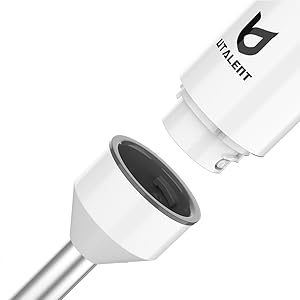
Assembling Attachments
- To attach the blender arm, chopper, or egg whisk, align the attachment with the main motor unit.
- Twist the attachment clockwise until it clicks securely into place.
- To detach, twist counter-clockwise and pull apart.

Operating Instructions
General Operation
- Ensure the appliance is fully charged and the desired attachment is securely assembled.
- To activate, press and hold the power button on the main unit. The LED lights will indicate power.
- The blender features variable speed control. Press the power button with varying depth to adjust the blending speed.
- Release the power button to stop operation.


Using the Blender Arm
- Attach the blender arm to the main motor unit.
- Immerse the blender arm into the ingredients. Ensure the blade guard is fully submerged to prevent splashing.
- Press and hold the power button to begin blending. Move the blender up and down gently for even processing.
- Ideal for smoothies, milkshakes, soups, and hummus.

Using the Chopper Attachment
- Place ingredients into the 500ml chopper bowl. Do not overfill.
- Attach the main motor unit to the chopper lid, ensuring it is securely locked.
- Press and hold the power button in short pulses for chopping.
- Suitable for chopping meat, nuts, vegetables, and herbs.

Using the Egg Whisk
- Attach the egg whisk to the main motor unit.
- Place the whisk into the ingredients (e.g., egg whites, cream).
- Press and hold the power button to begin whisking.
- Ideal for whipping egg whites, cream, and light batters.
Product Demonstration Video
Watch this video for a comprehensive demonstration of the UTALENT 4-in-1 Cordless Hand Blender's features and various uses:
Video: An official product video from UTALENT demonstrating the 4-in-1 cordless hand blender, showcasing its use for blending, chopping, and whisking various ingredients.
Cleaning and Maintenance
Proper cleaning and maintenance will extend the life of your UTALENT Hand Blender.
Cleaning
- Always unplug the charging cable and ensure the appliance is turned off before cleaning.
- The blender arm, 600ml vessel, 500ml chopper attachment, and egg whisk are dishwasher-safe. Alternatively, they can be washed by hand with warm, soapy water. Rinse thoroughly and dry.
- The main motor unit should be wiped clean with a damp cloth. Never immerse the motor unit in water or any other liquid.
- Exercise extreme caution when cleaning the blades of the blender arm and chopper attachment as they are very sharp.
Storage
Store the appliance and its accessories in a dry, safe place, out of reach of children.
Troubleshooting
| Problem | Possible Cause | Solution |
|---|---|---|
| Blender does not turn on. | Battery is depleted. | Charge the blender for 3.5 hours until LED indicators show full charge. |
| Attachment not securely connected. | Ensure the attachment is twisted clockwise until it clicks into place. | |
| Poor blending performance. | Too many ingredients or ingredients are too large. | Reduce the quantity of ingredients or cut them into smaller pieces. |
| Battery power is low. | Recharge the blender. | |
| Blender stops during operation. | Overheating protection activated. | Turn off the blender and let it cool down for at least 15-20 minutes before resuming use. |
Specifications
| Feature | Detail |
|---|---|
| Brand | UTALENT |
| Model Number | TL6001 |
| Color | White |
| Special Features | Cordless, Rechargeable, Portable |
| Blender Vessel Capacity | 600 Milliliters |
| Chopper Capacity | 500 Milliliters |
| Product Dimensions | 2.2"D x 2"W x 16"H |
| Included Components | Chopper, Container, Egg Whisk, Charging Cable |
| Power Source | DC (Battery Powered) |
| Voltage | 12 Volts |
| Material Type Free | BPA Free |
| Blade Material | Stainless Steel |
| Control Type | Variable Speed Control |
| Container Material | Plastic |
| Item Weight | 2.82 pounds |
| Battery Type | 1 Lithium Ion battery required |
| Charging Time | Approx. 3.5 hours |
| Run Time (Full Charge) | Approx. 25-30 minutes (depending on usage) |

Warranty and Support
Warranty Information
This UTALENT Cordless Hand Blender comes with a 1 Year Limited Warranty from the date of purchase. This warranty covers manufacturing defects under normal household use. It does not cover damage resulting from misuse, accident, alteration, neglect, or commercial use.
Customer Support
For any questions, concerns, or warranty claims, please contact UTALENT customer support. Refer to the product packaging or the official UTALENT website for the most current contact information.
Ask a question about this manual
Ask about setup, troubleshooting, compatibility, parts, safety, or missing instructions. Manuals+ will review the question and use this page’s manual context to help answer it.