
Introduction
This instruction manual provides essential information for the safe and effective installation and use of your A-MIND LCD Display Touch Screen Digitizer Assembly Replacement Kit for Samsung Galaxy Tab A2 T590 and T595 models. Please read this manual thoroughly before proceeding with any installation steps to ensure proper handling and to prevent damage to the product or your device.
Product Overview
This product is a high-quality LCD display and touch screen digitizer assembly designed as a replacement part for the Samsung Galaxy Tab A2 models SM-T590 and SM-T595. It is intended to resolve issues such as cracked screens, non-functional touch response, dead pixels, display problems, or incorrect color display.
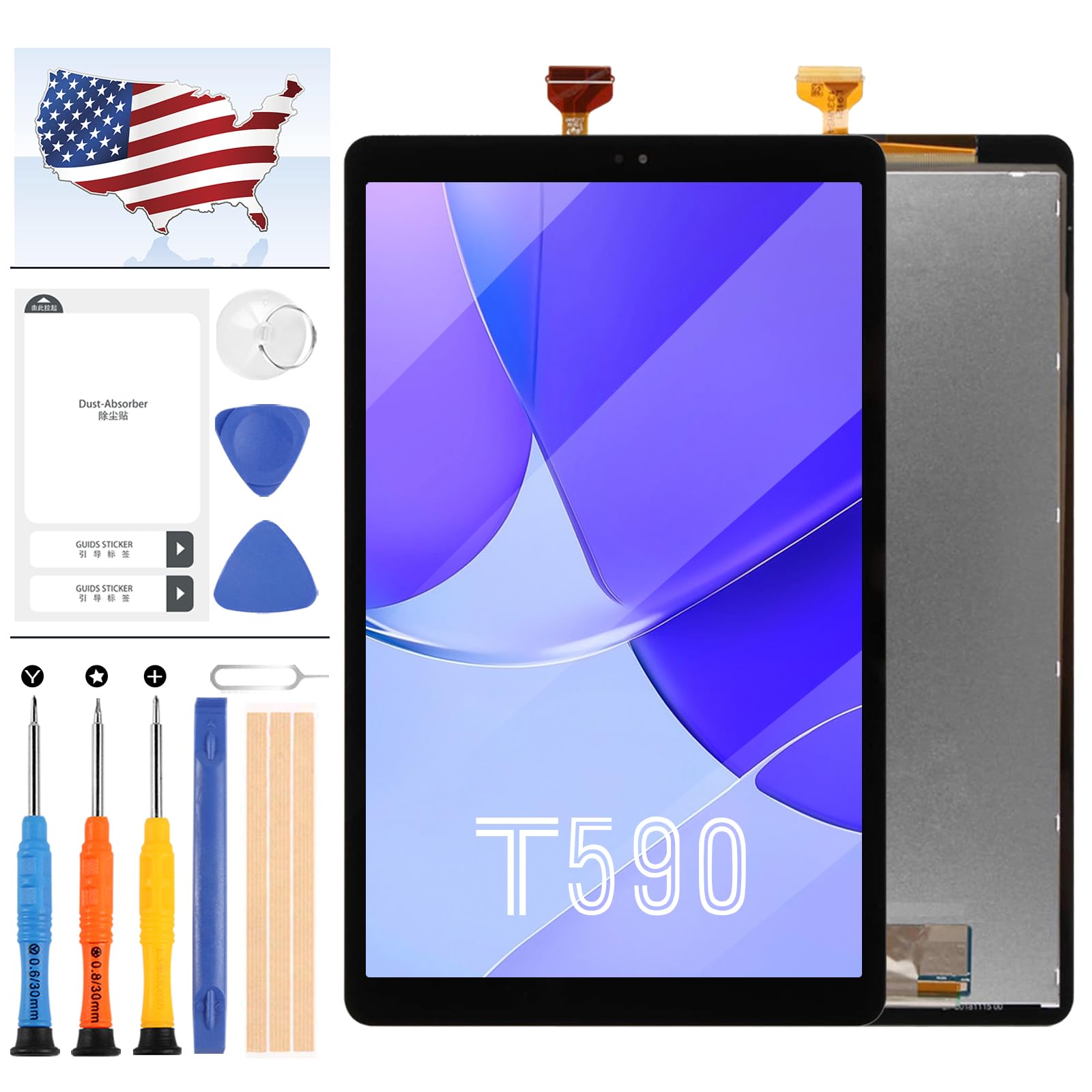
Image: Front view of the A-MIND LCD Display Touch Screen Digitizer Assembly for Samsung Galaxy Tab A2 T590/T595.
Package Contents
The replacement kit includes the following components:
- 1x LCD Display Touch Screen Replacement for Samsung Galaxy Tab A2 T590 T595 (Black)
- 1x Strong Suction Cup
- 2x Triangle Opening Tools
- 1x Card Pin
- 1x Plastic Spudger
- 1x Adhesive Tape

Image: The A-MIND LCD Display Touch Screen Replacement alongside the included installation tools.
Important Safety Information
- Static Electricity: Before attempting any repair, ensure you ground yourself with an ESD (electrostatic discharge) strap. This prevents static electricity from damaging the electronic components of your device.
- Eye Protection: Always wear eye protection during the repair process to guard against glass splinters or other debris.
- Handle with Care: The screen replacement is a very fragile product. Handle it with extreme care to avoid damage.
- Cable Bending: Do not over-bend the LCD cable. Bending it beyond 90 degrees can cause a black display or other malfunctions.
- Professional Installation Recommended: If you are not confident in your ability to perform the installation, it is recommended to seek professional assistance.
Pre-Installation Testing
It is crucial to test the screen replacement before full installation. This step ensures the product is fully functional upon arrival and prevents issues after assembly.
- Do Not Remove Protective Films: During testing, do not remove any protective films or tags from the screen.
- Simulate Testing: Disassemble your tablet (motherboard + LCD or screen). Connect the new replacement screen to the motherboard. Power on the device and test all functions, including display clarity, touch response, and color accuracy.
- If Issues Arise: If the screen does not function correctly during testing (e.g., black display, unresponsive touch), contact customer service immediately. Do not force the installation into the mobile phone. The manufacturer is not responsible for issues once the screen is fully installed without prior testing.
Video: A demonstration of the Samsung Galaxy Tab A2 SM-T590 T595 screen, useful for visual inspection before installation. This video is provided by BBA-TEK.
Installation Guide
This kit does not include detailed step-by-step installation instructions. Due to the complexity of tablet disassembly and reassembly, it is highly recommended to refer to external video guides for the specific model (Samsung Galaxy Tab A2 T590 or T595).
- Search for Video Tutorials: Search for "Samsung Galaxy Tab A2 T590 screen replacement" or "Samsung Galaxy Tab A2 T595 screen replacement" on video-sharing platforms like YouTube.
- Follow Instructions Carefully: Watch the chosen video tutorial completely before starting. Follow each step precisely.
- Use Provided Tools: Utilize the strong suction cup, triangle opening tools, card pin, plastic spudger, and adhesive tape included in your kit as demonstrated in the video guides.

Image: Rear view of the replacement screen, highlighting the flex cables and connectors that need careful handling during installation.
Maintenance
Once installed, proper care will extend the life of your new screen:
- Cleaning: Use a soft, lint-free cloth to clean the screen. Avoid harsh chemicals or abrasive materials.
- Protection: Consider using a screen protector and a protective case for your tablet to prevent future damage.
- Avoid Pressure: Do not apply excessive pressure to the screen, as this can cause damage to the LCD or digitizer.
Troubleshooting
| Problem | Possible Cause | Solution |
|---|---|---|
| Screen remains black after installation. | LCD cable not properly connected or over-bent. | Ensure all flex cables are securely connected and not bent excessively. Recheck connections. |
| Touch screen unresponsive or erratic. | Digitizer cable not properly connected; static electricity damage. | Verify digitizer cable connection. Ensure proper ESD precautions were taken during installation. |
| Display issues (e.g., lines, dead pixels, incorrect colors). | Faulty screen unit; damage during installation. | If tested before installation and found faulty, contact customer service. If damaged during installation, replacement may be necessary. |
Specifications
- Compatibility: Samsung Galaxy Tab A2 T590, SM-T590, T595, SM-T595
- Screen Size: 10.1 inches
- Material: Glass
- Color: Black
- UPC: 748899530771

Image: Front view of the replacement screen, detailing key specifications such as color, pixel density, screen size, and resolution.
Warranty and Support
A-MIND provides customer support for any issues related to your screen replacement. If you encounter any problems with your order, please contact our customer service team. We aim to provide assistance within 24 hours.
For quality problems, a new replacement can be exchanged if the screen is without any man-made or physical damage and cannot work normally. Please refer to the seller's return policy for detailed warranty information.
Contact Information: Refer to your purchase platform or packaging for specific customer service contact details.