
EBYTE E22-400T37S
EBYTE E22-400T37S LoRa Wireless RF Module User Manual
Model: E22-400T37S | Brand: EBYTE
1. Introduction
The EBYTE E22-400T37S is a new generation LoRa wireless module designed for long-distance, low-power communication. Operating in the 433MHz frequency band, it integrates advanced LoRa spread spectrum technology, PA+LNA for extended range, and various features to ensure reliable and secure data transmission. This manual provides essential information for the proper setup, operation, and maintenance of your E22-400T37S module.

Figure 1: EBYTE E22-400T37S LoRa Wireless RF Module.
2. Features and Functions
- Secure Communication: Supports user-defined communication keys for enhanced data confidentiality.
- Wireless Parameter Configuration: Allows remote configuration and reading of module parameters via wireless commands.
- Over-the-Air Wake-up (WoL): Enables ultra-low-power function, ideal for battery-powered applications.
- Multiple Transmission Modes: Supports fixed-point transmission, broadcast transmission, and channel monitoring.
- Deep Sleep Mode: Achieves power consumption less than 10uA in deep sleep, extending battery life.
- Frequency Band Support: Operates in the global license-free ISM 433MHz frequency band and supports 470MHz meter reading band.
- Extended Communication Range: Built-in PA+LNA enables communication distances up to 20km under ideal conditions (16km stable in urban environments).
- Parameter Retention: All configured parameters are saved upon power-down and restored upon power-up.
- Watchdog Design: Efficient watchdog ensures automatic module restart and continued operation in case of exceptions.
- Protection Functions: Includes built-in undervoltage, overvoltage warning, and over-temperature protection with warning LED.
- Heat Dissipation: Matrix pad reserved at the bottom for secondary development heat dissipation.
- LoRa Spread Spectrum Technology: Utilizes advanced LoRa spread spectrum technology for improved range, speed, and lower power consumption.
- Automatic Relay Networking: Supports multi-level relay for ultra-long-distance communication and simultaneous operation of multiple networks in the same area.
- LBT (Listen Before Talk) Function: Improves communication success rate in noisy environments by checking channel availability before transmission.

Figure 2: New Generation LoRa Spread Spectrum Technology provides enhanced anti-interference and longer transmission distance.

Figure 3: E22-400T37S demonstrates significantly lower power consumption compared to general LoRa modules, extending battery life.
3. Specifications
| Parameter | Value |
|---|---|
| Model | E22-400T37S |
| Frequency Band | 410.125~493.125MHz (Default 433.125MHz) |
| Output Power | 37dBm |
| Communication Interface | TTL Level UART |
| Supply Voltage | 4.5V - 15V |
| Deep Sleep Power Consumption | <10uA |
| Communication Distance (Ideal) | Up to 20KM |
| Communication Distance (Urban) | 16KM (stable) |
| Dimensions | 50mm x 30.9mm |
| Manufacturer | EBYTE |
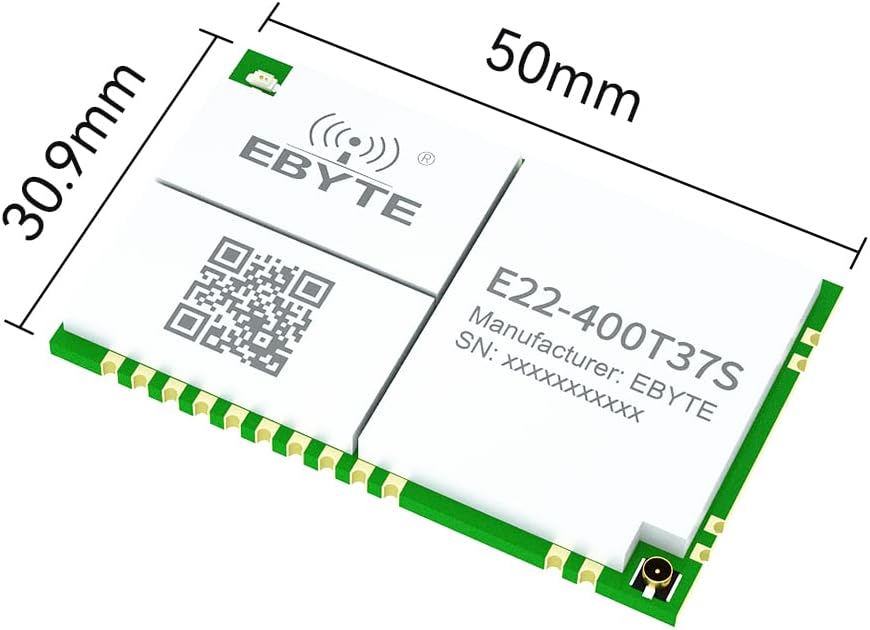
Figure 4: Physical dimensions of the E22-400T37S module (50mm x 30.9mm).

Figure 5: The compact size of the E22-400T37S module, suitable for space-constrained applications.
4. Setup
To set up your E22-400T37S module, follow these general guidelines:
- Power Supply: Connect the module to a stable power supply within the 4.5V to 15V range. Ensure correct polarity.
- Antenna Connection: Attach a suitable 433MHz antenna to the module's IPEX connector. A properly matched antenna is crucial for optimal performance.
- UART Connection: Connect the module's TTL UART pins (TX, RX, GND) to your microcontroller or host device. Ensure the baud rate and other serial parameters are correctly configured on both ends.
- Initial Configuration: Use the provided configuration software or send AT commands via UART to set initial parameters such as operating frequency, air data rate, and communication mode. Refer to the detailed EBYTE E22-400T37S datasheet for specific command sets.
- Mounting: Securely mount the module in your application, considering proper ventilation and avoiding metallic enclosures that could interfere with RF signals. The matrix pad at the bottom can be used for heat dissipation if needed.
5. Operating Instructions
The E22-400T37S module offers various operating modes and functionalities:
- Data Transmission: Once configured, data can be sent and received via the UART interface. The module handles the LoRa modulation and demodulation automatically.
- Parameter Modification: Parameters can be modified wirelessly or via the UART interface. For wireless configuration, send specific command data packets.
- Deep Sleep Mode: To conserve power, the module can be put into deep sleep mode. It can be woken up via over-the-air commands or specific pin triggers.
- LBT (Listen Before Talk): Enable LBT for improved communication reliability in environments with potential interference. The module will listen for channel activity before transmitting.
- Relay Networking: For extended range, configure modules to act as relays. This allows multi-hop communication across greater distances.
- Monitoring: The module supports channel monitoring, allowing you to assess channel activity and signal quality.
For detailed command sets and programming examples, refer to the official EBYTE E22-400T37S programming guide and datasheet.
6. Application Scenarios
The E22-400T37S LoRa module is versatile and suitable for a wide range of applications requiring long-distance, low-power wireless communication:

Figure 6: The E22-400T37S module is applicable in diverse fields such as Industrial Manufacturing (replacing signal cables), Smart Home (IoT solutions), Smart Farm (accurate monitoring), and Hotel Management (supporting numerous access points).
- Industrial Manufacturing: Ideal for short-distance industrial applications, replacing traditional signal cables to reduce wiring and simplify management.
- Smart Home: Provides robust physical layer technology solutions for home Internet of Things (IoT) ecosystems.
- Smart Farm: Enables accurate monitoring of various operational details across agricultural areas.
- Hotel Management: Supports a large number of access points for comprehensive management systems within hotels.
7. Maintenance
To ensure the longevity and optimal performance of your E22-400T37S module, observe the following maintenance guidelines:
- Environmental Conditions: Operate the module within its specified temperature and humidity ranges. Avoid extreme temperatures, direct sunlight, and high humidity.
- Cleanliness: Keep the module free from dust, dirt, and moisture. Do not use liquid cleaners directly on the module.
- Handling: Handle the module with care, especially the antenna connector and pins. Avoid static discharge by using appropriate ESD precautions.
- Power Supply Stability: Ensure a stable and clean power supply to prevent damage from voltage fluctuations.
- Antenna Integrity: Periodically check the antenna connection for looseness or damage. A damaged antenna can significantly reduce performance.
- Firmware Updates: Check the manufacturer's website (www.cdebyte.com) for any available firmware updates that may improve performance or add features.
8. Troubleshooting
If you encounter issues with your E22-400T37S module, consider the following troubleshooting steps:
- No Power/LED Off:
- Check power supply connections and voltage.
- Ensure the power supply is within the 4.5V-15V range.
- No Communication:
- Verify UART connections (TX, RX, GND) and ensure they are not swapped.
- Confirm baud rate, parity, data bits, and stop bits settings match on both the module and host device.
- Check if the module is in deep sleep mode; if so, send a wake-up command.
- Ensure the antenna is properly connected and not damaged.
- Poor Range/Intermittent Connection:
- Check antenna type and ensure it is suitable for 433MHz.
- Verify antenna is securely connected.
- Ensure there are no major obstructions (e.g., thick walls, metal objects) between modules.
- Check for strong interference sources in the operating environment.
- Consider enabling LBT function if operating in a noisy environment.
- Ensure modules are configured with matching parameters (frequency, air data rate, etc.).
- Module Overheating:
- Ensure adequate ventilation around the module.
- Verify the power supply voltage is not too high.
- Reduce transmission power if possible and if not impacting communication.
- The module has built-in over-temperature protection and will automatically stop sending if it exceeds its maximum temperature.
- Unexpected Behavior:
- Perform a factory reset if supported (refer to datasheet).
- Re-configure the module parameters.
- Check for firmware updates.
9. Warranty and Support
EBYTE products are designed for reliability and performance. For specific warranty terms and conditions, please refer to the official EBYTE warranty policy available on their website.
For technical support, product inquiries, or further assistance, please contact EBYTE directly:
- Manufacturer: Chengdu Ebyte Electronic Technology Co., Ltd.
- Website: www.cdebyte.com
- EU Representative: avamaster Consulting GmbH
- EU Address: Bethmannstr. 30-32, 60311 Frankfurt am Main, Germany
- EU Contact Email: compliance@avamaster.com

Figure 7: Product packaging displaying manufacturer and EU representative contact details.
Related documentsE22-400T37S


Ask a question about this manual
Ask about setup, troubleshooting, compatibility, parts, safety, or missing instructions. Manuals+ will review the question and use this page’s manual context to help answer it.