
Profile PHNT12CC
Profile PHNT12CC Clearview Air Conditioner User Manual
Brand: Profile | Model: PHNT12CC
1. Introduction and Overview
The Profile PHNT12CC Clearview Air Conditioner is an Energy Star certified window unit designed for efficient and quiet cooling of medium rooms up to 550 square feet. Featuring innovative inverter technology and a unique design that maintains full window view, this air conditioner offers advanced comfort and convenience.
Key features include ultra-quiet operation, an industry-exclusive flex-depth for custom fit, and built-in Wi-Fi for smart control via the SmartHQ app.
2. Safety Information
Please read all safety instructions carefully before installation and operation to prevent injury or damage. Keep this manual for future reference.
- Always ensure the unit is properly grounded. Do not use extension cords or adapter plugs.
- Disconnect power before servicing or cleaning the unit.
- Do not operate the air conditioner with a damaged power cord or plug.
- Ensure the window installation is secure and stable to prevent the unit from falling.
- Keep children and pets away from the unit during operation.
- Do not block air inlets or outlets.
3. Product Features

Full Window View
This Energy Star certified window air conditioner is designed to maintain the full view through the window, letting it open and close freely after you install the unit and allowing more natural light into the room. Fits windows 20"-40" wide, 13" minimum window opening height, 10" minimum height from floor.

Inverter Technology
Adaptive air conditioner inverter technology operates at smooth, varying levels, reducing noise and maximizing energy efficiency. At 34% more efficient, you can save energy without sacrificing performance.

Ultra Quiet Operation
This quiet air conditioner reaches sounds as low as 40 dB, underlining GE Profile's rating as the Quietest Window AC Brand in the US. ClearView's operation keeps the air flowing for minimal disruption.

Industry Exclusive Flex-Depth
The flex-depth design is engineered to expand to multiple positions, accommodating walls between 4.5" and 13.75" thick. The unit comes in the closed position and can be adjusted based on your windowsill depth for a secure, custom fit.

Built-in Wi-Fi
Use the SmartHQ app to control and monitor this WiFi-enabled smart air conditioner from anywhere, giving you connected peace of mind. Compatibility with devices like Amazon Alexa and Google Assistant makes everyday use easier and more versatile than ever. A remote control is also included.

Built-in Pump
The unit automatically collects condensation and empties it outside, eliminating the need for manual drainage in most conditions.
4. Setup and Installation
The Profile PHNT12CC is designed for easy and safe installation in single or double-hung windows. No mounting bracket is needed, allowing the window to be freely opened and closed after installation (subject to local code approval).
Installation Steps Overview:
- Unpack the air conditioner and all included components, including the window kit.
- Prepare the window opening. Ensure the window dimensions meet the requirements: 20"-40" wide, 13" minimum opening height.
- Adjust the unit's flex-depth to fit your wall thickness, ranging from 4.5" to 13.75".
- Carefully place the unit into the window opening, ensuring it is level and securely seated.
- Install the included window kit components to seal the opening around the unit.
- Allow the unit to sit for at least 2 hours after installation before plugging it in to allow compressor oil to settle.
For detailed, step-by-step installation instructions, please refer to the comprehensive User Manual PDF available for download from the product page or included with your purchase.
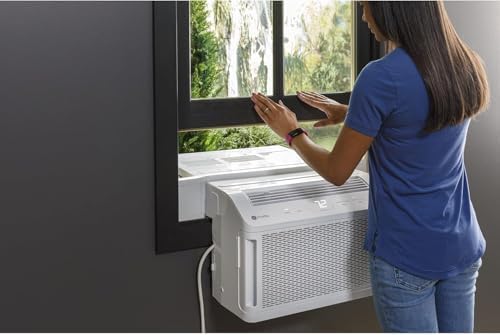
The design allows for easy window operation after installation.
5. Operating Instructions
Your Profile PHNT12CC air conditioner offers various modes and fan speeds for optimal home comfort. You can control the unit using the electronic controls on the unit, the included remote control, or via the SmartHQ app.
Control Panel and Remote:
- Power Button: Turns the unit On/Off.
- Mode Selection: Cycle through cooling, fan-only, and other available modes.
- Temperature Adjustment: Use '+' and '-' buttons to set desired temperature.
- Fan Speed: Adjust fan speed (Low, Medium, High, Auto).
- Timer: Set a 24-hour on/off timer for scheduled operation.
- Filter Reset: Resets the filter indicator light after cleaning.
SmartHQ App Control:
Download the SmartHQ app to your smartphone or tablet to unlock advanced control features:
- Monitor current status and settings.
- Schedule operation times.
- Control the unit remotely from anywhere.
- Check energy usage.
- Set up geolocation for automated control based on your proximity.

Electronic controls provide easy access to settings.
6. Maintenance
Regular maintenance ensures optimal performance and longevity of your air conditioner.
Filter Cleaning:
- The unit features a removable filter for easy cleaning.
- An indicator light will illuminate after approximately 250 hours of operation to remind you to clean the filter.
- To clean, remove the filter and wash it with warm, soapy water. Rinse thoroughly and allow it to air dry completely before reinserting.
- After cleaning and reinserting the filter, press the "Filter Reset" button on the control panel or remote.
Water Drainage:
- The built-in pump automatically collects and expels condensation outside.
- During periods of high humidity or before storing the unit for the winter, it is recommended to manually drain any accumulated water to prevent stagnation and mold growth. Refer to the full user manual for specific drainage procedures.
7. Troubleshooting
This section addresses common issues you might encounter. For more detailed troubleshooting, please consult the full User Manual PDF.
| Problem | Possible Cause / Solution |
|---|---|
| Unit does not turn on. | Check if the power cord is securely plugged in. Ensure the circuit breaker has not tripped. |
| Air conditioner is not cooling effectively. | Check if the air filter is dirty and needs cleaning. Ensure windows and doors are closed. Verify the temperature setting is appropriate. Room size may exceed unit capacity. |
| Pinging noise from unit. | A pinging noise from water hitting the condenser on rainy or humid days is normal. This process helps remove moisture and improves efficiency. |
| Filter indicator light is on. | The air filter needs cleaning. Clean the filter and press the "Filter Reset" button. |
8. Specifications
| Specification | Detail |
|---|---|
| Model Number | PHNT12CC |
| Cooling Capacity | 12,200 BTU |
| Coverage Area | Up to 550 Sq. Ft. |
| Product Dimensions (DxWxH) | 28" x 19.63" x 12.75" |
| Item Weight | 75.8 pounds |
| Noise Level | As low as 40 dB |
| Voltage | 115 Volts |
| Form Factor | Window |
| Special Features | Filter Light Reminder, Inverter Compressor, Remote Controlled, WiFi Enabled |
| Energy Star Certified | Yes |
| Seasonal Energy Efficiency Ratio (SEER) | 12.1 |
9. Warranty and Support
Your Profile PHNT12CC Clearview Air Conditioner comes with a 1-Year Limited Warranty from the manufacturer, GE Appliances.
For complete warranty details, service inquiries, or additional support, please refer to the full User Manual PDF provided with your product or visit the official GE Appliances support website. You may also find helpful information and FAQs on the Profile Store on Amazon.
Related documentsPHNT12CC


Ask a question about this manual
Ask about setup, troubleshooting, compatibility, parts, safety, or missing instructions. Manuals+ will review the question and use this page’s manual context to help answer it.