
Introduction
Thank you for choosing the Gigastone QP-10200B 3-in-1 Qi Power Bank. This device combines the functionality of a traditional wall charger, a portable power bank, and a wireless charging pad into one compact unit. With a 10,000 mAh capacity, USB-C PD 3.0, USB-A QC3.0, and 15W wireless charging, it provides versatile power solutions for your mobile devices. Please read this manual carefully to ensure proper use and to maximize the performance and lifespan of your product.
Product Overview
Key Features
- 4-in-1 Functionality: Functions as a power bank, wireless charging pad, PD charger, and QC charger.
- High Capacity: 10,000 mAh internal battery for extended use.
- Fast Charging: Supports USB-C Power Delivery (PD 3.0) 20W and USB-A Quick Charge (QC3.0) 18W.
- Wireless Charging: 15W Qi wireless charging compatible with various devices (7.5W for iPhone, 10-15W for Android).
- Integrated AC Plug: Foldable AC plug (100-240V) for direct wall charging and self-recharging.
- Multi-Device Charging: Capable of charging up to 3 devices simultaneously.
- Safety Protections: Equipped with over current, over charge, overheat, over voltage, short circuit, and static electricity protection.
- Compact Design: Lightweight and portable with a foldable plug for easy travel.
Component Identification
Refer to the diagram below for an overview of the power bank's components.

Image: Gigastone QP-10200B 3-in-1 Qi Power Bank showing its various parts and features. This includes the foldable AC plug, 10,000mAh power capacity, wireless charging indicator, USB-C PD 3.0 (20W) port, USB-A QC3.0 (18W) port, power button, clear LED display for power status, anti-slip rubber base, and the Qi wireless charging area.
- AC Plug: Foldable prongs for direct wall charging.
- USB-C PD 3.0 Port: For fast charging compatible devices with up to 20W output.
- USB-A QC3.0 Port: For fast charging compatible devices with up to 18W output.
- Qi Wireless Charging Pad: For wireless charging Qi-enabled devices.
- Power Button: Activates the power bank and LED display.
- LED Power Status Display: Shows remaining battery percentage.
- Wireless Indicator: Lights up when wireless charging is active.
Setup
Initial Charge
Before first use, it is recommended to fully charge the power bank. To do this:
- Fold out the integrated AC plug.
- Plug the power bank directly into a standard wall outlet (100-240V).
- The LED display will show the charging progress. The power bank is fully charged when the display shows 100%.
This process also recharges the power bank itself without needing an additional cable.
Operating Instructions
Charging Devices via USB Ports
To charge your devices using the USB-C or USB-A ports:
- Connect your device to the power bank using a compatible USB-C to USB-C cable (for PD 3.0) or a USB-A to device-specific cable (for QC3.0).
- Press the power button on the power bank to activate charging.
- The LED display will show the power bank's remaining charge, and your device should indicate that it is charging.

Image: The Gigastone QP-10200B power bank demonstrating its ability to charge three devices concurrently: one smartphone via USB-C, a Nintendo Switch via USB-A, and another smartphone wirelessly on its top surface.
The power bank supports charging up to three devices simultaneously (two via USB ports and one wirelessly).
Fast Charging Performance
The Gigastone QP-10200B supports fast charging protocols to quickly power up your compatible devices.

Image: A visual representation of the Gigastone QP-10200B's fast charging performance, indicating that it can charge an iPhone 13 2.3 times, a Samsung S21 1.8 times, and an iPad Air 4 1.3 times faster than standard charging methods. It highlights support for PD 20W for newer iPhones and PD 18W for older models.
For optimal fast charging, ensure your device and charging cable are compatible with USB-C PD 3.0 or USB-A QC3.0 standards.
Wireless Charging
To charge your Qi-enabled device wirelessly:
- Press the power button on the power bank to activate it.
- Place your Qi-enabled device (e.g., smartphone) directly onto the wireless charging pad area of the power bank.
- Ensure the device is centered on the charging pad for optimal performance.
- The wireless indicator light on the power bank will illuminate, and your device should show that it is charging.
Note: Remove any metal objects, magnetic attachments, or thick cases from your device before placing it on the wireless charging pad, as these can interfere with charging.
Recharging the Power Bank
You can recharge the Gigastone QP-10200B in two ways:
- Via AC Plug: Fold out the integrated AC plug and plug the power bank directly into a wall outlet. This is the most convenient method as it requires no additional cables.
- Via USB-C Port: Connect a USB-C cable from a wall adapter (not included) to the power bank's USB-C port.
The LED display will show the charging status, indicating the battery percentage as it recharges.

Image: The Gigastone QP-10200B power bank is shown in a hand, emphasizing its compact size for travel. An inset compares the convenience of its integrated AC plug for recharging against the clutter of multiple charging cables.
Maintenance
- Keep the power bank away from water, moisture, and extreme temperatures.
- Avoid dropping or subjecting the device to strong impacts.
- Clean the power bank with a soft, dry cloth. Do not use harsh chemicals or abrasive cleaners.
- Store the power bank in a cool, dry place when not in use.
- For optimal battery health, fully charge and discharge the power bank at least once every three months if not used regularly.
Troubleshooting
- Device not charging:
- Ensure the power bank is sufficiently charged. Check the LED display.
- Press the power button to activate the power bank.
- Check if the charging cable is securely connected to both the power bank and your device.
- Try a different charging cable or port.
- For wireless charging, ensure your device is Qi-enabled and properly aligned on the charging pad. Remove any thick cases or metal objects.
- Slow charging:
- Ensure your device and cable support fast charging (PD 3.0 or QC3.0).
- Avoid charging multiple devices simultaneously if you require maximum speed for one device.
- Check if the cable is damaged.
- Power bank not recharging:
- Ensure the AC plug is fully extended and securely plugged into a live wall outlet.
- If using the USB-C port for recharging, ensure the wall adapter and cable are functional.
- Overheating:
- It is normal for the power bank to become slightly warm during charging or discharging.
- If it becomes excessively hot, disconnect all devices and unplug it from the wall. Allow it to cool down before reuse.
- Ensure proper ventilation and avoid covering the power bank during operation.
Specifications
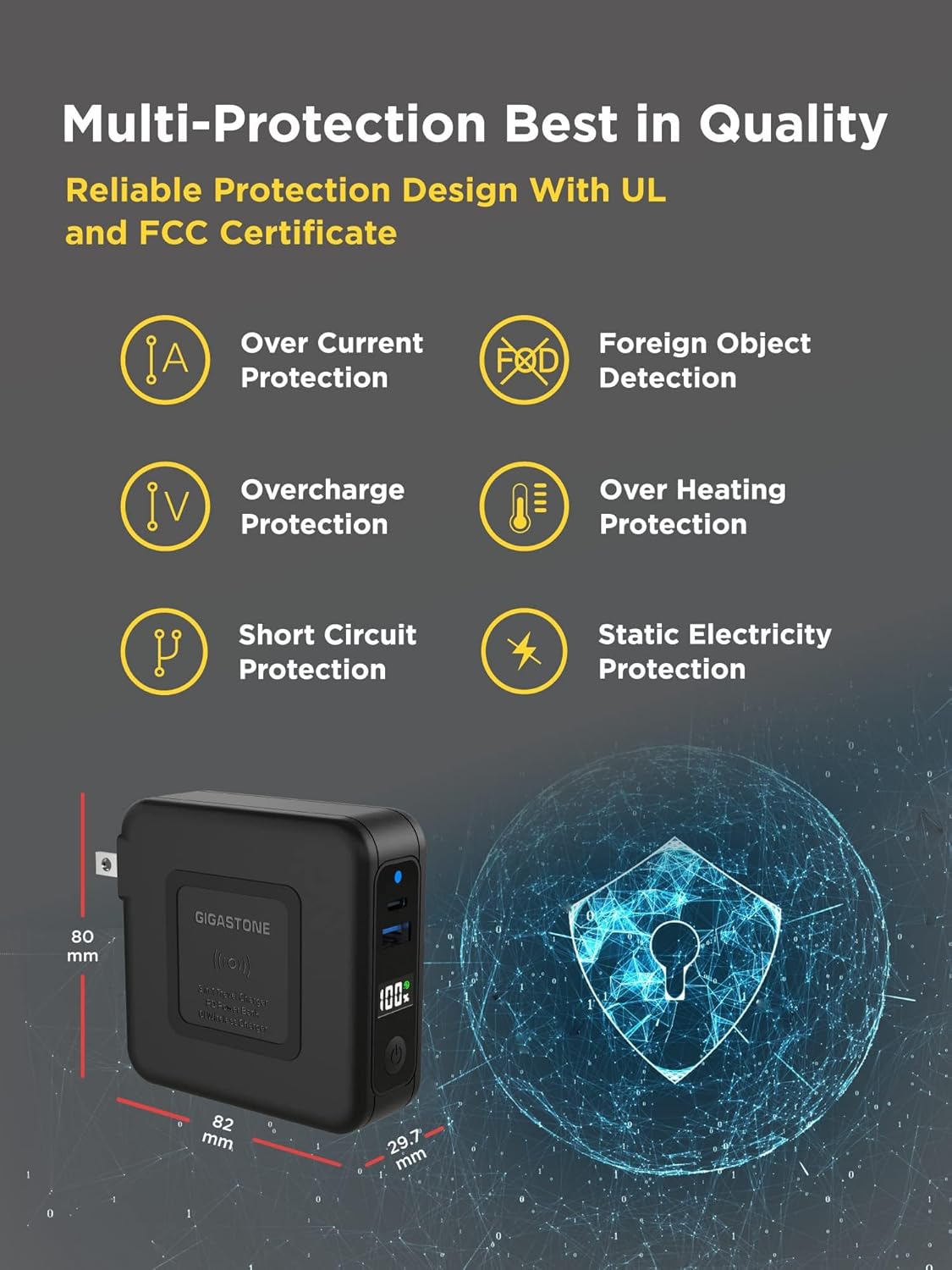
Image: The Gigastone QP-10200B power bank highlighting its compact dimensions (80mm x 82mm x 29.7mm) and comprehensive safety features, including protection against over current, foreign objects, overcharge, overheating, short circuits, and static electricity.
| Feature | Detail |
|---|---|
| Model Number | QP-10200B |
| Battery Capacity | 10,000 mAh |
| USB-C Output (PD 3.0) | 20W Max |
| USB-A Output (QC3.0) | 18W Max |
| Wireless Output | 15W Max (7.5W for iPhone, 10-15W for Android) |
| AC Input | 100-240V |
| Dimensions (L x W x H) | 3.22 x 3.14 x 1.17 inches (82 x 80 x 29.7 mm) |
| Number of Ports | 3 (1x USB-C, 1x USB-A, 1x Wireless) |
| Safety Features | Over current, over charge, overheat, over voltage, short circuit, static electricity protection |
| Compatible Devices | Apple, Android, Qi-enabled devices, Macbook, Samsung, iPhone |
Safety Information
Please observe the following safety precautions:
- Do not disassemble, modify, or repair the device yourself.
- Do not expose the power bank to fire, direct sunlight, or high temperatures.
- Do not use the power bank in wet environments or immerse it in water.
- Keep out of reach of children.
- Use only original or certified cables for charging.
- Dispose of the power bank according to local regulations for electronic waste.
Warranty and Support
Warranty Information
The Gigastone QP-10200B 3-in-1 Qi Power Bank comes with a 1-year limited manufacturer's warranty from the date of purchase. This warranty covers defects in materials and workmanship under normal use. It does not cover damage caused by misuse, accident, unauthorized modification, or external causes.

Image: Gigastone branding alongside the QP-10200B power bank, prominently displaying a "1 Year Warranty" badge, indicating the product's manufacturer warranty.
Customer Support
For warranty claims, technical support, or any questions regarding your Gigastone product, please contact our customer service team:
- Email: service@gigastone.com
- Phone: +1-949-450-2900
- Website: www.gigastone.com
- Address: 17520 Von Karman Ave, Irvine, CA 92614, USA
Please have your model number (QP-10200B) and proof of purchase ready when contacting support.
