Introduction
This manual provides detailed instructions for the UGREEN Car Phone Holder Vent Mount, Model 15321. Designed for secure and convenient smartphone placement in your vehicle, this guide covers setup, operation, maintenance, and troubleshooting to ensure optimal performance and safety.
What's in the Box
- 1x UGREEN Air Vent Car Phone Holder
- 1x Instruction Manual
Product Features
- Max Weight Capacity: 17.6 oz (500g). Fits 4.7" to 7.2" cell phones with a maximum 0.55-inch thickness (including case).
- Simple One-Hand Operation: Features a gravity auto-lock mechanism for automatic clamping when the phone is placed.
- Firm Grip with Upgraded Vent Hook Clip: Securely grasps air outlet blades, preventing the mount from falling off. Note: Not compatible with circular vents.
- Secure Hold: Spring-loaded grip structure ensures stability, even on bumpy roads, effectively preventing the phone from falling.
- Scratch-Free Design: Premium silicone pads on the phone cradle protect your cellphone from scratches.
- 360° Rotation: Allows for adjustable viewing angles to suit user preference.

Image: UGREEN Car Phone Holder mounted on a car vent, positioned to not block airflow, with a phone securely held.

Image: UGREEN phone holder illustrating the gravity stable structure, showing how the phone's weight activates the clamping arms.
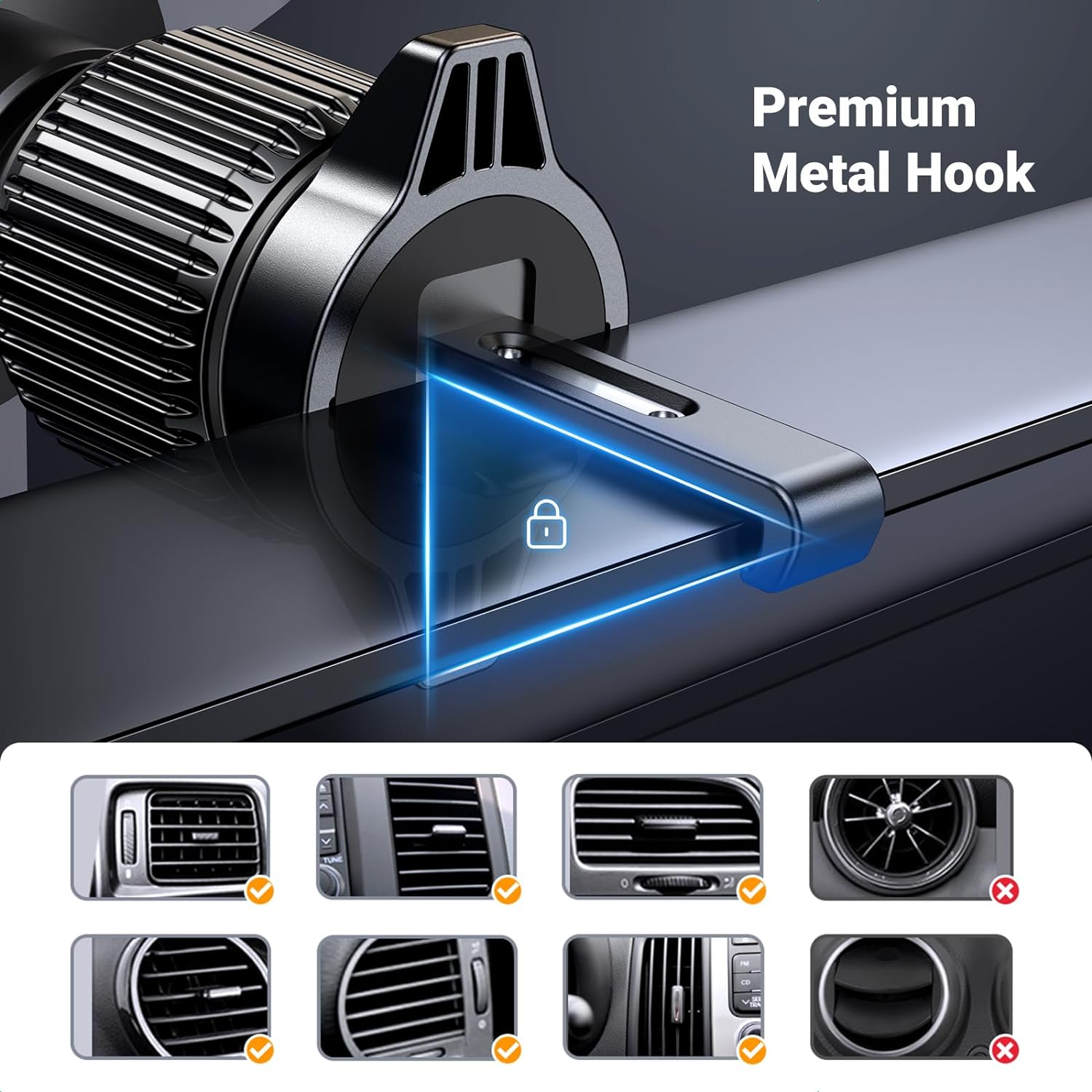
Image: Close-up image of the UGREEN phone holder's premium metal hook, designed for a firm grip on car air vents.

Image: Demonstrating one-hand operation of the UGREEN phone holder, showing a hand placing a phone into the mount.

Image: Showing the 360-degree adjustable ball joint on the UGREEN phone holder, allowing for flexible viewing angles.
Compatibility
The UGREEN Car Phone Holder Vent Mount is compatible with a wide range of smartphones:
- Supports 4.7" to 7.2" cell phones.
- Accommodates phones with a maximum thickness of 0.55 inches (including protective case).
- Compatible Phone Models include: iPhone 17, iPhone 17 Pro Max, iPhone 16, iPhone 16 Plus, iPhone 16 Pro, iPhone 16 Pro Max, iPhone 15, iPhone 15 Plus, iPhone 15 Pro, iPhone 15 Pro Max, iPhone 14, iPhone 14 Plus, iPhone 14 Pro, iPhone 14 Pro Max, iPhone 13 Mini, iPhone 13 Pro, iPhone 13 Pro Max, iPhone 12, 11, XS, XR, X, SE, iPhone 8, 7, 6S Plus, 6.
- Also compatible with Samsung Galaxy S22, S21, S20, S10, Note20, LG G8, G7, V50, V60, Motorola Moto G Power, Google Pixel 6a, and similar sized devices.
Important Note: This vent phone mount cannot support circular vents and is not compatible with the 2022 Toyota Camry.
Setup and Installation
- Attach the Phone Holder to the Vent Mount:
- Unscrew the nut on the vent mount's ball joint.
- Place the phone holder onto the ball joint.
- Tighten the nut securely to fix the phone holder in place.
- Install the Vent Mount in Your Car:
- Loosen the hook on the vent clip by twisting the knob until it extends sufficiently.
- Insert the hook into one of your car's air vent blades.
- Twist the knob to tighten the hook, ensuring it firmly grips the vent blade.
- Adjust the angle of the mount as desired using the 360-degree rotation feature.
Video: Official UGREEN video demonstrating the installation process of the car phone holder onto a vent and placing a phone.
Video: Official UGREEN video showcasing the installation and 'never blocking air vent' feature of the car phone holder.
Video: Demonstrating the unboxing and initial setup of a gravity car phone holder, showing how to attach it to a car vent.
Operating Instructions
- Placing Your Phone: Gently slide your phone downwards into the holder. The gravity-activated arms will automatically clamp onto your phone, securing it in place.
- Removing Your Phone: Lift your phone upwards. The gravity arms will release, allowing you to easily remove your device.
- Adjusting Viewing Angle: Loosen the knob on the ball joint to adjust the phone's angle (vertical or horizontal) and rotation (360 degrees). Tighten the knob to secure the desired position.
Maintenance
- Regularly check that the vent hook is securely tightened to prevent wobbling.
- Clean the silicone pads with a soft, damp cloth to maintain optimal grip and prevent scratches.
- Avoid exposing the mount to extreme temperatures for prolonged periods.
Troubleshooting
- Mount feels loose: Ensure the vent hook knob is fully tightened. Verify that your car's vent type is compatible (not circular).
- Phone is not clamping securely: Check that your phone's thickness (with case) does not exceed 0.55 inches. Ensure the phone is placed correctly to activate the gravity arms.
- Phone holder blocks airflow: The design is intended to minimize airflow blockage. Adjust the mount's position on the vent or the vent's direction if necessary.
Specifications
| Feature | Detail |
|---|---|
| Product Dimensions | 3.35 x 2.44 x 1.57 inches |
| Item Weight | 3.63 ounces |
| Item Model Number | 15321 |
| Special Features | Gravity Auto-Lock, Never Blocking Air Vent, Upgraded Firm Vent Hook |
| Compatible Devices | 4.7" to 7.2" cell phones (Max 0.55" thickness with case) |
| Mounting Type | Vent |
| Color | Black |
| Manufacturer | UGREEN |
Warranty and Support
For detailed warranty information, product registration, or customer support, please visit the official UGREEN website or contact their customer service directly through the contact information provided with your purchase.


