
VEAGASO VG360
VEAGASO 70 Pints Dehumidifier
Model: VG360
Introduction
Welcome to the user manual for your new VEAGASO 70 Pints Dehumidifier. This manual provides essential information for the safe and efficient operation, maintenance, and troubleshooting of your appliance. Please read it thoroughly before using the dehumidifier and retain it for future reference.
Important Safety Information
To reduce the risk of fire, electric shock, or injury when using your dehumidifier, follow these basic precautions:
- Read all instructions before using the appliance.
- Ensure the power supply matches the voltage specified on the rating label.
- Do not operate the dehumidifier with a damaged cord or plug.
- Always unplug the dehumidifier before cleaning, servicing, or moving it.
- Do not block air inlets or outlets. Keep them clear of obstructions.
- Do not use the dehumidifier in wet or damp environments where water may splash onto it.
- Keep children and pets away from the appliance during operation.
- Do not attempt to repair or modify the unit yourself. Contact qualified service personnel.
Product Overview
Key Features
- High Capacity: Removes up to 70 pints of moisture per day, suitable for spaces up to 5500 Sq. Ft.
- Multiple Modes: Features Sleeping Area (55% RH), Living Area (50% RH), Basement (45% RH), and Continuous dehumidification modes.
- Auto Shut-off: Automatically turns off when the water tank is full to prevent overflow.
- Flexible Drainage: Offers both manual emptying of the 8.5-pint water tank and continuous drainage via an included hose.
- Adjustable Humidity: Allows humidity level adjustment from 35% to 80% for customized comfort.
- User-Friendly Design: Equipped with a backlit digital display, handle, and wheels for easy mobility, and a removable, washable filter for simple maintenance.
Components
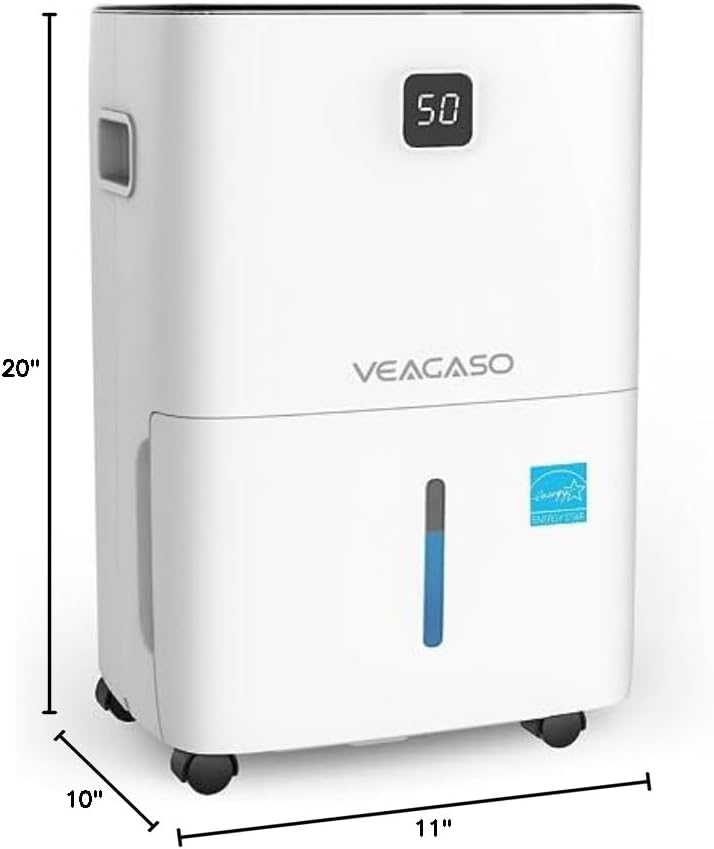
Familiarize yourself with the main parts of your VEAGASO dehumidifier:


Setup
Unpacking
Carefully remove the dehumidifier from its packaging. Inspect the unit for any shipping damage. Retain the packaging materials for future storage or transport.
Placement
Place the dehumidifier on a flat, stable surface in the area where dehumidification is needed. Ensure there is at least 8 inches (20 cm) of space around the unit for proper airflow. Do not place it against a wall or furniture that could obstruct the air intake or exhaust.
Drainage Options
Your VEAGASO dehumidifier offers two methods for water removal:
- Manual Drain (Water Tank): The unit comes with an 8.5-pint removable water tank. When the tank is full, the dehumidifier will automatically shut off, and the "Bucket Full" indicator will illuminate with an audible alarm. Carefully remove the tank, empty the collected water, and reinsert it securely.
- Continuous Drain (Drain Hose): For continuous operation without manual emptying, attach the included drain hose to the continuous drainage port on the back of the unit. Route the hose to a suitable drain (e.g., floor drain, large bucket) ensuring it is sloped downwards for gravity drainage.


Operating Instructions
Control Panel Functions
The control panel provides easy access to all dehumidifier settings:

- POWER: Turns the unit On or Off.
- MIRAGE DISPLAY: Backlit display showing current humidity level.
- FILTER: Illuminates when it's time to clean the air filter.
- FAN SPEED: Cycles through Low, Medium, and High fan speeds. Higher speeds remove moisture more effectively.
- HUMIDITY %: Displays the current relative humidity. Adjustable from 35% to 80%.
- MODE: Selects preset humidity levels for specific areas: Sleeping Area (55%), Living Area (50%), Basement (45%). Also includes a Continuous mode for constant dehumidification.
- TIMER: Sets the auto On/Off time for scheduled operation.
- LOCK: Press and hold for 3 seconds to activate/deactivate Child Lock, preventing accidental changes to settings.
- BUCKET FULL: Indicator light and alarm when the water tank is full.
Setting Desired Humidity
Press the Humidity % button to adjust the target humidity level. The display will show the set humidity, then revert to the current room humidity. The unit will operate until the desired humidity is reached, then cycle on and off to maintain it.
Using Modes
Press the MODE button to cycle through the preset modes (Sleeping Area, Living Area, Basement) or select Continuous mode. Each mode targets a specific humidity level for convenience.
Timer Function
Use the TIMER button to set a delayed start or stop time for the dehumidifier. This allows you to schedule operation according to your needs, saving energy and ensuring comfort.
Maintenance
Regular maintenance ensures optimal performance and extends the lifespan of your dehumidifier.
Emptying the Water Tank
When the "Bucket Full" indicator lights up and the alarm sounds, the water tank needs to be emptied. Carefully pull out the water tank, discard the collected water, and slide the tank back into place until it clicks securely.
Cleaning the Air Filter
The removable air filter should be cleaned regularly (every 2-4 weeks, or more often depending on usage and air quality) to maintain efficiency. When the "FILTER" indicator illuminates, it's time to clean the filter.
- Turn off the dehumidifier and unplug it from the power outlet.
- Remove the filter from the back of the unit.
- Wash the filter with warm, soapy water. Rinse thoroughly.
- Allow the filter to air dry completely before reinserting it. Do not use a dryer or direct heat.
- Once the filter is reinserted, press and hold the "FILTER" button for 3 seconds to reset the filter indicator.

Storage
If storing the dehumidifier for an extended period, ensure the water tank is empty and clean. Clean the air filter. Store the unit upright in a dry, cool place, away from direct sunlight.
Troubleshooting
If you encounter issues with your dehumidifier, refer to the following table for common problems and solutions:
| Problem | Possible Cause | Solution |
|---|---|---|
| Dehumidifier does not turn on. | No power supply; Power cord not plugged in; Water tank full or not properly inserted. | Check power connection; Empty and reinsert water tank correctly. |
| No water collected. | Room humidity is too low; Temperature is too low; Air filter is clogged; Unit is in continuous drain mode. | Check room humidity/temperature; Clean air filter; Verify drain hose connection. |
| Unit runs continuously. | Set humidity level is too low; Unit is in Continuous mode; Room is too large or too humid. | Increase set humidity; Change mode; Consider using multiple units for very large spaces. |
| Loud noise during operation. | Unit is not on a level surface; Air filter is clogged; Internal components loose. | Place on a flat surface; Clean air filter; Contact customer support if noise persists. |
| Frost appears on coils. | Room temperature is too low. | This unit has an automatic defrost function. If frost persists, increase room temperature. |
Specifications
| Feature | Detail |
|---|---|
| Brand | VEAGASO |
| Model Name | VG360 |
| Floor Area Coverage | 5500 Square Feet |
| Dehumidification Capacity | 70 Pints per Day (at 95°F, 90% RH) |
| Water Tank Volume | 8.5 Pints |
| Product Dimensions | 10"D x 11"W x 20"H |
| Item Weight | 30.9 Pounds |
| Color | White |
| Material | Plastic |
| Operation Modes | Continuous, Sleeping, Living, Basement |
| Adjustable Humidity Range | 35% to 80% |
| Number of Speeds | 3 (Fan Speeds) |
| Special Features | Adjustable Humidity Control, Automatic Defrost, Continuous/Manual Draining |
Warranty and Support
VEAGASO is committed to your satisfaction. Your dehumidifier comes with the following:
- 30-Day Free Exchange/Refund Policy: If you are not completely satisfied, you may exchange or return the product within 30 days of purchase.
- 1-Year Warranty Service: The dehumidifier is covered by a 1-year warranty from the date of purchase against defects in materials and workmanship.
For any questions, concerns, or assistance with your VEAGASO dehumidifier, including how to connect the drain hose or troubleshooting, please do not hesitate to contact our friendly customer service team. We welcome your questions and feedback.
Related documentsVG360


Ask a question about this manual
Ask about setup, troubleshooting, compatibility, parts, safety, or missing instructions. Manuals+ will review the question and use this page’s manual context to help answer it.