
1. Introduction
The BLUETTI EB70S is a portable solar generator designed to provide reliable power for various outdoor activities, road trips, and emergency situations. This unit features a 716Wh LiFePO4 battery pack and delivers up to 800W of continuous AC power through its 120V outlets. When paired with the included 200W foldable solar panel, it offers a sustainable and efficient charging solution.
This manual provides essential information for the safe and effective use of your BLUETTI EB70S solar generator and 200W solar panel. Please read it thoroughly before operation.
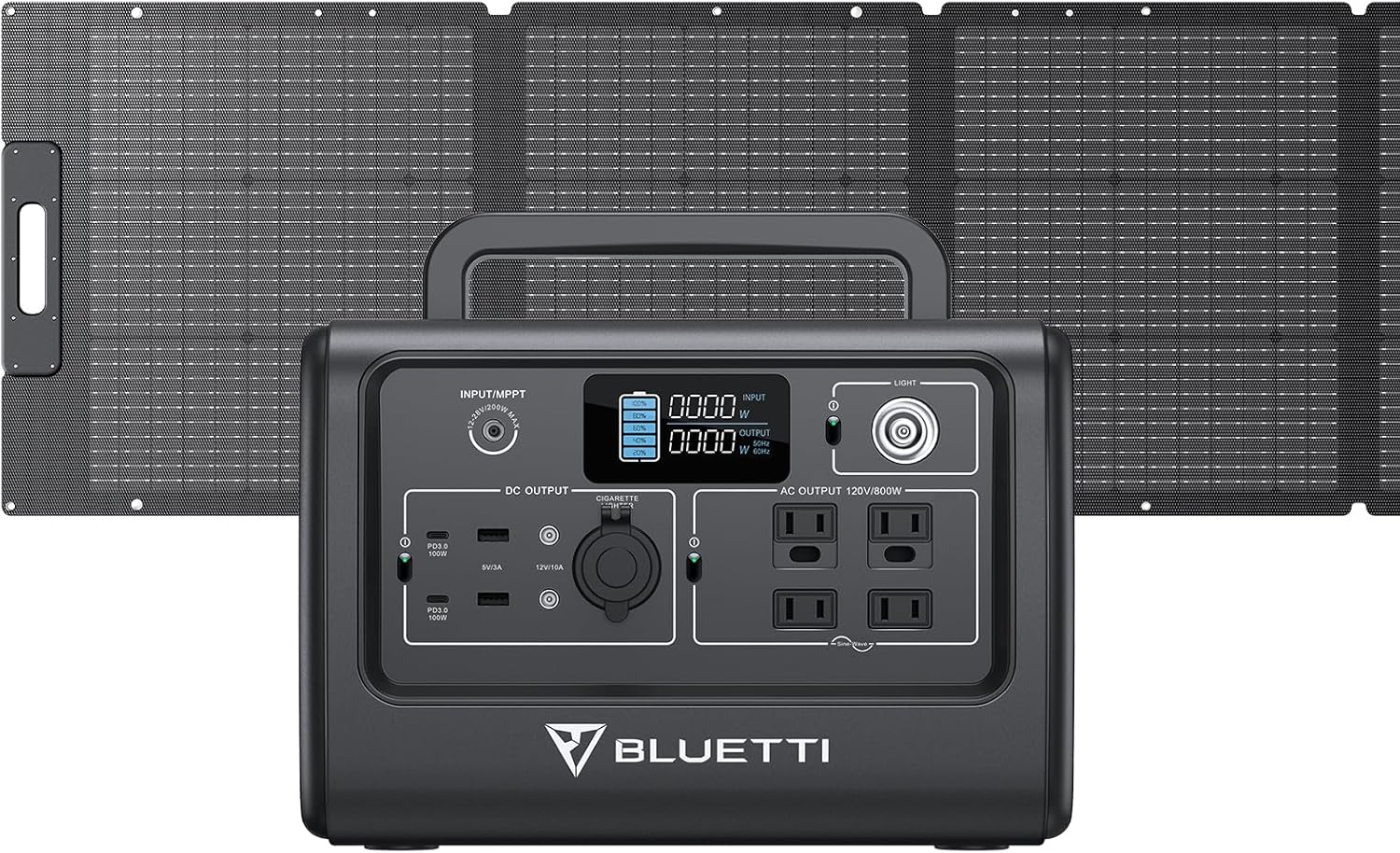
Image: The BLUETTI EB70S portable power station shown with its accompanying 200W foldable solar panel.
2. Safety Information
Your safety is paramount. The BLUETTI EB70S utilizes ultra-safe LiFePO4 battery cells and advanced Battery Management System (BMS) technology for enhanced reliability and durability. Adhere to the following safety guidelines:
- Do not disassemble, repair, or modify the unit.
- Keep the unit away from heat sources, open flames, and direct sunlight.
- Avoid exposure to water or high humidity.
- Ensure proper ventilation during use and charging.
- Use only BLUETTI-approved accessories and charging cables.
- Store the unit in a cool, dry place when not in use.

Image: An internal view of the power station illustrating the LiFePO4 battery cells and the Battery Management System (BMS) for safety.
3. Package Contents
Upon opening your BLUETTI EB70S package, verify that all the following items are included:
- BLUETTI EB70S Portable Power Station
- BLUETTI 200W Foldable Solar Panel (PV200)
- AC Adapter
- Solar Charging Cable (MC4 to DC7909)
- Car Charging Cable
- User Manual
4. Product Overview
4.1. EB70S Portable Power Station
The EB70S features multiple output ports to power a wide range of devices. The intuitive display provides real-time information on battery capacity, input/output power, and alerts.

Image: The BLUETTI EB70S power station displaying its 12 versatile outlets, including AC outlets, wireless charging pad, USB-C, DC5521, car port, and USB-A ports.

Image: A close-up of the EB70S display screen, showing indicators for battery capacity, input/output power, AC frequency, temperature anomaly, overload, and low-battery alerts.
4.2. 200W Foldable Solar Panel (PV200)
The 200W solar panel is designed for portability and efficiency, featuring monocrystalline solar cells and a durable ETFE coating for optimal performance and longevity.

Image: The 200W solar panel, emphasizing its monocrystalline solar cells with a cell efficiency of up to 23.4% and a maximum output power of 200W.

Image: A diagram illustrating the durable ETFE coating of the solar panel, which is lighter than glass, offers 95% light transmittance, is UV-resistant, and contributes to a longer lifespan.

Image: A person carrying the folded BLUETTI solar panel, demonstrating its compact folded size of 23.9" x 23.0" x 1.7" and light weight of 17.2 lbs, highlighting its portability.
5. Setup
5.1. Connecting the Solar Panel
To charge your EB70S using the solar panel, follow these steps:
- Unfold the 200W solar panel and position it in direct sunlight.
- Connect the solar charging cable (MC4 to DC7909) to the solar panel's MC4 connectors.
- Plug the DC7909 end of the cable into the input port of the EB70S power station.
- Ensure the connection is secure. The display on the EB70S will indicate incoming solar power.

Image: A diagram illustrating the connection process for solar charging, showing the solar panel connected to the EB70S power station via the solar charging cable.

Image: Visual guide demonstrating the easy setup and compatibility of the solar panel with various BLUETTI power station models, showing the MC4 connector and solar charging cable.
5.2. Positioning the Solar Panel
The 200W solar panel includes three built-in kickstands, allowing for optimal angle adjustment to maximize sunlight absorption. Adjust the angle to 45° ± 10° for best results.

Image: The BLUETTI solar panel deployed with its three built-in kickstands, illustrating how to adjust the angle for optimal sunlight capture (45° ± 10°).
6. Charging the EB70S
6.1. Solar Charging
The EB70S can be recharged from 0% to 80% in approximately 3-6 hours using the 200W solar panel, depending on sunlight conditions.

Image: A person setting up the solar panel in an outdoor environment, demonstrating the process of harnessing solar energy to charge the power station.
6.2. AC Charging
Using the included AC adapter, the EB70S can be fully recharged from 0% to 80% within 3 hours. A full charge typically takes 4-4.5 hours.

Image: The BLUETTI EB70S power station connected to a wall outlet via its AC adapter, illustrating the easiest way to charge the unit indoors.
6.3. Car Charging
The EB70S can also be recharged via a 12V or 24V car port using the provided car charging cable. Charging time from a car port typically ranges from 4-7 hours.

Image: The BLUETTI EB70S power station being charged inside a car, demonstrating its ability to be recharged on the go via a 12V/8A input.
7. Operating the EB70S
7.1. Powering On/Off
Press and hold the main power button to turn the unit on or off. The LCD screen will illuminate upon activation.
7.2. Using Output Ports
Activate the desired output section (AC, DC, USB) by pressing the corresponding button on the control panel. Connect your devices to the appropriate ports.
- AC Outlets: Provides 120V/800W power for appliances.
- USB-A & USB-C (PD 100W): For charging mobile devices, laptops, and other USB-powered gadgets.
- DC 5521 & Car Port: For 12V DC devices.
- Wireless Charger: Place compatible devices on the 15W wireless charging pad.

Image: The BLUETTI EB70S in a camping setting, demonstrating its capacity to power various devices such as phones (65 times), electric blankets (5 hours), mini-fridges (11 hours), and slow cookers (3 hours).

Image: A person working outdoors with a laptop powered by the BLUETTI EB70S, illustrating its utility for keeping essentials charged while away from traditional power sources.
7.3. ECO Mode
The EB70S features an ECO mode for enhanced energy efficiency. When activated, the AC output will automatically turn off after 4 hours if the load is low (less than 10W) or if there is no load, helping to conserve power.

Image: A visual representation explaining the ECO mode feature, which automatically turns off AC output after 4 hours of low or no load to save power.
8. Maintenance
Proper maintenance ensures the longevity and optimal performance of your BLUETTI EB70S.
- Battery Life: The LiFePO4 battery cells are designed for over 2500 life cycles to 80% capacity. To maximize battery lifespan, avoid consistently draining the battery to 0% or keeping it at 100% for extended periods.
- Cleaning: Use a dry, soft cloth to clean the exterior of the power station and solar panel. Do not use harsh chemicals or abrasive materials.
- Storage: If storing the unit for an extended period, charge it to approximately 50-60% and recharge every 3-6 months to prevent deep discharge. Store in a cool, dry place away from direct sunlight and extreme temperatures.
- Solar Panel Care: Keep the solar panel surface clean from dust, dirt, and debris to ensure maximum charging efficiency.
9. Troubleshooting
If you encounter issues with your BLUETTI EB70S, refer to the following common troubleshooting tips:
- Unit Not Turning On: Ensure the battery is charged. If completely depleted, it may require a few minutes of charging before it can power on.
- No Output from Ports: Check if the specific output section (AC/DC/USB) is activated. Verify that the connected device is within the power station's wattage limits.
- Slow Solar Charging: Ensure the solar panel is in direct sunlight and free from obstructions. Adjust the panel's angle for optimal sun exposure. Check all cable connections.
- Overload Alert: If an overload alert appears on the display, disconnect some devices to reduce the load. The unit will automatically reset once the load is within limits.
- Temperature Anomaly: If the unit becomes too hot or too cold, it may temporarily stop charging or discharging to protect the battery. Allow it to return to a safe operating temperature.
For more detailed troubleshooting or persistent issues, please refer to the official User Manual (PDF) or contact BLUETTI customer support.
10. Specifications
| Feature | Specification |
|---|---|
| Brand | BLUETTI |
| Model Name | EB70S+PV200 solar panel |
| Item Model Number | EB70S |
| Battery Type | LiFePO4 |
| Capacity | 716Wh |
| AC Output Wattage | 800 Watts (Running), 1400 Watts (Starting) |
| AC Output Voltage | 120 Volts |
| Power Source | Solar Powered, Electric |
| Max Solar Input | 200W |
| Recharge Time (Solar) | 3-6 hours (0-80%) |
| Recharge Time (AC) | 3 hours (0-80%), 4-4.5 hours (Full) |
| Recharge Time (Car) | 4-7 hours (12V/24V) |
| Life Cycles | 2500+ to 80% capacity |
| Item Weight (EB70S) | 21.4 Pounds |
| Product Dimensions (EB70S) | 8.5"L x 12.6"W x 8.7"H |
| Solar Panel Folded Size | 23.9" x 23.0" x 1.7" |
| Solar Panel Weight | 17.2 lbs |
| Material | Metal (Power Station), ETFE (Solar Panel) |
| Recommended Uses | Camping, Outdoor, Emergency |
11. Warranty & Support
The BLUETTI EB70S Solar Generator comes with a 24-month warranty from the date of purchase. This warranty covers defects in materials and workmanship under normal use.
For technical assistance, warranty claims, or any questions regarding your product, please contact BLUETTI customer support. BLUETTI maintains widespread sales and after-service networks to assist you.

Image: Customer service representatives ready to provide support for product inquiries and assistance.
You can also find additional resources and frequently asked questions on the official BLUETTI website or by referring to the comprehensive User Manual (PDF) provided with your product.


