
1. Introduction
This manual provides essential instructions for the safe and effective use of your Yale Electronic Alarm Safe YEC/200/DB2. Please read this manual thoroughly before installation and operation, and keep it for future reference.
The Yale Electronic Alarm Safe is designed to offer a standard level of security for your valuable items such as keys, passports, cash, and cards. It features an electronic keypad for access and an integrated alarm system for enhanced protection.
2. Safety Information
- Do not store the emergency keys inside the safe. Keep them in a secure, separate location.
- Ensure batteries are inserted with correct polarity.
- Replace all batteries simultaneously when the low battery indicator appears.
- Do not expose the safe to extreme temperatures or humidity.
- Keep the safe away from strong magnetic fields.
- Always test the safe's functionality after changing the PIN code or replacing batteries.
3. Package Contents
Verify that all items are present in the package:
- 1 x Yale Electronic Alarm Safe YEC/200/DB2
- 2 x Mechanical Emergency Keys
- 4 x AA Alkaline Batteries
- 1 x Set of Fixing Bolts (for wall or floor mounting)
- 1 x User Manual / Assembly Instructions
4. Setup
4.1 Initial Battery Installation
- Open the safe using one of the mechanical emergency keys. Insert the key into the keyhole, turn it, and rotate the handle to open the door.
- Locate the battery compartment on the inside of the safe door.
- Insert the 4 AA alkaline batteries, ensuring correct polarity (+/-).
- Close the battery compartment cover.
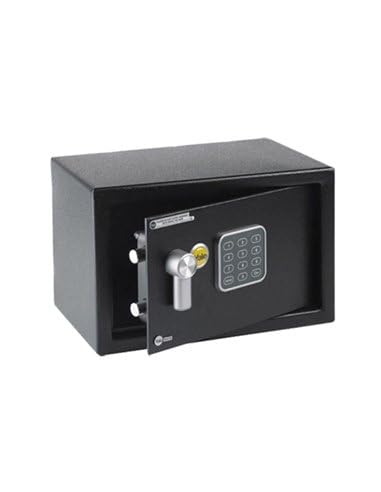
Image: The Yale Electronic Alarm Safe with its door open, revealing the electronic keypad on the door and the interior compartment. This view helps in locating the battery compartment.
4.2 Setting Your User PIN Code
The safe comes with a factory default code (usually 1-5-9 or 1-2-3-4-5-6, refer to specific instructions in the included manual). It is crucial to change this immediately.
- With the safe door open, press the internal reset button (usually a small red button located near the hinge or battery compartment).
- The yellow indicator light on the keypad will illuminate, indicating the safe is in programming mode.
- Enter your new 3 to 8-digit PIN code on the keypad.
- Press the '#' key to confirm.
- The green light will flash, indicating successful code change.
- Important: Test the new code several times with the door open before closing it.

Image: A user's hand interacting with the electronic keypad of the Yale safe, demonstrating the process of entering a PIN code.
4.3 Mounting the Safe
For optimal security, it is recommended to securely fix the safe to a wall or floor.
- Choose a suitable location, ensuring there is enough space to open the door fully.
- Mark the drilling points through the pre-drilled holes at the back or bottom of the safe.
- Drill pilot holes into the wall or floor using an appropriate drill bit for concrete or wood.
- Align the safe with the drilled holes and secure it using the provided fixing bolts.
- Ensure the safe is firmly attached and cannot be easily removed.

Image: The Yale Electronic Alarm Safe integrated into a wooden cabinet, demonstrating a secure and discreet mounting option.
5. Operating the Safe
5.1 Opening with PIN Code
- Enter your 3 to 8-digit PIN code on the keypad.
- Press the '#' key to confirm.
- If the code is correct, the green LED will illuminate. You will have a few seconds to turn the handle and open the safe door.
- If an incorrect code is entered, the red LED will flash.
5.2 Opening with Mechanical Emergency Key
Use the emergency key if you forget your PIN code or if the batteries are completely depleted.
- Locate the keyhole cover (usually discreetly placed near the handle or keypad). Remove the cover.
- Insert one of the mechanical emergency keys into the keyhole.
- Turn the key clockwise (or counter-clockwise, depending on the model) and simultaneously rotate the handle to open the safe door.
- Once open, you can replace the batteries if needed or reset the PIN code.
5.3 Integrated Alarm Function
The safe is equipped with a 130-decibel alarm system.
- Trigger Conditions: The alarm will activate if the safe is tampered with (e.g., strong vibrations, attempts to force open) or if three consecutive incorrect PIN codes are entered.
- Alarm Duration: The alarm will sound for 1 minute.
- Disarming the Alarm: To stop the alarm, enter the correct PIN code or open the safe using the mechanical emergency key.
5.4 LED Indicators
- Green LED: Indicates successful PIN entry and safe opening.
- Red LED: Indicates an incorrect PIN code entry or low battery power.
- Yellow LED: Illuminates during PIN code programming.
6. Maintenance
6.1 Battery Replacement
When the red LED flashes during operation, it indicates low battery power. Replace all 4 AA batteries promptly to ensure continued functionality.
- Open the safe using your PIN code or the emergency key.
- Locate the battery compartment on the inside of the door.
- Remove the old batteries and dispose of them responsibly.
- Insert 4 new AA alkaline batteries, observing correct polarity.
- Close the battery compartment cover.
- Test the safe operation with the new batteries.
6.2 Cleaning
Clean the exterior of the safe with a soft, damp cloth. Do not use abrasive cleaners or solvents, as these can damage the finish or electronic components.
7. Troubleshooting
| Problem | Possible Cause | Solution |
|---|---|---|
| Safe does not open with PIN code. | Incorrect PIN entered. Batteries are low or depleted. PIN code was changed and forgotten. | Re-enter the correct PIN code carefully. Replace all 4 AA batteries. Use the mechanical emergency key to open the safe and reset the PIN code. |
| Alarm sounds unexpectedly. | Safe was tampered with or moved. Three incorrect PIN entries. | Enter the correct PIN code or use the emergency key to disarm. Ensure the safe is securely mounted. |
| Keypad is unresponsive. | Batteries are completely depleted. Electronic malfunction. | Use the mechanical emergency key to open and replace batteries. If problem persists, contact customer support. |
| Door does not close properly. | Obstruction in the door frame. Locking bolts are not retracting fully. | Check for any items blocking the door. Ensure the handle is fully rotated to retract bolts before closing. |
8. Specifications
- Model: YEC/200/DB2
- Brand: Yale
- Material: Alloy Steel
- Lock Type: Electronic Combination Lock
- Exterior Dimensions (H x W x D): 200 x 310 x 200 mm (7.87 x 12.2 x 7.87 inches)
- Interior Dimensions (H x W x D): 190 x 300 x 150 mm (7.48 x 11.81 x 5.91 inches)
- Door Dimensions (H x W): 157 x 267 mm (6.18 x 10.51 inches)
- Capacity: 8.6 Liters
- Weight: 3.6 kg (7.94 lbs)
- Batteries: 4 x AA Alkaline (included)
- Special Features: Integrated 130dB Alarm System, Anti-shock Solenoid, Interior Carpet
- Mounting Type: Floor or Wall Mount (fixing bolts included)
- Spare Parts Availability: 2 Years
- Country of Origin: China
9. Warranty and Support
Yale products are manufactured to high standards and undergo rigorous quality control. This product comes with a standard manufacturer's warranty. Please refer to the warranty card included in your package for specific terms and conditions.
For technical support, spare parts, or warranty claims, please contact your local Yale customer service or visit the official Yale website. Keep your proof of purchase for warranty purposes.
For more information, you may visit the Yale Privacy and Legal Center: https://www.yalehome.com/global/en/privacy-and-legal-center


