
1. Introduction
Thank you for purchasing the N'OVEEN Electric Faucet with LED Temperature Display. This instant water heater is designed to provide hot water quickly and efficiently for various applications. Please read this manual carefully before installation and operation to ensure safe and optimal performance of the product. Keep this manual for future reference.
2. Safety Instructions
WARNING: Failure to follow these safety instructions may result in electric shock, fire, or serious injury.
- This appliance is intended for household use only.
- Installation must be performed by a qualified electrician or plumber in accordance with local electrical and plumbing codes.
- Ensure the power supply voltage matches the rating specified on the appliance.
- Do not operate the appliance if the power cord or plug is damaged.
- Do not immerse the appliance in water or other liquids.
- Always disconnect the power supply before cleaning or performing any maintenance.
- Do not block the water outlet during operation.
- Keep children away from the appliance during operation.
- Ensure proper grounding of the electrical circuit.
- Do not use extension cords or adapters with this appliance.
3. Product Overview
The N'OVEEN Electric Faucet is an instant water heater featuring an LED temperature display and a durable design. It is available with both rigid and flexible spout options.

Figure 1: Main view of the N'OVEEN Electric Faucet with a rigid spout, featuring an integrated LED temperature display showing '60'.
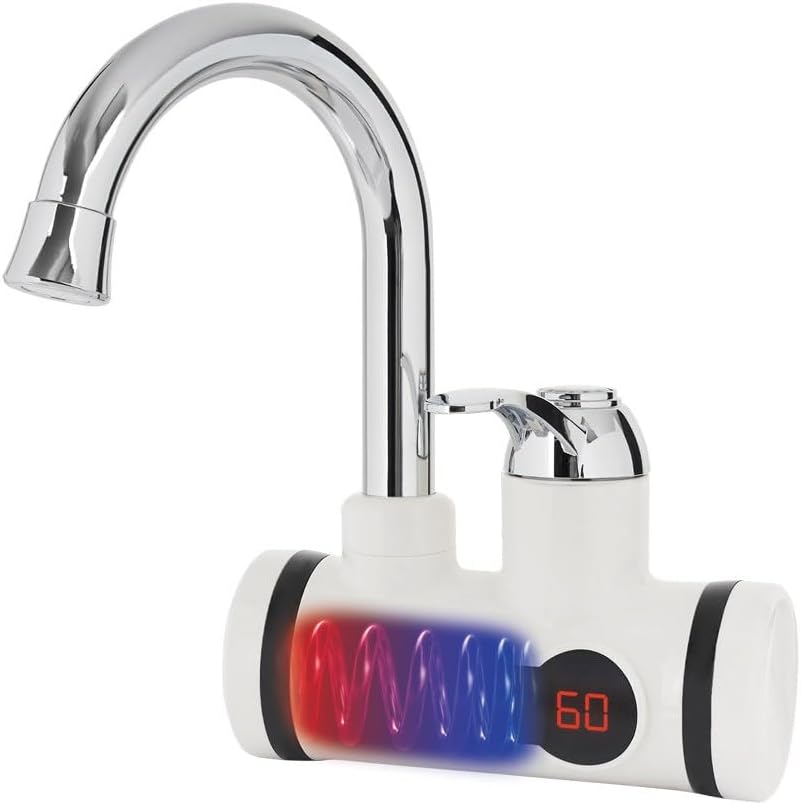
Figure 2: Diagram illustrating the internal heating process within the faucet, showing water flowing through a heated coil.

Figure 3: The N'OVEEN Electric Faucet equipped with a flexible gooseneck spout, offering versatile water direction.
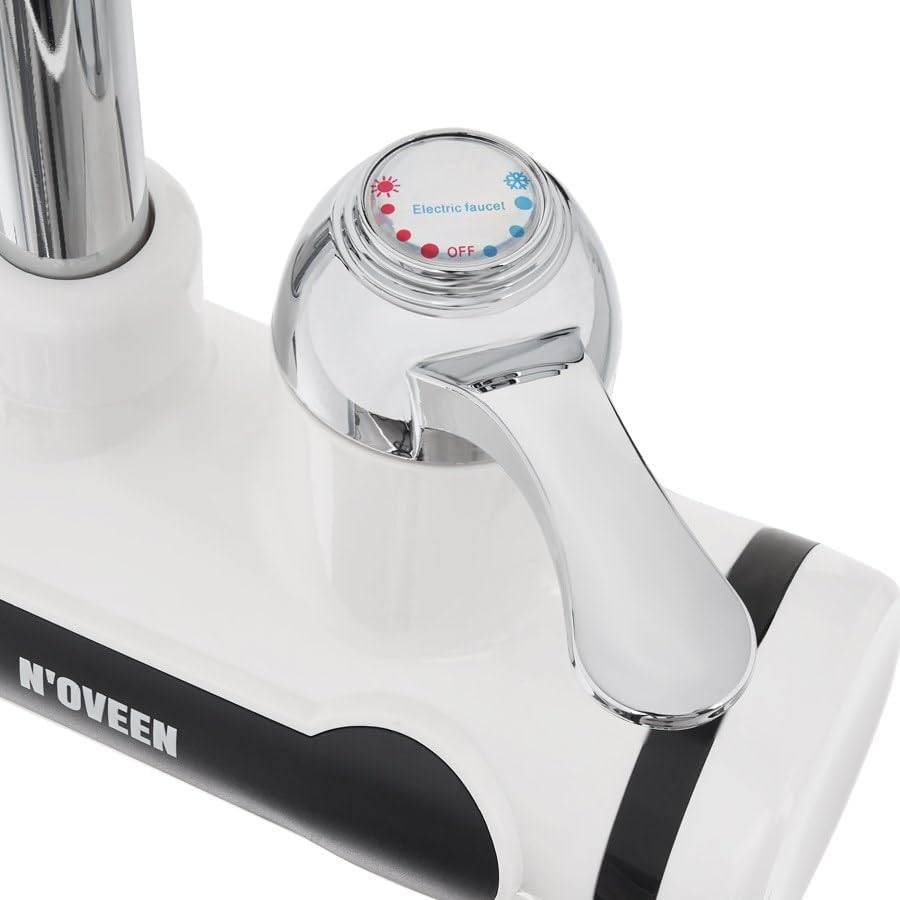
Figure 4: Detailed view of the faucet's control lever, indicating settings for 'Electric faucet' (hot water) and 'OFF', with red and blue indicators for temperature.
4. Setup and Installation
Proper installation is crucial for the safe and efficient operation of your N'OVEEN Electric Faucet. It is highly recommended that installation be carried out by a certified professional.
4.1 Package Contents
Please verify that all components are present before beginning installation. Refer to your product packaging for a complete list of included items. Typically, the package includes:
- N'OVEEN Electric Faucet unit (with rigid or flexible spout)
- Mounting hardware
- Sealing gaskets
- Instruction manual

Figure 5: The flexible spout component, which can be attached to the main faucet unit.

Figure 6: A water filter screen and a threaded adapter, essential components for proper water connection and filtration.
4.2 Installation Steps
- Prepare the Installation Area: Ensure the water supply is turned off and the area under the sink is clear.
- Mount the Faucet: Insert the faucet base into the mounting hole on your sink or countertop. Secure it from underneath using the provided mounting hardware and gaskets.
- Connect Water Supply: Connect the cold water inlet hose of the faucet to your cold water supply line. Ensure all connections are tight to prevent leaks.
- Connect Power: Plug the power cord into a properly grounded electrical outlet. Ensure the circuit can handle a 3600W load.
- Test for Leaks: Slowly turn on the main water supply and check for any leaks around the connections.
- Initial Flush: Before first use, run cold water through the faucet for a few minutes to flush out any air or debris from the system.
5. Operating Instructions
The N'OVEEN Electric Faucet is designed for straightforward operation, providing instant hot water on demand.
5.1 Water Temperature Control
- The faucet features a side lever for controlling water flow and temperature.
- Move the lever to the left for hot water. The further left you move it, the hotter the water will become, up to 60°C.
- Move the lever to the right for cold water.
- The temperature can be adjusted between 30°C and 60°C when in hot water mode.
- The heating element activates automatically when the lever is moved to the hot water position.
5.2 LED Temperature Display
- The integrated LED display shows the current water temperature in real-time.
- This allows for precise monitoring and adjustment of the water temperature for comfort and safety.
6. Maintenance
Regular maintenance ensures the longevity and optimal performance of your electric faucet.
6.1 Cleaning
- Always disconnect the power supply before cleaning.
- Clean the exterior of the faucet with a soft, damp cloth. Do not use abrasive cleaners, solvents, or harsh chemicals, as these can damage the finish.
- Periodically clean the aerator at the end of the spout to remove any mineral deposits or debris that may affect water flow. Unscrew the aerator, rinse it, and reattach.
6.2 Descaling
- In areas with hard water, mineral deposits (limescale) can build up inside the heating element and affect efficiency.
- If you notice reduced hot water flow or heating efficiency, descaling may be necessary. This procedure should ideally be performed by a qualified technician.
7. Troubleshooting
If you encounter issues with your N'OVEEN Electric Faucet, refer to the following common problems and solutions.
| Problem | Possible Cause | Solution |
|---|---|---|
| No hot water | No power supply Water flow too low Heating element malfunction | Check power connection and circuit breaker. Ensure adequate water pressure and flow. Contact a qualified technician. |
| Water is not hot enough | Water flow too high Limescale buildup Ambient water temperature too low | Reduce water flow using the lever. Perform descaling (professional recommended). Allow more time for heating or reduce flow further. |
| Water leakage | Loose connections Damaged seals | Check and tighten all water connections. Replace damaged seals. If leakage persists, contact a professional. |
| LED display not working | Power issue Display malfunction | Check power supply. If power is present and display remains off, contact customer support. |
For problems not listed here or if solutions do not resolve the issue, please contact N'OVEEN customer support or a qualified service technician.
8. Specifications
| Feature | Specification |
|---|---|
| Brand | N'OVEEN |
| Model Number | NOVEEN_50 |
| Power | 3600 Watts |
| Heat Output | 3000 Watts (heating tube) |
| Voltage | Refer to product label for specific voltage requirements |
| Material | Stainless Steel, Durable Plastic |
| Max Temperature | 60°C (140°F) |
| Flow Rate | 2.5 Liters per second |
| Product Dimensions (L x W x H) | 1 x 1 x 1 cm (approximate, refer to actual product for precise dimensions); 1.44 kg |
| Special Features | Compact, Durable, LED Temperature Display |
9. Warranty and Support
For information regarding product warranty, please refer to the warranty card included with your purchase or visit the official N'OVEEN website. If you require technical assistance or have questions about your product, please contact N'OVEEN customer support through the contact details provided in your purchase documentation.