
1. Product Overview
The KEF R3 Meta redefines bookshelf speaker performance. It features a true three-way design, incorporating the 12th generation Uni-Q® driver array with Metamaterial Absorption Technology (MAT™) and a powerful 6.5-inch hybrid aluminum bass driver. This design pushes acoustic performance to new extremes, delivering exceptional clarity and detail.
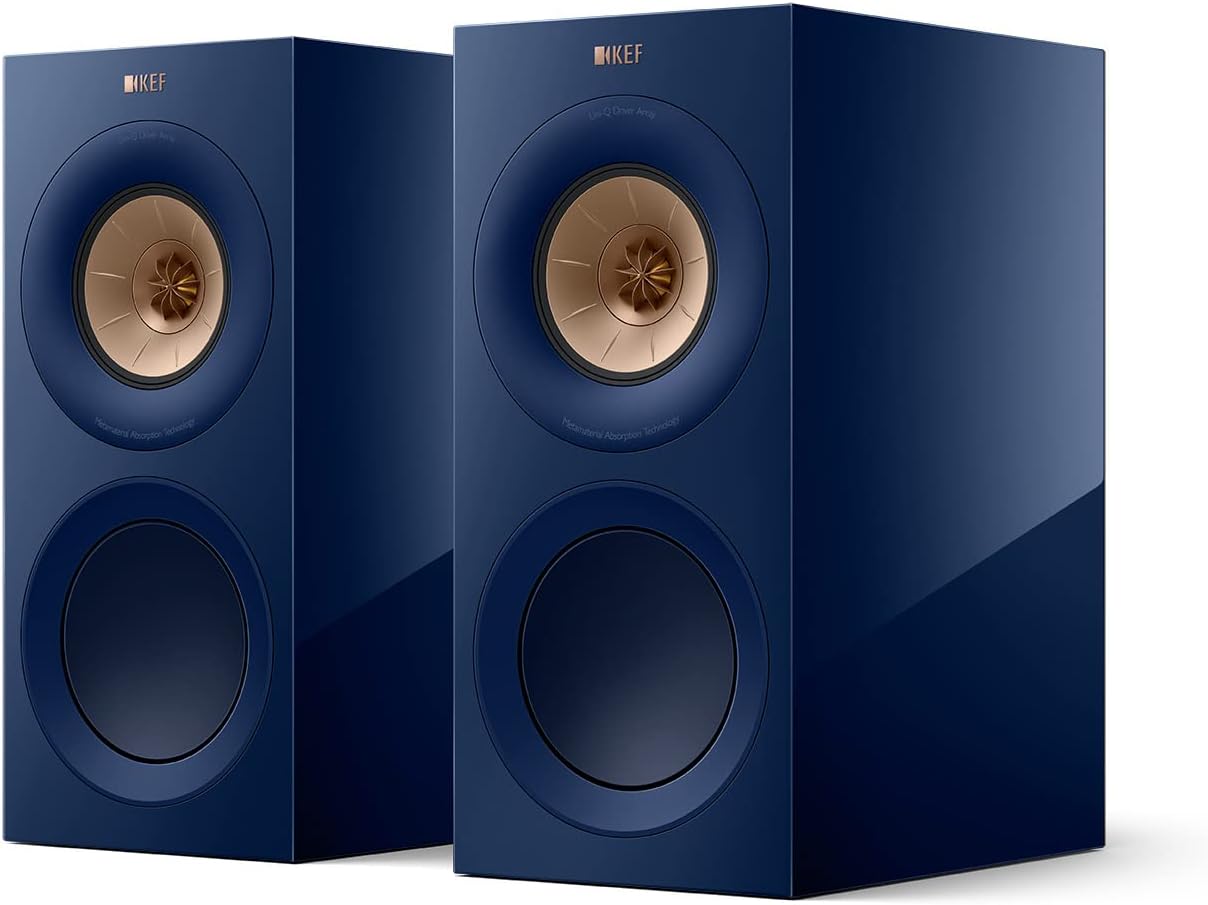
Figure 1: KEF R3 Meta Bookshelf Speakers (Indigo Gloss, Pair)
2. Setup Guide
2.1 Unpacking
Carefully remove all components from the packaging. Ensure all items listed below are present:
- 1 Pair of KEF R3 Meta Speakers
2.2 Speaker Placement
Optimal speaker placement is crucial for sound quality. Position the speakers to form an equilateral triangle with your primary listening position. Ensure they are placed on a stable surface or dedicated speaker stands. Maintain a distance from walls to prevent excessive bass resonance.

Figure 2: Front view of KEF R3 Meta Bookshelf Speaker
2.3 Connections
Connect your KEF R3 Meta speakers to your amplifier or receiver using high-quality speaker cables. The speakers have an impedance of 4 Ohms, so ensure your amplifier is compatible. Use the binding posts on the rear of each speaker for connection.

Figure 3: Rear view with connection terminals
Video 1: An overview of the KEF R Series Meta speakers, highlighting their design and technological features, including the Uni-Q driver array and Metamaterial Absorption Technology.
3. Operating Your Speakers
3.1 Power On/Off
The KEF R3 Meta speakers are passive and do not have a direct power button. They receive power from your connected amplifier. Refer to your amplifier's manual for power control.
3.2 Source Selection
Source selection (e.g., Auxiliary, RCA) is managed through your connected amplifier or receiver. Ensure the correct input is selected on your amplifier to hear audio through the speakers.
3.3 Audio Playback
Once connected and powered, your speakers will reproduce audio from your selected source. The Uni-Q driver array ensures a wide and even sound dispersion.

Figure 4: Close-up of the KEF R3 Meta Uni-Q driver, featuring Metamaterial Absorption Technology.
4. Care and Maintenance
To maintain the aesthetic and acoustic performance of your KEF R3 Meta speakers, follow these guidelines:
- Cleaning: Use a soft, dry, lint-free cloth to gently wipe the cabinet surfaces. Avoid abrasive cleaners or solvents.
- Grilles: The micro-fiber grilles can be carefully removed for cleaning or if you prefer the aesthetic of the exposed drivers. Handle with care to avoid damage.
- Environment: Avoid exposing speakers to direct sunlight, extreme temperatures, or high humidity.
5. Troubleshooting Common Issues
If you encounter any issues with your KEF R3 Meta speakers, consider the following:
- No Sound: Ensure all speaker cables are securely connected to both the speakers and the amplifier. Verify that the amplifier is powered on and the correct input source is selected.
- Distorted Sound: Check speaker cable connections for any loose strands or short circuits. Reduce the volume on your amplifier. Ensure the amplifier is not overdriven.
- Uneven Sound: Verify speaker placement and ensure both speakers are equidistant from the listening position. Check the balance settings on your amplifier.
For persistent issues, refer to your amplifier's manual or contact customer support.
6. Technical Specifications
| Feature | Specification |
|---|---|
| Model Name | R3 Meta |
| Speaker Type | Bookshelf |
| Material | Aluminum |
| Color | Blue (Indigo Gloss) |
| Product Dimensions | 13.2"D x 16"W x 16.6"H |
| Item Weight | 28.4 Kilograms (62.5 pounds) |
| Impedance | 4 Ohms |
| Frequency Response (±3dB) | 58Hz - 28kHz |
| Woofer Diameter | 6.5 Inches |
| Tweeter Diameter | 1 Inches |
| Connectivity Technology | Auxiliary, RCA |
| Included Components | 1 Pair of KEF R3 Meta Speakers |
7. Warranty Information
The KEF R3 Meta speakers come with a 5-year manufacturer warranty. Please retain your proof of purchase for any warranty claims. For detailed terms and conditions, refer to the official KEF website or contact customer support.
8. Customer Support
For further assistance, technical support, or inquiries regarding your KEF R3 Meta speakers, please visit the official KEF website or contact their customer service department. Contact details can typically be found on the KEF website's support section.


