1. Introduction
Thank you for choosing the ODK 40-Inch Computer Desk. This manual provides detailed instructions for assembly, usage, maintenance, and troubleshooting to ensure you get the most out of your new desk. Designed for multi-use, this desk offers ample space for work, study, or gaming, complete with storage solutions and an ergonomic monitor stand.

Figure 1: ODK 40-Inch Computer Desk (White)
This image displays the ODK 40-Inch Computer Desk in white, showcasing its monitor stand, two drawers, and side shelves. The desk is set up with two monitors, a keyboard, mouse, and various office accessories, highlighting its functional design.
2. Safety Information
- Ensure all parts are securely fastened before use.
- Do not overload shelves or drawers beyond their weight capacity.
- Keep small parts away from children during assembly to prevent choking hazards.
- Avoid placing hot items directly on the desk surface without protection.
- Do not stand or climb on the desk.
3. Package Contents
Before beginning assembly, verify that all components listed below are present and undamaged. If any parts are missing or damaged, please contact customer service.

Figure 2: Desk components prior to assembly.
This image shows the various components of the ODK Computer Desk laid out on a carpeted floor, including metal frame pieces, wooden panels for the desktop, monitor stand, and shelves, along with a bag of hardware and the instruction manual.
- Desktop Panel (1)
- Monitor Stand Shelf (1)
- Side Shelf Panels (2)
- Metal Frame Components (various)
- Fabric Drawers (2)
- Hardware Pack (screws, bolts, tools)
- Instruction Manual (1)
4. Setup and Assembly
Assembly is designed to be straightforward. It is recommended to have two people for assembly, though one person can complete it. Follow the numbered steps in the provided manual and refer to the diagrams.
Key Assembly Steps:
- Unpack all components and verify against the parts list.
- Assemble the main metal frame structure using the provided hardware.
- Attach the desktop panel to the assembled frame.
- Install the side shelf panels. Note that the top shelf is adjustable to two different heights.
- Assemble the fabric drawers and insert them into the designated slots.
- Attach the monitor stand shelf to the desktop. This component is also removable if a flat surface is preferred.
- Ensure all screws are tightened and the desk is stable. Adjustable foot pads can be used to level the desk on uneven surfaces.
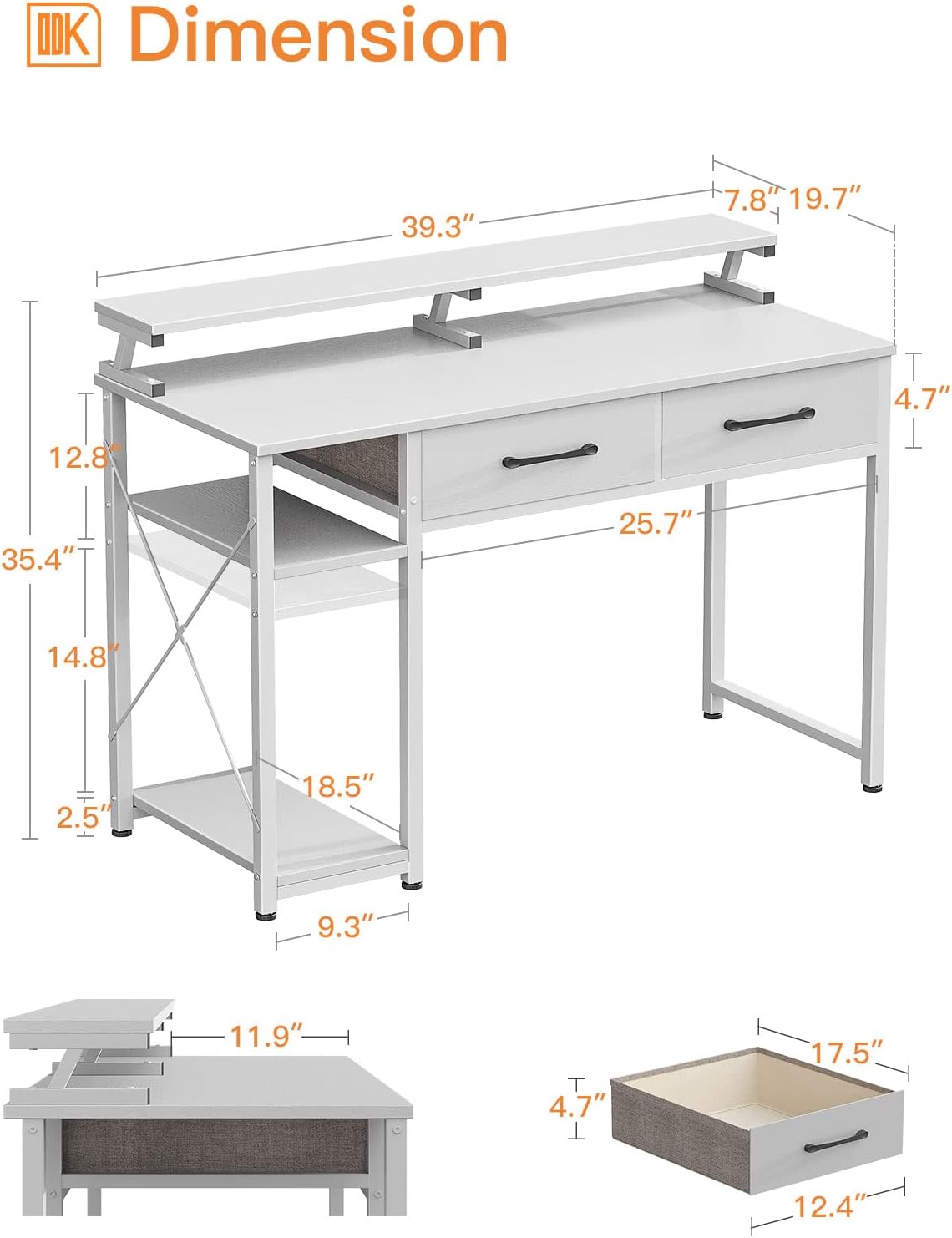
Figure 3: Desk dimensions and structural overview.
This diagram illustrates the overall dimensions of the ODK Computer Desk, including the height of the monitor stand, desktop, and side shelves. It also shows the internal dimensions of the fabric drawers.
Note: No official product videos from the seller were available for embedding. The assembly process is detailed in the included written instructions.
5. Features
- Multi-Use Design: The 40" x 19.7" surface provides ample space for writing, working, and gaming. The desk's industrial and modern design complements various decor styles.
- Integrated Storage: Two drawers offer convenient under-desk storage for books, documents, and office supplies. Open shelves keep frequently used items within easy reach.
- Adjustable Shelves: The side shelves feature a 2-level adjustable height, allowing accommodation for different-sized items, including a computer tower.
- Monitor Stand Shelf: A 6.7” high monitor shelf raises your screen for improved visibility and helps reduce neck and back strain. It provides ample space for one or two monitors. This shelf is also reversible and removable.
- Sturdy and Stable: Constructed with a thicker metal frame and sturdy wood board, ensuring durability and stability. Adjustable table foot pads enhance stability and protect floors.

Figure 4: Detail of a fabric drawer.
This close-up image shows the interior of one of the ODK Computer Desk's fabric drawers, filled with various items like headphones, a smartphone, and glasses, demonstrating its storage capacity.

Figure 5: Adjustable side shelf.
This image highlights the adjustable nature of the ODK Computer Desk's side shelves, showing how the middle shelf can be positioned at different heights to accommodate items like a computer tower or storage baskets.

Figure 6: Ergonomic viewing experience.
This diagram illustrates the ergonomic benefits of the ODK Computer Desk's monitor stand, showing a user maintaining a comfortable posture with their screen at eye level, reducing strain on the neck and back.
6. Usage and Operating Instructions
- Workstation Setup: Place your monitor(s) on the elevated stand for optimal viewing. Utilize the main desktop for your keyboard, mouse, and writing space.
- Storage Utilization: Use the fabric drawers for organizing smaller office supplies, documents, or personal items. The side shelves are ideal for a computer tower, books, or decorative items. Adjust the shelf height as needed for taller items.
- Cable Management: Route cables neatly behind the monitor stand and through the desk's structure to maintain a tidy workspace.
7. Maintenance
- Cleaning: Wipe the desk surfaces with a damp cloth for general cleaning. For stubborn marks, use a mild, non-abrasive cleaner. Dry immediately with a soft, dry cloth.
- Avoid Harsh Chemicals: Do not use harsh chemicals, abrasive cleaners, or solvents, as these can damage the finish.
- Regular Checks: Periodically check all screws and fasteners to ensure they remain tight. Tighten if necessary.
8. Troubleshooting
- Wobbly Desk: Ensure all screws are fully tightened. Adjust the foot pads on the bottom of the desk legs to level the desk on uneven floors.
- Drawers Not Sliding Smoothly: Check that the fabric drawers are correctly assembled and inserted. Ensure no obstructions are in the drawer slots.
- Missing Parts: If any parts are missing upon delivery, refer to the 'Package Contents' section and contact customer service for assistance.
9. Specifications
| Feature | Specification |
|---|---|
| Brand | ODK |
| Shape | Rectangular |
| Desk Design | Computer Desk |
| Product Dimensions (D x W x H) | 19.7"D x 39.3"W x 35.4"H |
| Color | White |
| Style | Modern |
| Base Material | Metal Steel |
| Top Material Type | Engineered Wood |
| Finish Type | Powder Coated |
| Special Feature | Reversible |
| Number of Drawers | 2 |
| Number of Shelves | 2 (side shelves) |
| Required Assembly | Yes |
| Recommended Number of People for Assembly | 2 |
10. Warranty and Support
ODK is committed to providing quality products and customer satisfaction. For any problems or inquiries regarding your ODK Computer Desk, please feel free to contact our customer service team. We aim to respond within 24 hours.
Please retain your purchase receipt for any warranty claims.


