
1. Introduction
This manual provides comprehensive instructions for the safe and effective use of your Enjoyedled DQ-R90L Remote Control, designed for DJ Disco Stage Party Lights. Please read this manual thoroughly before operating the device and retain it for future reference.
2. Product Overview
The Enjoyedled DQ-R90L is an infrared remote control specifically designed to operate compatible DJ Disco Stage Party Lights. It offers various lighting modes to enhance your event atmosphere.
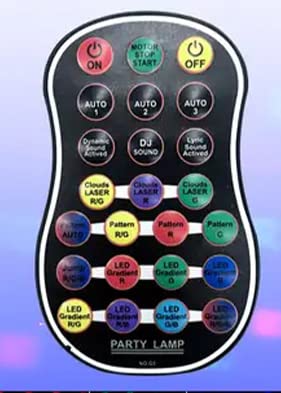
Figure 1: Enjoyedled DQ-R90L Remote Control. This image displays the remote control, typically black, featuring an array of buttons for various functions such as power, mode selection, and color control.
Key Features:
- Material: Constructed from durable plastic.
- Auto Mode: Automatically changes light colors to create a romantic and relaxed atmosphere.
- Strobe Mode: Colors appear and disappear quickly, producing a flash effect.
- Sound Control Mode: Lighting colors change in synchronization with the rhythm of surrounding music.
- Connectivity: Infrared (IR) technology.
- Maximum Range: Up to 10 meters (33 feet).
3. Setup
- Battery Installation: Open the battery compartment on the back of the remote control. Insert the required batteries (typically 2x AAA, not included) ensuring correct polarity (+/-). Close the compartment securely.
- Power On Light Fixture: Ensure your compatible DJ Disco Stage Party Light is powered on and ready to receive commands.
- Point and Operate: Point the remote control directly towards the infrared receiver on your light fixture. The remote operates via infrared signals, requiring a clear line of sight.
4. Operating Instructions
The DQ-R90L remote control provides intuitive button controls for various lighting effects. Ensure the remote is pointed at the light fixture's IR receiver for proper function.
Button Functions:
- Power Button: Turns the light fixture on or off.
- AUTO Button: Activates the automatic color changing mode. The lights will cycle through various colors and patterns.
- STROBE Button: Engages the strobe effect, causing colors to flash rapidly.
- SOUND Button: Enables sound-activated mode. The lights will react and change colors according to the beat and volume of nearby music.
- Color Buttons (e.g., R, G, B, W): Selects specific static colors (Red, Green, Blue, White, etc., depending on the light fixture's capabilities).
- +/- Buttons: Adjusts brightness, speed of effects, or sensitivity in sound mode, depending on the active mode.
For optimal performance, maintain a clear line of sight between the remote and the light fixture. The maximum effective range is approximately 10 meters.
5. Maintenance
- Battery Replacement: When the remote's range decreases or it becomes unresponsive, replace the batteries with new ones of the correct type and polarity.
- Cleaning: Wipe the remote control with a soft, dry cloth. Do not use liquid cleaners or abrasive materials, as these can damage the surface or internal components.
- Storage: Store the remote in a cool, dry place away from direct sunlight and extreme temperatures when not in use for extended periods. Remove batteries if storing for several months to prevent leakage.
6. Troubleshooting
| Problem | Possible Cause | Solution |
|---|---|---|
| Remote not responding. | Dead or incorrectly inserted batteries. No clear line of sight to the light fixture. | Replace batteries, ensuring correct polarity. Ensure remote is pointed directly at the light's IR receiver without obstructions. |
| Limited range or intermittent response. | Weak batteries. Obstructions between remote and light. Interference from other IR devices. | Replace batteries. Remove any objects blocking the signal path. Move away from other IR-emitting devices. |
| Light fixture not responding to specific modes (e.g., Sound Control). | Light fixture not compatible with the mode. Mode not properly activated. | Refer to your light fixture's manual for compatibility. Press the mode button firmly. Ensure sufficient sound for Sound Control mode. |
7. Specifications
- Brand: Enjoyedled
- Model Name: DQ-R90L
- Model Number: DQ-R90L
- Connectivity Technology: Infrared
- Compatible Devices: DJ Disco Stage Party Lights
- Controller Type: Button Control
- Maximum Range: 10 Meters
- Material: Plastic
- Special Feature: Ergonomic design
- Maximum Number of Supported Devices: 1 (per remote)
- UPC: 704078008714
- Manufacturer: HUIZHOU SHI DAQI TECHNOLOGY CO., LTD
8. Warranty and Support
For warranty information, technical support, or service inquiries, please contact the seller or manufacturer directly. Keep your purchase receipt as proof of purchase.
You can visit the official Enjoyedled store for more product information: Enjoyedled Store
