
1. Introduction
This manual provides detailed instructions for the installation, operation, and maintenance of your MBETA 11 Inch Full Touch Screen Car Recorder. Please read this manual thoroughly before using the device to ensure proper functionality and safety.
2. Product Overview
The MBETA Car Recorder is an advanced dual-camera system designed to enhance driving safety and provide reliable recording. Key features include:
- 11-inch IPS Touch Screen Display: Offers a clear and expansive view for easy operation and playback.
- 2K Front Camera & 1080P Rear Camera: Provides high-definition recording for both front (1296P) and rear (1080P) views.
- Starlight Night Vision: Enhanced low-light performance for clear recordings in challenging conditions.
- G-Sensor for Emergency Recording: Automatically locks video files upon detecting sudden impacts or collisions, preventing overwriting.
- High-Definition Reversing Image: Automatically displays a wide-angle rear view with auxiliary parking lines when reversing.
- Voice Control: Allows hands-free operation for certain functions.
- Loop Recording: Continuously records by overwriting the oldest unlocked files when the memory card is full.
- 24-Hour Parking Monitoring: Provides surveillance when the vehicle is parked (requires hardwire kit, sold separately).

Image 1: The MBETA 11 Inch Full Touch Screen Car Recorder with its rear camera module. The main unit features a large display, while the compact rear camera captures the view behind the vehicle.
3. Package Contents
Please check the package for the following items:
- MBETA 11 Inch Car Recorder (Main Unit)
- Rear Camera
- Car Charger (Power Cable)
- Rear Camera Cable
- Mounting Straps/Brackets
- User Manual
- Memory Card (TF card)

Image 2: All components included in the MBETA Car Recorder package, showing the main unit, rear camera, cables, and mounting accessories.
4. Setup and Installation
- Insert Memory Card: Before mounting, insert a TF card (up to 64GB recommended) into the designated slot on the main unit. Ensure the card is inserted correctly.
- Mount the Main Unit: Secure the 11-inch car recorder over your existing rearview mirror using the provided mounting straps or brackets. Ensure it is firmly attached and does not obstruct your view.
- Install the Rear Camera: Mount the rear camera at the back of your vehicle, typically above the license plate or on the rear window. Ensure it has a clear view.
- Connect Rear Camera Cable: Route the rear camera cable from the rear camera to the main unit. Connect it to the AV input port on the main unit. For reversing functionality, connect the red wire of the rear camera cable to your car's reverse light power supply (12V).
- Connect Power: Plug the car charger into your vehicle's cigarette lighter socket. Connect the other end to the power input port on the main unit.
- Power On: Start your vehicle. The car recorder should automatically power on and begin recording.
5. Operating Instructions
5.1. Basic Operation
- Power On/Off: The device typically powers on automatically with the vehicle ignition and powers off when the ignition is turned off. You can also manually power it on/off using the power button.
- Recording: Once powered on, the device will automatically start loop recording. The front and rear cameras will record simultaneously.
- Touch Screen Control: Navigate menus, adjust settings, and view playback by touching the 11-inch IPS screen.

Image 3: A hand demonstrating interaction with the 11-inch full touch screen display, showing its intuitive interface for control.
5.2. Reversing Image Function
When the vehicle is shifted into reverse gear, the screen will automatically switch to display the rear camera view. This view includes auxiliary parking lines to assist with safe parking.

Image 4: The car recorder screen showing a wide-angle view from the rear camera, complete with colored parking guide lines to aid in reversing maneuvers.
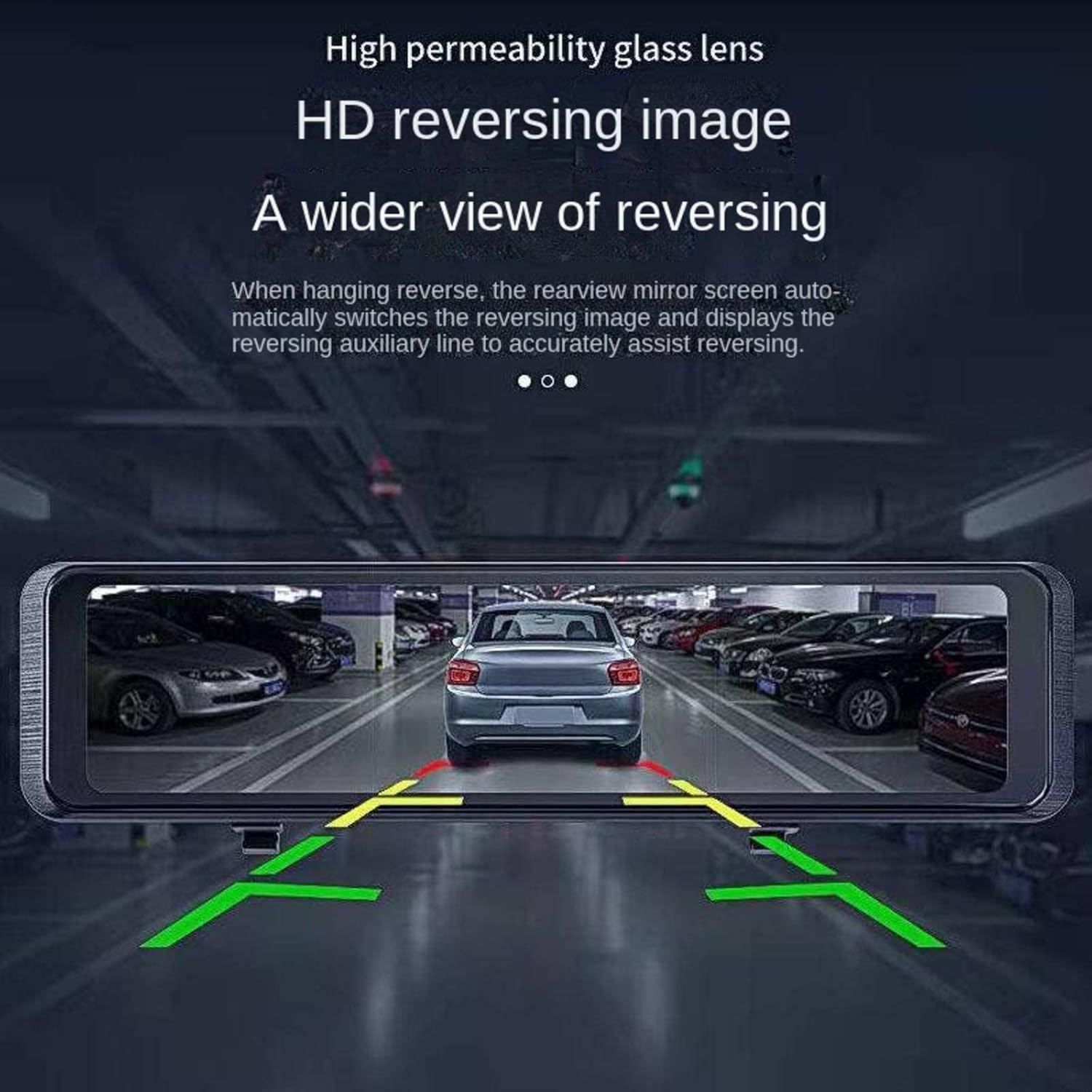
Image 5: A practical demonstration of the reversing image feature, showing a vehicle backing into a parking space with the assistance of the on-screen guide lines.
5.3. G-Sensor and Emergency Recording
The built-in G-Sensor detects sudden impacts or vibrations. In such events, the current video segment will be automatically locked and saved to a protected folder, preventing it from being overwritten by loop recording.
5.4. Voice Control
The device supports voice commands for certain functions. Refer to the on-screen prompts or specific voice command list (if available in settings) for supported commands.
5.5. Parking Monitoring (Optional)
For 24-hour parking monitoring, a dedicated hardwire kit (sold separately) is usually required to provide continuous power to the device when the vehicle is off. This feature allows the recorder to capture events while parked.
6. Maintenance
- Cleaning: Use a soft, dry cloth to clean the screen and lens. Avoid using abrasive cleaners or solvents.
- Memory Card: Regularly format the TF card (e.g., once a month) within the device's settings to ensure optimal performance and prevent data corruption. Back up important files before formatting.
- Temperature: Avoid exposing the device to extreme temperatures, direct sunlight for prolonged periods, or high humidity.
7. Troubleshooting
| Problem | Possible Cause | Solution |
|---|---|---|
| Device does not power on. | No power supply; faulty car charger; loose connection. | Check car charger connection and vehicle's cigarette lighter. Ensure the car charger is functional. |
| Recording stops unexpectedly. | Memory card full or corrupted; faulty memory card; G-Sensor sensitivity too high. | Format the memory card. Try a new, high-quality TF card. Adjust G-Sensor sensitivity in settings. |
| Rear camera not displaying. | Loose cable connection; faulty rear camera. | Check the rear camera cable connection to the main unit. Ensure the cable is not damaged. |
| Screen freezes or is unresponsive. | Software glitch; memory card issue. | Press and hold the power button to force a restart. If the issue persists, format the memory card. |
8. Specifications
| Feature | Detail |
|---|---|
| Model Name | New Recorder |
| Screen Size | 11-inch Full Touch Screen IPS Display |
| Front Camera Resolution | 2K (1296P) |
| Rear Camera Resolution | 1080P |
| Shooting Angle | 170° (Front) |
| Lens Aperture | F2.1 |
| Memory Card Support | TF card, up to 64GB |
| Data Transfer Interface | USB, HDMI, AV |
| Power Supply | 2.5A |
| Voltage | 12-24V |
| Product Dimensions | 11.02 x 2.99 x 1.57 inches (approx. 28cm x 7.6cm x 4cm) |
| Item Weight | 1.76 pounds (0.8 kg) |
| Control Method | Touch, Voice |
| Mounting Type | Rearview Mirror Mount |
9. Support
For any questions or assistance regarding your MBETA Car Recorder, please contact our customer support. We are committed to resolving any issues you may encounter within 24 hours.
Note: Warranty information is not provided in the product details. Please refer to your purchase documentation for specific warranty terms.