
Introduction
Thank you for choosing the HLDIRECT 55 Inch Gaming Desk. This manual provides detailed instructions for assembly, operation, maintenance, and troubleshooting to ensure you get the most out of your new gaming desk. Please read this manual thoroughly before beginning assembly or use.
Safety Information
Important Safety Instructions:
- Ensure the desk is properly anchored to the wall to prevent tipping.
- Do not exceed the maximum weight limit of 150 kilograms (approximately 330 pounds).
- Adjust foot pads for stability on uneven surfaces.
- Use the desk in a well-ventilated area.
- Keep small parts away from children during assembly to prevent choking hazards.
Package Contents
Please verify that all components are present before beginning assembly:
- Desk Top (Carbon Fiber Surface)
- Desk Legs (Alloy Steel Frame)
- Headphone Hook
- Cup Holder
- Cable Grommets (2 units)
- Assembly Hardware (screws, bolts, etc.)
- Assembly Tools (as provided)
- Large Mouse Pad (included with some models)
Setup and Assembly
Assembly typically takes approximately 30 minutes. All necessary assembly tools are included. Follow these steps for proper assembly:
- Unpack Components: Carefully remove all parts from the packaging and lay them out on a clean, soft surface to prevent scratches.
- Attach Legs to Desktop: Secure the alloy steel frame legs to the underside of the carbon fiber desktop using the provided screws. Ensure all connections are firm. Note: Some parts may require being angled slightly to fit correctly. Apply gentle pressure to align screw holes.
- Install Crossbars: Attach any crossbars or support beams between the legs for added stability.
- Install Accessories: Attach the headphone hook and cup holder to the desired locations on the desk frame.
- Insert Cable Grommets: Place the cable grommets into the designated holes on the desktop for cable management.
- Adjust Leveling Feet: Once assembled, place the desk in its intended location. Adjust the foot pads at the base of the legs to ensure the desk is stable and level on any floor surface. Each foot pad can be extended up or down by 1 cm.

Image: Fully assembled HLDIRECT 55 Inch Gaming Desk with a complete gaming setup, showcasing its spacious design and accessories.

Image: Diagram illustrating the dimensions of the HLDIRECT 55 Inch Gaming Desk: 55 inches wide, 23.6 inches deep, and 29 inches high.

Image: Close-up of the A-shaped leg design, highlighting the adjustable foot pad for stability.
Key Features
- Large Gaming Surface: The 55-inch wide and 23.6-inch deep desktop accommodates multiple monitors and gaming peripherals. The improved frame structure supports monitor arm brackets.
- Ergonomic Design: Features a curved tabletop to reduce abdominal pressure and allow closer arm placement, minimizing fatigue during extended use. Ample under-desk space provides leg room. Rounded corners enhance safety.
- Industrial-Grade Load Capacity: Constructed with a 1.1mm steel frame, triangular structure, and dual-frame design, ensuring a 200lb (150kg) load capacity for stability. Adjustable foot pads provide stability on uneven floors.
- Carbon Fiber Desktop: The entire tabletop features a carbon fiber texture, offering a strong visual sense, delicate touch, and enhanced durability. It is waterproof, non-slip, wear-resistant, and heat-resistant.
- Integrated Cable Management: Equipped with two double-sided cable grommets to help organize wires and maintain a tidy desktop.
- Convenient Accessories: Includes a headphone hook for easy storage of headsets and a cup holder to prevent spills and protect electronic devices.

Image: Overhead view illustrating the ergonomic curved design of the desktop, allowing users to sit closer comfortably.
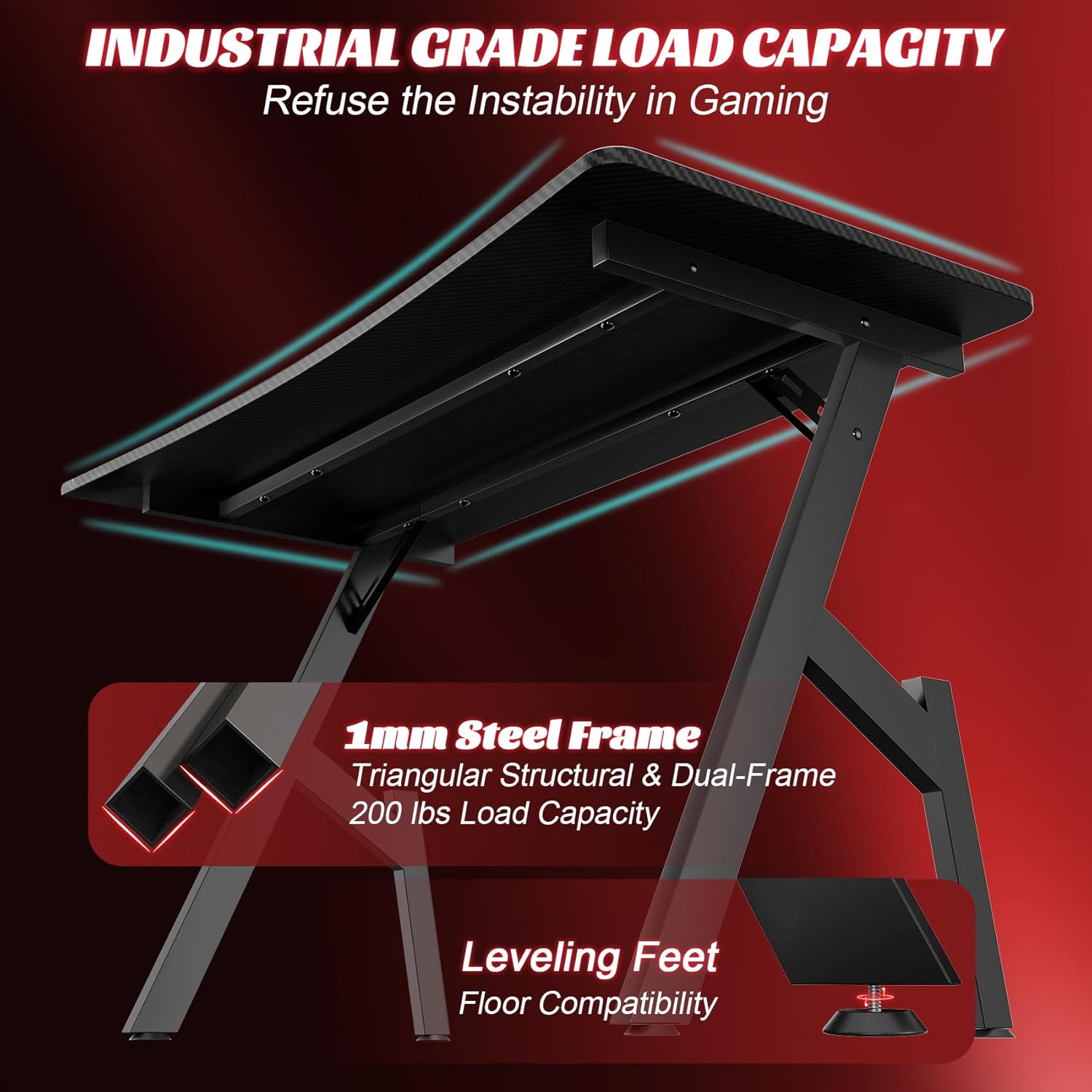
Image: Underside view of the desk, highlighting the 1.1mm steel frame, triangular structure, and dual-frame for robust load capacity.

Image: Top-down view showing the double-sided cable grommets, headphone hook, and cup holder for organized and convenient use.
Maintenance
- Cleaning: The carbon fiber desktop is waterproof and easy to clean. Use a soft, damp cloth to wipe down the surface. Avoid abrasive cleaners that could damage the finish.
- Stability Check: Periodically check all screws and connections to ensure they remain tight. Re-tighten if necessary to maintain desk stability.
- Weight Distribution: Distribute weight evenly across the desktop to prevent undue stress on any single point.
Troubleshooting
- Issue: Parts do not align during assembly.
- Solution: Some components, particularly the leg frames, may require slight angling to fit correctly. Do not force parts. Gently adjust the angle of the pieces until the screw holes align, then insert and tighten screws. Ensure you are following the assembly steps in the correct order.
- Issue: Desk feels wobbly after assembly.
- Solution: Check that all screws are fully tightened. Adjust the leveling foot pads at the bottom of each leg. Rotate them to extend or retract until the desk is stable on your floor surface.
- Issue: Missing parts or damaged components.
- Solution: If you encounter any missing or damaged parts, please contact HLDIRECT customer service immediately for assistance. Refer to the "Warranty and Support" section for contact information.
Specifications
| Attribute | Detail |
|---|---|
| Brand | HLDIRECT |
| Model Name | HLDIRECT 55 Inch Gaming Desk with Carbon Fibre Surface |
| Product Dimensions (D x W x H) | 23.6"D x 55"W x 29"H (60cm D x 140cm W x 74cm H) |
| Desktop Material | Carbon Fiber (Engineered Wood core) |
| Frame Material | Alloy Steel |
| Color | Black |
| Maximum Weight Recommendation | 150 Kilograms (approx. 330 lbs) |
| Special Features | Ergonomic Design, Cup Holder, Headphone Hook, Cable Management Grommets |
| Assembly Required | Yes |
Warranty and Support
The HLDIRECT 55 Inch Gaming Desk comes with a limited warranty. For any questions, concerns, or support needs regarding your product, our experienced and professional customer team is available to provide 7*24 hours of premium service.
Please contact HLDIRECT customer service through the retailer's platform or visit the official HLDIRECT website for further assistance.