
Product Overview
The QttyElok F20Tuya+10IC is an IP68 waterproof RFID fingerprint access control keypad designed for outdoor installation. It features a touch screen panel and supports multiple identification methods including Tuya APP, NFC, Fingerprint, RFID Card, and Password. This system offers enhanced security and convenient access management for various applications.
The device operates at a 13.56MHz frequency and has a user capacity of 100. It includes a white backlight for clear visibility in the dark and a doorbell button. Door opening time is adjustable from 1 second to 30 minutes.
Product Components

Image: The QttyElok F20Tuya+10IC access controller keypad, along with several blue RFID keyfobs and connection wires, displayed on a white surface.
The product package includes the NFC Bluetooth Tuya Access Controller keypad and 10 pieces of 13.56MHz RFID Keyfobs. The keypad features a touch screen panel, fingerprint sensor, card reading area, and a doorbell button.

Image: A detailed view of the access controller, highlighting its external features like the work indicator, digital buttons, card area, doorbell button, and fingerprint sensor. The internal view shows the high-quality relay, power cable socket, and speaker.
Setup and Installation
Wiring Diagram
Refer to the following diagram for proper wiring of the access controller with a power supply, electric lock, doorbell, and exit button. Note that the power supply, electric lock, doorbell, and exit button need to be purchased separately.
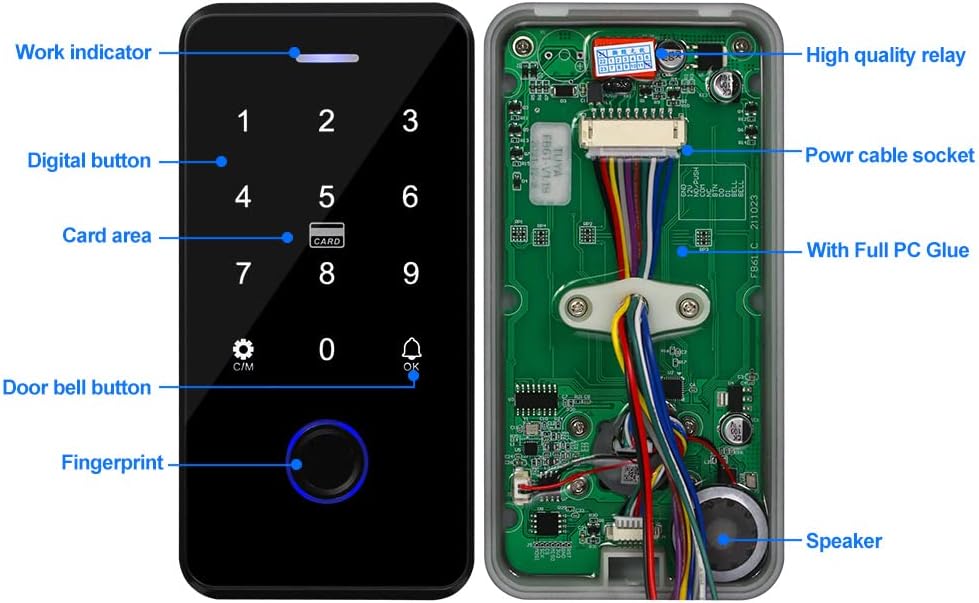
Image: A clear wiring diagram illustrating connections between the access controller, power supply, electric locks, exit button, and doorbell. Labels indicate GND, 12V, NO/PUSH, COM, NC, BET, D0, D1, BEEL, and BEEL terminals.
Waterproof Installation
The QttyElok F20Tuya+10IC is IP68 waterproof and can be installed outdoors. It features full PC glue on the back side, allowing it to function reliably in rain and stormy conditions.

Image: The access controller keypad being sprayed with water, demonstrating its IP68 waterproof rating for outdoor use. An inset shows the internal circuit board with full PC glue protection.
Operating Instructions
Tuya APP Integration
The device can be connected and managed via the Tuya APP. This allows for remote unlocking, adding users (fingerprints, passwords, RFID cards), setting temporary passwords, and viewing unlock records.
- Download the Tuya APP by scanning the QR code or searching "Tuya" on your app store.
- Connect the device to the Tuya APP using Bluetooth.
- Supported languages include Chinese and English.
- Set periodic passwords or one-time passwords valid for 6 hours and single use.
- Share passwords via WeChat, Email, and SMS.
- Configure "family home" and "door lock alarm" functions, including SMS and phone reminders.
- View unlock records by clicking reminder information.

Image: A series of images demonstrating the QttyElok F20Tuya+10IC access controller's multiple unlocking methods, including fingerprint, RFID card, NFC, password, and Tuya APP.

Image: Screenshots of the Tuya APP interface, showing how to scan a QR code to download the app, manage temporary codes, add users (fingerprint, code, card), and view unlock logs. A link to download the app is also visible: http://smart.tuya.com/download.
Video: How to Connect to Tuya APP
Video Description: This video demonstrates the step-by-step process of connecting the access control keypad to the Tuya APP, including entering the programming password, adding the device, and entering Wi-Fi information. It also shows how to unlock the door remotely via the app, set temporary passwords, add private passwords and RFID cards, set door keep open times, and view unlock records.
NFC Functionality
Ensure your mobile phone has NFC capabilities. Program an RFID card on the access keypad or Tuya APP, then copy it using your mobile phone's NFC function. For iOS mobile phones, you must first add a bank card to your phone's NFC to enable card copying.

Image: The access controller keypad with a hand demonstrating NFC unlocking using a smartphone. Icons for IP68 waterproof, Tuya, fingerprint, RFID, NFC, password, microphone, and doorbell are displayed below.
Fingerprint and RFID Card Management
The keypad supports fingerprint and RFID card verification. All programming for these methods can be done directly on the keypad or through the Tuya APP.
- Set Management Card: Enter programming password # 7, then swipe the card to set it as a management card.
- Add User Card: Use the "Add card" function (programming password # 1, swipe card) to add user cards.
- Delete User Card: Use the "Delete card" function (programming password # 8, swipe card) to remove user cards.
Video: Operation Video of QTTYELOK Access Control Keypad
Video Description: This video provides a comprehensive guide to operating the QTTYELOK Access Control Keypad. It covers setting management cards, adding and deleting user cards, adding and deleting user codes, turning on/off combined door opening methods, and modifying public and programming passwords. It also demonstrates restoring factory settings.
Password Management
- Default Public Unlocking Password: The default public unlocking password is 7890.
- Modify Public Unlocking Password: Enter programming password # 2, then new password # new password # #.
- Modify Programming Password: Enter programming password # 9, then new programming password # new programming password # *.
Normally Open Mode
To turn on the normally open mode, swipe a card to open the door, then press 0 #. To turn off this mode, swipe a card or press the password to open the door, then exit the normally open mode.
Specifications
| Feature | Detail |
|---|---|
| User Capacity | 100 |
| Material | Plastic |
| Panel | Touch screen panel |
| Working Voltage | DC 12V |
| Waterproof Level | IP68 (can be installed outdoor) |
| Working Frequency | 13.56MHz |
| Identification Methods | Tuya APP, NFC, Fingerprint, RFID Card, Password |
| Record Capacity | Mobile phone APP remotely views latest 10000 lock opening information |
| Backlight | White backlight |
| Doorbell Button | Yes |
| Administrator Capacity | Can set three administrators |
| Language | Chinese, English |
| Volume Setting | 0~4 adjustable |
| Door Opening Time | 01 seconds - 30 minutes adjustable |
| Working Temperature | -20C ~ 70C |
| Product Size | 140*70*16mm (5.51 x 2.76 x 0.63 inches) |
| Item Weight | 8.4 ounces (0.24 Kilograms) |
| Included Components | 10 x RFID Keyfobs |
| Color | White |
Restoring Factory Settings
To restore the device to factory settings, enter the new programming password # 6, then new programming password # #. For example: * 456789 # 6 456789 # *.