
xitomer GPSGY28
Instruction Manual: xitomer Motorcycle GPS Bracket Mounting
Model: GPSGY28 | Brand: xitomer
Product Overview
The xitomer Motorcycle GPS Bracket Mounting is designed to provide a sturdy and durable platform for GPS devices and phone mounts on compatible motorcycles. Constructed from 6061-T6 Aluminum Alloy, this bracket is built for reliability and features a black anodized finish to complement your motorcycle's aesthetics.
It is compatible with common GPS mounting patterns, including Garmin, Zumo, and AMPs, allowing for versatile use with various navigation and communication devices.

Image: The xitomer Motorcycle GPS Bracket Mounting, showcasing its robust design and black finish.
Key Features:
- Fitment: Specifically designed for Pan America motorcycles, model years 2021-2024.
- Material: Manufactured from high-quality 6061-T6 Aluminum Alloy for strength and durability.
- Compatibility: Features mounting holes compatible with Garmin / Zumo / AMPs pattern GPS mounts and two-ball systems.
- Finish: Available in black anodizing to match handlebar colors.
- Installation: Designed for straightforward installation.
Installation Guide
This section provides general instructions for installing the xitomer Motorcycle GPS Bracket. While the product is designed for easy installation, professional installation is recommended if you are unsure about any steps. Stainless steel mounting accessories are included with the bracket.
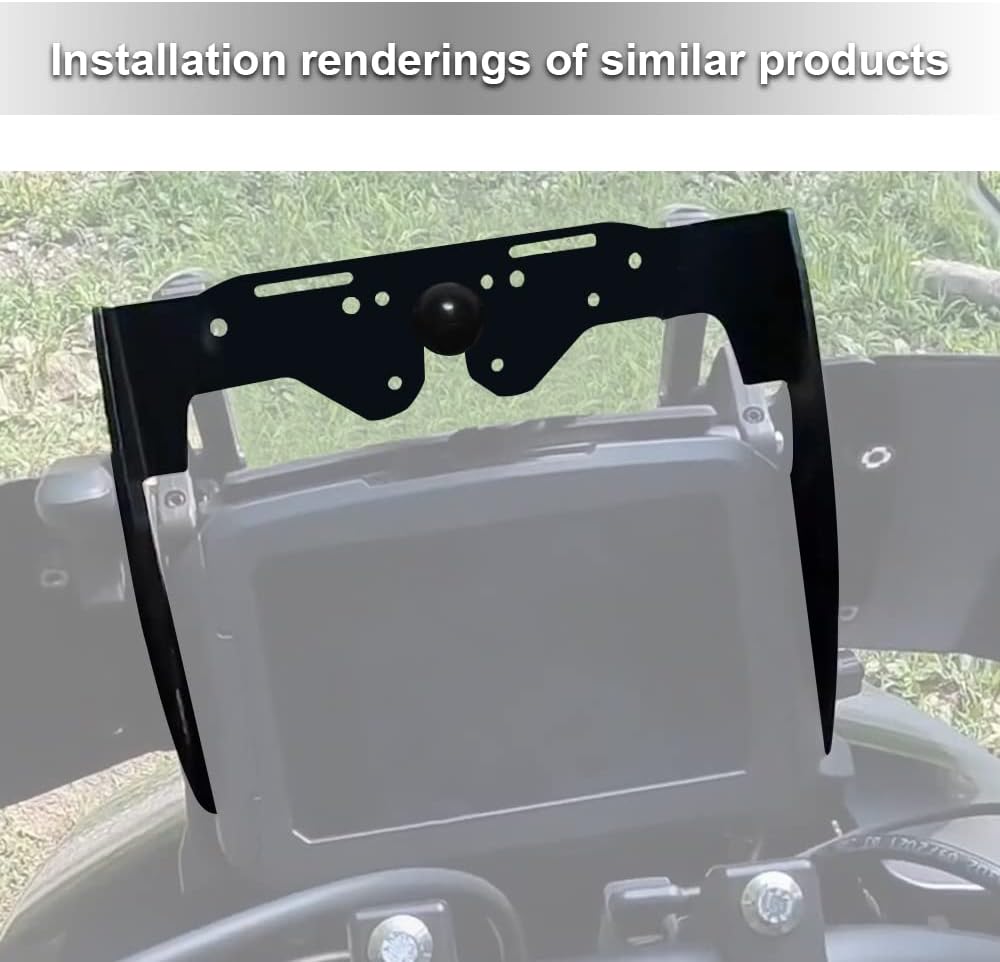
Image: An illustration showing the xitomer GPS bracket installed on a motorcycle dashboard, providing a clear mounting point.
Installation Steps:
- Preparation: Ensure your motorcycle is turned off and stable. Gather necessary tools (e.g., wrenches, screwdrivers).
- Locate Mounting Area: Identify the designated mounting area on your Pan America motorcycle, typically near the dashboard or handlebar area.
- Position the Bracket: Carefully position the xitomer GPS bracket in the desired location. The bracket is designed to fit specific points on the motorcycle.
- Secure the Bracket: Use the provided stainless steel mounting accessories to firmly attach the bracket to the motorcycle. Ensure all screws and bolts are tightened securely to prevent movement during operation.
- Attach GPS/Phone Mount: Once the xitomer bracket is securely installed, you can attach your compatible GPS device or phone mount (e.g., Garmin, Zumo, or AMPs pattern mounts) to the bracket's mounting holes.
- Final Check: Verify that the bracket and any attached devices are stable and do not obstruct your view or motorcycle controls.
Note: The GPS plate and ball are not included with this product and must be purchased separately if required for your specific GPS device.

Image: This image clarifies that accessories like the AMPS plate and RAM ball base are for display purposes only and are not included with the xitomer GPS bracket.
Usage and Compatibility
The xitomer GPS Bracket provides a stable and secure base for various navigation and communication devices. Its design accommodates standard mounting patterns, ensuring broad compatibility.
- Device Mounting: Once installed, the bracket allows for the attachment of GPS units (e.g., Garmin, Zumo) or smartphone holders that utilize the AMPs hole pattern or a two-ball mounting system.
- Optimal Positioning: The bracket is positioned to offer an optimal viewing angle for your navigation device while riding, minimizing distraction.
- Vehicle Fitment: This bracket is specifically engineered to fit Pan America motorcycles from 2021 to 2024 models.
Care and Maintenance
Proper care and maintenance will ensure the longevity and continued performance of your xitomer GPS Bracket.
- Cleaning: Clean the bracket periodically with a soft, damp cloth. Avoid abrasive cleaners or solvents that could damage the black anodized finish.
- Inspection: Regularly inspect all mounting points and fasteners to ensure they remain tight and secure. Vibrations from riding can sometimes loosen connections over time.
- Damage Check: Check the bracket for any signs of damage, such as bends, cracks, or corrosion. If significant damage is observed, consider replacing the unit to maintain safety and stability.
- Material Properties: The 6061-T6 Aluminum Alloy is resistant to corrosion, and the powder coating adds an extra layer of protection.

Image: A detailed view highlighting the aluminum alloy construction and 3mm thickness of the bracket, emphasizing its robust build.
Troubleshooting
If you encounter issues with your xitomer GPS Bracket, refer to the following common problems and solutions:
- Bracket Feels Loose After Installation:
Solution: Re-check all mounting screws and bolts. Ensure they are tightened to the appropriate torque. Vibrations during riding can sometimes cause fasteners to loosen. If the issue persists, inspect the mounting points on your motorcycle for any wear or damage.
- GPS Device/Phone Mount Does Not Fit:
Solution: Verify that your GPS device or phone mount uses a compatible AMPs hole pattern or a two-ball system. This bracket is designed for these specific mounting types. If your device uses a different system, an adapter may be required (not included).
- Windshield Interference:
Solution: In some cases, certain GPS units or their mounts may interfere with the full range of motion of an adjustable windshield. If this occurs, assess if a slight adjustment to the GPS unit's position on the bracket is possible, or if the interference is minimal and does not impede safe operation. Some users have reported minor modifications to the bracket or windshield may be necessary for full windshield travel with specific large GPS units.
- Bracket Appears Twisted or Misaligned:
Solution: During installation, ensure the bracket is properly aligned before tightening all fasteners. If it appears twisted, loosen the fasteners, re-align the bracket, and then re-tighten them evenly. Ensure no cables or other components are obstructing its proper seating.
Product Specifications
| Brand | xitomer |
| Model Number | GPSGY28 |
| Material | 6061-T6 Aluminum Alloy |
| Color | Black |
| Item Weight | 2.03 pounds |
| Package Dimensions | 9.65 x 8.31 x 3.27 inches |
| Compatible Devices | GPS devices and phone mounts with AMPs pattern / Two-ball system |
| Compatible Motorcycle Models | Pan America 2021-2024 |
| Mounting Type | Bar Mount |
| Country of Origin | China |
Warranty and Support
For specific warranty information regarding your xitomer Motorcycle GPS Bracket Mounting, please refer to the documentation provided at the time of purchase or contact xitomer directly.
If you require technical assistance, have questions about installation, or need to report a defect, please reach out to xitomer customer support. Contact information can typically be found on the manufacturer's official website or through your point of purchase.
Visit the official xitomer store for more products and support: xitomer Store on Amazon
Ask a question about this manual
Ask about setup, troubleshooting, compatibility, parts, safety, or missing instructions. Manuals+ will review the question and use this page’s manual context to help answer it.