
1. Introduction
The WEEFUN Tina2S 3D Printer is a compact, fully assembled 3D printer designed for ease of use, making it suitable for beginners, home users, and educational environments. It features WiFi cloud printing capabilities, automatic bed leveling, and a quiet operation, allowing for a seamless and efficient 3D printing experience. This manual provides detailed instructions for setting up, operating, maintaining, and troubleshooting your Tina2S 3D Printer.
2. What's in the Box
Please verify that all items listed below are included in your package:
- 1 x 3D Printer TINA2 S Machine
- 1 x AC Power Adapter with Cord
- 1 x SD Card
- 1 x USB Cable
- 1 x MicroSD Card Reader
- 1 x PEI Heatable Platform
- 1 x 100g PLA Filament (white)
- 1 x M6 Brass Nozzle
- 1 x 1.5mm Hex Wrench
- 1 x 2.0mm Hex Wrench
3. Setup
3.1 Unboxing and Placement
Carefully remove the printer and all accessories from the packaging. Place the printer on a stable, level surface in a well-ventilated area, away from direct sunlight and heat sources.

Figure 3.1: The WEEFUN Tina2S 3D Printer, showcasing its compact design and connectivity features.
3.2 Connecting Power
Connect the provided AC power adapter to the printer's power input port and then plug it into a standard electrical outlet.
3.3 Initial Filament Loading
Attach the filament spool holder to the side of the printer. Place the provided 100g PLA filament spool onto the holder. Gently feed the filament into the extruder's input hole until it is gripped by the feeding mechanism. Follow the on-screen prompts or refer to the printer's display for specific filament loading instructions.
3.4 Auto Bed Leveling and Protective Cover Removal
The Tina2S features automatic bed leveling. Before your first print, ensure you remove the Coupling Protect-COVER from the Z-axis lead screw. This cover is for transport protection only and must be removed for proper operation and accurate auto-leveling.

Figure 3.2: Illustration of the auto bed leveling system and the critical step of removing the Z-axis coupling protective cover before printing.
4. Operating Instructions
4.1 Printing Methods
The Tina2S 3D Printer offers multiple ways to initiate prints:
- WiFi Cloud Printing (Poloprint Cloud App): Utilize the self-developed "Poloprint Cloud" app on your smartphone or tablet for intelligent online one-click slicing and WiFi cloud printing. This method provides access to a massive model library.
- SD Card Printing: Transfer your 3D model files (G-code) to the included SD card and insert it into the printer's SD card slot. Select your desired file from the printer's menu to begin printing.
- USB Connection: Connect the printer to your computer via USB. The Tina2S is compatible with various slicing software such as Wiibuilder, Cura, Kiri (Chrome book), and PrusaSlicer. You can prepare your models and send them directly to the printer.

Figure 4.1: Overview of WiFi Cloud Printing and software compatibility with the Tina2S printer.
4.2 Key Operational Features
- Ultra-Quiet Printing: The printer is built with a self-developed motherboard designed for ultra-quiet operation, typically producing 40-50dB of noise, ensuring a comfortable printing environment.
- Fast Print Speed: The Tina2S can achieve print speeds of up to 200mm/s, significantly reducing print times.
- Heatable PEI Spring Steel Magnetic Flexible Platform: The print bed can heat up to 60°C, which helps prevent warping and improves adhesion for various filaments. The flexible magnetic surface allows for easy removal of finished prints.
- Resume Printing Function: In the event of a power outage, the printer can resume printing from where it left off (within a 5-second memory window), saving material and time.

Figure 4.2: The Tina2S operates at a low noise level, comparable to a quiet room.

Figure 4.3: High-speed printing capability and components like the easily disassembled nozzle and cooling fan.

Figure 4.4: The heatable PEI platform ensures good adhesion and easy model removal.
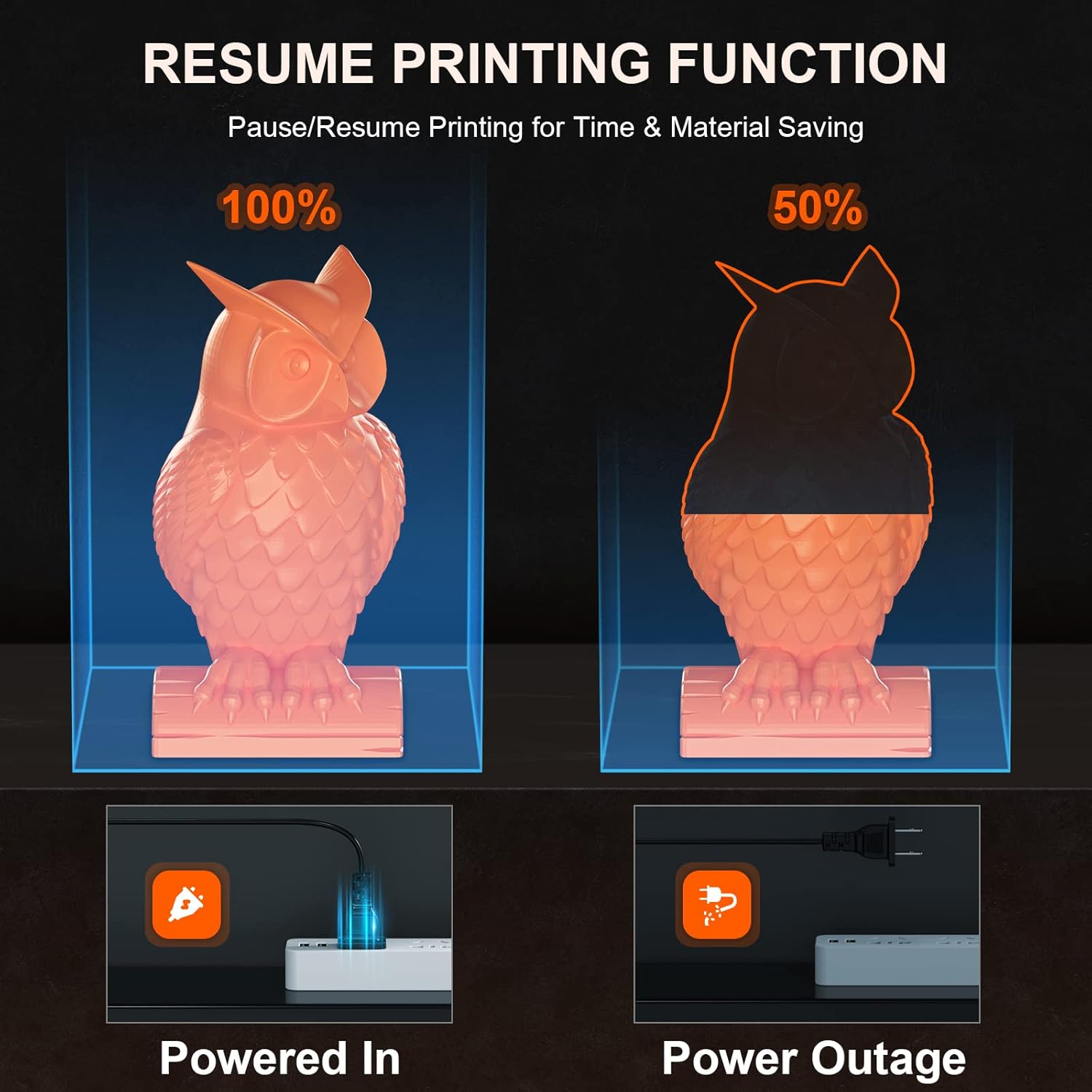
Figure 4.5: The resume printing feature helps prevent print failures due to unexpected power interruptions.
5. Maintenance
5.1 General Cleaning
Regularly clean the printer's exterior with a soft, dry cloth. Ensure no dust or filament debris accumulates on the moving parts, especially the lead screws and rails.
5.2 Nozzle Care
Periodically, while the nozzle is heated, use a brass brush to gently clean any accumulated filament or residue from the nozzle tip. This helps maintain print quality and prevent clogs.
5.3 Build Plate Maintenance
The PEI spring steel magnetic flexible platform may require occasional cleaning with isopropyl alcohol to maintain optimal adhesion. If using masking tape on the build plate, replace it as needed to ensure consistent print quality.
6. Troubleshooting
6.1 Common Printing Issues
- Filament Not Extruding/Clogged Nozzle: Check if the filament is properly loaded. If the nozzle is clogged, try cleaning it as described in the maintenance section or replace it with one of the spare nozzles provided. Ensure the hot end is heating correctly.
- Poor First Layer Adhesion: Ensure the build plate is clean. Verify that the auto-leveling process completed successfully. The heatable PEI platform should be set to an appropriate temperature for your filament type (e.g., 60°C for PLA).
- Print Quality Issues (Layer Shifts, Stringing): Check for any loose belts or components. Ensure the filament is dry and stored properly. Adjust retraction settings in your slicing software to reduce stringing.
- Printer Not Connecting to WiFi: Ensure your WiFi network is 2.4GHz, as the printer supports this frequency. Double-check network credentials.
For more detailed troubleshooting steps, please refer to the official WEEFUN Tina2S User Guide PDF available online or contact customer support.
7. Specifications
| Feature | Detail |
|---|---|
| Product Dimensions | 8.26 x 8.26 x 11.4 inches (20.98 x 20.98 x 28.96 cm) |
| Item Weight | 5.72 pounds (2.6 Kilograms) |
| Model Number | TINA2S V8 |
| Brand | WEEFUN |
| Material | Aluminum, Metal, Plastic |
| Color | TINA2S |
| Manufacturer | WEEFUN |
| First Available Date | March 15, 2023 |
8. Warranty & Support
WEEFUN offers comprehensive support for your Tina2S 3D Printer:
- Return/Replacement Policy: Enjoy 30 days of worry-free return or replacement from the date of purchase.
- Repair Service: A 12-month free repair service is provided for manufacturing defects.
- Technical Support: Lifetime professional technical support is available to assist you with any questions or issues you may encounter.
For assistance, please contact WEEFUN support via email at support@weefun3d.com. We aim to reply within 24 hours.
