
Alpicool XD45
Alpicool XD45 Portable Refrigerator User Manual
Model: XD45 | Capacity: 35 Litres
Introduction
Thank you for choosing the Alpicool XD45 Portable Refrigerator. This versatile appliance is designed to keep your food and beverages cool or frozen, whether you are at home, camping, or on the road. With its robust design, dual-zone compartments, and multiple power options, the XD45 offers reliable cooling performance for various applications.
This manual provides essential information on the setup, operation, maintenance, and troubleshooting of your Alpicool XD45. Please read it thoroughly before use to ensure safe and optimal performance.

The Alpicool XD45 Portable Refrigerator, featuring its dual compartments and connectivity with a mobile application for remote control.
Key Features
- Quick Cooling System: Capable of reaching temperatures as low as -20°C for efficient freezing.
- Dual-Zone Compartments: Features two separate compartments for refrigeration and freezing. Note: Only the freezer compartment's temperature is adjustable; the fridge compartment's temperature adjusts relative to the freezer.
- AC & DC Power Options: Includes both AC (100-240V) and DC (12V/24V) power cords for versatile use at home or in vehicles.
- MAX & ECO Modes: Choose MAX mode for rapid cooling or ECO mode for energy-efficient operation.
- 3-Stage Battery Protection: Safeguards your vehicle's battery from excessive discharge with adjustable protection levels.
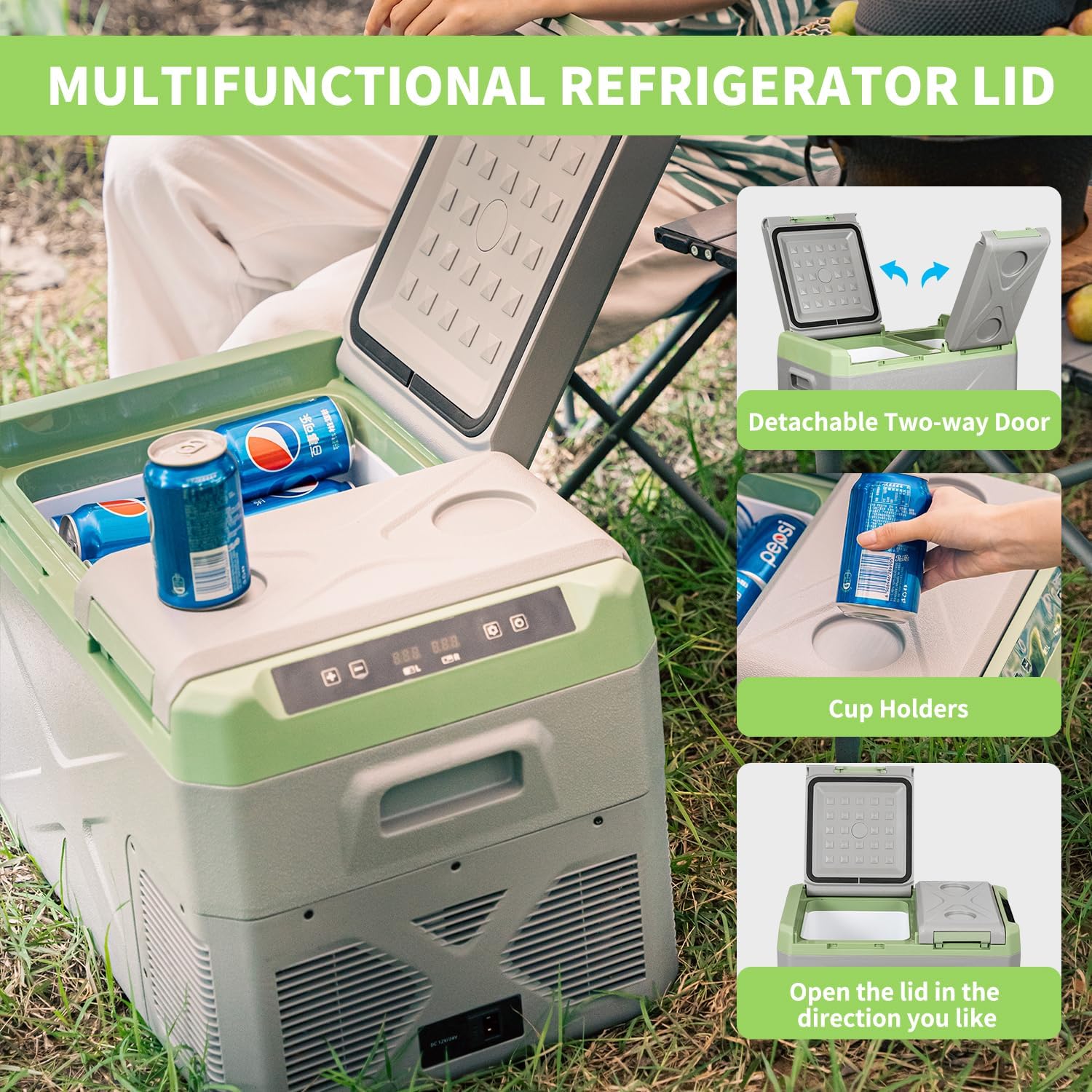
- Detachable Door: The lid can be easily detached for cleaning or to change the opening direction.
- Integrated Cup Holders: Conveniently located on the lid for holding beverages.
- Recessed Handle: Ergonomic design for easy portability.
- LED Display: Clear digital display for temperature monitoring and settings.
- Drain Plug: Located inside the compartment for easy water drainage and cleaning.
Detailed view of the Alpicool XD45's practical features, such as the detachable door, cup holders, and LED display.
Setup
Unboxing and Initial Placement
Carefully remove the Alpicool XD45 from its packaging. Ensure all accessories, including AC and DC power cords, are present. Place the refrigerator on a flat, stable surface, ensuring adequate ventilation around all sides. Allow at least 10 cm of space around the unit for proper airflow.

The Alpicool XD45 package includes the portable refrigerator, AC power adapter, and DC car power cable.
Power Connection
The Alpicool XD45 supports multiple power inputs:
- 12V/24V DC: Connect the DC power cord to the refrigerator's DC input port and then to your vehicle's 12V or 24V cigarette lighter socket.
- 100-240V AC: Connect the AC power adapter to the refrigerator's AC input port, then plug the adapter into a standard wall outlet.
- Portable Power Station/Solar Panel: The unit can also be powered by compatible portable power stations or solar panels using the appropriate cables.
Ensure the power source matches the required voltage for safe operation.

The Alpicool XD45 offers flexible power options for various environments.
Operating Instructions
Control Panel
The control panel features an LED display and buttons for adjusting settings. Refer to the specific button functions in your quick start guide for detailed operation.
Temperature Settings
The Alpicool XD45 allows you to set the temperature for the freezer compartment. The fridge compartment's temperature will automatically adjust based on the freezer setting. For optimal cooling, it is recommended to pre-cool the unit before loading items.
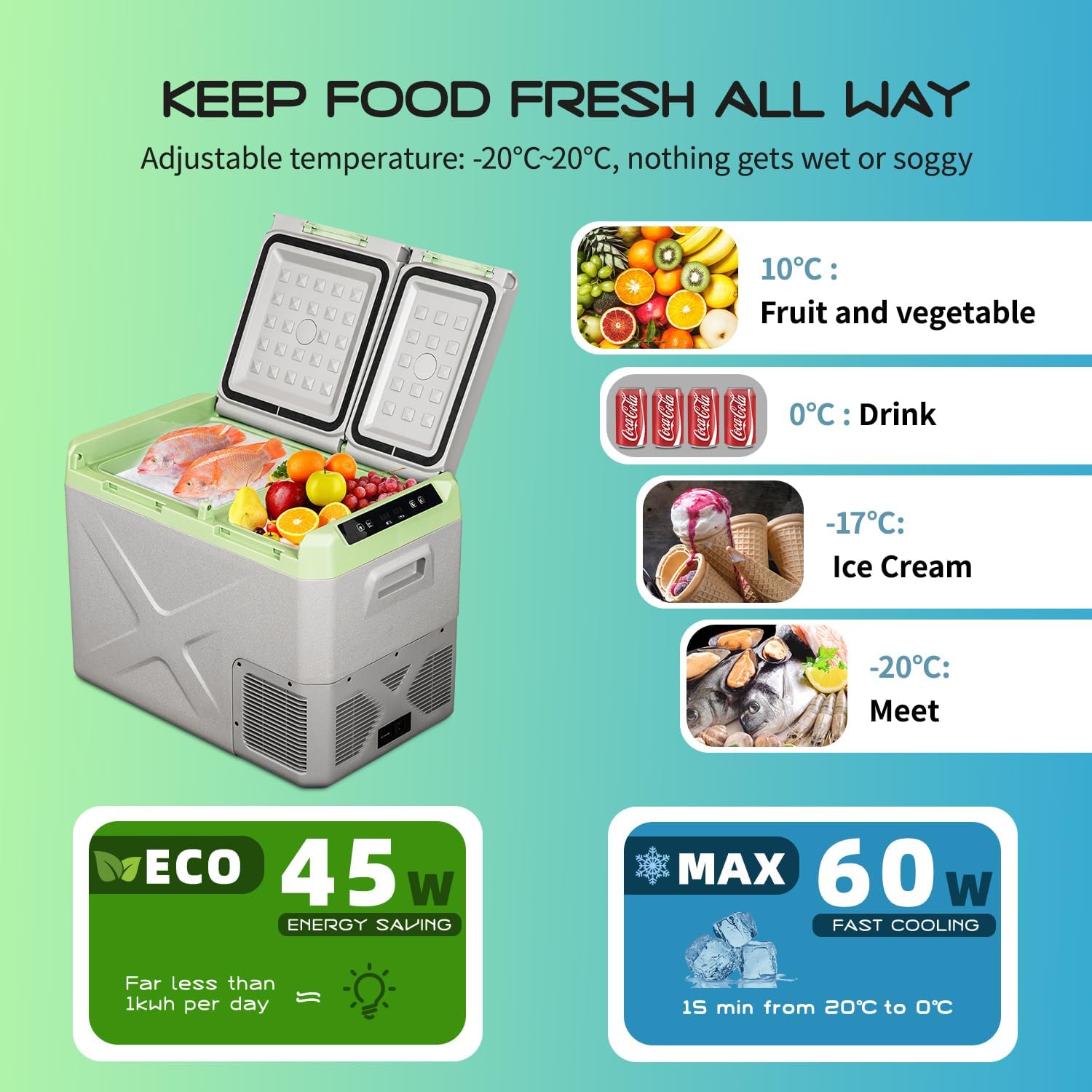
- Fruit and Vegetables: Approximately 10°C
- Drinks: Approximately 0°C
- Ice Cream: Approximately -17°C
- Meat: Approximately -20°C
Recommended temperature settings for various items and power consumption modes.
MAX and ECO Modes
- MAX Mode: Provides maximum cooling power for rapid temperature reduction. Ideal for initial cooling or when quick chilling is needed.
- ECO Mode: Optimizes energy consumption for extended operation, suitable for maintaining temperature over longer periods.
3-Stage Battery Protection
This feature prevents your vehicle's battery from being drained by the refrigerator. You can select one of three protection levels (High, Medium, Low) based on your battery type and usage. The refrigerator will automatically shut off if the input voltage drops below the selected cut-off point.

Understanding the 3-level battery protection to safeguard your vehicle's power source.
Lid Operation
The XD45 features a versatile lid design. The two-way detachable door allows you to open the lid from either side or remove it completely for easier access and cleaning. Integrated cup holders provide a convenient spot for your drinks.

The Alpicool XD45's lid offers flexible opening options and built-in cup holders.
Maintenance
Cleaning
Regular cleaning ensures optimal performance and hygiene. Disconnect the power before cleaning. Use a soft cloth dampened with mild detergent and water to wipe down the interior and exterior surfaces. Do not use abrasive cleaners or immerse the unit in water.
The integrated drain plug allows for easy removal of melted ice or spills. Simply open the plug to drain liquids from the bottom of the compartment.

The convenient drain plug facilitates easy cleaning and water removal.
Storage
When storing the refrigerator for an extended period, ensure it is clean and dry. Leave the lid slightly ajar to prevent odors and mold growth. Store in a dry, well-ventilated area away from direct sunlight and extreme temperatures.
Troubleshooting
If you encounter issues with your Alpicool XD45, please refer to the following common troubleshooting steps:
| Problem | Possible Cause | Solution |
|---|---|---|
| Refrigerator not turning on | No power supply; loose connection; blown fuse in vehicle. | Check power cord connection; try a different power outlet/socket; inspect vehicle fuse. |
| Unit not cooling sufficiently | Lid not closed properly; insufficient ventilation; ambient temperature too high; overloaded with warm items. | Ensure lid is sealed; provide adequate ventilation; pre-cool items before loading; use MAX mode for faster cooling. |
| Error code displayed | Specific internal fault or sensor issue. | Refer to the quick start guide for specific error code meanings. Try restarting the unit. If persistent, contact customer support. |
| Excessive noise | Unit not level; fan obstruction. | Ensure unit is on a flat surface; check for any obstructions around the fan vents. |
If the problem persists after attempting these solutions, please contact Alpicool customer support for further assistance.
Specifications
| Feature | Detail |
|---|---|
| Brand | Alpicool |
| Model | XD45 |
| Capacity | 35 Litres |
| Product Dimensions (L x W x H) | 60.3 x 36.5 x 44.2 cm |
| Item Weight | 12.5 kg |
| Cooling Range | -20°C to +20°C |
| Input Voltage (DC) | 12V / 24V |
| Input Voltage (AC) | 100-240V |
| Defrost System | Frost Free |
| Installation Type | Freestanding |
| Special Features | Portable, Dual-Zone, Battery Protection |
Warranty and Support
Alpicool products are manufactured to high-quality standards. For warranty information and customer support, please refer to the warranty card included with your product or visit the official Alpicool website. Keep your purchase receipt as proof of purchase for any warranty claims.
For technical assistance, troubleshooting beyond this manual, or spare parts, please contact Alpicool customer service through the contact details provided in your product documentation.
Related documentsXD45


Ask a question about this manual
Ask about setup, troubleshooting, compatibility, parts, safety, or missing instructions. Manuals+ will review the question and use this page’s manual context to help answer it.