
1. Introduction
This manual provides essential information for the safe and efficient operation, installation, and maintenance of your Candy FIDCP X696 multifunction electric oven. Please read these instructions thoroughly before using the appliance and retain them for future reference.
2. Safety Information
For your safety and to ensure proper use, carefully read all instructions before installing and using the appliance. Keep this manual with the appliance for future reference. The manufacturer declines all responsibility for any damage resulting from incorrect installation or improper use.
- Electrical Safety: Ensure the oven is correctly earthed and connected to a suitable power supply. Do not use adapters or extension cords. Disconnect the appliance from the power supply before any cleaning or maintenance.
- Hot Surfaces: The oven and its accessible parts become very hot during use. Care should be taken to avoid touching heating elements. Children less than 8 years of age shall be kept away unless continuously supervised.
- Child Safety: This appliance can be used by children aged from 8 years and above and persons with reduced physical, sensory or mental capabilities or lack of experience and knowledge if they have been given supervision or instruction concerning use of the appliance in a safe way and understand the hazards involved. Children shall not play with the appliance. Cleaning and user maintenance shall not be made by children without supervision.
- Cleaning: Always allow the oven to cool down before cleaning. Use appropriate cleaning agents and methods as described in the maintenance section.
- Ventilation: Ensure adequate ventilation around the appliance as specified in the installation instructions.
3. Product Overview
The Candy FIDCP X696 is a built-in multifunction electric oven designed for versatile cooking. It features a convection heating method, providing even heat distribution for consistent cooking results.
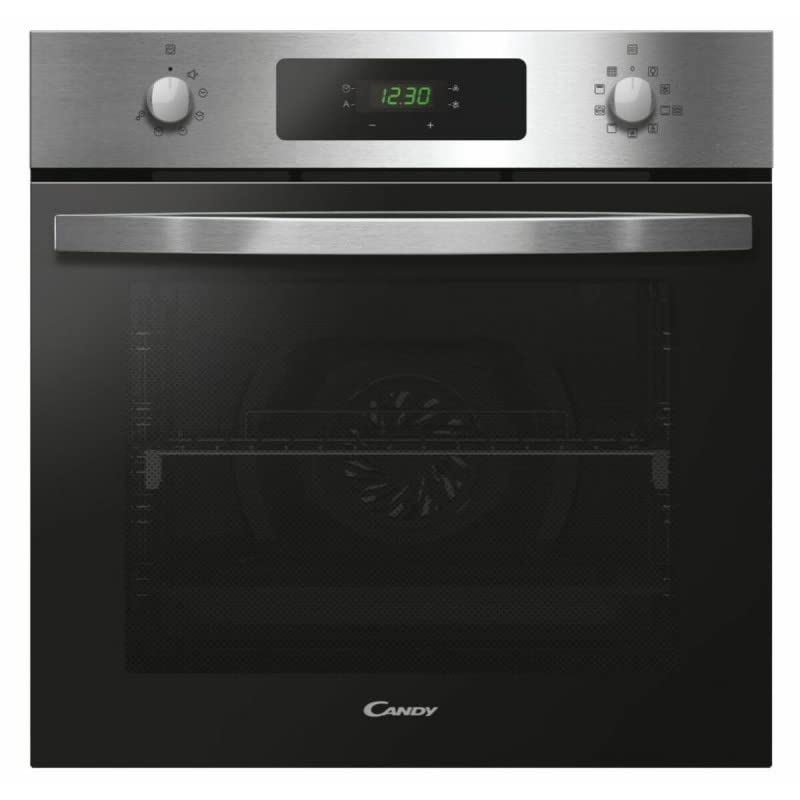
Figure 3.1: Front view of the Candy FIDCP X696 Multifunction Oven, showcasing its stainless steel finish and control panel.
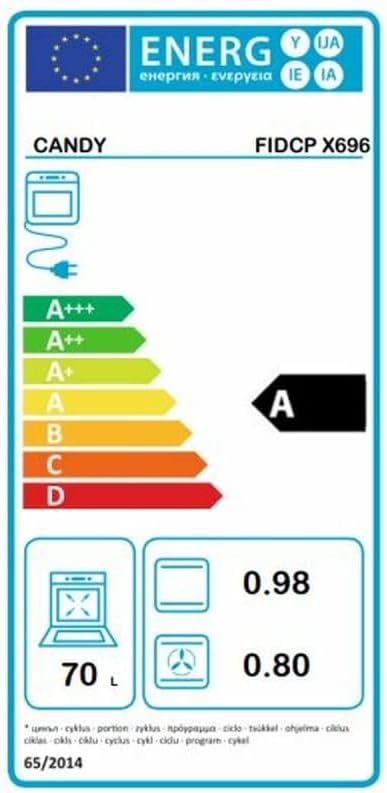
Figure 3.2: Interior view of the Candy FIDCP X696 Multifunction Oven, showing the oven cavity and rack supports.
4. Installation
Proper installation is crucial for the safe and efficient operation of your oven. It must be installed by a qualified technician in accordance with local regulations and the instructions provided.
4.1 Pre-installation Checks
- Ensure the cabinet opening dimensions match the oven's requirements.
- Verify that the electrical supply meets the specifications listed on the rating plate of the oven.
- Check for any damage to the appliance during transit. Do not install a damaged appliance.
4.2 Electrical Connection
The oven must be connected to the mains electricity supply by a qualified electrician. Ensure the appliance is disconnected from the power supply before making any connections. The wiring diagram is typically located on the appliance itself or within the packaging.
4.3 Mounting the Oven
Carefully slide the oven into the prepared cabinet opening. Secure the oven to the cabinet using the screws provided, typically through holes in the oven frame. Ensure the oven is level and stable.
4.4 Ventilation
Adequate ventilation is essential to prevent overheating. Ensure that the cabinet design allows for proper airflow around the oven, especially at the rear and sides.
5. Operating Instructions
Familiarize yourself with the control panel before operating the oven. The specific layout and functions may vary slightly, but the general principles remain consistent.
5.1 Initial Use
- First Cleaning: Before first use, clean the oven interior and accessories with warm soapy water and dry thoroughly.
- Burning Off: Heat the empty oven at maximum temperature for approximately 30-60 minutes to burn off any manufacturing residues. Ensure the room is well-ventilated during this process.
5.2 Setting the Clock and Timer
Refer to the specific symbols on your control panel for setting the current time and using the minute minder or cooking timer functions. Typically, a clock symbol indicates time setting, and a bell symbol indicates the timer.
5.3 Selecting Cooking Functions
The Candy FIDCP X696 offers multiple cooking functions. Use the function selector knob to choose the desired cooking mode. Common functions include:
- Conventional Heating: Top and bottom heating elements for traditional baking and roasting.
- Convection (Fan-forced): Fan distributes heat evenly from a circular element, ideal for multi-level cooking and faster results.
- Grill: For grilling and browning.
- Defrost: Fan-only function to gently thaw frozen foods.
5.4 Setting Temperature
Use the temperature selector knob to set the desired cooking temperature. The oven will begin to heat once a function and temperature are selected. An indicator light will typically turn off once the set temperature is reached.
5.5 Preheating
For best results, preheat the oven to the desired temperature before placing food inside, especially for baking.
6. Cleaning and Maintenance
Regular cleaning and maintenance will ensure the longevity and optimal performance of your oven.
6.1 Exterior Cleaning
Clean the exterior surfaces with a soft cloth dampened with warm soapy water. For stainless steel finishes, use a specialized stainless steel cleaner and polish in the direction of the grain. Avoid abrasive cleaners or scourers.
6.2 Interior Cleaning
Allow the oven to cool completely. Remove any loose food debris. Clean the interior with a damp cloth and a mild oven cleaner, following the cleaner's instructions. Rinse thoroughly and dry. Avoid harsh chemical cleaners on seals.
6.3 Oven Door
Clean the glass panels of the oven door with a soft cloth and glass cleaner. For stubborn stains, a non-abrasive cream cleaner can be used. Some oven doors can be partially or fully removed for easier cleaning; refer to specific instructions if available.
6.4 Replacing the Oven Light
Ensure the oven is disconnected from the power supply. Unscrew the protective glass cover, remove the old bulb, and replace it with a new heat-resistant bulb of the correct wattage (typically 25W/300°C). Replace the glass cover.
7. Troubleshooting
Before contacting customer service, consult the following troubleshooting guide for common issues.
| Problem | Possible Cause | Solution |
|---|---|---|
| Oven does not heat | No power supply; incorrect settings; fuse tripped. | Check power connection; ensure correct function/temperature selected; check household fuse/circuit breaker. |
| Uneven cooking | Incorrect rack position; overloaded oven; door not fully closed. | Use recommended rack positions; avoid overcrowding; ensure door is sealed. |
| Oven light not working | Bulb is faulty or loose. | Replace or tighten the oven bulb (see Section 6.4). |
| Excessive smoke during cooking | Food spills; excessive fat/grease. | Clean oven interior thoroughly; use appropriate cooking methods to minimize splatters. |
If the problem persists after attempting these solutions, please contact customer support.
8. Specifications
The following table details the technical specifications of the Candy FIDCP X696 multifunction oven.
| Feature | Detail |
|---|---|
| Brand | Candy |
| Model Name | FIDCP X696 |
| Manufacturer | CANDY |
| Model Number | 33703579 |
| Installation Type | Built-In |
| Fuel Type | Electric |
| Heating Method | Convection |
| Colour | Stainless Steel |
| Oven Capacity | 70 Liters |
| Energy Efficiency Class | A |
| Energy Consumption (Conventional) | 0.98 kWh/cycle |
| Energy Consumption (Fan-forced) | 0.80 kWh/cycle |
| ASIN | B0BTYVZJ3Y |
| Date First Available | 19 August 2023 |

Figure 8.1: Energy label for the Candy FIDCP X696 oven, indicating an energy efficiency class of A, a capacity of 70 liters, and energy consumption values for conventional and fan-forced modes.
9. Warranty and Support
Your Candy FIDCP X696 oven is covered by a manufacturer's warranty. The terms and conditions of the warranty are typically provided with the purchase documentation. Please retain your proof of purchase for any warranty claims.
For technical assistance, spare parts, or to report a fault, please contact Candy customer support. Contact details can usually be found on the manufacturer's official website or in your purchase documentation.
When contacting support, please have the following information ready:
- Model Name: FIDCP X696
- Model Number: 33703579
- Date of Purchase
- Description of the issue

