
1. Product Overview
The ZIQING Blood Pressure Monitor is an automatic upper arm device designed for accurate and convenient blood pressure and heart rate measurement at home. It features a large LCD screen, voice broadcast function, and memory storage for two users.

Image: Overview of the ZIQING Blood Pressure Monitor's main features including clinical accuracy, one-button operation, large LCD, adjustable cuff, 2-user mode, voice broadcast, fast reading, irregular heartbeat detection, and auto power off.
2. Components
The package includes the following items:
- 1 x Blood Pressure Monitor Unit
- 1 x Upper Arm Cuff (adjustable for 8.7''-17.3'' / 22-44cm arm circumference)
- 1 x USB Cable (for power)
- 1 x User Manual
Note: 4 x AAA batteries are not included and must be purchased separately if battery operation is desired.

Image: The main blood pressure monitor unit, the adjustable arm cuff, and the USB power cable.
3. Setup
3.1 Powering the Device
The ZIQING Blood Pressure Monitor can be powered in two ways:
- USB Cable: Connect the provided USB cable to the monitor and to a USB power source such as a laptop, power bank, or USB wall adapter (not included).
- Batteries: Insert 4 x AAA batteries into the battery compartment located on the bottom of the unit. Ensure correct polarity.
3.2 Setting Date, Time, and Voice
To set the date, time, and voice broadcast function:
- With the device off, press and hold the 'S' (Set) button for approximately 15 seconds until the year flashes.
- Press the 'M' (Memory) button to adjust the year. Press 'S' to confirm and move to the next setting (month, day, hour, minute).
- Repeat step 2 for month, day, hour, and minute.
- After setting the time, the display will show 'SP ON' or 'SP OFF'. Use the 'M' button to toggle the voice broadcast function on or off. Press 'S' to confirm.
- Press 'S' again to save all settings and exit setup mode.

Image: Detailed diagram showing the display and symbols of the blood pressure monitor, including date/time, systolic/diastolic readings, pulse, and various indicators.
3.3 Connecting the Cuff
Connect the cuff's air tube connector firmly into the port on the side of the blood pressure monitor unit. Ensure it is securely inserted to prevent air leakage during measurement.
Video: An official demonstration video showing the unboxing, setup, and basic operation of the ZIQING Upper Arm Blood Pressure Monitor, including connecting the cuff and powering the device.
4. Operating Instructions
4.1 Proper Measurement Posture
For accurate readings, follow these guidelines:
- Sit still for at least five minutes before measurement.
- Be seated in a chair with back support.
- Place your arm on a table with your palm facing up and fingers relaxed.
- Ensure the cuff is at the same height as your heart.
- Avoid talking or moving during the measurement.
4.2 Cuff Placement
Correctly position the arm cuff as follows:
- Slide the cuff onto your upper arm, ensuring the air tube is on the inside of your arm and points towards your forearm.
- The lower edge of the cuff should be 2-3 cm (0.8-1.2 inches) above your elbow joint.
- Wrap the cuff snugly around your arm. It should be tight enough that you can only insert two fingers between the cuff and your arm.
- Ensure the cuff's tube is aligned with the center of your palm.

Step 1: Slide the cuff onto your upper arm.

Step 2: Position the cuff 2-3cm above the elbow.

Step 3: Ensure the cuff is at heart level.

Step 4: Relax your arm on a table for measurement.
4.3 Taking a Measurement
Once the cuff is correctly placed and you are in the proper posture, simply press the 'Start' button. The monitor will automatically inflate the cuff, measure your blood pressure and heart rate, and display the results on the large LCD screen. If voice broadcast is enabled, the results will also be announced.

Image: A user initiating a blood pressure measurement with the one-button operation.
4.4 Understanding Your Readings
The monitor displays Systolic (SYS), Diastolic (DIA), and Pulse (PUL) readings. It also includes a WHO (World Health Organization) indicator on the left side of the screen, which uses a color-coded bar to classify your blood pressure level:
- Green: Normal Blood Pressure
- Yellow: Slight High Blood Pressure
- Red: High Blood Pressure / Serious
The device stores up to 99 memories for each of two users (User 1 and User 2). Use the 'S' button to switch between users and the 'M' button to view past readings.
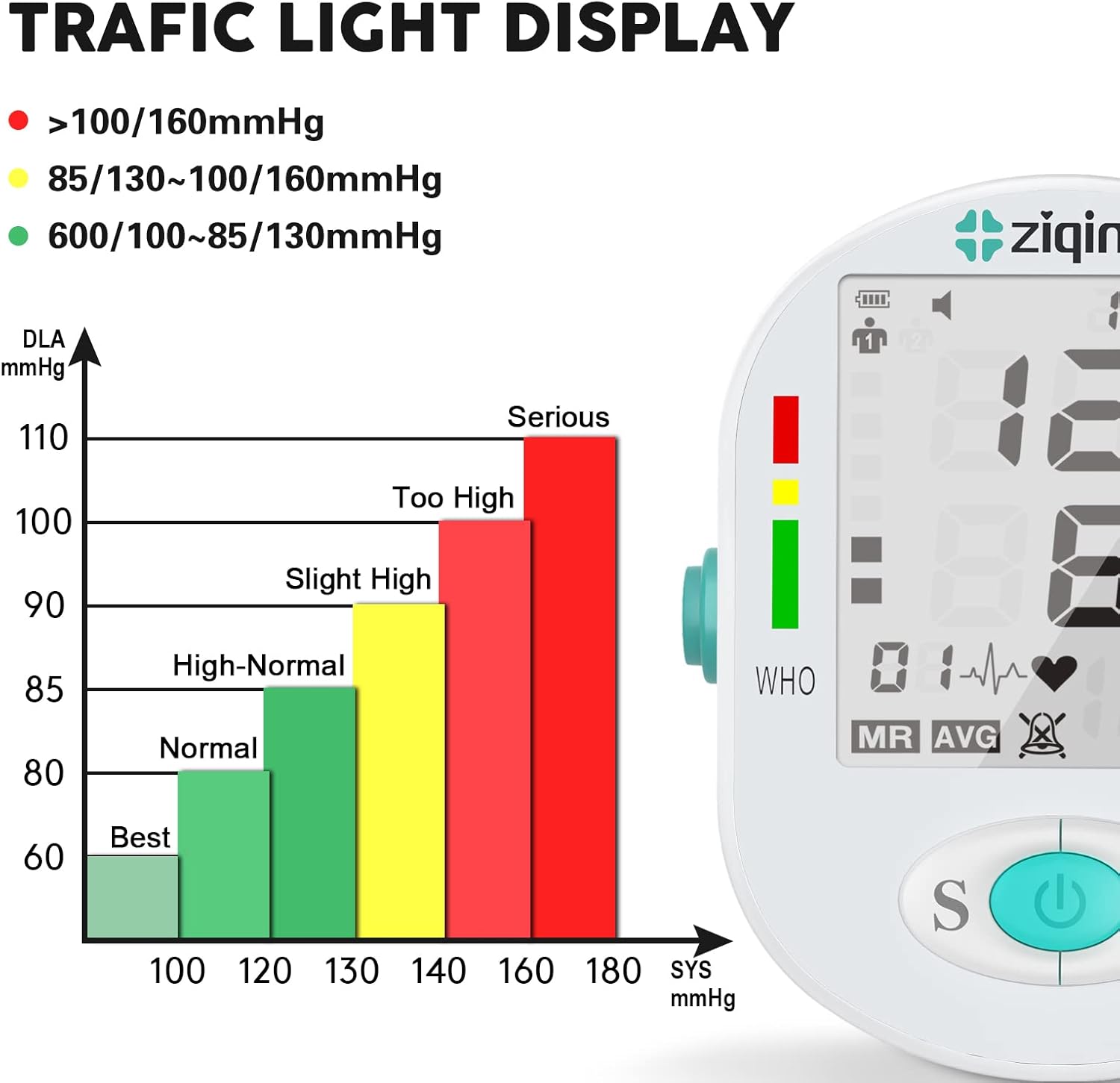
Image: The blood pressure monitor display showing the WHO classification chart with green, yellow, and red zones indicating different blood pressure levels.

Image: The blood pressure monitor displaying readings for two different users, highlighting its dual-user memory function.
5. Maintenance
To ensure the longevity and accuracy of your blood pressure monitor:
- Keep the device clean by wiping it with a soft, dry cloth. Do not use abrasive cleaners or immerse the unit in water.
- Store the monitor and cuff in a cool, dry place, away from direct sunlight and extreme temperatures.
- Avoid dropping the device or subjecting it to strong impacts.
- If using batteries, remove them if the device will not be used for an extended period to prevent leakage.
6. Troubleshooting
If you encounter any issues with your ZIQING Blood Pressure Monitor, refer to the following common problems and solutions:
| Error Message / Symptom | Possible Cause | Solution |
|---|---|---|
| Measurement reading is not accurate | Incorrect measurement method, movement during measurement, wrist congestion from repeated measurements. | Ensure proper posture (sit still for 5 mins, back supported, arm on table, cuff at heart height). For repeated measurements, rest for 4-5 minutes or raise and shake the arm to improve circulation. |
| Error 1 displayed | Sensor signal abnormal, component damaged. | Contact customer support for processing. |
| Error 2 displayed | Cuff not tightened sufficiently. | Tighten the cuff and measure again. |
| Error 3 displayed | Arm or body movement during measurement. | Keep your arm or body still and measure again. |
| Error 4 displayed | Cuff too loose or air leakage. | Tighten the cuff and measure again. |
| Error 5 displayed | Cuff too tight or air circuit blocked. | Adjust the cuff and measure again. |
| Error 6 displayed | Serious pressure interference during measurement. | Hold your arm or body still and measure again. |
| Error 7 displayed | Pressure value exceeds 295mmHg (39.33Kpa). | Remeasure. |
7. Specifications
| Feature | Detail |
|---|---|
| Product Dimensions | 5.59 x 4.44 x 2.75 inches |
| Item Weight | 15.84 ounces |
| Brand | ZIQING |
| Model | B0BTYPMCNQ |
| Included Components | BP Machine, Arm Cuff, USB Cable, User Manual |
| Power Source | Corded Electric, Battery Powered (4 x AAA batteries, not included) |
| Use for | Arm |
| Display Type | Digital |
| Cuff Size | 8.7 - 17.3 inches (22 - 44 cm) |
| Memory Storage | 2 users, 99 memories per user |
| Material Feature | BP machine: ABS; BP cuff: Environmentally friendly materials |
8. Warranty and Support
ZIQING provides a worry-free 12-month warranty for this blood pressure monitor. Our professional team is available 24/7 to assist with any questions or issues you may have regarding your product. Please contact us directly for support.