
1. Introduction
This manual provides instructions for the proper setup, operation, and maintenance of your ECONTROLLY FSR50 WY57780 replacement remote control. This remote is designed to be compatible with Yamaha Receiver Sound Bar models SR-301 and YHT-S401.
Please read this manual thoroughly before using the remote control to ensure optimal performance and longevity.
2. Setup
2.1 Battery Installation
- Locate the battery compartment on the back of the remote control.
- Slide the battery compartment cover downwards or press the latch and lift to open.
- Insert two (2) AAA batteries, ensuring the positive (+) and negative (-) terminals align correctly with the markings inside the compartment.
- Replace the battery compartment cover, ensuring it clicks securely into place.
Note: This remote control does not require any programming. Once batteries are installed, it is ready for use with compatible Yamaha devices.

Figure 1: Rear view of the remote control with the battery compartment.
3. Operating Instructions
The ECONTROLLY FSR50 WY57780 remote control provides full functionality for your compatible Yamaha Receiver Sound Bar. Below is a general overview of key button functions.
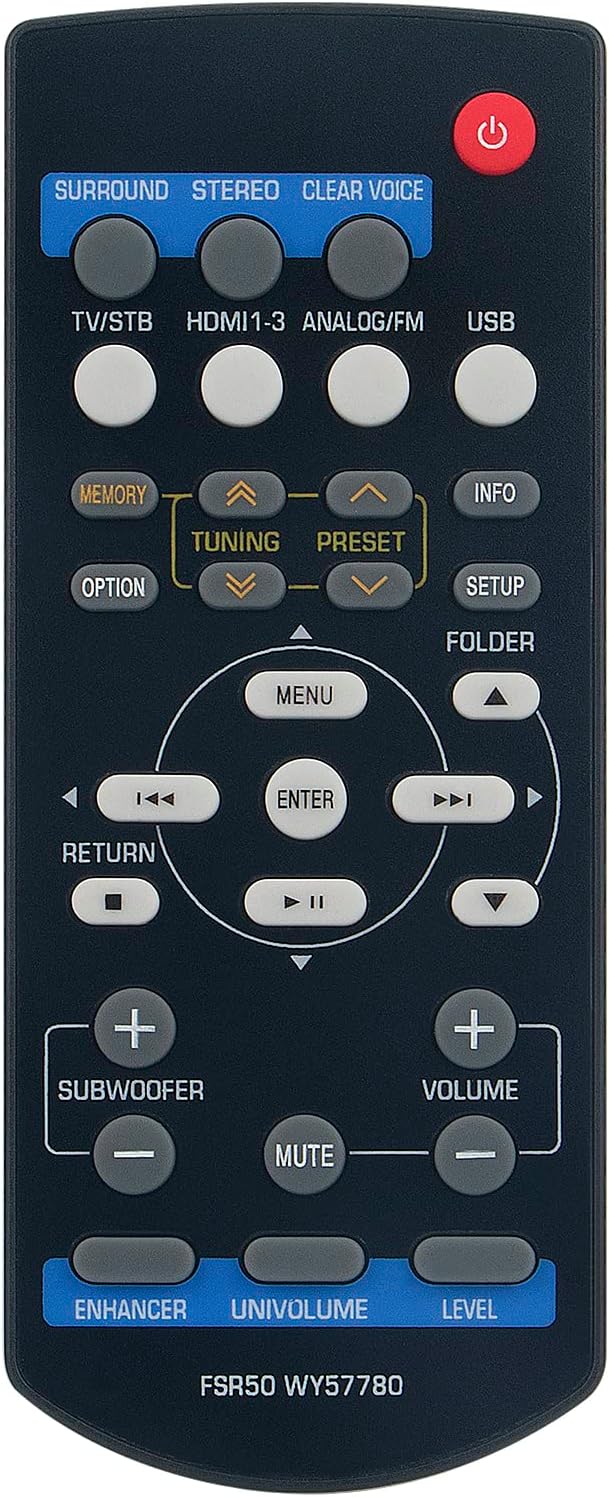
Figure 2: Front view of the remote control with button layout.
3.1 Basic Functions
- Power Button (⏻): Turns the Yamaha device on or off.
- Volume (+/-): Adjusts the main volume level.
- Mute: Silences or restores the audio output.
- Input Selectors (e.g., TV/STB, HDMI1-3, ANALOG/FM, USB): Switches between different audio/video input sources.
- Surround, Stereo, Clear Voice: Selects audio processing modes.
3.2 Navigation and Menu Controls
- Menu: Accesses the device's main menu.
- Arrow Buttons (▲ ▼ ◄ ►): Navigates through menu options.
- Enter: Confirms a selection.
- Return: Goes back to the previous screen or menu.
- Setup: Directly accesses the setup menu.
3.3 Advanced Functions
- Subwoofer (+/-): Adjusts the subwoofer volume level independently.
- Tuning (▲ ▼): Used for radio tuning.
- Preset (◄ ►): Selects radio presets.
- Memory: Stores radio presets.
- Info: Displays information about the current source or settings.
- Folder: Navigates through folders, typically for USB media.
- Enhancer, Univolume, Level: Specific audio enhancement and control features. Refer to your Yamaha device's manual for detailed usage of these functions.
4. Maintenance
4.1 Battery Replacement
Replace batteries when the remote control's response becomes sluggish or stops functioning. Always replace both batteries simultaneously with new AAA alkaline batteries. Do not mix old and new batteries, or different types of batteries.
4.2 Cleaning
To clean the remote control, wipe it with a soft, dry cloth. For stubborn dirt, lightly dampen the cloth with water. Do not use abrasive cleaners, solvents, or alcohol, as these can damage the surface or internal components.
4.3 Storage
If the remote control will not be used for an extended period, remove the batteries to prevent leakage and potential damage to the device.
5. Troubleshooting
| Problem | Possible Cause | Solution |
|---|---|---|
| Remote control does not work. |
|
|
| Buttons are unresponsive or sticky. | Accumulated dirt or debris. | Clean the remote control as described in the Maintenance section. |
6. Specifications
- Model: FSR50 WY57780
- Brand: ECONTROLLY
- Compatible Devices: Yamaha Receiver Sound Bar SR-301, YHT-S401
- Power Source: 2 x AAA Batteries (not included)
- Connectivity Technology: Infrared (IR)
- Dimensions: 7 x 2 x 0.65 inches (approximately)
- Weight: 1.76 ounces (without batteries)
7. Support
For any questions, concerns, or further assistance regarding your ECONTROLLY FSR50 WY57780 remote control, please contact the seller or manufacturer directly through your purchase platform.
Please refer to your original Yamaha device's instruction manual for detailed information on specific functions of your sound bar or receiver.
