
1. Introduction
The GRECELL Portable Power Station EB1000 is a versatile and reliable power source designed for various applications, including outdoor camping, RV travel, home backup, and off-grid living. With a 999Wh capacity and 1000W continuous output (2000W peak), it provides clean, stable power for a wide range of electronic devices and small appliances. This manual provides essential information for the safe and efficient operation, maintenance, and troubleshooting of your power station.
2. Safety Instructions
Please read and understand all safety instructions before operating the GRECELL EB1000 Portable Power Station. Failure to follow these instructions may result in electric shock, fire, or serious injury.
- Power Rating: Do not use this power station to power devices with a rated power exceeding 1000 watts. Overloading can damage the unit and connected devices.
- AC Output: Always turn off the AC output when not in use. Leaving it on without loads can drain the battery.
- Ventilation: Ensure adequate ventilation around the power station during operation and charging. The built-in dual cooling fans prevent overheating; do not block their vents.
- Battery Management System (BMS): The unit features an upgraded BMS for protection against over-voltage, over-current, short-circuit, over-charge, over-load, and over-heating. This system automatically shuts off when devices reach full charge.
- Environment: Avoid exposing the power station to extreme temperatures, direct sunlight for prolonged periods, high humidity, or corrosive environments.
- Water Exposure: Do not immerse the unit in water or expose it to heavy rain.
- Disassembly: Do not attempt to disassemble, repair, or modify the power station. Contact customer support for service.
- Children: Keep the power station out of reach of children.
3. Package Contents
Verify that all items are present in your package:
- GRECELL Portable Power Station EB1000
- AC Adapter
- Car Charging Cable
- Solar Charging Cable (7909 connector)
- User Manual
- Cable Storage Bag

Image: GRECELL EB1000 Portable Power Station and its accessories.
4. Product Features and Components
The GRECELL EB1000 is equipped with multiple output ports and features for versatile power delivery:
- AC Outlets: 2 x 110V Pure Sine Wave AC sockets (1000W continuous, 2000W peak).
- USB-C Port: 1 x PD 60W for fast charging compatible devices like laptops and smartphones.
- USB-A Ports: 3 x QC 3.0 (18W each) for quick charging various USB devices.
- Wireless Charging Pad: Integrated 10W wireless charging for compatible smartphones.
- DC Outputs: 2 x DC outputs.
- Car Port: 1 x 12V car port.
- LCD Display: Provides real-time information on wattage, battery level, and estimated runtime.
- LED Light: Built-in LED light with Constant, SOS, and Strobe modes for emergency illumination.
- Cooling System: Silent dual cooling fans to prevent overheating.

Image: Front panel of the GRECELL EB1000 showing all output ports.

Image: Internal cooling fan system diagram.
5. Setup
5.1 Initial Charging
Before first use, fully charge your GRECELL EB1000. This ensures the battery gauge is calibrated correctly and the unit is ready for optimal performance.
5.2 Charging Methods
The power station can be recharged using three methods:
- AC Wall Outlet: Connect the included AC adapter to the power station's input port and then to a standard wall outlet. Charging time is approximately 7-8 hours.
- Solar Panels: Connect compatible solar panels (not included, 200W recommended) to the power station's solar input port using the provided solar charging cable. The built-in MPPT (Maximum Power Point Tracking) technology optimizes solar charging efficiency. Charging time is approximately 6-9 hours depending on sunlight conditions.
- Car Outlet: Use the included car charging cable to connect the power station to your vehicle's 12V car outlet. Charging time is approximately 7-9 hours.
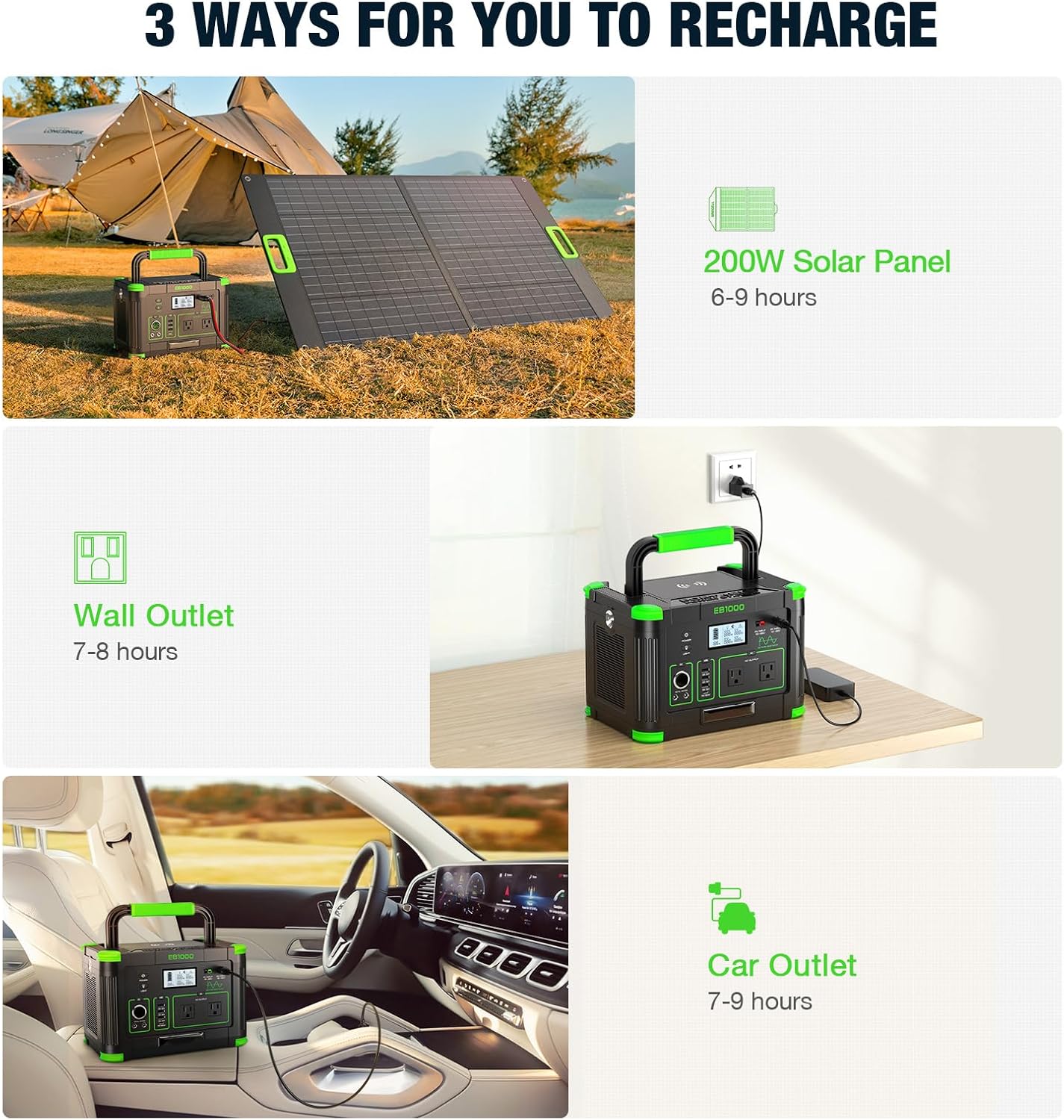
Image: Three ways to recharge the GRECELL EB1000.

Image: Solar charging the GRECELL EB1000.
6. Operating Instructions
6.1 Powering On/Off
Press and hold the main POWER ON/OFF button to turn the unit on or off. The LCD display will illuminate upon activation.
6.2 Using Output Ports
Each output module (AC, DC, USB) has an individual switch. Press the corresponding button to activate or deactivate the desired output. The LCD display will show the active outputs and real-time power consumption.
- AC Outlets: Press the 'AC' button to enable the AC outlets. Connect your 110V devices.
- USB Ports: Press the 'USB' button to enable the USB-A and USB-C ports. Connect your USB devices for charging.
- DC Output/Car Port: Press the 'DC' button to enable the DC outputs and car port.
6.3 Wireless Charging
To use the wireless charging feature, first press the 'POWER ON/OFF' button, then press the 'USB' button. Place your compatible device on the wireless charging pad located on top of the unit.
6.4 LED Light Operation
Press the light switch for 2 seconds to turn on the LED light. Tap the switch to cycle through different modes: Constant light, SOS mode, and Strobe mode.
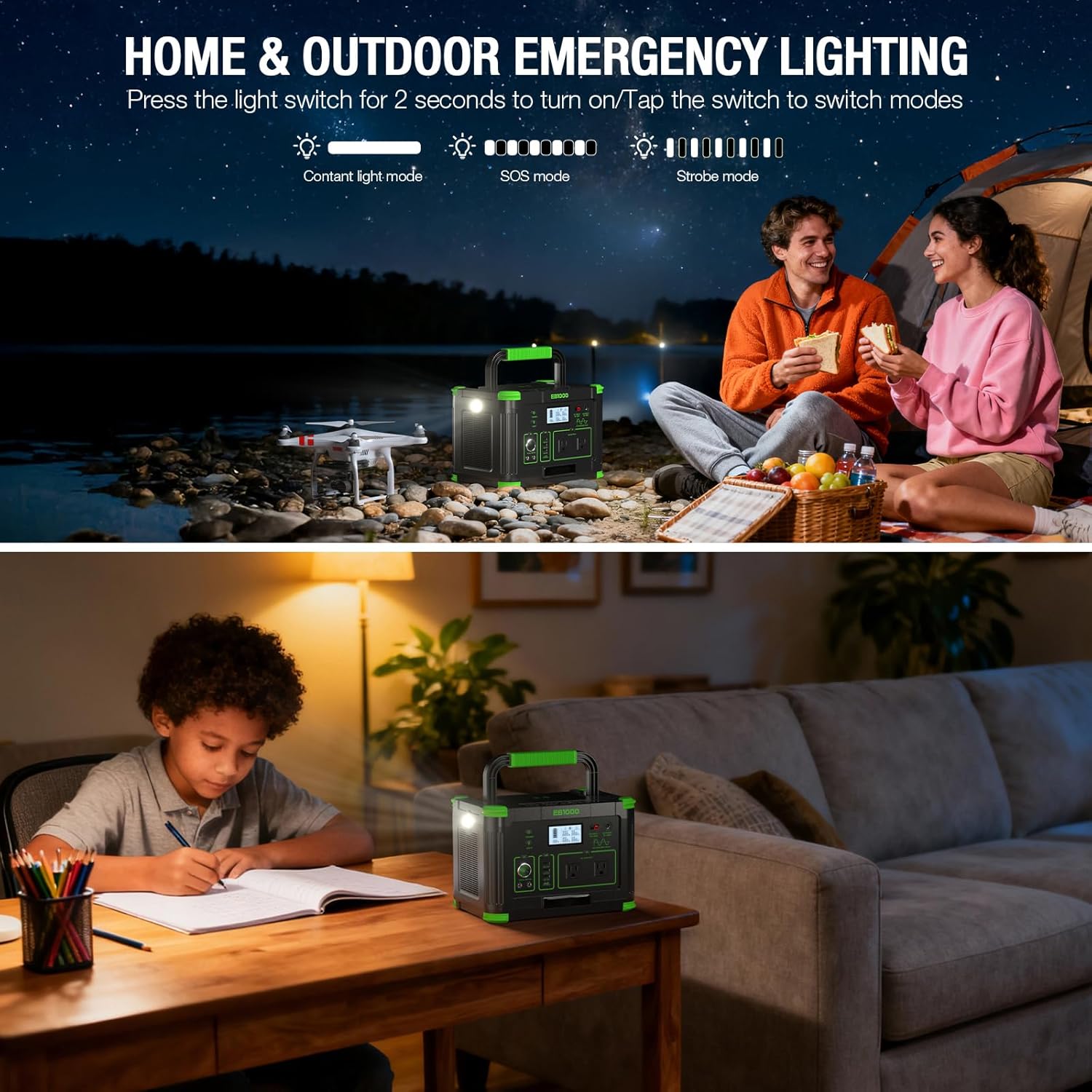
Image: GRECELL EB1000 LED light in use for camping and indoor lighting.

Image: LED light modes (Bright, SOS, Flash Light).
6.5 Pass-Through Charging
The GRECELL EB1000 supports pass-through charging, meaning you can use the power station to power devices while it is simultaneously being recharged.

Image: Pass-through charging with solar panel and devices.
7. Maintenance
Proper maintenance ensures the longevity and optimal performance of your power station.
- Battery Calibration: To maintain accurate battery level readings, it is recommended to occasionally drain the power station completely (to 0%) and then fully recharge it to 100% immediately. This helps reset the internal battery gauge.
- Storage: If storing the unit for an extended period, charge it to approximately 50-80% and store it in a cool, dry place away from direct sunlight. Recharge every 3-6 months to prevent deep discharge.
- Cleaning: Use a dry, soft cloth to clean the exterior of the power station. Do not use liquid cleaners or solvents.
- Inspection: Regularly inspect the unit and cables for any signs of damage. Do not use if damaged.
8. Troubleshooting
If you encounter issues with your GRECELL EB1000, refer to the following common troubleshooting tips:
- Unit Not Turning On: Ensure the battery is charged. If completely depleted, it may take a few minutes of charging before the unit responds.
- Device Not Charging/Powering:
- Check if the specific output (AC, USB, DC) is enabled by pressing its respective button.
- Verify that the device's power consumption does not exceed the output limit of the port or the total output limit of the power station (1000W).
- Ensure the device is properly connected to the port.
- Wireless Charger Not Working: Ensure both the main POWER ON/OFF button and the 'USB' button are pressed to activate the wireless charging function. Confirm your device supports wireless charging and is placed correctly on the pad.
- Battery Gauge Inaccurate: Perform a full discharge (to 0%) followed by an immediate full recharge (to 100%) to recalibrate the battery gauge.
- Overload Protection Activated: If the unit shuts down due to overload, disconnect the high-power device, turn the power station off, then on again, and connect devices within the specified wattage limits.
- Overheating: The unit has cooling fans. If it feels excessively hot, ensure vents are not blocked and operate in a cooler environment. The BMS will shut down the unit if it overheats.
For issues not resolved by these steps, please contact GRECELL customer support.
9. Specifications
| Brand | GRECELL |
| Model Name | EB1000 |
| Capacity | 999Wh |
| AC Output | 1000W (2000W Peak), 110V Pure Sine Wave |
| USB-C Output | 1 x PD 60W |
| USB-A Output | 3 x QC 3.0 (18W each) |
| Wireless Charging | 10W |
| DC Output | 2 x DC outputs |
| Car Port Output | 1 x 12V |
| Recharge Methods | AC Wall Outlet, Solar Panel, Car Outlet |
| Dimensions (L x W x H) | 11.6" x 7.91" x 7.91" (29.5cm x 20.1cm x 20.1cm) |
| Weight | 17.8 lbs (8.1 kg) |
| Special Features | Pure Sine Wave, MPPT Technology, BMS Battery Protection, LED Light with SOS mode, Portable |

Image: GRECELL EB1000 dimensions.
10. Warranty and Support
The GRECELL Portable Power Station EB1000 comes with a 1-year warranty from the date of purchase. For warranty claims or technical support, please contact the seller directly through your purchase platform. Ensure you retain your proof of purchase for warranty validation.


