
1. Introduction
The PopBloom RL90 WiFi LED Aquarium Light is designed for marine saltwater tanks, promoting healthy growth of SPS/LPS corals and other reef inhabitants. This advanced lighting system features smart APP control, allowing for customizable light cycles, spectrum adjustments, and natural simulations like sunrise, sunset, and lunar cycles. This manual provides detailed instructions for installation, operation, and maintenance to ensure optimal performance and longevity of your aquarium light.
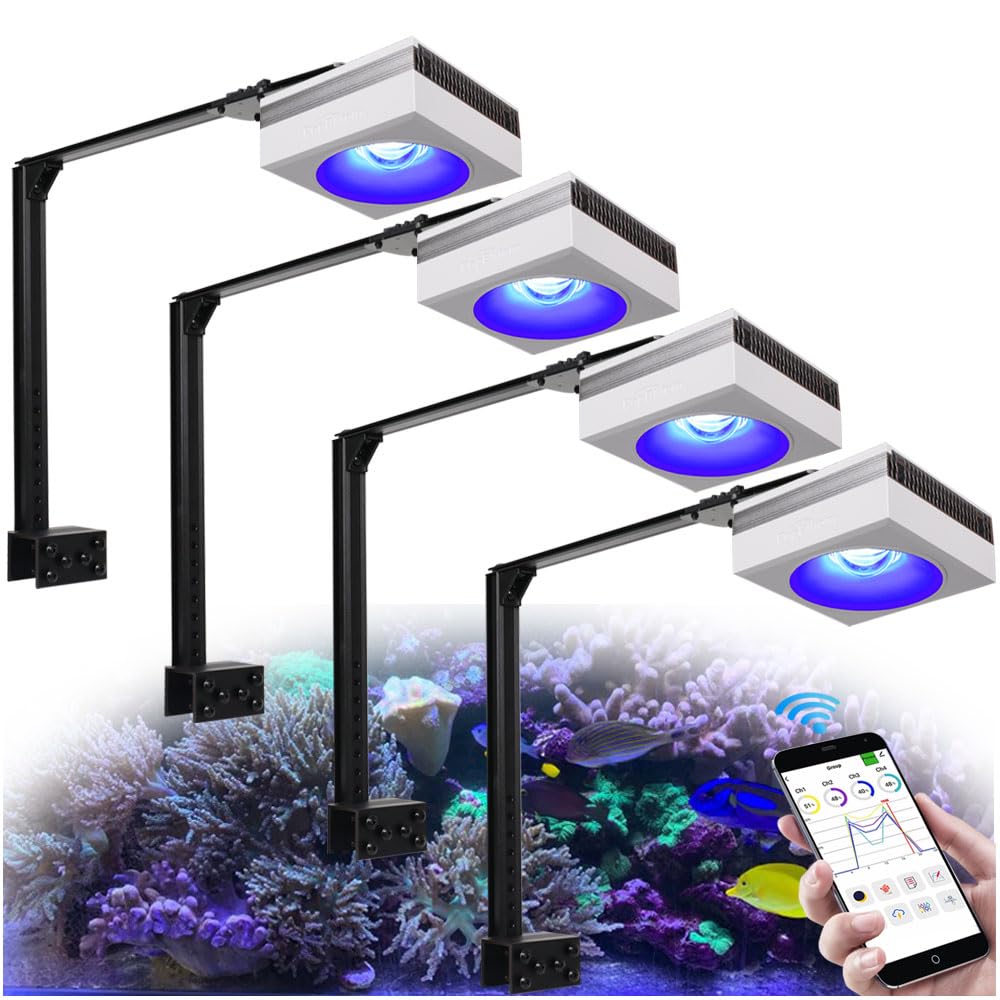
Image: PopBloom RL90 WiFi LED Aquarium Light in operation, demonstrating smartphone app control over a reef tank.
2. Package Contents
Verify that all items listed below are included in your package. If any items are missing or damaged, please contact customer support.
- 4 x PopBloom RL90 WiFi LED Light Units
- 4 x Mount Kits (for tank edge mounting)
- 4 x Power Supplies
- 4 x Power Plugs (various types: Euro, US, UK, AU)

Image: A visual representation of the PopBloom RL90 package contents, including the LED lights, power adapters, and mounting hardware.
3. Specifications
| Feature | Detail |
|---|---|
| Model Number | Hertz RL90 WiFi |
| Product Dimensions | 12.19 x 12.19 x 5.59 cm (4.7 x 4.7 x 2.2 inches) |
| LED Array Power | 90 W |
| PAR (Water Surface) | 500 PAR |
| PAR (60cm Depth) | 150 PAR |
| Channels | 4 Independent Channels |
| Channel 1 | 10W 12000K White |
| Channel 2 | 5W Moonlight |
| Channel 3 | 65W REEF GROW Blue |
| Channel 4 | 10W Vivid Color |
| Control Method | WiFi / Smart APP (Android/iOS) |
| WiFi Network | 2.4GHz |
| Material | Glass-Aluminum Oxide |
| Power Source | Battery Powered (Note: This refers to the control unit, not the main power for the light itself which is AC powered via adapter) |
| Maximum Wattage | 400 Watts (Total system capacity, individual unit is 90W) |

Image: Technical parameters of the RL90, showing LED array power, PAR values, and the breakdown of the 4 LED channels.
4. Setup
4.1 Physical Installation (Mount Kit)
- Assemble the Mount Kit: Attach the arm kit to the light unit using the provided screws. Ensure all connections are secure.
- Attach to Aquarium: The mount kit includes two types of bases (2cm and 4cm) to accommodate various tank rim thicknesses (rimless, rimmed, horizontal). Select the appropriate base and securely fasten the mount to the edge of your aquarium.
- Adjust Light Position: Position the light unit over your aquarium. The adjustable arm allows for precise placement to achieve optimal light coverage.
4.2 Power Connection
- Connect the power supply to the light unit.
- Plug the appropriate power plug into the power supply.
- Insert the power plug into a suitable electrical outlet.
4.3 Smart APP Installation and WiFi Connection
- Download the App: Scan the QR code provided in the product packaging or search for "Smart Life" in your mobile device's App Store (iOS) or Google Play Store (Android). Alternatively, you can visit https://a.smart321.com/tuyasmartlifeiot to download the app.
- Register/Log In: Open the Smart Life app and create a new account or log in with an existing one.
- Add Device: Follow the in-app instructions to add your PopBloom RL90 light. Ensure your phone is connected to a 2.4GHz WiFi network during the pairing process.
- Connect to WiFi: The app will guide you through connecting the light to your home WiFi network. This typically involves putting the light into pairing mode (refer to the light's indicator for specific instructions, usually a blinking light) and entering your WiFi credentials in the app.
- Group Management: If you have multiple RL90 lights, the app allows you to group them for synchronized control (up to 12 lights).

Image: Screenshot of the Smart Life app interface for controlling the PopBloom RL90, with a QR code for easy app download.
5. Operating the PopBloom RL90
The PopBloom RL90 offers various operating modes and features through the Smart Life app to customize your aquarium lighting.
5.1 App Control Features
- DIY Mode: Customize a 24-hour lighting schedule. Set start and end times, and adjust the color and brightness for each of the four channels independently.
- Natural Simulation: Simulate natural phenomena such as sunrise, sunset, 24-hour auto cycle, 4 seasons, lunar cycle, and storm effects. This helps create a natural environment for your corals and marine life.
- Lunar Cycle: Activate a 29-day lunar cycle. The app will automatically update the light intensity to mimic the moon's phases.
- Lightning Mode: Stimulate vigorous coral growth with random lightning flashes. Run for a set duration.
- Slow Acclimation Mode: Gradually introduce new corals or acclimate your tank to the new light by slowly increasing intensity over a set period.
- Group Control: Manage multiple RL90 lights simultaneously from the app.

Image: The Smart Life app interface demonstrating various programmable modes like manual adjustment, lunar cycle, lightning, and acclimation.
5.2 Spectrum and PAR Distribution
The RL90 features a full spectrum with 4 channels designed for optimal coral growth and coloration. The blue/UV spectrum promotes calcium absorption and Vitamin D3 synthesis in corals, enhancing their health and vibrant colors.
The light provides an ideal PAR distribution, ensuring even light penetration throughout your aquarium. Refer to the PAR distribution map for optimal light placement and intensity settings.

Image: A heat map illustrating the PAR (Photosynthetically Active Radiation) distribution from the Hertz RL90, showing light intensity across a 60x60cm area at different depths.
6. Maintenance
Regular maintenance ensures the longevity and optimal performance of your PopBloom RL90 LED Aquarium Light.
- Cleaning: Periodically wipe the light unit and lens with a soft, damp cloth to remove salt creep, dust, and water spots. Ensure the unit is unplugged before cleaning. Do not use harsh chemicals or abrasive materials.
- Ventilation: Ensure the cooling fins on the light unit are free from obstructions to allow for proper heat dissipation. Good airflow prevents overheating and extends LED lifespan.
- Cable Inspection: Regularly check power cables and connections for any signs of wear, damage, or corrosion. Replace damaged cables immediately.
7. Troubleshooting
| Problem | Possible Cause | Solution |
|---|---|---|
| Light not turning on | No power, faulty connection, power supply issue. | Check power outlet, ensure all cables are securely connected. Test with another outlet if possible. |
| Cannot connect to WiFi/App | Incorrect WiFi password, 5GHz network, light not in pairing mode, app issues. | Ensure you are using a 2.4GHz WiFi network. Double-check password. Put light into pairing mode (refer to light indicator). Restart app and light. |
| Light flickers or dims unexpectedly | Loose connection, power fluctuation, overheating. | Check all connections. Ensure adequate ventilation around the light unit. Contact support if issue persists. |
| App settings not applying to light | Connectivity issue between app and light. | Ensure your phone and light are connected to the same WiFi network. Restart the app. |
8. Warranty and Support
8.1 Manufacturer Warranty
The PopBloom RL90 WiFi LED Aquarium Light comes with a 3-year warranty from the date of purchase. This warranty covers defects in materials and workmanship under normal use. It does not cover damage caused by misuse, accidents, unauthorized modifications, or improper installation.
8.2 Customer Support
For technical assistance, warranty claims, or any questions regarding your PopBloom RL90 light, please contact the manufacturer:
Manufacturer: Shenzhen PopBloom Electronic Technology Co., Ltd
Refer to your product packaging or the official PopBloom website for the most current contact information.


