
usmile Q4
usmile Kids Electric Toothbrush
User Manual
1. Product Overview
The usmile Kids Electric Toothbrush (Model Q4) is designed for children aged 3-12, featuring a micro-bubble motor for effective cleaning, DuPont Tynex 5901HA fluoride-containing bristles for cavity prevention, and a long-lasting battery. Its ergonomic design and fun dinosaur pattern encourage good oral hygiene habits.

Image: The usmile Kids Electric Toothbrush Q4, shown with its packaging and two brush heads.

Image: Two usmile kids electric toothbrushes, one pink and one green, highlighting their recommendation by dentists for children aged 3 and above.
2. What's in the Box
- Brush Handle (Model Q4) x1
- Soft Brush Head x2
- Cute Sticker x1
- User Manual x1
- Type-C Cable x1
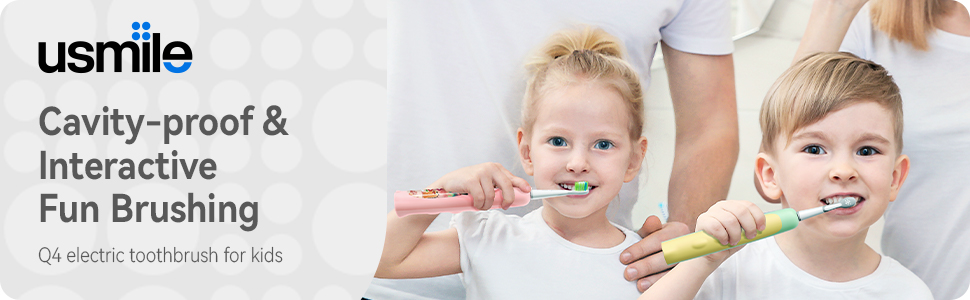
Image: A visual representation of the items included in the product package, such as the toothbrush handle, brush heads, stickers, user manual, and charging cable.
3. Setup
3.1 Initial Charge
Before first use, fully charge the toothbrush. Connect the provided USB Type-C cable to the charging port on the toothbrush handle and a suitable power source. A full charge takes approximately 4 hours and can last up to 6 months.
3.2 Attaching the Brush Head
Align the brush head with the metal shaft on the toothbrush handle and push it down firmly until it clicks into place. Ensure it is securely attached before use.

Image: A hand holding the usmile kids electric toothbrush, illustrating the ergonomic handle and the small 14mm brush head designed for children.
3.3 Applying Stickers (Optional)
Personalize your toothbrush by applying the included fun DIY stickers to the handle. Ensure the surface is clean and dry before applying for best adhesion.

Image: A hand applying a decorative sticker to the handle of the usmile kids electric toothbrush, demonstrating the customization option.
4. Operating Instructions
4.1 Power On/Off and Mode Selection
The toothbrush features 2 modes (Clean & Soft) that can be easily controlled with a single button. Press the button once to turn on the toothbrush and cycle through the modes. Press and hold to turn off.
4.2 Brushing Technique
Wet the toothbrush head and apply a pea-sized amount of toothpaste. Place the toothbrush head in the mouth, ensuring the bristles are at a slight angle towards the gumline. The ergonomic handle with its protruding design helps children maintain the correct brushing posture. Move the brush slowly across all tooth surfaces, allowing the micro-bubble motor to provide a gentle yet thorough cleaning with up to 33,000 vibrations per minute.

Image: The usmile kids electric toothbrush, illustrating the micro-bubble motor in action, which provides 33,000 vibrations per minute for effective stain and plaque removal.
4.3 Built-in Timer
The toothbrush includes a 2-minute timer to help children develop good brushing habits, ensuring they brush for the dentist-recommended duration. It also features a 30-second quadrant reminder to encourage thorough cleaning of all areas of the mouth.
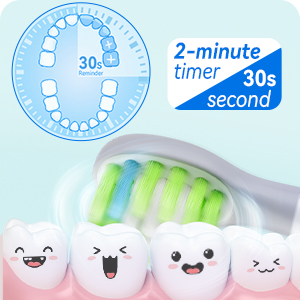
Image: A visual guide to the toothbrush's 2-minute timer and 30-second quadrant reminder, promoting comprehensive brushing.
4.4 Bristle Technology
The toothbrush features DuPont Tynex 5901HA fluoride-containing bristles, designed to resist acidic erosion and prevent tooth decay. These ultra-soft bristles are gentle on delicate gums while providing effective cleaning.

Image: A close-up view of the DuPont Fluorine Soft Bristles, highlighting their ability to fight sugar and acid attack and prevent tooth decay.
4.5 Instructional Video
Video: An official product video demonstrating the features and proper use of the usmile Kids Electric Toothbrush, including children brushing their teeth.
5. Maintenance
5.1 Cleaning the Toothbrush
After each use, rinse the toothbrush head and handle thoroughly under running water. The toothbrush is IPX7 waterproof, allowing for easy washing and cleaning without worry.

Image: The usmile kids electric toothbrush being rinsed under running water, showcasing its IPX7 waterproof capability for easy cleaning.
5.2 Charging
Recharge the toothbrush using the USB Type-C cable when the battery indicator shows low power. A single 4-hour charge provides up to 6 months of battery life.
5.3 Brush Head Replacement
It is recommended to replace the brush head every 3 months, or sooner if the bristles appear frayed or worn, to maintain optimal cleaning performance.
6. Troubleshooting
- Toothbrush not turning on: Ensure the toothbrush is fully charged. If the issue persists, try a different charging cable or power adapter.
- Weak vibration or no vibration: Check if the brush head is securely attached to the handle. If it is, the battery might be low and requires charging.
- Charging issues: Verify that the USB Type-C cable is properly connected to both the toothbrush and the power source. Ensure the power source is active.
- Unusual noise: If the toothbrush makes an unusual noise, ensure the brush head is correctly installed. If the noise continues, discontinue use and contact customer support.
7. Specifications
| Feature | Detail |
|---|---|
| Product Dimensions | 1.02 x 1.02 x 8.94 inches; 14.39 ounces |
| Item Model Number | Q4 |
| Batteries | 1 Lithium Ion battery required |
| Date First Available | February 27, 2023 |
| Manufacturer | usmile |
| ASIN | B0BTYGGJ7Z |
| Brand | usmile |
| Age Range (Description) | Ages of 3-12 |
| Special Feature | Brushing Timer |
| Power Source | Corded Electric |
| Item Firmness Description | Soft |

Image: A summary of the toothbrush's key features, including its two brushing modes, 55dB whisper-level vibration frequency, and 180-day battery life.
8. Warranty & Support
The usmile Kids Electric Toothbrush comes with a one-year warranty and a 30-day satisfaction guarantee. Our customer service team is available 24/7 to answer any questions or concerns you may have.
For support, please contact us through the usmile official website or your purchase platform.
Related documentsQ4

Ask a question about this manual
Ask about setup, troubleshooting, compatibility, parts, safety, or missing instructions. Manuals+ will review the question and use this page’s manual context to help answer it.