
Introduction
Thank you for choosing the Zordai Z8 Ultra Max Smartwatch. This manual provides essential information for setting up, operating, maintaining, and troubleshooting your device. The Z8 Ultra Max is designed for both genders, featuring a durable, water-resistant design, advanced health monitoring, and seamless smartphone connectivity.

Image: Zordai Z8 Ultra Max Smartwatch with an orange silicone band, displaying a digital watch face with health metrics.
Package Contents
Ensure all items are present in your package:
- Zordai Z8 Ultra Max Smartwatch
- Silicone Strap
- Wireless Charger
- User Manual (Catalog)
- Watch Cover
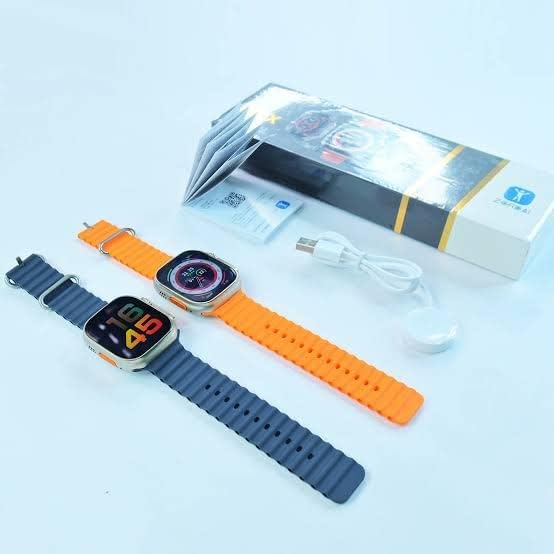
Image: Two Zordai Z8 Ultra Max smartwatches, one with an orange band and one with a blue band, displayed alongside their packaging and a wireless charging cable.
Setup
1. Charging the Smartwatch
Before first use, fully charge your Z8 Ultra Max Smartwatch. Use the provided wireless charger. Connect the charger to a USB power source. Place the back of the smartwatch onto the charging pad. The watch screen will indicate charging status. A full charge typically takes approximately 45 minutes.
2. Powering On/Off
- To Power On: Press and hold the side power button until the screen lights up.
- To Power Off: Press and hold the side power button, then select 'Power Off' on the screen.
3. Pairing with Your Smartphone
The Z8 Ultra Max connects to your smartphone via Bluetooth 5.2 for full functionality.
- Download the companion application from your phone's app store. Refer to the included catalog for the app name or QR code.
- Enable Bluetooth on your smartphone.
- Open the companion app and follow the on-screen instructions to search for and pair with your Z8 Ultra Max.
- Confirm the pairing request on both your phone and smartwatch.
The smartwatch is compatible with various iPhone models, including iPhone 8, 8 Plus, X, XR, XS, XS Max, 11, 11 Pro, 11 Pro Max, SE (2nd & 3rd Gen), 12, 12 Mini, 12 Pro, 12 Pro Max, 13, 13 Mini, 13 Pro, 13 Pro Max, 14, 14 Plus, 14 Pro, and 14 Pro Max.
Operating Instructions
1. Navigation
- Touchscreen: Swipe left, right, up, or down to navigate through menus and notifications. Tap to select items.
- Side Buttons: Use the two side buttons for quick access to functions or to navigate between watch faces. The rotating crown can also be used for scrolling.

Image: Side view of the Zordai Z8 Ultra Max Smartwatch, highlighting the two side buttons and the rotating crown for interaction.
2. Communication Features
- Calls: Once paired with your smartphone, you can make and receive calls directly from your smartwatch. The watch supports full contact synchronization via the app.
- Messages: Receive and read notifications from various messaging apps, including WhatsApp and Messenger, directly on your watch screen.
3. Health Monitoring
The Z8 Ultra Max provides comprehensive health tracking:
- Heart Rate: Monitor your heart rate throughout the day.
- Blood Oxygen: Measure your blood oxygen saturation levels.
- Blood Pressure: Track your blood pressure.
- Calorie & Fat Burn: Estimates calorie and fat burn rates during activities.
Note: This device is not a medical instrument. Health data is for reference only and should not be used for medical diagnosis or treatment.
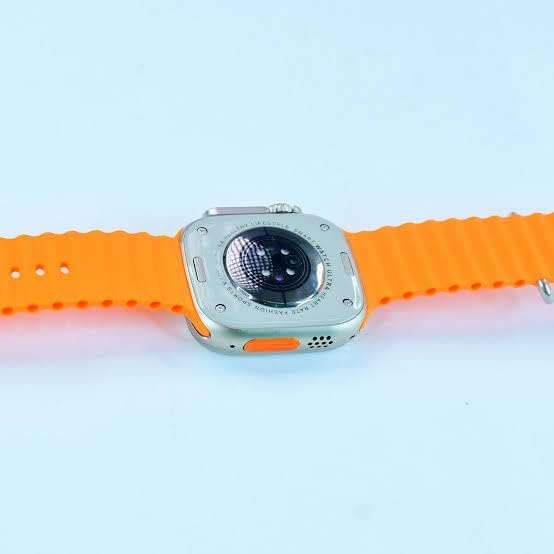
Image: The back of the Zordai Z8 Ultra Max Smartwatch, showing the optical sensors used for health monitoring.
4. Fitness and Sports Modes
Engage in various sports activities with dedicated tracking modes, including:
- Climbing
- Running
- Walking
- Long-distance walking
- Cycling
5. Additional Features
- GPS: Built-in GPS for location tracking and navigation.
- Calculator: Access a calculator directly on your wrist.
- Weather: Get real-time weather updates.
- Music Player: Control music playback on your paired smartphone.
- Custom Watch Faces: Download new watch faces or set personal photos as wallpapers through the companion app.
- Screen Lock & Passcode: Secure your smartwatch with a screen lock and protection code.
- Find My Phone: Use your watch to locate your paired smartphone.
- NFC: Supports NFC functionality.

Image: The Zordai Z8 Ultra Max Smartwatch displaying a grid of colorful application icons, indicating its smart functionality.
Maintenance
1. Water Resistance
The Zordai Z8 Ultra Max is designed to be water-resistant. This means it can withstand splashes, rain, and brief immersion. However, it is not recommended for diving, hot showers, or prolonged exposure to water. Always ensure the watch is dry before charging.
2. Cleaning
Wipe the watch screen and body with a soft, dry, lint-free cloth. For stubborn dirt, slightly dampen the cloth with water. Avoid using harsh chemicals or abrasive materials that could damage the screen or casing.
3. Battery Care
To maximize battery life (up to 2-3 days depending on usage), avoid extreme temperatures. Charge the watch regularly and avoid letting the battery completely drain for extended periods.
4. Durability
The watch features a full metal frame made from a zinc alloy blend, designed to be rust and scratch-resistant. While durable, avoid dropping the watch or exposing it to severe impacts.
Troubleshooting
- Watch not turning on: Ensure the watch is fully charged. Connect it to the wireless charger and wait a few minutes before attempting to power it on again.
- Cannot pair with smartphone:
- Ensure Bluetooth is enabled on your phone and the watch.
- Make sure the watch is within range of your phone.
- Restart both your phone and the smartwatch.
- Clear any previous pairings from your phone's Bluetooth settings and try again.
- Notifications not appearing:
- Check the companion app settings to ensure notification permissions are granted for all desired applications.
- Ensure the watch is properly connected to your phone via Bluetooth.
- Inaccurate health data: Ensure the watch is worn snugly on your wrist, not too tight or too loose. Clean the sensors on the back of the watch regularly.
- Short battery life: Reduce screen brightness, disable unnecessary notifications, and limit continuous health monitoring if not required. Ensure background app refresh is managed.
Specifications
| Model | Z8 Ultra Max |
| Operating System | Smartwatch OS |
| Display Type | LCD Touchscreen |
| Screen Size | 49mm (approx. 2.8 inches) |
| Resolution | 240 x 240 |
| Connectivity | Bluetooth 5.2, GPS, NFC |
| Case Material | Zinc Alloy Metal Blend |
| Band Material | Silicone |
| Water Resistance | Waterproof (suitable for splashes, rain) |
| Battery Capacity | 380 mAh |
| Battery Life | 2-3 days (typical usage) |
| Charging Time | Approx. 45 minutes (fast charging) |
| Dimensions | 49 x 53 x 15 mm |
| Compatible Devices | Smartphones (iPhone 8 to 14 Pro Max) |
Warranty and Support
Warranty Information
The Zordai Z8 Ultra Max Smartwatch comes with a 90-day limited warranty from the date of purchase. This warranty covers manufacturing defects under normal use. It does not cover damage caused by misuse, accidents, unauthorized modifications, or normal wear and tear. Please retain your proof of purchase for warranty claims.
Customer Support
For technical assistance, troubleshooting beyond this manual, or warranty inquiries, please contact Zordai customer support through the retailer where you purchased the product or visit the official Zordai website for contact information.


