
Introduction
This manual provides instructions for the Beyution RC877S replacement infrared remote control. This remote is designed to be a direct replacement for various Onkyo Audio Soundbar and Home Theater Systems, including models LS-T10, LS-B50, LSB50, LST10, 24140877, RC-877S, and RC877. It operates using infrared technology and typically requires no programming or setup for compatible devices.
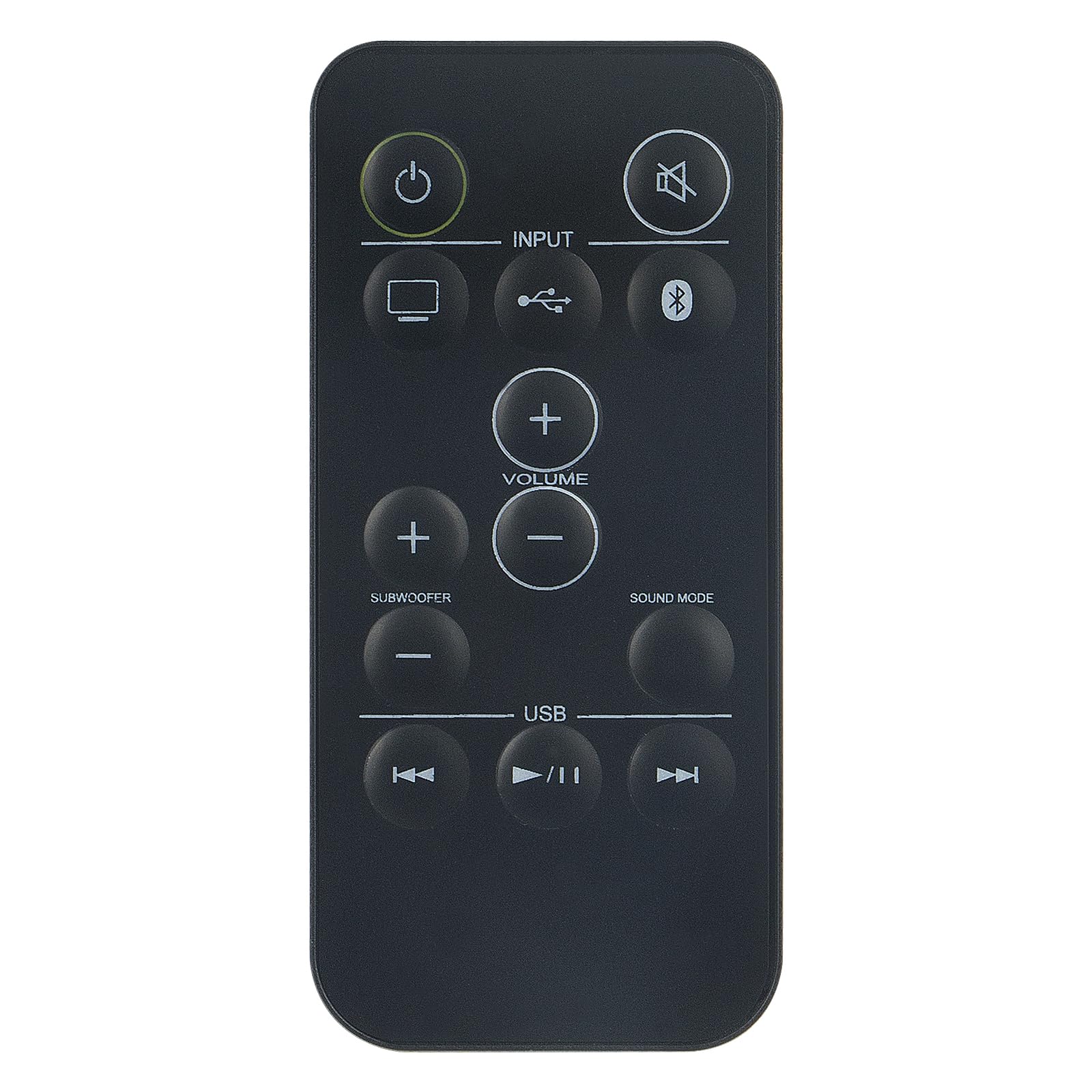
Image: Front view of the Beyution RC877S remote control, showing all buttons clearly labeled.
Setup
Battery Installation
The RC877S remote control requires two AAA batteries for operation. Follow these steps to install the batteries:
- Locate the battery compartment cover on the back of the remote control.
- Slide the cover downwards or press the latch (if present) to open the compartment.
- Insert two AAA batteries, ensuring the positive (+) and negative (-) terminals align correctly with the markings inside the compartment.
- Replace the battery compartment cover by sliding it back into place until it clicks securely.
Note: This remote control is designed to work immediately with compatible devices without any additional programming. If the remote does not respond, ensure batteries are installed correctly and have sufficient charge.

Image: Angled view of the Beyution RC877S remote control, highlighting its ergonomic design.
Operating Instructions
Point the remote control directly at your Onkyo audio soundbar or home theater system. The maximum effective operating distance is approximately 10 meters (33 feet).
Button Functions:
- Power (⏻): Turns the device on or off.
- Mute (🔇): Mutes or unmutes the audio output.
- Input: Cycles through available input sources (e.g., TV, USB, Bluetooth).
- Volume (+/-): Increases or decreases the main volume level.
- Subwoofer (+/-): Adjusts the subwoofer volume level.
- Sound Mode: Changes the audio sound mode or preset.
- USB: Selects the USB input source.
- Previous Track (⏮): Skips to the beginning of the current track or the previous track during media playback.
- Play/Pause (⏸/⏸): Plays or pauses media playback.
- Next Track (⏭): Skips to the next track during media playback.

Image: A person comfortably using the remote control to operate a home theater system, demonstrating typical usage.
Maintenance
To ensure the longevity and optimal performance of your remote control, follow these maintenance guidelines:
- Cleaning: Wipe the remote control with a soft, dry cloth. For stubborn dirt, slightly dampen the cloth with water or a mild cleaning solution, then wipe dry immediately. Avoid using abrasive cleaners or solvents.
- Battery Replacement: Replace batteries when the remote's response becomes sluggish or it stops functioning. Always replace both batteries at the same time with new ones of the same type (AAA).
- Storage: Store the remote control in a cool, dry place away from direct sunlight, extreme temperatures, and high humidity. If the remote will not be used for an extended period, remove the batteries to prevent leakage.
- Avoid Drops: Protect the remote from physical impact, as drops can damage internal components.
Troubleshooting
If you experience issues with your RC877S remote control, refer to the following common solutions:
- Remote not responding:
- Check if the batteries are installed correctly with the correct polarity (+/-).
- Replace old batteries with new AAA batteries.
- Ensure there is a clear line of sight between the remote control and the device's infrared receiver. Obstructions can block the signal.
- Make sure you are within the effective operating range (approximately 10 meters).
- Specific buttons not working:
- Clean the remote control, especially around the buttons, to remove any dirt or debris that might be obstructing them.
- If only certain buttons are unresponsive, the remote might be damaged.
- Device not compatible:
- Verify that your Onkyo audio system model is listed as compatible (LS-T10, LS-B50, LSB50, LST10, 24140877, RC-877S, RC877).
- This remote is an infrared replacement and does not require programming. If your original remote used a different technology (e.g., RF), this replacement may not be suitable.
If these steps do not resolve the issue, please refer to the Warranty and Support section for further assistance.
Specifications
| Brand | Beyution |
| Model Name | RC877S |
| Model Number | WY-RC877S-US |
| Connectivity Technology | Infrared |
| Maximum Range | 10 meters (33 Feet) |
| Number of Batteries Required | 2 |
| Battery Type | AAA Alkaline |
| Material | ABS Plastic |
| Color | Black |
| Item Dimensions (L x W x H) | 5" x 1" x 0.5" |
Warranty and Support
Warranty Information
This Beyution RC877S remote control comes with a 1-year warranty from the date of purchase. This warranty covers manufacturing defects and ensures the product functions as intended under normal use. Please retain your proof of purchase for warranty claims.
Customer Support
For any questions, concerns, or issues regarding your remote control, including damage or malfunction, please contact our customer service team. We are committed to providing a satisfactory solution within 24 hours.
Contact: Please refer to the seller's contact information on your purchase platform for direct assistance.