
Introduction
The Mopeka Pro+ Remote Outdoor Antenna is designed to extend the signal range of your Mopeka PRO+ sensor, specifically for propane tank monitoring applications. This antenna features a magnetic mount for convenient placement and includes a 2-meter (6.5 ft) cable for flexible installation.
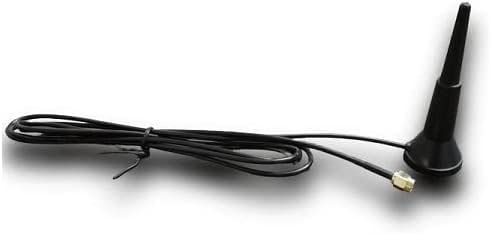
Image: Mopeka Pro+ Remote Outdoor Antenna. This image displays the compact antenna unit with its magnetic base and attached cable.
Setup Instructions
Follow these steps to properly install your Mopeka Pro+ Remote Outdoor Antenna:
- Prepare the Mopeka PRO+ Sensor: Ensure your Mopeka PRO+ sensor is accessible. If it is already mounted, you may need to temporarily remove it to access the antenna port.
- Remove Existing Antenna (if applicable): Carefully unscrew any existing stubby antenna from the Mopeka PRO+ sensor. If reinstalling the sensor, apply appropriate grease as recommended by the sensor's manual and re-center it.
- Attach the Remote Antenna: Screw the Mopeka Pro+ Remote Outdoor Antenna cable connector securely onto the antenna port of your Mopeka PRO+ sensor. Ensure a snug connection to prevent signal loss.
- Mount the Antenna: Place the magnetic base of the remote antenna on a suitable metallic surface, such as the top of your propane tank or another nominal outdoor location. Choose a spot that provides a clear line of sight to your monitoring device and minimizes obstructions for optimal signal transmission.
- Route the Cable: Carefully route the 2-meter (6.5 ft) cable to avoid kinks, sharp bends, or potential damage from environmental factors.

Image: Mopeka Pro+ sensor with remote antenna connected, alongside a smartphone displaying the Mopeka monitoring application. This illustrates the antenna's connection and the system in operation.
Operating Instructions
Once installed, the Mopeka Pro+ Remote Outdoor Antenna functions by enhancing the signal reception and transmission capabilities of your Mopeka PRO+ sensor. This allows for improved communication between the sensor and your monitoring device, such as a smartphone running the Mopeka app, especially over longer distances or in environments with signal interference.
The antenna supports multiple frequency bands, including LTE CAT M1, 2.4Ghz Wifi, and BLE (Bluetooth Low Energy), ensuring compatibility with various Mopeka PRO+ sensor models and communication protocols.

Image: A hand holding a smartphone displaying the Mopeka application, which shows the current level of a propane tank. This demonstrates the user interface for monitoring.
Maintenance
To ensure continued optimal performance of your Mopeka Pro+ Remote Outdoor Antenna, consider the following maintenance guidelines:
- Regular Inspection: Periodically inspect the antenna, cable, and connectors for any signs of wear, damage, or corrosion.
- Secure Mounting: Verify that the magnetic mount remains securely attached to its surface. Re-adjust if necessary.
- Cleanliness: Keep the antenna free from excessive dirt, debris, snow, or ice, which could obstruct signal transmission. Use a soft, damp cloth for cleaning if needed.
- Cable Integrity: Ensure the cable is not pinched, cut, or exposed to extreme temperatures or harsh chemicals.
Troubleshooting
If you encounter issues with your Mopeka Pro+ Remote Outdoor Antenna, consider the following troubleshooting steps:
- Poor Signal or No Connection:
- Verify the antenna cable is securely connected to the Mopeka PRO+ sensor.
- Ensure the antenna is placed in an optimal location, free from major obstructions, and has a clear line of sight to the sensor or receiver.
- Check the Mopeka PRO+ sensor's battery level and overall functionality.
- Try repositioning the antenna to a different metallic surface or a higher point to improve signal strength.
- Physical Damage: If the antenna or cable appears physically damaged, it may need replacement. Contact Mopeka support for assistance.
Specifications
| Feature | Specification |
|---|---|
| Product Dimensions | 4.76 x 1.6 x 1.6 inches |
| Item Weight | 1.41 ounces |
| Brand | Mopeka |
| Color | Black |
| Number of Channels | 1 |
| Impedance | 50 Ohms |
| Maximum Range | 1.5 Meters (Antenna cable length is 2 meters / 6.5 ft) |
| Global Trade Identification Number (GTIN) | 00854069008404 |
| First Available Date | February 3, 2023 |
Warranty and Support
For detailed warranty information, technical support, or to inquire about replacement parts, please visit the official Mopeka website or contact Mopeka customer service directly. Contact information can typically be found on the product packaging or the Mopeka official website.
Mopeka Website: www.mopeka.com