
Introduction
This manual provides essential information for the safe and optimal operation of your BEZGAR Remote Control Car 233, model TD202MINI-1. Please read through these instructions carefully before use to ensure proper setup, operation, and maintenance of your new remote control car.

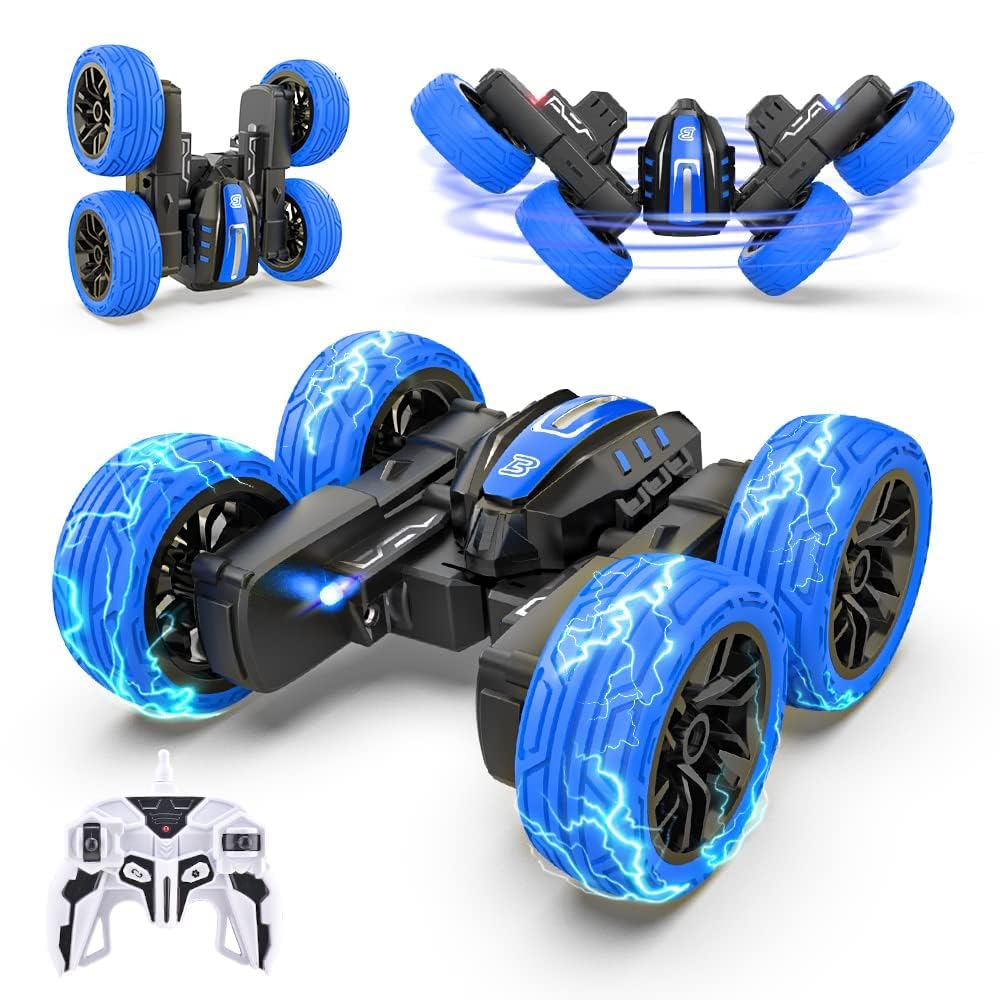
The BEZGAR Remote Control Car 233, a compact and versatile stunt vehicle.
What's in the Box
Carefully unpack all components and ensure everything listed below is present:
- BEZGAR Remote Control Car 233 (Model TD202MINI-1)
- Remote Controller
- USB Charging Cable
- Mini Screwdriver
- Product Manual (this document)
Setup
1. Remote Controller Battery Installation
The remote controller requires two AA batteries (not included).
- Use the provided mini screwdriver to open the battery compartment on the back of the remote controller.
- Insert two AA batteries, ensuring correct polarity (+/-).
- Close the battery compartment and secure it with the screw.
2. Charging the Car Battery
The car is equipped with a built-in rechargeable Lithium-Ion battery.
- Locate the charging port on the underside of the car.
- Connect the USB charging cable to the car's charging port and to a standard USB power source (e.g., computer, USB wall adapter).
- The charging indicator light will illuminate during charging and turn off when fully charged. A full charge typically takes approximately 30 minutes.
- Do not overcharge the battery.
3. Power On and Pairing
- Turn on the car using the ON/OFF switch located near the charging port.
- Turn on the remote controller.
- The car and remote will automatically pair. A successful connection is indicated by a solid light on both devices.
Operating Instructions
The BEZGAR Remote Control Car 233 offers versatile control and exciting features for both indoor and outdoor play.

Overview of the BEZGAR RC car's functions and features.
Basic Controls
- Use the left joystick on the remote for forward and backward movement.
- Use the right joystick for left and right steering.
Special Features
- 360° Rotating Stunts: The car is designed to perform impressive 360-degree flips and spins. Experiment with joystick combinations to achieve various dynamic stunts.
- Double-Sided Driving: The car can drive on both sides, allowing for continuous play even after flips or tumbles, enhancing durability and fun.
- LED Lights: Integrated LED lights enhance visibility and add to the excitement, especially when playing in low-light conditions.
- Demo Mode: Press the dedicated demo button on the remote to activate an automatic stunt sequence, showcasing the car's capabilities.
- Cyclone Mode: Engage cyclone mode for rapid spinning actions, adding another layer of thrilling maneuvers.
- Non-Slip Vacuum Tires: The specialized tires provide excellent grip and stability on various indoor and outdoor surfaces, from smooth floors to rougher terrains.
Playing Environment
This mini RC car is suitable for both indoor and outdoor use. Ensure a clear, open space for optimal performance and safety. The 2.4GHz control system allows for multiple players to race simultaneously without signal interference.

The 2.4GHz control allows for multiple cars to be operated simultaneously without interference.

The compact size makes the BEZGAR RC car highly portable and easy to carry.
Maintenance
Cleaning
- Wipe the car and remote controller with a soft, dry cloth after each use.
- Avoid using water or chemical cleaners, as they may damage electronic components.
Storage
- When not in use, turn off both the car and the remote controller.
- Remove batteries from the remote controller if storing for extended periods to prevent leakage.
- Store the car and accessories in a cool, dry place, away from direct sunlight and extreme temperatures.
Troubleshooting
If you encounter any issues, please refer to the table below for common problems and solutions:
| Problem | Possible Cause | Solution |
|---|---|---|
| Car does not respond to remote. | Low battery in car or remote. Not paired. | Charge car battery. Replace remote batteries. Ensure both are powered on and paired. |
| Short play time. | Battery not fully charged. | Ensure car battery is fully charged before use. |
| Erratic movement/interference. | Other 2.4GHz devices nearby. | Move to an area with less interference. Ensure no other RC devices are operating on the same frequency. |
| Car does not perform stunts. | Insufficient power. Obstruction. | Ensure battery is fully charged. Check for any debris obstructing moving parts. |
Specifications
- Brand: BEZGAR
- Model Name: TD202MINI-1
- Scale: 1:30 Scale
- Material: Plastic
- Power Source: Battery Powered (Lithium-Ion for car, AA for remote)
- Operation Mode: Manual
- Additional Features: Portable, Rechargeable, LED Lights, 360° Rotating, Double-Sided Driving, 2.4GHz Control
- Item Dimensions: 4 x 3 x 4 inches (approximate)
- Recommended Age: 6+ years
Dimensions and key features of the BEZGAR Remote Control Car 233.
Warranty and Support
For any questions, technical support, or warranty inquiries regarding your BEZGAR Remote Control Car 233, please contact BEZGAR Customer Service directly. Our team is available to assist you.
Customer Service Hotline: +1 (833) 325-1118 (24/7)
Please retain your purchase receipt as proof of purchase for any warranty claims.