
1. Product Overview
The Folgtek 48MP 1296P Trail Camera is designed for capturing high-quality images and videos of wildlife, for hunting, or for security monitoring. It features advanced motion detection, clear night vision, and a durable waterproof design.
Key Features
- Clear 48MP Photos & 1296P HD Videos: Captures crystal-clear 48-megapixel still images and high-definition 1296P videos with super clear sound recording.
- High Sensitivity PIR & 0.1s Trigger Time: Equipped with high-sensitivity infrared detection sensors for instant, delay-free triggering upon detecting animal movements. Trigger distance up to 27 meters (90 feet).
- IP66 Waterproof Design: The robust casing provides protection against rain and dust, ensuring reliable operation in various outdoor environments.
- 120° Wide Angle Lens: Offers a broad field of view to capture more of the surrounding area.
- 100ft Night Vision: Features 36 high-performance infrared LEDs for clear night vision up to 30 meters (100 feet).
- 2.4" LCD Screen: For easy camera setup and review of captured media.
- Versatile Applications: Suitable for animal observation, hunting, home security, and garden monitoring.

Figure 1: The Folgtek 48MP 1296P Trail Camera, showcasing its compact and durable design.
2. Package Contents
Please check the package to ensure all items are present:
- Folgtek Trail Camera (2 units, if purchased as a 2-pack)
- User Manual
- Mounting Strap
- USB Cable
Note: 8 x 1.5V AA batteries and an SD card (up to 256GB) are not included and must be purchased separately.
3. Setup Guide
3.1 Battery Installation
- Open the camera's battery compartment latch.
- Insert 8 new 1.5V AA batteries, ensuring correct polarity (+/-).
- Close the battery compartment securely to maintain the IP66 waterproof seal.
3.2 SD Card Installation
- Locate the SD card slot, usually next to the battery compartment.
- Insert a Class 10 or higher SD card (up to 256GB) with the metal contacts facing down until it clicks into place.
- It is recommended to format the SD card using the camera's menu before first use.
3.3 Mounting the Camera
The camera can be mounted using the included strap or a tripod (not included).
- Strap Mounting: Thread the mounting strap through the slots on the back of the camera. Securely fasten the camera to a tree or pole at the desired height and angle.
- Tripod Mounting: Use the 1/4-inch threaded insert at the bottom of the camera to attach it to a tripod or other mounting accessory.

Figure 2: The camera mounted on a tree, demonstrating its IP66 waterproof capability.
4. Operating Instructions
4.1 Powering On/Off
- To power on, slide the power switch to the 'ON' position. The camera will enter test mode or start recording based on your settings.
- To power off, slide the power switch to the 'OFF' position.
4.2 Mode Selection
The camera typically offers three operating modes:
- Photo Mode: Captures still images when triggered.
- Video Mode: Records video clips when triggered.
- Photo + Video Mode: Captures a still image followed by a video clip when triggered.
Select the desired mode via the camera's internal menu on the 2.4" LCD screen.
4.3 Adjusting Settings
Access the camera's menu using the control buttons to configure various settings, including:
- Resolution: Set photo (e.g., 48MP, 24MP) and video (e.g., 1296P, 1080P) resolutions.
- PIR Sensitivity: Adjust the sensitivity of the motion sensor (Low, Medium, High) to suit the environment and avoid false triggers.
- Trigger Interval: Define the delay between consecutive triggers.
- Time & Date: Set the current time and date for accurate timestamps on recordings.
- Loop Recording: Enable or disable loop recording, which overwrites the oldest files when the SD card is full.
- Language: Select your preferred language for the menu.
4.4 Motion Detection (PIR)
The camera utilizes a Passive Infrared (PIR) sensor to detect heat changes caused by moving objects. The 0.1-second trigger speed ensures quick capture.

Figure 3: Illustration of the camera's rapid 0.1-second trigger speed, capturing fast-moving subjects.
4.5 Night Vision
The camera automatically switches to night vision mode in low-light conditions, utilizing its 36 infrared LEDs to illuminate subjects up to 30 meters (100 feet) without startling animals.
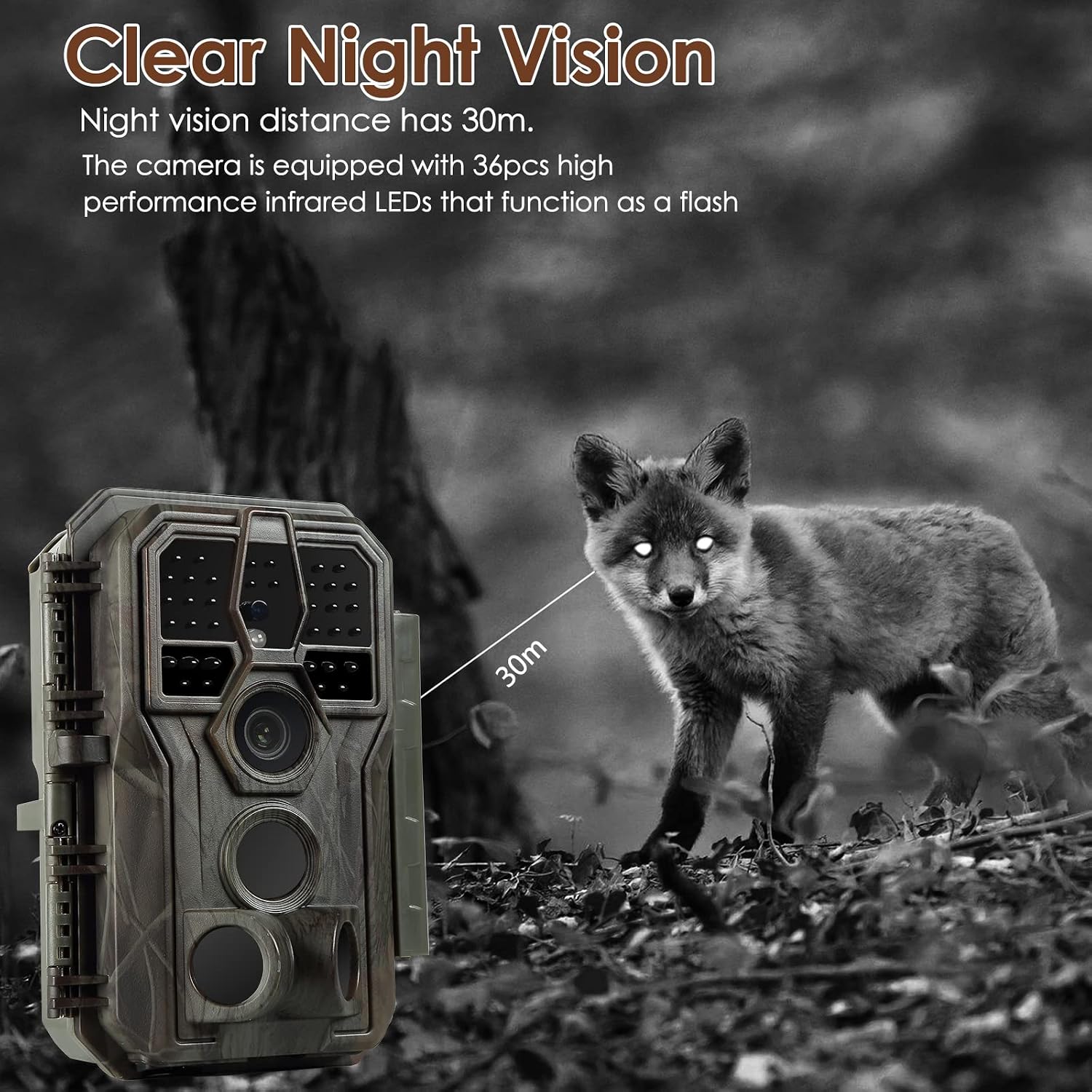
Figure 4: Night vision capability, showing a fox detected at 30 meters in darkness.
4.6 Wide Angle Coverage
The 120-degree wide-angle lens, combined with three detection zones, ensures a broad area is monitored, reducing blind spots.

Figure 5: The 120-degree wide-angle lens and three detection zones provide extensive coverage.
4.7 Application Scenarios
The camera is versatile and can be used in various scenarios:
- Hunting: Monitor game trails and animal activity.
- Wildlife Monitoring: Observe animal behavior in their natural habitat.
- Farm Security: Monitor livestock or deter intruders.
- Home Security: Provide surveillance for your property.

Figure 6: Various application scenarios for the Folgtek Trail Camera.
5. Maintenance
Proper maintenance ensures the longevity and optimal performance of your trail camera.
5.1 Cleaning
- Gently wipe the camera lens and PIR sensors with a soft, dry cloth to remove dust and dirt. Avoid abrasive materials.
- Clean the camera body with a damp cloth if necessary, ensuring no water enters the battery or SD card compartments.
5.2 Battery Care
- Replace all 8 AA batteries simultaneously when the low battery indicator appears. Do not mix old and new batteries.
- Remove batteries if the camera will not be used for an extended period to prevent leakage.
5.3 SD Card Management
- Regularly format the SD card using the camera's menu to ensure optimal performance and prevent data corruption.
- Back up important files from the SD card to a computer before formatting.
6. Troubleshooting
Refer to the table below for common issues and their solutions.
| Problem | Possible Cause | Solution |
|---|---|---|
| Camera does not power on. | Low or dead batteries; incorrect battery polarity; power switch in OFF position. | Replace all batteries with new ones, ensuring correct polarity. Check if the power switch is set to 'ON'. |
| Poor image/video quality. | Dirty lens; low light conditions; incorrect resolution settings. | Clean the lens. Ensure sufficient lighting or check night vision settings. Adjust photo/video resolution in the menu. |
| Camera not detecting motion. | PIR sensitivity too low; PIR sensor obstructed; camera positioned too far from target. | Increase PIR sensitivity in settings. Clear any obstructions from the sensor. Reposition the camera closer to the detection area. |
| SD card error. | SD card not inserted correctly; incompatible SD card; corrupted SD card. | Reinsert the SD card. Ensure it is a Class 10 or higher card. Format the SD card via the camera's menu. Try a different SD card. |
| Night vision not working. | IR LEDs obstructed; camera not in night mode; insufficient power. | Ensure IR LEDs are clear. Check camera settings for night mode. Replace batteries. |
7. Technical Specifications
| Feature | Specification |
|---|---|
| Brand | Folgtek |
| Model Name | FTXJ |
| Photo Resolution | 48 Megapixels |
| Video Recording Resolution | 1296p HD |
| Night Vision Range | 100 feet (30 meters) |
| Trigger Speed | 0.1 seconds |
| Waterproof Rating | IP66 |
| Viewing Angle | 120 Degrees |
| Display | 2.4" LCD |
| Power Source | 8 x 1.5V AA Batteries (not included) |
| Storage | SD Card up to 256GB (not included) |
| Material | Plastic |
| Item Dimensions (L x W x H) | 20 x 10 x 5 cm |
| Special Features | Motion Detector, Night Vision |
| Connectivity Technology | Wired (USB for data transfer) |
| Wireless Communication Technology | Wi-Fi |
| Recommended Uses | Home Security, Wildlife Monitoring |
8. Warranty and Support
For warranty information and technical support, please refer to the documentation included with your purchase or contact the seller directly. Keep your purchase receipt as proof of purchase.
Manufacturer: Folgtek
ASIN: B0BTPBHQLJ


