
1. Introduction
This manual provides essential instructions for the assembly, operation, and maintenance of your ODK L-Shaped Gaming Desk. Please read this manual thoroughly before assembly and use to ensure proper setup and longevity of your product.

Image 1.1: The ODK L-Shaped Gaming Desk in a typical setup, showcasing its design and ample space for multiple monitors and peripherals.
Product Features:
- L-Shaped Design: Provides a large surface area for multiple monitors, gaming equipment, and office supplies.
- Carbon Fiber Surface: Durable and aesthetically pleasing finish, offering a smooth tactile experience.
- Sturdy Construction: Features 8 table legs for solid support and stability.
- Ample Legroom: Designed to provide generous space for comfortable seating and movement.
2. Setup and Assembly
The ODK L-Shaped Gaming Desk requires assembly. Please ensure all components are present before beginning. It is recommended to assemble the desk in the room where it will be used.
Package Contents:
The package typically includes:
- Desk panels (L-shaped sections)
- Leg frames and support beams
- Assembly hardware (screws, bolts, Allen wrench)
- Adjustable foot pads
- Additional accessories: Keyboard Tray, Built-in Outlet, Headphone Hook, Cable Management Tray, Cup Holder, Monitor Arm, Built-in USB Port (availability may vary by model variant)
Assembly Instructions:
- Unpack all components and verify against the parts list provided in the separate assembly guide.
- Follow the step-by-step diagrams in the included assembly manual to connect the leg frames and support beams.
- Securely attach the desk panels to the assembled frame using the provided hardware.
- Install any additional accessories such as the keyboard tray, headphone hook, or cable management tray as per the instructions.
- Once assembled, place the desk in its desired location and adjust the foot pads to ensure stability and levelness.

Image 2.1: Dimensional overview of the ODK L-Shaped Gaming Desk, indicating key measurements for planning your space.
3. Operation and Usage
The ODK L-Shaped Gaming Desk is designed for versatile use in gaming, work, and study environments. Its spacious layout allows for efficient organization of your equipment.
Optimizing Your Workspace:
- Monitor Placement: Utilize the L-shape to comfortably position multiple monitors for an immersive experience or enhanced productivity.
- Ergonomics: Position your chair and monitors to maintain a healthy sitting posture. The desk's design supports proper ergonomics, especially when combined with a monitor riser or arm.
- Cable Management: Use the integrated cable management tray (if included) to keep wires tidy and out of sight, improving aesthetics and safety.
- Accessory Use: Make use of the headphone hook, cup holder, and built-in USB ports/outlets (if included) for convenience.
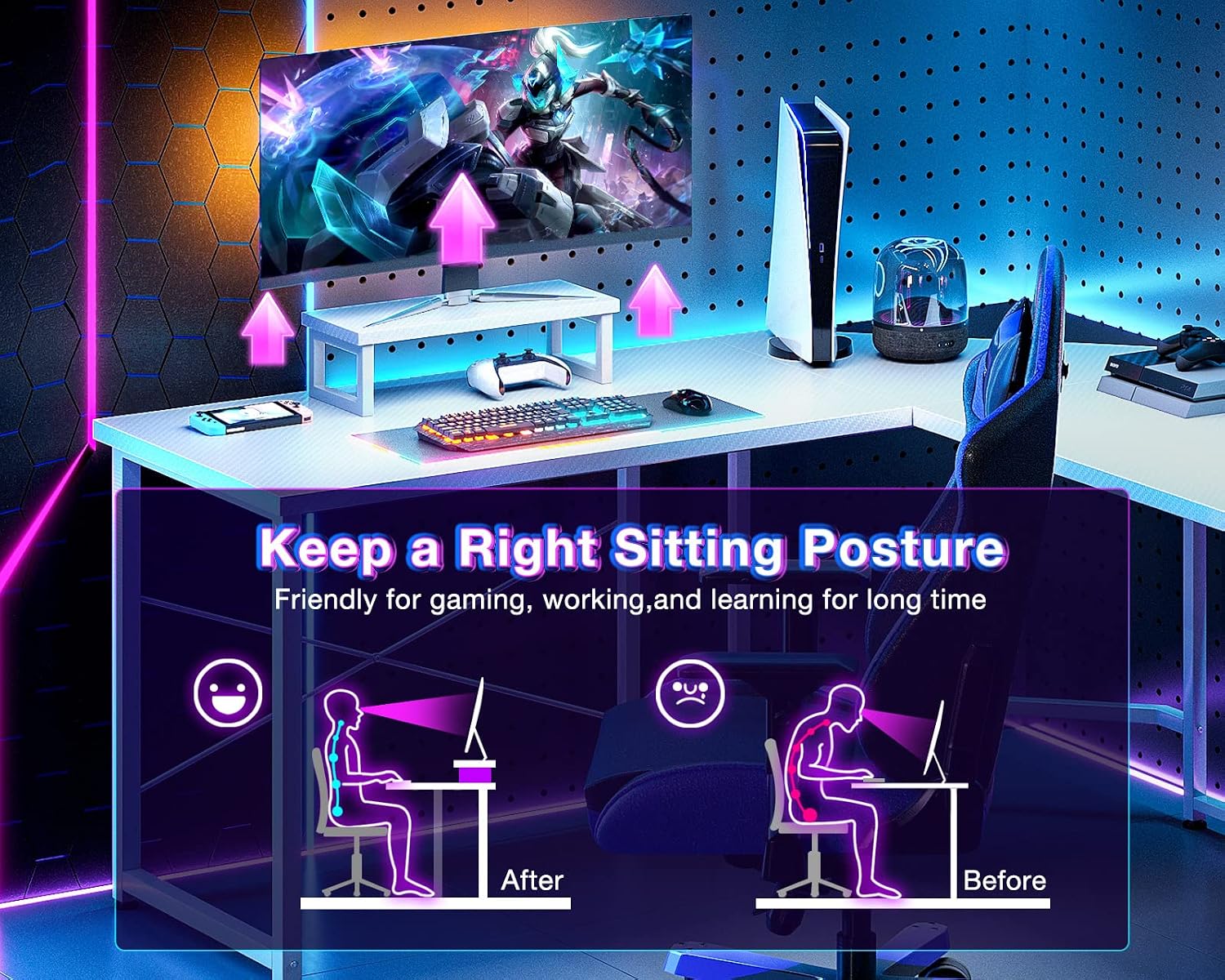
Image 3.1: Guidance on maintaining a correct sitting posture to promote comfort and reduce strain during extended use.

Image 3.2: Illustration of the generous legroom provided by the desk's design, allowing for comfortable movement.
4. Maintenance
Regular maintenance will help preserve the appearance and functionality of your ODK L-Shaped Gaming Desk.
Cleaning Instructions:
- Surface: Wipe the carbon fiber surface with a soft, damp cloth. Avoid abrasive cleaners or harsh chemicals that could damage the finish.
- Frame: Clean the metal frame with a mild soap solution and a soft cloth. Dry immediately to prevent rust.
- Spills: Promptly clean any spills to prevent staining, especially on the carbon fiber surface.
General Care:
- Periodically check and tighten all screws and bolts to ensure the desk remains stable.
- Avoid placing extremely hot or cold items directly on the surface without protective coasters.
- Do not overload the desk beyond its recommended weight capacity.
5. Troubleshooting
This section addresses common issues you might encounter with your ODK L-Shaped Gaming Desk.
Common Issues and Solutions:
- Desk is Wobbly:
- Ensure all assembly screws and bolts are securely tightened.
- Adjust the foot pads on each leg to level the desk on uneven floors.
- Missing Parts:
- Carefully check all packaging materials. If parts are still missing, contact ODK customer support.
- Surface Damage:
- For minor scratches, specialized carbon fiber repair kits may be available. For significant damage, consider contacting ODK for replacement options.

Image 5.1: Detail of the premium board surface and the adjustable foot pads, crucial for desk stability and leveling.
6. Specifications
| Attribute | Detail |
|---|---|
| Brand | ODK |
| Model Number | B01011519USAN0202AIUOXZX |
| ASIN | B0BTNRH7CC |
| Product Dimensions (L x W x H) | 129.54 x 129.54 x 76.2 cm (51 x 51 x 30 inches) |
| Item Weight | 17.96 kg (39.6 lbs) |
| Shipping Weight | 18.31 kg (40.37 lbs) |
| Color | Carbon Fiber Surface, White |
| Primary Material | Engineered Wood |
| Top Material Type | Engineered Wood |
| Base Material | Alloy Steel |
| Finish Type | Powder Coated |
| Assembly Required | Yes |
| Style | Modern |
| Special Features | Adjustable (foot pads) |
7. Warranty and Support
Warranty Information:
For detailed warranty information regarding your ODK L-Shaped Gaming Desk, please refer to the official documentation included with your purchase or visit the ODK official website. Warranty terms and conditions may vary.
Customer Support:
If you have any questions, require assistance with assembly, or need to report a defect, please contact ODK customer support through the contact information provided on their official website or through your point of purchase.