
1. Introduction
This user manual provides essential information for the installation, operation, and maintenance of your Lorex 4K 8MP IP Bullet PoE Wired Security Camera (Model E842CA). This camera is designed for outdoor surveillance, offering high-resolution video, advanced motion detection, and reliable performance in various weather conditions.
Please read this manual thoroughly before using the product to ensure proper setup and functionality. Keep this manual for future reference.
2. What's in the Box
Verify that all components are present in your package:
- 1x Lorex 4K Ultra HD Bullet Camera (E842CA)
- 1x Cat5 Ethernet Extension Cable
- 1x Mounting Bracket & Kit

Figure 2.1: Front view of the Lorex E842CA camera.

Figure 2.2: Side view of the Lorex E842CA camera, showing its bullet form factor.

Figure 2.3: Back view of the Lorex E842CA camera, including the adjustable mounting arm.
3. Setup
3.1. Physical Installation
The Lorex E842CA camera is designed for outdoor use and can be mounted on a ceiling or wall. Choose a location that provides the desired viewing angle and is within reach of your Power over Ethernet (PoE) connection.
- Prepare the Mounting Surface: Use the included mounting template (if provided) to mark drill holes.
- Secure the Mounting Bracket: Attach the mounting bracket to the surface using the screws and anchors from the mounting kit. Ensure it is securely fastened.
- Attach the Camera: Connect the camera to the mounting bracket. Adjust the camera's angle to cover the desired area.
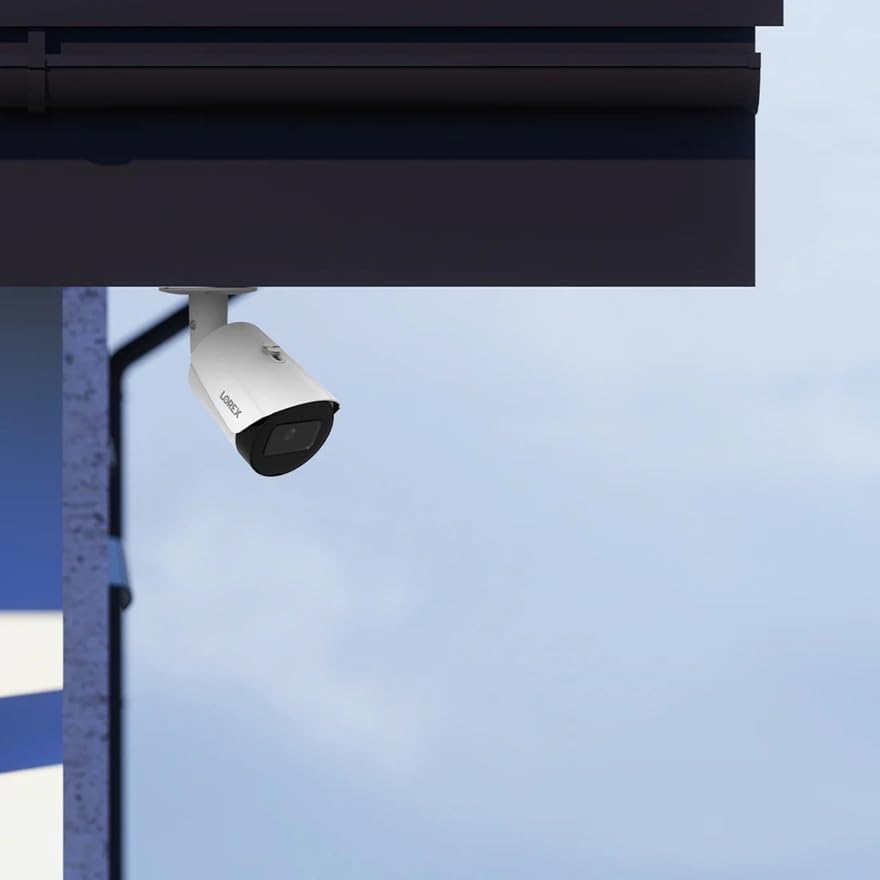
Figure 3.1: Example of the Lorex E842CA camera mounted under an overhang for optimal coverage and protection.
3.2. Power and Network Connection (PoE)
This camera utilizes Power over Ethernet (PoE) for both power and data transmission, simplifying installation. A PoE injector or a PoE-enabled Network Video Recorder (NVR) is required and not included with this add-on camera.
- Connect Ethernet Cable: Connect one end of the included Cat5 Ethernet extension cable to the camera's Ethernet port.
- Connect to PoE Source: Connect the other end of the Ethernet cable to a PoE port on your NVR or a PoE injector.
- Secure Connections: For outdoor installations, ensure all Ethernet connections at the camera are properly protected from weather to prevent failure.

Figure 3.2: Ethernet cables connected to a network device, illustrating the wired PoE connection.
3.3. Initial Configuration
The camera is designed to integrate with a Lorex NVR system. Refer to your NVR's manual for instructions on adding new IP cameras. For standalone use or integration with third-party systems, consult the Lorex support website for specific software and configuration tools.

Figure 3.3: The Lorex Fusion system, demonstrating how wired and Wi-Fi cameras can integrate with an NVR.
4. Operation
4.1. 4K Ultra HD Video
The E842CA camera features an 8MP image sensor, providing 4K Ultra HD resolution. This high resolution ensures exceptional detail and clarity in recorded footage. The increased pixel count also enhances digital zoom capabilities, allowing for clearer identification of distant objects during post-recording analysis.

Figure 4.1: A comparison showing the enhanced detail available with 4K Ultra HD resolution, particularly when digitally zoomed.
4.2. Color Night Vision (CNV)
This camera is equipped with Color Night Vision (CNV) technology, which provides full-color video in low-light conditions. CNV performs optimally with ambient lighting present. In environments with total darkness, the camera will automatically switch to its infrared LEDs for clear black and white night vision footage.

Figure 4.2: A split image illustrating the difference between traditional infrared night vision (black and white) and Color Night Vision.
4.3. Smart Motion Detection (Person/Vehicle)
The E842CA features advanced Smart Motion Detection, capable of distinguishing between people and vehicles. This technology helps reduce false alerts by only sending notifications when a person or vehicle is detected within the camera's field of view, focusing on relevant events.

Figure 4.3: A smartphone displaying a push notification for person detection, enabled by Smart Motion Detection.
4.4. Listen-in Audio
Equipped with a built-in microphone, this camera provides listen-in audio recording. This feature captures sound from the surveillance area, offering an additional layer of information or evidence, such as voices, that complements the video footage.

Figure 4.4: An illustration of the listen-in audio feature capturing conversations within the camera's range.
4.5. Control Method
The camera can be controlled and monitored via a compatible NVR and the Lorex Connect or Lorex Classic mobile applications. These apps are available for Android devices and allow for remote viewing, playback, and configuration of camera settings.
5. Maintenance
5.1. Weather Resistance
The E842CA camera has an IP67 weatherproof rating, ensuring its functionality in extreme hot or freezing temperatures, as well as protection against dust and water ingress. This rating guarantees year-round outdoor coverage.

Figure 5.1: The camera operating reliably in rainy conditions, highlighting its IP67 weatherproof rating.
5.2. Cleaning and Inspection
Periodically inspect the camera lens for dirt or obstructions and clean with a soft, damp cloth. Avoid abrasive cleaners. Regularly check cable connections, especially outdoor Ethernet connections, to ensure they remain sealed and protected from moisture to prevent signal loss or damage.
6. Troubleshooting
6.1. No Video Feed
- Check Power: Ensure the camera is receiving power via the PoE connection. Verify the PoE injector or NVR port is active.
- Check Cable: Inspect the Ethernet cable for damage. Try a different cable if necessary.
- NVR Compatibility: Confirm the camera is compatible with your NVR system. Refer to your NVR's documentation.
6.2. Poor Image Quality
- Clean Lens: Ensure the camera lens is clean and free from dirt, dust, or smudges.
- Lighting Conditions: Verify adequate lighting for Color Night Vision. In very dark conditions, the camera will switch to black and white infrared.
- Network Bandwidth: Ensure your network has sufficient bandwidth for 4K video streaming.
6.3. False Motion Alerts
- Adjust Sensitivity: Reduce the motion detection sensitivity settings in your NVR or app.
- Configure Detection Zones: Set up specific detection zones to exclude areas with frequent irrelevant motion (e.g., moving trees, public pathways).
- Verify Smart Detection: Ensure Person/Vehicle detection is enabled and configured correctly.
6.4. Remote Access Issues
- Network Configuration: Ensure your NVR or camera is properly connected to the internet and network settings (e.g., port forwarding) are correctly configured if not using Lorex Cloud services.
- App Connection: Verify your mobile device has a stable internet connection and the Lorex app is updated.
7. Specifications

Figure 7.1: Product label for the Lorex E842CA camera, displaying key identification information.
| Feature | Detail |
|---|---|
| Model Number | E842CA |
| Video Capture Resolution | 4K (8MP) |
| Indoor/Outdoor Usage | Outdoor |
| Power Source | Corded Electric (PoE) |
| Mounting Type | Ceiling Mount, Wall Mount |
| Viewing Angle | 125 Degrees |
| Night Vision Range | 30 Meters |
| Frame Rate | 30 frames per second |
| Water Resistance Level | IP67 Weatherproof |
| Low Light Technology | Color Night Vision |
| Alert Type | Smart Motion Detection (Person/Vehicle) |
| Audio | Listen-in Audio (Built-in Microphone) |
| Dimensions (L x W x H) | 11.5 x 6 x 5 inches |
| Item Weight | 1 pound |
8. Warranty & Support
8.1. Warranty Information
Lorex products typically come with a limited warranty. For specific details regarding the warranty period and terms for your E842CA camera, please refer to the warranty card included with your product or visit the official Lorex website. Keep your proof of purchase for warranty claims.
8.2. Technical Support
For technical assistance, product registration, software updates, and additional resources, please visit the official Lorex support website at www.lorex.com. You can also find FAQs, troubleshooting guides, and contact information for customer service there.


