
1. Introduction
The AYINO DA615H is a versatile audio device designed to extract audio from various sources and decode it into 5.1-channel or 2.0-channel output. It supports HDMI ARC, Coaxial, Optical, PC-USB, U disk, and Bluetooth 5.0 inputs, providing flexible connectivity for your home audio system. This manual provides detailed instructions for setting up, operating, and maintaining your device.
2. Package Contents
Please check the package contents upon unboxing to ensure all items are present:
- 1x AYINO DA615H Audio Decoder
- 3x Power RCA audio cables
- 1x Optical fiber cable
- 1x DC-5V/1A power adapter
- 1x Bluetooth Antenna
- 1x User Manual (this document)
3. Product Overview
The AYINO DA615H features multiple input and output ports for comprehensive audio connectivity. Familiarize yourself with the device layout:
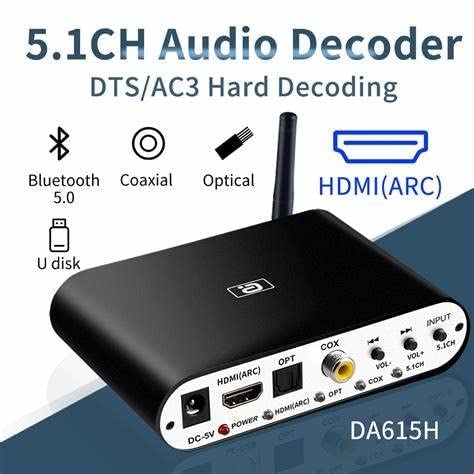
Image 3.1: Front and rear view of the AYINO DA615H audio decoder, highlighting the HDMI ARC, Optical, Coaxial, USB, and power inputs, along with the 5.1CH audio outputs.

Image 3.2: Detailed view of the AYINO DA615H's multi-interface compatibility, illustrating the 5.1 and 2.1 channel audio outputs (FL/FR, SL/SR, CEN/SW) and the USB input port.
Key Features:
- HDMI ARC Input: Extracts audio from your TV's ARC port.
- Multiple Audio Inputs: Supports HDMI ARC, Coaxial, Optical, PC-USB, U disk, and Bluetooth 5.0.
- 5.1CH Audio Decoding: Decodes Dolby AC-3, DTS, DTS-ES, FLAC, APE, WAV, HDCD, AAC, WMV, MP3, m4a, etc.
- Output Modes: Supports 5.1ch and 2.0ch output modes.
- S/PDIF Switcher: Converts all signal sources (except U disk) to Coaxial/Optical output.
- High-Resolution Audio: Supports 192Khz/24Bit playback.
- Bluetooth 5.0: Wireless audio reception with an external antenna for extended range.
- USB Disk Function: Plays audio files directly from a USB disk.
- LCD Panel Display: Real-time display of playing information.
4. Setup Instructions
Follow these steps to set up your AYINO DA615H audio decoder:
4.1 Power Connection
- Connect the provided DC-5V/1A power adapter to the 'DC-5V' port on the DA615H.
- Plug the power adapter into a wall outlet. The power indicator light will illuminate.
4.2 Input Source Connection
Choose your desired input method:
- HDMI ARC: Connect an HDMI cable from your TV's HDMI ARC port to the 'HDMI (ARC)' input on the DA615H. Ensure your TV's ARC function is enabled.
- Coaxial/Optical: Connect a Coaxial or Optical cable from your source device (e.g., DVD player, game console) to the respective 'COX' or 'OPT' input on the DA615H.
- PC-USB: Connect a USB cable from your computer to the 'PC-USB' port on the DA615H.
- U Disk: Insert a USB flash drive containing audio files into the 'USB' port.
- Bluetooth 5.0: Attach the provided Bluetooth antenna to the 'ANT' connector. Pair your Bluetooth device (e.g., smartphone, tablet) with the DA615H.
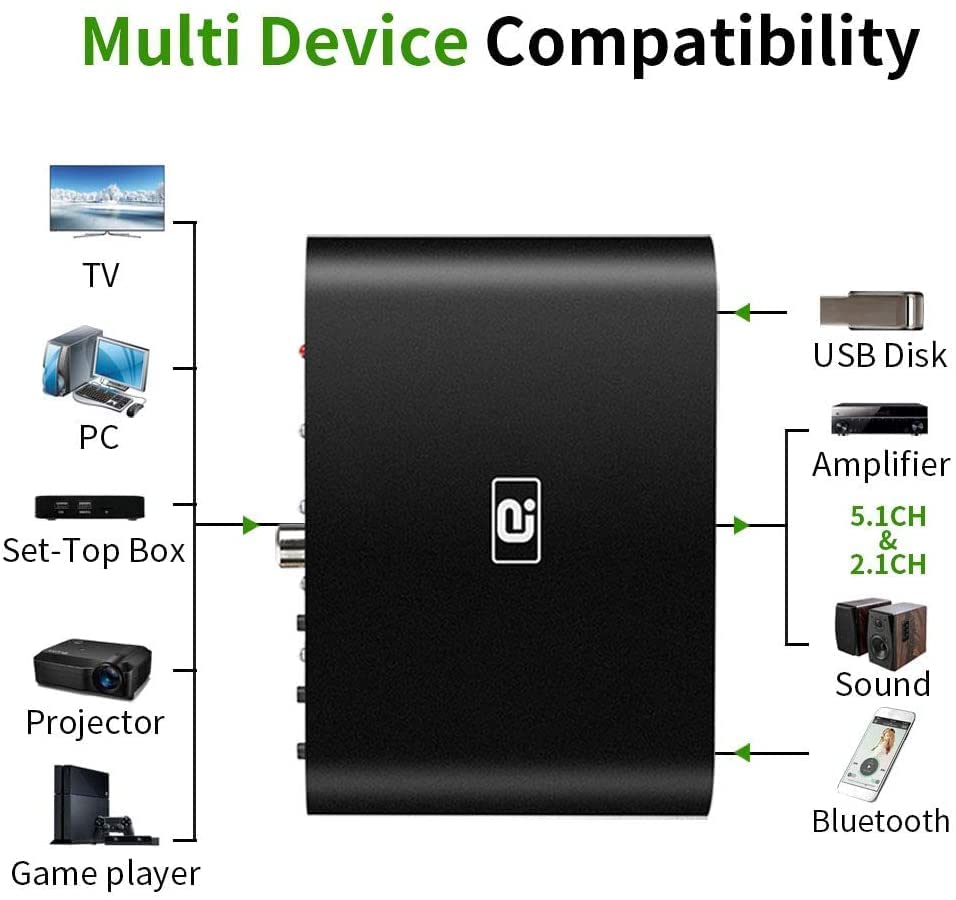
Image 4.1: Multi-device compatibility diagram, illustrating various input sources and output destinations for the DA615H.

Image 4.2: HDMI ARC connection diagram, detailing how audio is transmitted from a TV or projector to the DA615H for decoding and output to speakers or an amplifier.
4.3 Audio Output Connection
Connect the DA615H to your amplifier or speaker system:
- 5.1 Channel Output: Use RCA cables to connect the FL/FR (Front Left/Right), SL/SR (Surround Left/Right), and CEN/SW (Center/Subwoofer) outputs on the DA615H to the corresponding 5.1 channel inputs on your amplifier or active speaker system.
- 2.0 Channel Output: For 2.0 channel stereo, connect the FL/FR outputs to your stereo amplifier or speakers.
- Coaxial/Optical Passthrough: If using the DA615H as an S/PDIF switcher, connect a Coaxial or Optical cable from the DA615H's output to your receiver/amplifier.

Image 4.3: 5.1ch interface connection options, demonstrating how to connect the DA615H to an amplifier or a 5.1 speaker system using RCA cables.
5. Operating Instructions
Once connected, operate your AYINO DA615H as follows:
5.1 Input Source Selection
Use the 'INPUT' button on the device to cycle through the available input sources: HDMI ARC, Coaxial, Optical, PC-USB, U disk, and Bluetooth 5.0. The LCD panel will display the currently selected input.
5.2 Volume Control
Adjust the output volume using the 'VOL+' and 'VOL-' buttons on the device.
5.3 Output Mode Selection (5.1ch/2.0ch)
The device supports both 5.1 channel and 2.0 channel output modes. If the audio signal source is 5.1ch, the hardware decodes true 5.1. If the audio signal source is 2.0ch, the software performs virtual 5.1 decoding. In 2.0ch output mode, only the FL/FR (Front Left/Right) channels are active.
5.4 USB Disk Playback
When a USB disk is inserted and selected as the input source, the device will automatically play supported audio formats (FLAC, APE, DTS, AC3, WAV, HDCD, DSD, AAC, WMV, MP3, M4A, etc.). Use the 'Previous Song' and 'Next Song' buttons to navigate tracks.

Image 5.1: USB Disk Playback and Bluetooth 5.0 wireless distance capabilities of the DA615H.
5.5 Bluetooth Pairing
With the Bluetooth antenna connected and Bluetooth input selected, search for the device on your smartphone or tablet and pair. The Bluetooth 5.0 connection offers a wireless range of over 20 meters.
6. Maintenance
To ensure the longevity and optimal performance of your AYINO DA615H, follow these maintenance guidelines:
- Cleaning: Use a soft, dry cloth to clean the device. Avoid using liquid cleaners or abrasive materials.
- Environment: Keep the device in a cool, dry place, away from direct sunlight, high temperatures, and humidity.
- Ventilation: Ensure proper ventilation around the device to prevent overheating. Do not block any ventilation openings.
- Power: Disconnect the power adapter if the device will not be used for an extended period.
7. Troubleshooting
If you encounter issues with your AYINO DA615H, refer to the following common problems and solutions:
| Problem | Possible Cause | Solution |
|---|---|---|
| No power | Power adapter not connected or faulty. | Ensure the power adapter is securely connected to the device and a working power outlet. Try a different outlet or adapter if available. |
| No audio output | Incorrect input/output selection, faulty cables, or source device issues. | Verify the correct input source is selected on the DA615H. Check all audio cables for secure connections. Ensure your amplifier/speakers are powered on and set to the correct input. Confirm the source device is playing audio. |
| No 5.1 channel sound | Source audio is 2.0ch, incorrect output mode, or amplifier/speaker setup. | Ensure your audio source is providing a 5.1 channel signal (e.g., Dolby Digital, DTS). Verify your amplifier/speaker system is configured for 5.1 channel input. |
| HDMI ARC not working | TV ARC function disabled, incorrect HDMI cable, or TV compatibility issue. | Enable HDMI ARC/CEC on your TV settings. Use a high-quality 19-core standard HDMI cable. Ensure your TV supports ARC protocol output. |
| Bluetooth connection unstable | Distance too far, interference, or antenna not connected. | Ensure the Bluetooth antenna is securely attached. Reduce the distance between the DA615H and your Bluetooth device. Avoid obstacles and sources of interference. |
8. Specifications
| Feature | Detail |
|---|---|
| Brand | AYINO |
| Model | DA615H |
| Input Interfaces | HDMI ARC, Coaxial, Optical, PC-USB, U disk, Bluetooth 5.0 |
| Output Interfaces | 5.1ch RCA (FL/FR, SL/SR, CEN/SW), Coaxial, Optical |
| Audio Decoding Formats | Dolby AC-3, DTS, DTS-ES, FLAC, APE, WAV, HDCD, AAC, WMV, MP3, m4a, etc. |
| Max Audio Resolution | 192Khz/24Bit |
| Bluetooth Version | 5.0 |
| Supply Voltage | 5 Volts (DC) |
| Number of Channels | 6 |
| Country of Origin | China |
9. Warranty and Support
For warranty information and technical support, please contact the manufacturer or authorized distributor.
Contact Information:
- Importer: Etzin PVT LTD Mumbai India
- Help-Line: +91-22-49696922
Please retain your proof of purchase for warranty claims.