
1. Introduction
The PopBloom RL90 LED Aquarium Light is designed for coral reef tanks, offering advanced features for optimal marine lighting. This manual provides detailed instructions for setup, operation, and maintenance to ensure the best performance for your aquarium.
Video: An overview of the PopBloom 2023 New RL90 Wi-Fi Reef Lights for Coral Fish Tanks, showcasing its features and application.
Key Features:
- High PAR Value: Scientifically engineered to balance PAR/Lumen output and coverage, suitable for tanks up to 30 inches deep. The 3-piece RL90 kit is recommended for 120-150cm hard and soft coral SPS/LPS tanks.
- Mounting Kit Included: Comes with adjustable arm brackets for easy installation on most rimmed or rimless tanks.
- Efficient Cooling System: Features a cold forging heat sink and smart cooling fan for extended LED lifespan and 15% energy saving, ensuring quiet operation.
- Smart-APP Control: Utilizes a 2.4GHz Wi-Fi network for comprehensive control. Offers DIY mode for moon settings, time offset, and limit output. Four dimmable and programmable channels allow customization of light color and brightness (1%~100%). Includes 6 auto preset modes.
- Real Daisy Chain & Group Control: The 2023 upgraded RL90 allows simultaneous control of up to 10 lights via one smart-APP system, enabling synchronized sunrise/sunset, lunar cycle, and seasonal effects without individual dimming.
2. Package Contents
Please verify that all components are present and in good condition upon opening the package:
- 3x PopBloom RL90 LED Lights
- 3x Arm Mount Kits
- 3x Power Supplies
- 3x Power Plugs
- 1x User Manual (this document)

Image: Contents of the PopBloom RL90 3-Light with Arm Kit package.
3. Product Specifications
| Specification | Detail |
|---|---|
| Model Name | RL903-A-US |
| Brand | PopBloom |
| Light Source Type | COB LED Array |
| Power (per light) | 90W |
| Channels | 4 Dimmable and Programmable Channels |
| Control Method | Smart-APP (2.4GHz Wi-Fi) |
| Material | Aluminum |
| Product Dimensions (per light) | 6.3"D x 4.7"W x 1.4"H |
| Item Weight (3-light kit) | 8.91 pounds |
| Special Features | Adjustable Height, Dimmable, Energy Efficient |
| Water Resistance Level | Not Water Resistant |
| Recommended Tank Length (3 lights) | 120-150cm (48-60 inches) |
| Max Tank Depth | 80cm (30 inches) |

Image: RL90 LED Light Specifications and Tank Recommendations.
4. Installation Guide
4.1 Arm Mount Kit Installation
The RL90 LED Aquarium Light comes with adjustable arm mount kits for secure placement on your aquarium. Follow these steps for installation:
- Attach the arm kit to the back of the RL90 light unit.
- Secure the arm kit to the rim of your aquarium. The brackets are designed to fit most rimmed or rimless tanks.
- Adjust the height and width of the arm as needed to position the light correctly over your tank. Ensure the light is stable and level.
- Connect the power supply to the light unit and then to a power outlet.

Image: RL90 Arm Mount Kit Installation Diagram.
5. Smart-APP Control (Smart Life App)
The PopBloom RL90 LED Aquarium Light is controlled via the Smart Life mobile application, available for both Android and iOS devices. This app allows for comprehensive customization and control of your lighting system.
5.1 Downloading the Smart Life App
To download the Smart Life app, scan the QR code below or search for "Smart Life" in your device's app store (App Store for iOS, Google Play for Android). You can also visit https://smartapp.tuya.com/smartlife.

Image: Smart Life App Download QR Code.
Video: Instructions on how to download the Smart Life app for RL90 WiFi lights.
5.2 Connecting to the Lamp
Ensure your phone's Wi-Fi (2.4GHz network only) and Bluetooth are enabled. Open the Smart Life app and follow the on-screen prompts to add your RL90 lights. The app will automatically search for nearby devices. You will need to enter your Wi-Fi password to connect the lights to your home network.
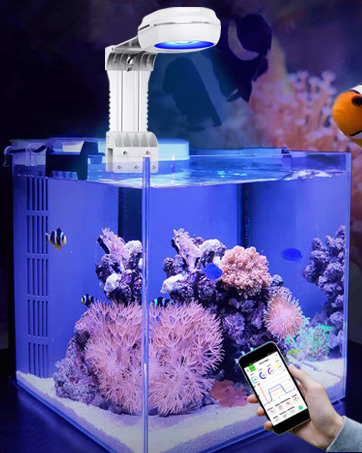
Image: Smart Life App Connection Steps.
Video: Guide on how to add devices and create groups within the Smart Life app for PopBloom RL90 WiFi lights.
5.3 Naming and Grouping Lights
After connecting, you can name each individual light for easy identification (e.g., "left," "right"). For multiple lights, create a group within the app to control them simultaneously. This allows for synchronized lighting effects across your entire aquarium.
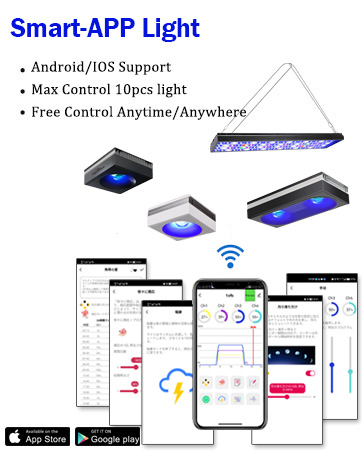
Image: Smart Life App Naming and Grouping Lights.
5.4 General App Control Overview
The Smart Life app provides a user-friendly interface to manage all aspects of your RL90 lighting. This includes setting schedules, adjusting individual channel intensities, and utilizing various pre-programmed modes to create the ideal environment for your marine life.
Video: A comprehensive demonstration of the RL90 Smart-APP control features for aquarium reef lights, showing various settings and customization options.
6. Operating Modes and Customization
The Smart Life app provides various modes and customization options to tailor the lighting to your aquarium's needs.
6.1 Manual Quick Set
Adjust the intensity of each of the four channels (Ch1: 8000K White, Ch2: Moonlight, Ch3: REEF GROW Blue, Ch4: Cyan Blue) individually from 1% to 100% to achieve your desired color and brightness. This mode allows for immediate adjustments.
6.2 Preset Programs
The app includes 16 preset lighting modes, such as "Tropical Spring," "SPS Dominant," and "LPS & Soft Coral," designed to simulate various natural environments and support different coral types. Select a program from the library to apply it to your lights.
6.3 Slow Acclimation and Lunar Cycle
Utilize the slow acclimation feature to gradually introduce new corals or fish to the lighting environment. The lunar cycle mode simulates natural moon phases, automatically adjusting intensity over a 29-day period.
6.4 Editing Custom Programs
You can create and edit your own custom lighting programs by adjusting time points and intensity levels for each channel. This allows for precise control over the light spectrum throughout the day.
6.5 HD Power Feature
The RL90 Full Spectrum light features HD Power, which dynamically adjusts the power available to each color channel. This means power can be borrowed from unused channels and allocated to active ones, providing a more vivid and customizable spectrum for your tank.

Image: RL90 HD Power Feature.
7. PAR Value and Light Distribution
The RL90 LED lights are designed to provide optimal Photosynthetically Active Radiation (PAR) values throughout your aquarium, ensuring healthy coral growth without creating hotspots or insufficient light areas.

Image: RL90 PAR Distribution Map.
Video: A demonstration of PAR testing for the RL90 Reef Tank Aquarium Lamp, showing light intensity measurements at various points.
8. Efficient Cooling System
The RL90 LED Aquarium Light incorporates a high-efficiency cooling system to maintain optimal operating temperatures and extend the lifespan of the LED components. This system utilizes a quality cold forging heat sink and a smart cooling fan, resulting in 15% energy savings and quiet operation.
9. Light Optics and Coverage
The RL90 features a glare-proof recessed lens design that ensures homogeneous light distribution with a gentle shimmer. This design optimizes the balance of power and spread, achieving over 90% optical efficiency and improved color blending. It is capable of reaching depths of up to 80cm (30 inches) with high uniformity, minimizing shaded areas and hotspots.
Image: RL90 Glare-proof Recessed Lens and Coverage Comparison.
10. Troubleshooting
If you encounter any issues with your PopBloom RL90 LED Aquarium Light, please refer to the following common troubleshooting steps:
- Light not turning on: Ensure the power supply is securely connected to both the light unit and a working power outlet. Check if the power outlet is functional.
- App connection issues: Verify that your phone's Wi-Fi and Bluetooth are enabled. Ensure your Wi-Fi network is 2.4GHz. Restart the app and the light unit, then attempt to reconnect.
- Inconsistent lighting: Check your programmed schedule in the Smart Life app for any unintended settings. Ensure all lights in a group are properly synchronized.
- Overheating: Ensure the light unit has adequate ventilation and is not obstructed. The efficient cooling system should prevent overheating under normal operating conditions.
For further assistance, please contact PopBloom customer support.
11. Warranty and Support
PopBloom products are designed for quality and durability. For information regarding warranty coverage, product registration, or technical support, please refer to the official PopBloom website or contact their customer service department. Keep your purchase receipt as proof of purchase for warranty claims.
Manufacturer: Shenzhen PopBloom Electronic Technology Co., Ltd


